Problem with PCI wireless card

sangamangi

New member
Local time
1:21 AM
Messages
5
I have windows 7 ultimate x64 installed in one partition and I have windows 7 Home Premieum x86 in another partition. when i use my Ultimate x64 i can use the Belkin PCI wireless card. but when I load in the other windows x86, I cannot even see the Belkin PCI card in the device manager.

How do I get the PCI card to be recoginized by the device manager. Thanks
 

My Computer

Computer Manufacturer/Model Number
Mine
OS
windows 7 Ultimate x64
CPU
Intel core 2 Quad
Motherboard
Intel DG45ID
Memory
Transcend 4GB
Graphics Card(s)
Onboard
Sound Card
Onboard
Monitor(s) Displays
Samsung 21
Screen Resolution
1600x900
Hard Drives
500GB sata, 500 GB sata
PSU
Coolermaster
Case
Coolermaster
Cooling
Coolermaster
Keyboard
Logitech
Mouse
Logitech
Internet Speed
2Mbps
This could be an issue with the drivers, Im sure you will have an X64 driver and a X86 driver for you Belkin PCI device.

I take it that you have installed the relevant drivers on both versions of 7.

7 would still detect the hardware in device manager, check the network adapters, or the other devices with the yellow question mark.

hope this helps.
 

My Computer

Computer Manufacturer/Model Number
CustomBuild001
OS
7 ultimate x64
CPU
Intel core i7 2600K
Motherboard
ASUS P8Z68-V PRO
Memory
Vengeance™ — 16GB Triple Channel DDR3 PC16000
Graphics Card(s)
GeForce GTX 560 Ti
Monitor(s) Displays
HannsG 22" widescreen (HDMI)
Screen Resolution
1680x1050
Hard Drives
Samsung 1TB x2(RAID1) Deskstar 160G, Buffalo ExHD 500GB
PSU
Corsair 850HX
Case
Antec Three Hundred Gaming Tower Case
Cooling
CPU Freezer 7 Pro Rev. 2...ANTEC 3phase cooling, 2 intake.
Keyboard
microsoft intellitype 6000 v3.0
Mouse
microsoft sidewinder
Internet Speed
50Mb
Other Info
64GB SSD in pipeline for Intel Smart Response Technology.
The thing is, the Pci card doesn't even show up in the device manager under network properties. whereas, i can see both the network adaptors running X64..
 

My Computer

Computer Manufacturer/Model Number
Mine
OS
windows 7 Ultimate x64
CPU
Intel core 2 Quad
Motherboard
Intel DG45ID
Memory
Transcend 4GB
Graphics Card(s)
Onboard
Sound Card
Onboard
Monitor(s) Displays
Samsung 21
Screen Resolution
1600x900
Hard Drives
500GB sata, 500 GB sata
PSU
Coolermaster
Case
Coolermaster
Cooling
Coolermaster
Keyboard
Logitech
Mouse
Logitech
Internet Speed
2Mbps
Goto device manager and select view, then can you take a screen shot of your device manager in X86 with the network devices and other devices extended.

Did you install two different drivers on both version of 7.
 

My Computer

Computer Manufacturer/Model Number
CustomBuild001
OS
7 ultimate x64
CPU
Intel core i7 2600K
Motherboard
ASUS P8Z68-V PRO
Memory
Vengeance™ — 16GB Triple Channel DDR3 PC16000
Graphics Card(s)
GeForce GTX 560 Ti
Monitor(s) Displays
HannsG 22" widescreen (HDMI)
Screen Resolution
1680x1050
Hard Drives
Samsung 1TB x2(RAID1) Deskstar 160G, Buffalo ExHD 500GB
PSU
Corsair 850HX
Case
Antec Three Hundred Gaming Tower Case
Cooling
CPU Freezer 7 Pro Rev. 2...ANTEC 3phase cooling, 2 intake.
Keyboard
microsoft intellitype 6000 v3.0
Mouse
microsoft sidewinder
Internet Speed
50Mb
Other Info
64GB SSD in pipeline for Intel Smart Response Technology.
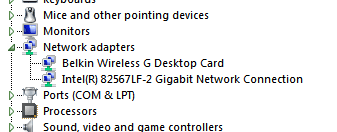
when i boot with my normal windows 7 Ultimate x64, i can see both the devices in the device manager. Both the devices work fine.
x64.PNG

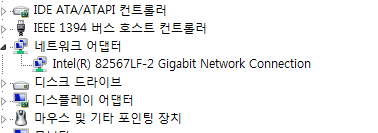
But, when i boot with windows 7 Home Premium K ( Korean), i can see only the built in Giabit adapter and it works fine as well. I do also have the 32 bit driver for belkin PCI card.
x86.PNG

what am I missing here? How do I go from here?
 

My Computer

Computer Manufacturer/Model Number
Mine
OS
windows 7 Ultimate x64
CPU
Intel core 2 Quad
Motherboard
Intel DG45ID
Memory
Transcend 4GB
Graphics Card(s)
Onboard
Sound Card
Onboard
Monitor(s) Displays
Samsung 21
Screen Resolution
1600x900
Hard Drives
500GB sata, 500 GB sata
PSU
Coolermaster
Case
Coolermaster
Cooling
Coolermaster
Keyboard
Logitech
Mouse
Logitech
Internet Speed
2Mbps
Did you install the X86 driver in windows 7 Home Premium K ( Korean)...
 

My Computer

Computer Manufacturer/Model Number
CustomBuild001
OS
7 ultimate x64
CPU
Intel core i7 2600K
Motherboard
ASUS P8Z68-V PRO
Memory
Vengeance™ — 16GB Triple Channel DDR3 PC16000
Graphics Card(s)
GeForce GTX 560 Ti
Monitor(s) Displays
HannsG 22" widescreen (HDMI)
Screen Resolution
1680x1050
Hard Drives
Samsung 1TB x2(RAID1) Deskstar 160G, Buffalo ExHD 500GB
PSU
Corsair 850HX
Case
Antec Three Hundred Gaming Tower Case
Cooling
CPU Freezer 7 Pro Rev. 2...ANTEC 3phase cooling, 2 intake.
Keyboard
microsoft intellitype 6000 v3.0
Mouse
microsoft sidewinder
Internet Speed
50Mb
Other Info
64GB SSD in pipeline for Intel Smart Response Technology.
Yes I did, but for no joy. I'll to uninstall and reinstall the drivers and see what happens. Thanks
 

My Computer

Computer Manufacturer/Model Number
Mine
OS
windows 7 Ultimate x64
CPU
Intel core 2 Quad
Motherboard
Intel DG45ID
Memory
Transcend 4GB
Graphics Card(s)
Onboard
Sound Card
Onboard
Monitor(s) Displays
Samsung 21
Screen Resolution
1600x900
Hard Drives
500GB sata, 500 GB sata
PSU
Coolermaster
Case
Coolermaster
Cooling
Coolermaster
Keyboard
Logitech
Mouse
Logitech
Internet Speed
2Mbps
finally sorted, I had to run the driver software from Belkin's site in XP compatible mode and now I can see the PCI card in the device manager... now off to get the right drivers in manually.... thaks a lot
 

My Computer

Computer Manufacturer/Model Number
Mine
OS
windows 7 Ultimate x64
CPU
Intel core 2 Quad
Motherboard
Intel DG45ID
Memory
Transcend 4GB
Graphics Card(s)
Onboard
Sound Card
Onboard
Monitor(s) Displays
Samsung 21
Screen Resolution
1600x900
Hard Drives
500GB sata, 500 GB sata
PSU
Coolermaster
Case
Coolermaster
Cooling
Coolermaster
Keyboard
Logitech
Mouse
Logitech
Internet Speed
2Mbps
Glad to be of assistance...

please feel free to leave rep using the middle icon at the top left of this post...:D

also you can end this thread as solved.

classic
 

My Computer

Computer Manufacturer/Model Number
CustomBuild001
OS
7 ultimate x64
CPU
Intel core i7 2600K
Motherboard
ASUS P8Z68-V PRO
Memory
Vengeance™ — 16GB Triple Channel DDR3 PC16000
Graphics Card(s)
GeForce GTX 560 Ti
Monitor(s) Displays
HannsG 22" widescreen (HDMI)
Screen Resolution
1680x1050
Hard Drives
Samsung 1TB x2(RAID1) Deskstar 160G, Buffalo ExHD 500GB
PSU
Corsair 850HX
Case
Antec Three Hundred Gaming Tower Case
Cooling
CPU Freezer 7 Pro Rev. 2...ANTEC 3phase cooling, 2 intake.
Keyboard
microsoft intellitype 6000 v3.0
Mouse
microsoft sidewinder
Internet Speed
50Mb
Other Info
64GB SSD in pipeline for Intel Smart Response Technology.
Back
Top