problem with the internet connection

i cant ping the gate way
but i can ping the other computers in the lan
and i cant ping dns ,google either

interesting...
what this computer connected to?
a hub, a switch or a router?

and also (as you said that you do static ip addressing)
did you try a higher ip (guessing since your subnet is 192.168.1.0 with your Subnet mask being 255.255.255.0) such as 192.168.1.192 or 252?
also can you try a different interface?

it always says destination host unreachable
and when im in ubuntu i can use the net properly and pin works fine
does ubuntu have the same IP info as the windows machine?

it seems that something is missing?
also if the routing device has any logging info can you check that...
 

My Computer

Computer Manufacturer/Model Number
Tx2500z Tablet Pc/Homemade Server
OS
Windows 7 Ult x64(x2), HomePrem x32(x4), Server 08 (+VM), 08 R2 (VM) , SuSe 11.2 (VM), XP 32 (VM)
CPU
Turion X2 ultra (oh well came with laptop)/P4 @3.2 (yes P4)
Motherboard
IDK HP Motherboard / Intel DG965SS
Memory
OCZ Dual Channel 4GB kit/ 1gb Dual Channel
Graphics Card(s)
HD 3200 graphics /GMA x3100 (yay for intergrated!!)
Sound Card
Realtek HD Audio(mic working, well sort of)/Siig IC-70012
Monitor(s) Displays
built-in Hp 12" laptop screen/ Acer 19"
Screen Resolution
1280x800 /1440x900
Cooling
All Air Cooled
Mouse
Logi MX Rev. /MS Wheel Optical 1.1A /Logitech Optical Mouse
Internet Speed
College baby but its still routed through vpn to 1536k...
Other Info
love my wacom pen and pressure sensitivity...
wished it worked in 7, SUSE for that matter though
Hi darkassain,

I think the router won't show any log of that machine, because it never connects or tries to connect to it. Well, at least not through IP4
This is the ip data he sent us.

onnection-specific DNS Suffix . :
Description . . . . . . . . . . . : NVIDIA nForce Networking Controller
Physical Address. . . . . . . . . : 00-00-00-00-00-00
DHCP Enabled. . . . . . . . . . . : No
Autoconfiguration Enabled . . . . : Yes
Link-local IPv6 Address . . . . . : fe80::58c9:3262:97dd:ec91%11(Preferred)
IPv4 Address. . . . . . . . . . . : 192.168.68.28(Preferred)
Subnet Mask . . . . . . . . . . . : 255.255.255.0
Default Gateway . . . . . . . . . : 192.168.68.1
DHCPv6 IAID . . . . . . . . . . . : 184549376
DHCPv6 Client DUID. . . . . . . . : 00-01-00-01-11-91-21-94-00-00-00-00-00-00
 

My Computer

OS
Win7 Build 7600 x86
CPU
Pentium II 300MHz
Motherboard
Asus
Memory
32mb EDO RAM
Graphics Card(s)
Diamond Viper
Sound Card
Soundblaster 16
Monitor(s) Displays
14" AOC CRT 16K color
Screen Resolution
800x600
Hard Drives
300mb Quantum fireball
PSU
110 Watts
Cooling
Passive
Keyboard
Trust Ergonomic
Mouse
Generic
Internet Speed
256K u 128K d
By the way, he's offline. :D
 

My Computer

OS
Win7 Build 7600 x86
CPU
Pentium II 300MHz
Motherboard
Asus
Memory
32mb EDO RAM
Graphics Card(s)
Diamond Viper
Sound Card
Soundblaster 16
Monitor(s) Displays
14" AOC CRT 16K color
Screen Resolution
800x600
Hard Drives
300mb Quantum fireball
PSU
110 Watts
Cooling
Passive
Keyboard
Trust Ergonomic
Mouse
Generic
Internet Speed
256K u 128K d
Hi darkassain,

I think the router won't show any log of that machine, because it never connects or tries to connect to it. Well, at least not through IP4
This is the ip data he sent us.

onnection-specific DNS Suffix . :
Description . . . . . . . . . . . : NVIDIA nForce Networking Controller
Physical Address. . . . . . . . . : 00-00-00-00-00-00
DHCP Enabled. . . . . . . . . . . : No
Autoconfiguration Enabled . . . . : Yes
Link-local IPv6 Address . . . . . : fe80::58c9:3262:97dd:ec91%11(Preferred)
IPv4 Address. . . . . . . . . . . : 192.168.68.28(Preferred)
Subnet Mask . . . . . . . . . . . : 255.255.255.0
Default Gateway . . . . . . . . . : 192.168.68.1
DHCPv6 IAID . . . . . . . . . . . : 184549376
DHCPv6 Client DUID. . . . . . . . : 00-01-00-01-11-91-21-94-00-00-00-00-00-00

your right i completely missed that he does not have a mac address...:sarc: (+rep for catching that)
hmm so might this be a driver issue (as the MAC addressed should be populated in ubuntu...)
that reminds me can you run ifconfig in ubuntu?
 

My Computer

Computer Manufacturer/Model Number
Tx2500z Tablet Pc/Homemade Server
OS
Windows 7 Ult x64(x2), HomePrem x32(x4), Server 08 (+VM), 08 R2 (VM) , SuSe 11.2 (VM), XP 32 (VM)
CPU
Turion X2 ultra (oh well came with laptop)/P4 @3.2 (yes P4)
Motherboard
IDK HP Motherboard / Intel DG965SS
Memory
OCZ Dual Channel 4GB kit/ 1gb Dual Channel
Graphics Card(s)
HD 3200 graphics /GMA x3100 (yay for intergrated!!)
Sound Card
Realtek HD Audio(mic working, well sort of)/Siig IC-70012
Monitor(s) Displays
built-in Hp 12" laptop screen/ Acer 19"
Screen Resolution
1280x800 /1440x900
Cooling
All Air Cooled
Mouse
Logi MX Rev. /MS Wheel Optical 1.1A /Logitech Optical Mouse
Internet Speed
College baby but its still routed through vpn to 1536k...
Other Info
love my wacom pen and pressure sensitivity...
wished it worked in 7, SUSE for that matter though
Another thing I noticed:

Gateway and DNS server are different, and he has autoconfig enabled.
(and netbios, which he doesn't need)

Connection-specific DNS Suffix . :
Description . . . . . . . . . . . : NVIDIA nForce Networking Controller
Physical Address. . . . . . . . . : 00-00-00-00-00-00
DHCP Enabled. . . . . . . . . . . : No
Autoconfiguration Enabled . . . . : Yes
Link-local IPv6 Address . . . . . : fe80::58c9:3262:97dd:ec91%11(Preferred)
IPv4 Address. . . . . . . . . . . : 192.168.68.28(Preferred)
Subnet Mask . . . . . . . . . . . : 255.255.255.0
Default Gateway . . . . . . . . . : 192.168.68.1
DHCPv6 IAID . . . . . . . . . . . : 184549376
DHCPv6 Client DUID. . . . . . . . : 00-01-00-01-11-91-21-94-00-00-00-00-00-00

DNS Servers . . . . . . . . . . . : 124.124.70.2
124.124.70.3

NetBIOS over Tcpip. . . . . . . . : Enabled

This means to me that next to a gateway, there must be a dns server too.

Plus he has autoconfig enabled, but he told me that all the computers have fixed IP in range up to 250 addresses.

If there is no device configured as DHCP server, and he tries to request an IP nothing will happen.

That's why he has to first find out how the other computers are setup to connect.


By the way, he got rid of Ubuntu, and is on Win7 now.
 

My Computer

OS
Win7 Build 7600 x86
CPU
Pentium II 300MHz
Motherboard
Asus
Memory
32mb EDO RAM
Graphics Card(s)
Diamond Viper
Sound Card
Soundblaster 16
Monitor(s) Displays
14" AOC CRT 16K color
Screen Resolution
800x600
Hard Drives
300mb Quantum fireball
PSU
110 Watts
Cooling
Passive
Keyboard
Trust Ergonomic
Mouse
Generic
Internet Speed
256K u 128K d
This is from a working computer with good connection.

Connection-specific DNS Suffix . :
Description . . . . . . . . . . . : Marvell Yukon 88E8039 PCI-E Fast Eth
ernet Controller
Physical Address. . . . . . . . . : 00-E0-91-15-7C-16
Dhcp Enabled. . . . . . . . . . . : No
IP Address. . . . . . . . . . . . : 192.168.68.27
Subnet Mask . . . . . . . . . . . : 255.255.255.0
IP Address. . . . . . . . . . . . : fe80::2e0:91ff:fe15:7c16%4
Default Gateway . . . . . . . . . : 192.168.68.1
DNS Servers . . . . . . . . . . . : 124.124.70.2
124.124.70.3


No mention of auto config, so it must be a fixed address.

He should put in fixed address and fixed dns in WIn7, than it should work.

At least, I think so. :D
 

My Computer

OS
Win7 Build 7600 x86
CPU
Pentium II 300MHz
Motherboard
Asus
Memory
32mb EDO RAM
Graphics Card(s)
Diamond Viper
Sound Card
Soundblaster 16
Monitor(s) Displays
14" AOC CRT 16K color
Screen Resolution
800x600
Hard Drives
300mb Quantum fireball
PSU
110 Watts
Cooling
Passive
Keyboard
Trust Ergonomic
Mouse
Generic
Internet Speed
256K u 128K d
sorry we had internet connection from 8 am -2 pm disabled:D
ive already made those necessary changes like fixed ip and dns
as i told u its working in ubuntu with same ip and dns but not in windows 7(i have both os installed)

and i had gmail account is that enough???


@darkassain
my ip range as told by my seniors is only from 192.168.68.1-255 and ive tried different combinations but nothing worked:cry:
i was connected to a hub and others connected to the same hub are getting net even im getting net when im in ubuntu:(
until day before yesterday i got net normally in windows but from that day onwards suddenly it went wrong and nothing worked thought it was virus googled every running process from my taskmanager to makeshore that no virus is running but found nothing:(


My Computer

OS
windows 7
Graphics Card(s)
nvidia geforce 8400 gs
and when i made ifconfig from ubuntu this is the result i got

eth27 Link encap:Ethernet HWaddr 00:00:6c:4a:d0:09
inet addr:192.168.68.28 Bcast:192.168.255.255 Mask:255.255.0.0
inet6 addr: fe80::200:6cff:fe4a:d009/64 Scope:Link
UP BROADCAST RUNNING MULTICAST MTU:1500 Metric:1
RX packets:185923 errors:0 dropped:0 overruns:0 frame:0
TX packets:99117 errors:0 dropped:0 overruns:0 carrier:0
collisions:0 txqueuelen:1000
RX bytes:216778420 (216.7 MB) TX bytes:7290537 (7.2 MB)
Interrupt:20 Base address:0x2000

lo Link encap:Local Loopback
inet addr:127.0.0.1 Mask:255.0.0.0
inet6 addr: ::1/128 Scope:Host
UP LOOPBACK RUNNING MTU:16436 Metric:1
RX packets:12 errors:0 dropped:0 overruns:0 frame:0
TX packets:12 errors:0 dropped:0 overruns:0 carrier:0
collisions:0 txqueuelen:0
RX bytes:888 (888.0 B) TX bytes:888 (888.0 B)

pan0 Link encap:Ethernet HWaddr d6:04:2b:4c:2c:59
BROADCAST MULTICAST MTU:1500 Metric:1
RX packets:0 errors:0 dropped:0 overruns:0 frame:0
TX packets:0 errors:0 dropped:0 overruns:0 carrier:0
collisions:0 txqueuelen:0
RX bytes:0 (0.0 B) TX bytes:0 (0.0 B)
 

My Computer

OS
windows 7
Graphics Card(s)
nvidia geforce 8400 gs
and when i made ifconfig from ubuntu this is the result i got

eth27 Link encap:Ethernet HWaddr 00:00:6c:4a:d0:09
inet addr:192.168.68.28 Bcast:192.168.255.255 Mask:255.255.0.0
inet6 addr: fe80::200:6cff:fe4a:d009/64 Scope:Link
UP BROADCAST RUNNING MULTICAST MTU:1500 Metric:1
RX packets:185923 errors:0 dropped:0 overruns:0 frame:0
TX packets:99117 errors:0 dropped:0 overruns:0 carrier:0
collisions:0 txqueuelen:1000
RX bytes:216778420 (216.7 MB) TX bytes:7290537 (7.2 MB)
Interrupt:20 Base address:0x2000

lo Link encap:Local Loopback
inet addr:127.0.0.1 Mask:255.0.0.0
inet6 addr: ::1/128 Scope:Host
UP LOOPBACK RUNNING MTU:16436 Metric:1
RX packets:12 errors:0 dropped:0 overruns:0 frame:0
TX packets:12 errors:0 dropped:0 overruns:0 carrier:0
collisions:0 txqueuelen:0
RX bytes:888 (888.0 B) TX bytes:888 (888.0 B)

pan0 Link encap:Ethernet HWaddr d6:04:2b:4c:2c:59
BROADCAST MULTICAST MTU:1500 Metric:1
RX packets:0 errors:0 dropped:0 overruns:0 frame:0
TX packets:0 errors:0 dropped:0 overruns:0 carrier:0
collisions:0 txqueuelen:0
RX bytes:0 (0.0 B) TX bytes:0 (0.0 B)

this confirms it...
malware may have wrecked with your machine...
im pretty sure that you dont configure anything on that machine (i dont remember though if hubs were smart enough to be able to assign you a ip address based on the mac address...:sarc:)
first see if you can reinstall the driver,
if that does not work then see if you can do a sfc /scannow and check...

next try to do a AV scan (if you have already done this, download any updates from another machine)

lastly try to do a system restore to a time when you didnt have this problem

if all of this does not work you might have luck with repair from the windows 7 dvd...
if all else fails backup your documents and anything of value reinstall windows...


the reasoning is look at the bold...
this does not look right to me because it seems you and your neighbors Subnet Masks dont match (judging from your subnet, yours should be 255.255.255.0 since this is a C class network and you are using the full 255 - 1 address space)
what you want to see in the ipconfig is the HWaddr that is boldned in windows...
if you see it as the physical address it should let you connect to other networks and consequently the internet...
 

My Computer

Computer Manufacturer/Model Number
Tx2500z Tablet Pc/Homemade Server
OS
Windows 7 Ult x64(x2), HomePrem x32(x4), Server 08 (+VM), 08 R2 (VM) , SuSe 11.2 (VM), XP 32 (VM)
CPU
Turion X2 ultra (oh well came with laptop)/P4 @3.2 (yes P4)
Motherboard
IDK HP Motherboard / Intel DG965SS
Memory
OCZ Dual Channel 4GB kit/ 1gb Dual Channel
Graphics Card(s)
HD 3200 graphics /GMA x3100 (yay for intergrated!!)
Sound Card
Realtek HD Audio(mic working, well sort of)/Siig IC-70012
Monitor(s) Displays
built-in Hp 12" laptop screen/ Acer 19"
Screen Resolution
1280x800 /1440x900
Cooling
All Air Cooled
Mouse
Logi MX Rev. /MS Wheel Optical 1.1A /Logitech Optical Mouse
Internet Speed
College baby but its still routed through vpn to 1536k...
Other Info
love my wacom pen and pressure sensitivity...
wished it worked in 7, SUSE for that matter though
ive scanned it already but no effect(im using avg free)
and cant we remove this with any other anti virus???
or any other which scans and removes malware???
 

My Computer

OS
windows 7
Graphics Card(s)
nvidia geforce 8400 gs
for system restore i had only one restore point and tried it but didnt worked either
 

My Computer

OS
windows 7
Graphics Card(s)
nvidia geforce 8400 gs
for system restore i had only one restore point and tried it but didnt worked either

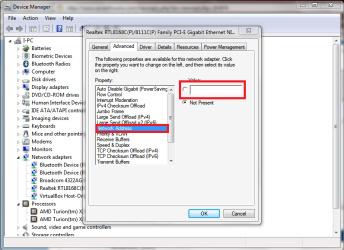
if you tried all the that i said then what you can try is force that MAC address..;)
go to the device manager and double click your network adapter...
then go to the the tab like on the pic copy and paste what you got in ubuntu
mac.PNG
this: 00:00:6c:4a:d0:09
restart and check in ipconfig to see if it was able to stick the mac address..;)
if this doesnt work then you might have to reinstall windows..
 
Last edited:

My Computer

Computer Manufacturer/Model Number
Tx2500z Tablet Pc/Homemade Server
OS
Windows 7 Ult x64(x2), HomePrem x32(x4), Server 08 (+VM), 08 R2 (VM) , SuSe 11.2 (VM), XP 32 (VM)
CPU
Turion X2 ultra (oh well came with laptop)/P4 @3.2 (yes P4)
Motherboard
IDK HP Motherboard / Intel DG965SS
Memory
OCZ Dual Channel 4GB kit/ 1gb Dual Channel
Graphics Card(s)
HD 3200 graphics /GMA x3100 (yay for intergrated!!)
Sound Card
Realtek HD Audio(mic working, well sort of)/Siig IC-70012
Monitor(s) Displays
built-in Hp 12" laptop screen/ Acer 19"
Screen Resolution
1280x800 /1440x900
Cooling
All Air Cooled
Mouse
Logi MX Rev. /MS Wheel Optical 1.1A /Logitech Optical Mouse
Internet Speed
College baby but its still routed through vpn to 1536k...
Other Info
love my wacom pen and pressure sensitivity...
wished it worked in 7, SUSE for that matter though
can u please give the detailed steps for changing the mac address please :D
 

My Computer

OS
windows 7
Graphics Card(s)
nvidia geforce 8400 gs
thanks buddy
by doing mac spoofing its finally working[:D]
 

My Computer

OS
windows 7
Graphics Card(s)
nvidia geforce 8400 gs
I have the same problem with the internet in windows 7 (no internet acces), when I restart the PC in safe mode work fine.What is the problem?
 

My Computer

Computer Manufacturer/Model Number
Home
OS
Microsoft Windows 7 Ultimate x64
CPU
Intel Core 2 Duo E6850, 3000 MHz (9 x 333)
Motherboard
Asus P5K/EPU
Memory
4 GB DDR2, 800 MHz
Graphics Card(s)
MSI nVIDIA GTS 250
Monitor(s) Displays
LG 17 inch
Screen Resolution
1280x1024
Hard Drives
WD 160 GB
Samsung 1TB
if you tried all the that i said then what you can try is force that MAC address..;)
go to the device manager and double click your network adapter...
then go to the the tab to look to at the pic that i have inserted then copy and paste what you got in ubuntu
this: 00:00:6c:4a:d0:09
restart and check in ipconfig to see if it was able to stick the mac address..;)
if this doesnt work then you might have to reinstall windows..

Damn, .. great solution.
The spoofing of mac address never crossed my mind.

+rep
 

My Computer

OS
Win7 Build 7600 x86
CPU
Pentium II 300MHz
Motherboard
Asus
Memory
32mb EDO RAM
Graphics Card(s)
Diamond Viper
Sound Card
Soundblaster 16
Monitor(s) Displays
14" AOC CRT 16K color
Screen Resolution
800x600
Hard Drives
300mb Quantum fireball
PSU
110 Watts
Cooling
Passive
Keyboard
Trust Ergonomic
Mouse
Generic
Internet Speed
256K u 128K d
I have the same problem with the internet in windows 7 (no internet acces), when I restart the PC in safe mode work fine.What is the problem?

Read this entire thread from the beginning.

Do the IPCONFIG/ALL in command prompt and compare it with the one at the beginning of this thread.

Then read all until the end and you'll find the solution.

Good luck
 

My Computer

OS
Win7 Build 7600 x86
CPU
Pentium II 300MHz
Motherboard
Asus
Memory
32mb EDO RAM
Graphics Card(s)
Diamond Viper
Sound Card
Soundblaster 16
Monitor(s) Displays
14" AOC CRT 16K color
Screen Resolution
800x600
Hard Drives
300mb Quantum fireball
PSU
110 Watts
Cooling
Passive
Keyboard
Trust Ergonomic
Mouse
Generic
Internet Speed
256K u 128K d
cannot detect wireless network isatap error code 31

so for the last few weeks i have been unable to detect networks with my pc. I get the error code 31 on the isatap adaptor. ive tryed removing it and also turning off IPv6 but still no luck im debating about just reformating and upgrading to 7 but im not entirley sure it will resolve that issue. In other fourms ive heard that this usually occurs after a corrupt instalation of the os so im hoping 7 will fixing it.
i have an xbox main pc and laptop runing of the router now and am trying to add my new pc to the network. its definitley in range of the router so the only thing that could be causing the issue is the adaptor. is it totaly nesscary to have this? and if not is there somthing that can take its place?
i have an hp pheniox SE with vista sp1 an athreos 802.11 a/b/g/n card and a linksys wrt54g router
 

My Computer

Computer Manufacturer/Model Number
hp SE pheniox
OS
vista
Back
Top