
Problem with WMP Emptying Out Library

shortmartin

New member
Local time
2:12 PM
Messages
9
I'm having a problem with Windows Media Player on my computer. I have a large library of roughly 110,000 files. I know that the system can handle this because it works fine on one of my home computers. But on the other one, a problem occurs.

When I open media player the library build process begins and gets to between 30 and 38k songs before the song counter begins to return to zero (countdown) resulting in an empty library and the graphical elements of the media player application becoming visually corrupted (red crosses where the images should be for the play, burn and sync tabs).

Both computers have roughly the same set-up, so I don't know why it works on one and not the other. Very frustrating :(

And I'm not super duper great working with computers, so I figured I'd try this forum because I know that I can find some excellent, helpful resources here.

FYI, the exact same problem was described on an older forum (from 2010) here (Wmp12 + Whs Pp3 + Mce + 45K Songs = Empty Library - Power Pack 3 - We Got Served Forums).

This is the only reference on the internet that I've found to this particular problem, and I haven't been able to find any answers or solutions. Please help! :)
 

My Computer

Computer type
PC/Desktop
Computer Manufacturer/Model Number
Dell
OS
Microsoft Windows 7 Professional 32-bit 7601 Multiprocessor Free Service Pack 1
CPU
Intel(R) Core(TM)2 Duo CPU E8500 @ 3.16GHz
Motherboard
Dell Inc. 0GM819
Memory
4.00 GB (3.25 GB usable)
Graphics Card(s)
ATI Radeon HD 2400 XT
Sound Card
(1) SB Audigy (2) High Definition Audio Device
Monitor(s) Displays
2 Dell monitors
Hard Drives
ST31000340NS ATA Device
Fixed hard disk media
931.51 GB
0 Partitions

ST3250310AS ATA Device
Fixed hard disk media
232.83 GB
2 Partitions

My Computer

Computer type
PC/Desktop
Computer Manufacturer/Model Number
Custom assembled by me :}
OS
Win-7-Pro64bit 7-H-Prem-64bit
CPU
i7-5930K 2nd i9-9940x both water blocked VRM's too
Motherboard
ASUS SABERTOOTH X99 2nd ASUS x299 Apex
Memory
Trident-z 3200C14 2nd Trident-z 3600C16
Graphics Card(s)
EVGA 1080ti ftw3 2nd Titan Xp both water blocked
Sound Card
Built-in Realtek
Monitor(s) Displays
1-AOC G2460PG 24"G-Sync 144Hz/ 2nd 1-ASUS VG248QE 24" 144Hz
Screen Resolution
1920 x 1080 144Hz
Hard Drives
2-Samsung M.2 Evo & Evo Plus
2-Samsung 850 EVO 500GB SSD's/ 3-2.5 W.D. Black 1tb-&3-1tb/3-3.5 WD Black 1tb hdd's
PSU
EVGA SuperNOVA 1000-P2 2nd 1200-P2
Case
2-Corsair Obsidian Series 450D Black ATX Mid Tower
Cooling
Custom water loops
Keyboard
Logitech G710+/ 2nd Logitech G910
Mouse
2-RedDragon M901 Perdition 16400 dpi Gaming mouse = wired
Internet Speed
Comcast Ping 19ms 89.31mbps download speed 6.12mbps upload
Antivirus
Malwarebytes Pro/ Superantispyware Pro
Browser
FireFox & Pale moon
Other Info
2nd ASUS X299 Apex/Intel i9-9940x with Custom water loop/7H-Prem-x64/Corsair 450D case/Ram Trident-z 3600C16 4x8gb / Samsung970Evo plus 500gb SSD/Dual ssd EZ swap evo/PSU EVGA SuperNova 1200w-P2 80+Platinum/GPU Titan Xp /8-ML-140 on push-pull on 2-280GTX rads
Thanks for your reply - sure . . . so there are two computers, one on which everything is working fine, and the other on which the problem is occurring.

1. On the first computer, I have two hard drives, both internal (C & D). The entire music collection is housed on the D drive.

2. On the second computer, where there are problems, I have one internal hard drive (C), with no music on it, and the entire music collection is being loaded into WMP from two external hard drives. Note that I've also tried loading the music into WMP with one hard drive only and the same problem occurs.

So I've wondered that the problem might be related to the use of external hard drives . . . but I'm inclined against this theory because I tried loading all of the music into WMP on the FIRST computer, using the external hard drives rather than the internal D drive, and it all worked out fine. Based on this finding, I think that there might be something particular about how the second computer is set up or configured.

Thanks again for your reply, any help is very appreciated. :)
 

My Computer

Computer type
PC/Desktop
Computer Manufacturer/Model Number
Dell
OS
Microsoft Windows 7 Professional 32-bit 7601 Multiprocessor Free Service Pack 1
CPU
Intel(R) Core(TM)2 Duo CPU E8500 @ 3.16GHz
Motherboard
Dell Inc. 0GM819
Memory
4.00 GB (3.25 GB usable)
Graphics Card(s)
ATI Radeon HD 2400 XT
Sound Card
(1) SB Audigy (2) High Definition Audio Device
Monitor(s) Displays
2 Dell monitors
Hard Drives
ST31000340NS ATA Device
Fixed hard disk media
931.51 GB
0 Partitions

ST3250310AS ATA Device
Fixed hard disk media
232.83 GB
2 Partitions
Thanks for the additional information,
Is this connection to the original source wired or wireless ?
Also are you using Home group sharing feature of win-7 ?
If wireless what type/ brand router is being used ?
If wmp has to rebuild the cache every time and fails even to do that I would think the router is breaking the connection somehow and all of the cache shortcuts are being removed/ altered thus the rebuild attempt.
Please also go to Start/ and type system information into the search box and post each computers information.
http://www.sevenforums.com/tutorials/9733-screenshots-files-upload-post-seven-forums.html
http://www.sevenforums.com/tutorials/180324-system-info-see-your-system-specs.html
 

My Computer

Computer type
PC/Desktop
Computer Manufacturer/Model Number
Custom assembled by me :}
OS
Win-7-Pro64bit 7-H-Prem-64bit
CPU
i7-5930K 2nd i9-9940x both water blocked VRM's too
Motherboard
ASUS SABERTOOTH X99 2nd ASUS x299 Apex
Memory
Trident-z 3200C14 2nd Trident-z 3600C16
Graphics Card(s)
EVGA 1080ti ftw3 2nd Titan Xp both water blocked
Sound Card
Built-in Realtek
Monitor(s) Displays
1-AOC G2460PG 24"G-Sync 144Hz/ 2nd 1-ASUS VG248QE 24" 144Hz
Screen Resolution
1920 x 1080 144Hz
Hard Drives
2-Samsung M.2 Evo & Evo Plus
2-Samsung 850 EVO 500GB SSD's/ 3-2.5 W.D. Black 1tb-&3-1tb/3-3.5 WD Black 1tb hdd's
PSU
EVGA SuperNOVA 1000-P2 2nd 1200-P2
Case
2-Corsair Obsidian Series 450D Black ATX Mid Tower
Cooling
Custom water loops
Keyboard
Logitech G710+/ 2nd Logitech G910
Mouse
2-RedDragon M901 Perdition 16400 dpi Gaming mouse = wired
Internet Speed
Comcast Ping 19ms 89.31mbps download speed 6.12mbps upload
Antivirus
Malwarebytes Pro/ Superantispyware Pro
Browser
FireFox & Pale moon
Other Info
2nd ASUS X299 Apex/Intel i9-9940x with Custom water loop/7H-Prem-x64/Corsair 450D case/Ram Trident-z 3600C16 4x8gb / Samsung970Evo plus 500gb SSD/Dual ssd EZ swap evo/PSU EVGA SuperNova 1200w-P2 80+Platinum/GPU Titan Xp /8-ML-140 on push-pull on 2-280GTX rads
- The connection to the hard drives is wired.
- I'm not sure if I'm using Home group sharing features (on either computer). How do I determine this?

- In terms of providing system information for each computer . . . I'll have to do that tomorrow (as I'm currently away from home) . . . but I'll do that very soon. Many thanks.
 

My Computer

Computer type
PC/Desktop
Computer Manufacturer/Model Number
Dell
OS
Microsoft Windows 7 Professional 32-bit 7601 Multiprocessor Free Service Pack 1
CPU
Intel(R) Core(TM)2 Duo CPU E8500 @ 3.16GHz
Motherboard
Dell Inc. 0GM819
Memory
4.00 GB (3.25 GB usable)
Graphics Card(s)
ATI Radeon HD 2400 XT
Sound Card
(1) SB Audigy (2) High Definition Audio Device
Monitor(s) Displays
2 Dell monitors
Hard Drives
ST31000340NS ATA Device
Fixed hard disk media
931.51 GB
0 Partitions

ST3250310AS ATA Device
Fixed hard disk media
232.83 GB
2 Partitions
My Computer

Computer type
PC/Desktop
Computer Manufacturer/Model Number
Custom assembled by me :}
OS
Win-7-Pro64bit 7-H-Prem-64bit
CPU
i7-5930K 2nd i9-9940x both water blocked VRM's too
Motherboard
ASUS SABERTOOTH X99 2nd ASUS x299 Apex
Memory
Trident-z 3200C14 2nd Trident-z 3600C16
Graphics Card(s)
EVGA 1080ti ftw3 2nd Titan Xp both water blocked
Sound Card
Built-in Realtek
Monitor(s) Displays
1-AOC G2460PG 24"G-Sync 144Hz/ 2nd 1-ASUS VG248QE 24" 144Hz
Screen Resolution
1920 x 1080 144Hz
Hard Drives
2-Samsung M.2 Evo & Evo Plus
2-Samsung 850 EVO 500GB SSD's/ 3-2.5 W.D. Black 1tb-&3-1tb/3-3.5 WD Black 1tb hdd's
PSU
EVGA SuperNOVA 1000-P2 2nd 1200-P2
Case
2-Corsair Obsidian Series 450D Black ATX Mid Tower
Cooling
Custom water loops
Keyboard
Logitech G710+/ 2nd Logitech G910
Mouse
2-RedDragon M901 Perdition 16400 dpi Gaming mouse = wired
Internet Speed
Comcast Ping 19ms 89.31mbps download speed 6.12mbps upload
Antivirus
Malwarebytes Pro/ Superantispyware Pro
Browser
FireFox & Pale moon
Other Info
2nd ASUS X299 Apex/Intel i9-9940x with Custom water loop/7H-Prem-x64/Corsair 450D case/Ram Trident-z 3600C16 4x8gb / Samsung970Evo plus 500gb SSD/Dual ssd EZ swap evo/PSU EVGA SuperNova 1200w-P2 80+Platinum/GPU Titan Xp /8-ML-140 on push-pull on 2-280GTX rads
Cool, I'll check in on the specs on each machine, and the home group info and post a reply very soon. Many thanks for your input thus far, very appreciated.
 

My Computer

Computer type
PC/Desktop
Computer Manufacturer/Model Number
Dell
OS
Microsoft Windows 7 Professional 32-bit 7601 Multiprocessor Free Service Pack 1
CPU
Intel(R) Core(TM)2 Duo CPU E8500 @ 3.16GHz
Motherboard
Dell Inc. 0GM819
Memory
4.00 GB (3.25 GB usable)
Graphics Card(s)
ATI Radeon HD 2400 XT
Sound Card
(1) SB Audigy (2) High Definition Audio Device
Monitor(s) Displays
2 Dell monitors
Hard Drives
ST31000340NS ATA Device
Fixed hard disk media
931.51 GB
0 Partitions

ST3250310AS ATA Device
Fixed hard disk media
232.83 GB
2 Partitions
So I've now updated my system specs. This is for the second computer that I've been referring to - the one on which the WMP library is having the 'emptying out' problem. If you want to know the system specs for the first computer, please just let me know and I can provide that information, too.

(Note: It seems to me from running this system spec tool that this device actually has two internal hard drives. Is this correct? For some reason, only a C drive shows up when I go to 'computer.' But if there are indeed two internal hard drives on this computer, then I could probably put all the music files on the other hard drive [as in the set up for my first computer] and that might resolve this problem. Just a thought.)

As for the network questions you were asking about . . . .

- the first computer (where WMP library is working) is connected to the internet via a local area connection. It says "joined" for home group. The internet connection speed is 100 mbps. And this connection uses all of the following items:

- Client for Microsoft Networks
- QoS Packet Scheduler
- File and Printer Sharing for Microsoft Networks
- Internet Protocol Version 6
- Internet Protocol Version 4
- Link-Layer Topology Discovery Mapper I/O Driver
- Link-Layer Topology Discovery Mapper Responder

- the second computer (where the WMP library isn't working) is also connected to the internet via a local area connection. There doesn't seem to be any information here about it belonging to a home group. The internet connection speed here is 1.0 gbps. And this connection also uses all of the following items:

- Client for Microsoft Networks
- QoS Packet Scheduler
- File and Printer Sharing for Microsoft Networks
- Internet Protocol Version 6
- Internet Protocol Version 4
- Link-Layer Topology Discovery Mapper I/O Driver
- Link-Layer Topology Discovery Mapper Responder
 

My Computer

Computer type
PC/Desktop
Computer Manufacturer/Model Number
Dell
OS
Microsoft Windows 7 Professional 32-bit 7601 Multiprocessor Free Service Pack 1
CPU
Intel(R) Core(TM)2 Duo CPU E8500 @ 3.16GHz
Motherboard
Dell Inc. 0GM819
Memory
4.00 GB (3.25 GB usable)
Graphics Card(s)
ATI Radeon HD 2400 XT
Sound Card
(1) SB Audigy (2) High Definition Audio Device
Monitor(s) Displays
2 Dell monitors
Hard Drives
ST31000340NS ATA Device
Fixed hard disk media
931.51 GB
0 Partitions

ST3250310AS ATA Device
Fixed hard disk media
232.83 GB
2 Partitions

My Computer

Computer type
PC/Desktop
Computer Manufacturer/Model Number
Custom assembled by me :}
OS
Win-7-Pro64bit 7-H-Prem-64bit
CPU
i7-5930K 2nd i9-9940x both water blocked VRM's too
Motherboard
ASUS SABERTOOTH X99 2nd ASUS x299 Apex
Memory
Trident-z 3200C14 2nd Trident-z 3600C16
Graphics Card(s)
EVGA 1080ti ftw3 2nd Titan Xp both water blocked
Sound Card
Built-in Realtek
Monitor(s) Displays
1-AOC G2460PG 24"G-Sync 144Hz/ 2nd 1-ASUS VG248QE 24" 144Hz
Screen Resolution
1920 x 1080 144Hz
Hard Drives
2-Samsung M.2 Evo & Evo Plus
2-Samsung 850 EVO 500GB SSD's/ 3-2.5 W.D. Black 1tb-&3-1tb/3-3.5 WD Black 1tb hdd's
PSU
EVGA SuperNOVA 1000-P2 2nd 1200-P2
Case
2-Corsair Obsidian Series 450D Black ATX Mid Tower
Cooling
Custom water loops
Keyboard
Logitech G710+/ 2nd Logitech G910
Mouse
2-RedDragon M901 Perdition 16400 dpi Gaming mouse = wired
Internet Speed
Comcast Ping 19ms 89.31mbps download speed 6.12mbps upload
Antivirus
Malwarebytes Pro/ Superantispyware Pro
Browser
FireFox & Pale moon
Other Info
2nd ASUS X299 Apex/Intel i9-9940x with Custom water loop/7H-Prem-x64/Corsair 450D case/Ram Trident-z 3600C16 4x8gb / Samsung970Evo plus 500gb SSD/Dual ssd EZ swap evo/PSU EVGA SuperNova 1200w-P2 80+Platinum/GPU Titan Xp /8-ML-140 on push-pull on 2-280GTX rads
I've gone ahead and followed the additional steps. Let me clarify before posting the result. The two computers connect to the internet differently. I live on a university campus, and I have a "home" computer that connects via the local cable provider. This is Computer 1 (on which the WMP library works swimmingly). I also have a "work" computer that connects to the internet via an Ethernet cable hooked up to the university. This is Computer 2 (on which WMP library empties out).

Computer 1

When I ask to show the network map, it says, "Windows cannot create the network map. Responses from other devices on the network are delayed or there is an incompatible router on the network."

Computer 2

When I ask to show the network map, it says, "Windows cannot create the network map because the network's location type is Public. In order to view the network map, you must set the network's location type to Home or Work in Network and Sharing Center."

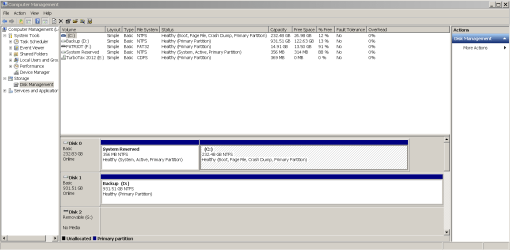
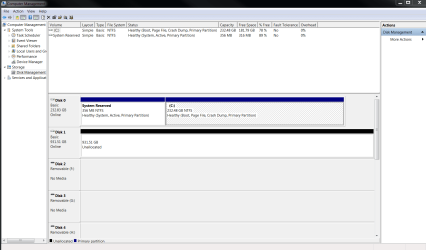
And here are the two attachments of screen shots of the disk management.

Thanks again for your continued assistance. :)
 

Attachments

  • Capture_home.PNG
    Capture_home.PNG
    70.6 KB · Views: 3
  • Capture_work.PNG
    Capture_work.PNG
    99.2 KB · Views: 3

My Computer

Computer type
PC/Desktop
Computer Manufacturer/Model Number
Dell
OS
Microsoft Windows 7 Professional 32-bit 7601 Multiprocessor Free Service Pack 1
CPU
Intel(R) Core(TM)2 Duo CPU E8500 @ 3.16GHz
Motherboard
Dell Inc. 0GM819
Memory
4.00 GB (3.25 GB usable)
Graphics Card(s)
ATI Radeon HD 2400 XT
Sound Card
(1) SB Audigy (2) High Definition Audio Device
Monitor(s) Displays
2 Dell monitors
Hard Drives
ST31000340NS ATA Device
Fixed hard disk media
931.51 GB
0 Partitions

ST3250310AS ATA Device
Fixed hard disk media
232.83 GB
2 Partitions
In my opinion I would just transfer the files to the massive Unallocated space on disk 1,
This is a really sweet free tool to help format the disk...
Free Partition Magic alternative. Best Free Partition Manager Freeware for Windows 2000/XP/Vista/7/8 32 bit & 64 bit - EaseUS Partition Master Free Edition.
Seems like the image on the left has the most issues/ only 27GB left on the primary but in the same case disk 1 is huge.
With the internet access issue is why I would cut out the frustration and just transfer the files,
I'm going to post for a second opinion though so stay tuned for an update hopefully soon,
Cheers.
 

My Computer

Computer type
PC/Desktop
Computer Manufacturer/Model Number
Custom assembled by me :}
OS
Win-7-Pro64bit 7-H-Prem-64bit
CPU
i7-5930K 2nd i9-9940x both water blocked VRM's too
Motherboard
ASUS SABERTOOTH X99 2nd ASUS x299 Apex
Memory
Trident-z 3200C14 2nd Trident-z 3600C16
Graphics Card(s)
EVGA 1080ti ftw3 2nd Titan Xp both water blocked
Sound Card
Built-in Realtek
Monitor(s) Displays
1-AOC G2460PG 24"G-Sync 144Hz/ 2nd 1-ASUS VG248QE 24" 144Hz
Screen Resolution
1920 x 1080 144Hz
Hard Drives
2-Samsung M.2 Evo & Evo Plus
2-Samsung 850 EVO 500GB SSD's/ 3-2.5 W.D. Black 1tb-&3-1tb/3-3.5 WD Black 1tb hdd's
PSU
EVGA SuperNOVA 1000-P2 2nd 1200-P2
Case
2-Corsair Obsidian Series 450D Black ATX Mid Tower
Cooling
Custom water loops
Keyboard
Logitech G710+/ 2nd Logitech G910
Mouse
2-RedDragon M901 Perdition 16400 dpi Gaming mouse = wired
Internet Speed
Comcast Ping 19ms 89.31mbps download speed 6.12mbps upload
Antivirus
Malwarebytes Pro/ Superantispyware Pro
Browser
FireFox & Pale moon
Other Info
2nd ASUS X299 Apex/Intel i9-9940x with Custom water loop/7H-Prem-x64/Corsair 450D case/Ram Trident-z 3600C16 4x8gb / Samsung970Evo plus 500gb SSD/Dual ssd EZ swap evo/PSU EVGA SuperNova 1200w-P2 80+Platinum/GPU Titan Xp /8-ML-140 on push-pull on 2-280GTX rads

My Computer

Computer type
PC/Desktop
Computer Manufacturer/Model Number
Own build (new) Desk1 / Asus ROG Win 7 / Desk2 1st build
OS
Desk1 7 Home Prem / Desk2 10 Pro / Main lap Asus ROG 10 Pro 2 laptop Toshiba 7 Pro Asus P2520 7 & 10
CPU
Desk1 i5 3750K / Laptop i7 GTX 860M / Desk2 i5 2500
Motherboard
Desk1 Asus P877-V / Desk2 Gigabyte H67 UD3H / Laptop ?
Memory
Desk1 8GB (1866) / Desk2 16GB (1333) / Laptop 8Gb DDR3
Graphics Card(s)
Desk 1& 2NVidia GTX 650 & Laptops on board Intel
Sound Card
Desk 1 & 2 -XONAR DG Realtek High Def audio Laptop
Monitor(s) Displays
Desk 1 Benq HD 2450 / Desk2 Philips 24" / Laptop 17.5"
Screen Resolution
1920x1080 D1 & D2 & Laptop 1
Hard Drives
Desk1 Samsung 120GB 830 SSD
Asus ROG 256GB 850 Pro SSD
Desk2 Samsung 840 256 SSD
Toshiba 120GB EVO
PSU
Desk 1 Corsair HX 1050/ Laptop ? / Desk 2 Corsair HX 650
Case
Desk 1 Cooler HAF XM ? Toshiba laptop / Desk2 Coolermaster
Cooling
Fans on all Desk1 -2 Desk2 - all Coolermasters 5 Laptop ?
Keyboard
Desk 1 MS Sidewinder X6 Desk 2 MS Sidewinder X 4
Mouse
Desk 1&2 - Gigabyte MS 900 gamer - laptop - Logitec wireless
Internet Speed
ADSL2+
Other Info
One other Desktop (tester) and spare Toshba laptop both with SSD's
Running Kaspersky 2016 ISS on all machines config'd identically
Logitec audio stereo systems on each machine (x3)
Canon MG5250MFC
Router/modem TP-Link running WPA2SK
Sounds good. So basically you think that having the music files on the large hard disks makes the most sense, and cuts out possible internet issues? One quick question - why would there be internet connectivity issues when it comes to the WMP library, if the music files are stored on external hard drives?

Many thanks!
 

My Computer

Computer type
PC/Desktop
Computer Manufacturer/Model Number
Dell
OS
Microsoft Windows 7 Professional 32-bit 7601 Multiprocessor Free Service Pack 1
CPU
Intel(R) Core(TM)2 Duo CPU E8500 @ 3.16GHz
Motherboard
Dell Inc. 0GM819
Memory
4.00 GB (3.25 GB usable)
Graphics Card(s)
ATI Radeon HD 2400 XT
Sound Card
(1) SB Audigy (2) High Definition Audio Device
Monitor(s) Displays
2 Dell monitors
Hard Drives
ST31000340NS ATA Device
Fixed hard disk media
931.51 GB
0 Partitions

ST3250310AS ATA Device
Fixed hard disk media
232.83 GB
2 Partitions

My Computer

Computer type
PC/Desktop
Computer Manufacturer/Model Number
Custom assembled by me :}
OS
Win-7-Pro64bit 7-H-Prem-64bit
CPU
i7-5930K 2nd i9-9940x both water blocked VRM's too
Motherboard
ASUS SABERTOOTH X99 2nd ASUS x299 Apex
Memory
Trident-z 3200C14 2nd Trident-z 3600C16
Graphics Card(s)
EVGA 1080ti ftw3 2nd Titan Xp both water blocked
Sound Card
Built-in Realtek
Monitor(s) Displays
1-AOC G2460PG 24"G-Sync 144Hz/ 2nd 1-ASUS VG248QE 24" 144Hz
Screen Resolution
1920 x 1080 144Hz
Hard Drives
2-Samsung M.2 Evo & Evo Plus
2-Samsung 850 EVO 500GB SSD's/ 3-2.5 W.D. Black 1tb-&3-1tb/3-3.5 WD Black 1tb hdd's
PSU
EVGA SuperNOVA 1000-P2 2nd 1200-P2
Case
2-Corsair Obsidian Series 450D Black ATX Mid Tower
Cooling
Custom water loops
Keyboard
Logitech G710+/ 2nd Logitech G910
Mouse
2-RedDragon M901 Perdition 16400 dpi Gaming mouse = wired
Internet Speed
Comcast Ping 19ms 89.31mbps download speed 6.12mbps upload
Antivirus
Malwarebytes Pro/ Superantispyware Pro
Browser
FireFox & Pale moon
Other Info
2nd ASUS X299 Apex/Intel i9-9940x with Custom water loop/7H-Prem-x64/Corsair 450D case/Ram Trident-z 3600C16 4x8gb / Samsung970Evo plus 500gb SSD/Dual ssd EZ swap evo/PSU EVGA SuperNova 1200w-P2 80+Platinum/GPU Titan Xp /8-ML-140 on push-pull on 2-280GTX rads
So the problem still persists . . . even though I've now put all of the music files on the internal (D) hard drive. So it apparently wasn't an issue with the external hard drives. I'd appreciate any further assistance. This is driving me crazy and is really frustrating because I have lots of great music and love using WMP. I really don't want to switch to Winamp or another device.
 

My Computer

Computer type
PC/Desktop
Computer Manufacturer/Model Number
Dell
OS
Microsoft Windows 7 Professional 32-bit 7601 Multiprocessor Free Service Pack 1
CPU
Intel(R) Core(TM)2 Duo CPU E8500 @ 3.16GHz
Motherboard
Dell Inc. 0GM819
Memory
4.00 GB (3.25 GB usable)
Graphics Card(s)
ATI Radeon HD 2400 XT
Sound Card
(1) SB Audigy (2) High Definition Audio Device
Monitor(s) Displays
2 Dell monitors
Hard Drives
ST31000340NS ATA Device
Fixed hard disk media
931.51 GB
0 Partitions

ST3250310AS ATA Device
Fixed hard disk media
232.83 GB
2 Partitions

My Computer

Computer type
PC/Desktop
Computer Manufacturer/Model Number
Own build (new) Desk1 / Asus ROG Win 7 / Desk2 1st build
OS
Desk1 7 Home Prem / Desk2 10 Pro / Main lap Asus ROG 10 Pro 2 laptop Toshiba 7 Pro Asus P2520 7 & 10
CPU
Desk1 i5 3750K / Laptop i7 GTX 860M / Desk2 i5 2500
Motherboard
Desk1 Asus P877-V / Desk2 Gigabyte H67 UD3H / Laptop ?
Memory
Desk1 8GB (1866) / Desk2 16GB (1333) / Laptop 8Gb DDR3
Graphics Card(s)
Desk 1& 2NVidia GTX 650 & Laptops on board Intel
Sound Card
Desk 1 & 2 -XONAR DG Realtek High Def audio Laptop
Monitor(s) Displays
Desk 1 Benq HD 2450 / Desk2 Philips 24" / Laptop 17.5"
Screen Resolution
1920x1080 D1 & D2 & Laptop 1
Hard Drives
Desk1 Samsung 120GB 830 SSD
Asus ROG 256GB 850 Pro SSD
Desk2 Samsung 840 256 SSD
Toshiba 120GB EVO
PSU
Desk 1 Corsair HX 1050/ Laptop ? / Desk 2 Corsair HX 650
Case
Desk 1 Cooler HAF XM ? Toshiba laptop / Desk2 Coolermaster
Cooling
Fans on all Desk1 -2 Desk2 - all Coolermasters 5 Laptop ?
Keyboard
Desk 1 MS Sidewinder X6 Desk 2 MS Sidewinder X 4
Mouse
Desk 1&2 - Gigabyte MS 900 gamer - laptop - Logitec wireless
Internet Speed
ADSL2+
Other Info
One other Desktop (tester) and spare Toshba laptop both with SSD's
Running Kaspersky 2016 ISS on all machines config'd identically
Logitec audio stereo systems on each machine (x3)
Canon MG5250MFC
Router/modem TP-Link running WPA2SK
thanks for this tip - I'll try it out and report back.
 

My Computer

Computer type
PC/Desktop
Computer Manufacturer/Model Number
Dell
OS
Microsoft Windows 7 Professional 32-bit 7601 Multiprocessor Free Service Pack 1
CPU
Intel(R) Core(TM)2 Duo CPU E8500 @ 3.16GHz
Motherboard
Dell Inc. 0GM819
Memory
4.00 GB (3.25 GB usable)
Graphics Card(s)
ATI Radeon HD 2400 XT
Sound Card
(1) SB Audigy (2) High Definition Audio Device
Monitor(s) Displays
2 Dell monitors
Hard Drives
ST31000340NS ATA Device
Fixed hard disk media
931.51 GB
0 Partitions

ST3250310AS ATA Device
Fixed hard disk media
232.83 GB
2 Partitions
Back
Top