processor running at 1/3 speed WTF

blackRaven546

New member
First image is in windows 7 second in windows vista (separate partition)
i mean WTF happened it used to run at full speed!! (its a 1.9 Dual core)

mruwkp.png

30a5qxj.jpg


Windows 7 original beta (7000), should i bear through the paint and upgrade to the RC version that was just released?
 

My Computer

Computer Manufacturer/Model Number
Toshiba a215-s7422
OS
WIndows 7 7100
CPU
1.9ghz AMD turion64 x2
Motherboard
ati x1200 (as i understand this is also the mobo)
Memory
4gb
Graphics Card(s)
ATI x1200
Sound Card
Realtek HD
Monitor(s) Displays
15in laptop display, 24in dell monitor
Screen Resolution
1280x800 and 1680x1050
Hard Drives
320gb western digital black 7200rpm
PSU
laptop
Case
laptop
Cooling
laptop
Keyboard
old microsoft keyboard
Mouse
logitech G5
Internet Speed
7mb down 3mb up (cable)
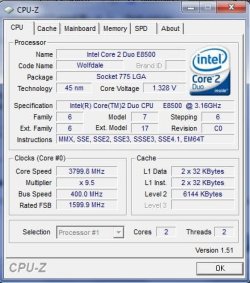
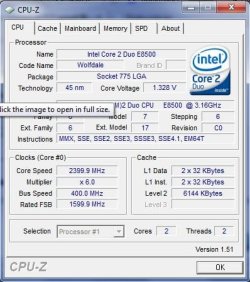
If you look a little closer you will see that the FSB speed is the same but your multiplier has dropped to x4 in Windows 7, which is most likely to to save power and prolong the life of your components, if you start doing something that is more intensive and requires more power you should see the multiplier rise to the default again.
 

My Computer

Computer Manufacturer/Model Number
Home Brew
OS
Windows 7 Ultimate Vista Ultimate x64
CPU
Core 2 Duo E8500 3.16Ghz @ 3.8Ghz
Motherboard
eVGA 750i FTW
Memory
2x2Gigs Patriot PC2-6400 LL
Graphics Card(s)
Inno3D GeForce GTX260 216 SP
Monitor(s) Displays
ASUS VW222U 22" 2ms Response time
Screen Resolution
1680x1050
Hard Drives
SATA 150GB
SATA II 250GB
USB IDE 750GB Ext.
PSU
HYTEC 600W & Thermaltake 650W Toughpower Power Exp
Case
Thermaltake Armor LCS (Liquid Cooling System)
Cooling
Liquid Cooling System
Keyboard
Logitech G15 Gaming Keyboard
Mouse
Logitech G9 Gaming Mouse
Here you go this is what mine looks like when the multiplier drops, this happens in Vista as well for me.

2009-05-07_020937.jpg2009-05-07_020952.jpg
 

My Computer

Computer Manufacturer/Model Number
Home Brew
OS
Windows 7 Ultimate Vista Ultimate x64
CPU
Core 2 Duo E8500 3.16Ghz @ 3.8Ghz
Motherboard
eVGA 750i FTW
Memory
2x2Gigs Patriot PC2-6400 LL
Graphics Card(s)
Inno3D GeForce GTX260 216 SP
Monitor(s) Displays
ASUS VW222U 22" 2ms Response time
Screen Resolution
1680x1050
Hard Drives
SATA 150GB
SATA II 250GB
USB IDE 750GB Ext.
PSU
HYTEC 600W & Thermaltake 650W Toughpower Power Exp
Case
Thermaltake Armor LCS (Liquid Cooling System)
Cooling
Liquid Cooling System
Keyboard
Logitech G15 Gaming Keyboard
Mouse
Logitech G9 Gaming Mouse
but ive turned off all the power saving settings, and Counter Strike Source has such a low framerate now. my computer is all sluggish
 

My Computer

Computer Manufacturer/Model Number
Toshiba a215-s7422
OS
WIndows 7 7100
CPU
1.9ghz AMD turion64 x2
Motherboard
ati x1200 (as i understand this is also the mobo)
Memory
4gb
Graphics Card(s)
ATI x1200
Sound Card
Realtek HD
Monitor(s) Displays
15in laptop display, 24in dell monitor
Screen Resolution
1280x800 and 1680x1050
Hard Drives
320gb western digital black 7200rpm
PSU
laptop
Case
laptop
Cooling
laptop
Keyboard
old microsoft keyboard
Mouse
logitech G5
Internet Speed
7mb down 3mb up (cable)
Have you actually set your power settings to Performance mode?
 

My Computer

Computer Manufacturer/Model Number
Home Brew
OS
Windows 7 Ultimate Vista Ultimate x64
CPU
Core 2 Duo E8500 3.16Ghz @ 3.8Ghz
Motherboard
eVGA 750i FTW
Memory
2x2Gigs Patriot PC2-6400 LL
Graphics Card(s)
Inno3D GeForce GTX260 216 SP
Monitor(s) Displays
ASUS VW222U 22" 2ms Response time
Screen Resolution
1680x1050
Hard Drives
SATA 150GB
SATA II 250GB
USB IDE 750GB Ext.
PSU
HYTEC 600W & Thermaltake 650W Toughpower Power Exp
Case
Thermaltake Armor LCS (Liquid Cooling System)
Cooling
Liquid Cooling System
Keyboard
Logitech G15 Gaming Keyboard
Mouse
Logitech G9 Gaming Mouse
As mentioned, check your power settings. There's a section in there about min/max cpu usage.
 

My Computer

OS
7264x64/7260x86
i did i set both the min and the max to 100% and when i run a game nothing happenes to the speed. (below shows half-life source one of my favorite games)

r9268g.png
 

My Computer

Computer Manufacturer/Model Number
Toshiba a215-s7422
OS
WIndows 7 7100
CPU
1.9ghz AMD turion64 x2
Motherboard
ati x1200 (as i understand this is also the mobo)
Memory
4gb
Graphics Card(s)
ATI x1200
Sound Card
Realtek HD
Monitor(s) Displays
15in laptop display, 24in dell monitor
Screen Resolution
1280x800 and 1680x1050
Hard Drives
320gb western digital black 7200rpm
PSU
laptop
Case
laptop
Cooling
laptop
Keyboard
old microsoft keyboard
Mouse
logitech G5
Internet Speed
7mb down 3mb up (cable)
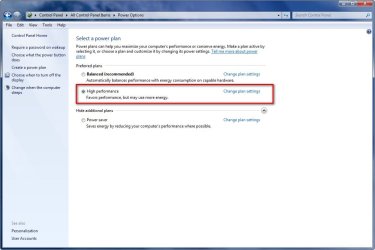
I will ask again, do you have Performance mode selected as shown Here?

2009-05-07_025813.jpg
 

My Computer

Computer Manufacturer/Model Number
Home Brew
OS
Windows 7 Ultimate Vista Ultimate x64
CPU
Core 2 Duo E8500 3.16Ghz @ 3.8Ghz
Motherboard
eVGA 750i FTW
Memory
2x2Gigs Patriot PC2-6400 LL
Graphics Card(s)
Inno3D GeForce GTX260 216 SP
Monitor(s) Displays
ASUS VW222U 22" 2ms Response time
Screen Resolution
1680x1050
Hard Drives
SATA 150GB
SATA II 250GB
USB IDE 750GB Ext.
PSU
HYTEC 600W & Thermaltake 650W Toughpower Power Exp
Case
Thermaltake Armor LCS (Liquid Cooling System)
Cooling
Liquid Cooling System
Keyboard
Logitech G15 Gaming Keyboard
Mouse
Logitech G9 Gaming Mouse
YES i have
 

My Computer

Computer Manufacturer/Model Number
Toshiba a215-s7422
OS
WIndows 7 7100
CPU
1.9ghz AMD turion64 x2
Motherboard
ati x1200 (as i understand this is also the mobo)
Memory
4gb
Graphics Card(s)
ATI x1200
Sound Card
Realtek HD
Monitor(s) Displays
15in laptop display, 24in dell monitor
Screen Resolution
1280x800 and 1680x1050
Hard Drives
320gb western digital black 7200rpm
PSU
laptop
Case
laptop
Cooling
laptop
Keyboard
old microsoft keyboard
Mouse
logitech G5
Internet Speed
7mb down 3mb up (cable)
Does your latop have built in power modes(acpi)?

Maybe that is setting they cpu to underclock.
 

My Computer

OS
7264x64/7260x86
um what? im not sure what that is sorry, i mean if it dose im dont know how i turned it on, it used to run full speed before yesterday, im downloading the new beta now hopefully that will fix it after i do a clean install.
 

My Computer

Computer Manufacturer/Model Number
Toshiba a215-s7422
OS
WIndows 7 7100
CPU
1.9ghz AMD turion64 x2
Motherboard
ati x1200 (as i understand this is also the mobo)
Memory
4gb
Graphics Card(s)
ATI x1200
Sound Card
Realtek HD
Monitor(s) Displays
15in laptop display, 24in dell monitor
Screen Resolution
1280x800 and 1680x1050
Hard Drives
320gb western digital black 7200rpm
PSU
laptop
Case
laptop
Cooling
laptop
Keyboard
old microsoft keyboard
Mouse
logitech G5
Internet Speed
7mb down 3mb up (cable)
Toshiba satellite a2-15 s7422
 

My Computer

Computer Manufacturer/Model Number
Toshiba a215-s7422
OS
WIndows 7 7100
CPU
1.9ghz AMD turion64 x2
Motherboard
ati x1200 (as i understand this is also the mobo)
Memory
4gb
Graphics Card(s)
ATI x1200
Sound Card
Realtek HD
Monitor(s) Displays
15in laptop display, 24in dell monitor
Screen Resolution
1280x800 and 1680x1050
Hard Drives
320gb western digital black 7200rpm
PSU
laptop
Case
laptop
Cooling
laptop
Keyboard
old microsoft keyboard
Mouse
logitech G5
Internet Speed
7mb down 3mb up (cable)
Having the same problem ill reiterate my post i made on the tweaking section:

Not sure which forums to start posting this at so I will start here and move my way around. So here goes: I seem to be unable to stop Windows 7 RC1 7100 from auto Throttling my CPU. CPUID reports that the multiplier is fluctuation anywhere from x21 down to 8x dropping my corespeed from 3519 down to 1300mhz. vCore remains stable at 1.304v.

I know this is purely a Windows 7//Vista problem as when I boot back over to Win XP x32 SP3 I get no fluctuations what so ever. I have tried going into the "Power Management" options in Control Panel and chossing the high performance profile and even making my own custom profile and manually setting the CPU to 100%. Temps are all nominal(~36-39C idle).

EIST, C-State, Overspeed Protection and TurboMode are all disabled in bios. And other 'power managment' in the Advanced BiOS(ACPI is Enabled but i dont think that is a problem) features and all Power Management Features are turned off.

Mobo is a MSI x58 Platinum SLI

I've did some googling and came across somethign that mentioned this registry directory:
[HKEY_LOCAL_MACHINE\SYSTEM\CurrentControlSet\Control\Session Manager]

Two entries caught my eye: ProcessorControl and ProtectionMode

I was tempted to tinker with some settings but I figure I'd come here before i shoot myself in the foot. Any help would be appreciated as this auto throttling is quite annoying.

I started a new thread in the Hard & Devices section with a more clear and specific title to this problem as well went into a little detail about what I found.

The link can be found here: http://www.sevenforums.com/hardware-devices/8871-w7-cant-stop-cpu-throttling.html#post87661
 
Last edited:

My Computer

OS
Windows 7 RC 1 7100//Win XPx32 SP3
CPU
i7 920 @ 3.5ghz
Motherboard
MSI x58 Platinum SLI BIOS v3.4
Memory
OCZ Gold PC1600(OCZ3G1600LV6GK)
Graphics Card(s)
eVGA 260 GTX SCC
Sound Card
SoundBlaster X-Fi Extreme Music
PSU
Antec TP-650 650W Continuous power ATX12V V2.3
Case
Lian Li
Cooling
COOLER MASTER Hyper N 520 RR-920-N520-GP 92mm
Mouse
G9
ok i actually fixed my problem by installing the RC (i needed a clean install anyway cause id get a error anytime i tried to go to controll panel or device manager etcetc) and i have to say it runs faster then 7000 but maybe its me, but anyway my processor is running at 99% power ^_^ (its running like 5mhz slower then its "said" speed but it not like that matters) but for a real solution i couldnt think of one beside installing a newer version :3

288k6h.png
 

My Computer

Computer Manufacturer/Model Number
Toshiba a215-s7422
OS
WIndows 7 7100
CPU
1.9ghz AMD turion64 x2
Motherboard
ati x1200 (as i understand this is also the mobo)
Memory
4gb
Graphics Card(s)
ATI x1200
Sound Card
Realtek HD
Monitor(s) Displays
15in laptop display, 24in dell monitor
Screen Resolution
1280x800 and 1680x1050
Hard Drives
320gb western digital black 7200rpm
PSU
laptop
Case
laptop
Cooling
laptop
Keyboard
old microsoft keyboard
Mouse
logitech G5
Internet Speed
7mb down 3mb up (cable)
Still experiencing the throttle problem with a clean RC1 install with latest updates.
 

My Computer

OS
Windows 7 RC 1 7100//Win XPx32 SP3
CPU
i7 920 @ 3.5ghz
Motherboard
MSI x58 Platinum SLI BIOS v3.4
Memory
OCZ Gold PC1600(OCZ3G1600LV6GK)
Graphics Card(s)
eVGA 260 GTX SCC
Sound Card
SoundBlaster X-Fi Extreme Music
PSU
Antec TP-650 650W Continuous power ATX12V V2.3
Case
Lian Li
Cooling
COOLER MASTER Hyper N 520 RR-920-N520-GP 92mm
Mouse
G9
not sure...

I had this happen on my Dell Inspiron 9200 Laptop that I just put Windows 7 RC on.... I ended up fixing the issue (my processor is a Pentium M 1.6ghz... was showing up at 798mhz )....

First I went to Intel's website and found the mobile chipset for my model of chipset in my laptop ... tried installing the Windows Vista version... it errored out after trying to install, but then the troubleshooter picked up 10 seconds after it bombing out and asked if I wanted to install using the recommended config from windows.. I clicked YES, and then it installed... I rebooted the PC.... After rebooting I double checked my Bios to see if the Speed Step was turned on still.. (IT was... but just to make sure I changed it to OFF, saved my bios, ... then went back into the bios and Turned it back on) ... Once I rebooted and loaded back into windows it then showed my processor at 1.6ghz.... Solved. I notice when I run "Everquest" on it that my processor slams at 96-100% ... but I notice no lag, and it actually seems like its running a lot faster than what it used to with vista ultimate on it....

Hope this might help anyone with a laptop doing this...
 

My Computer

OS
Windows 7-RC-32 bit
If that were a desktop I would advise to Disable Cool & Quiet in bios


I had this problem after upgrading to Win7 .
Turns out Windows 7 throtles the CPU no matter what overclocking you try.
may have something to do with EPU or something
Anyway ,, when i disabled the Cool&Quiet feature in bios the clock speed on the processor returned to normal.
 

My Computer

Computer Manufacturer/Model Number
Home Built
OS
Windows 7 64 ultimate
CPU
AMD Phenom II x4 550 3.4gHz
Motherboard
ASUS M4A785TD-V EVO AM3
Memory
Kingston HyperX 2GB DDR3 1800 (PC3 14400)
Graphics Card(s)
on board HD 4200
Sound Card
on board
Monitor(s) Displays
Samsung SyncMaster 204b
Screen Resolution
1600 x 1200
Hard Drives
WD 160gb SATA II
PSU
Antec TruePower 650w
Case
Crap
Keyboard
sunbeamtech green illuminated keyboard
Mouse
Razer Diamondback
Back
Top