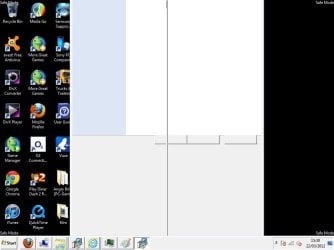
Programs not opening properly e.g Task Manager (even in safe mode)

edgie

New member
Local time
5:50 PM
Messages
5
Hi,

I got a virus yesterday off a dodgy website, in task manager it showed that i had 2 rundll programs open, note pad and a couple of internet explorer pages, i kept trying to close them but i couldn't.

Anyway i scanned using Avast and it said there was no virus etc but i restored my laptop to a couple of days ago.

Now i can't open task manager properly or install a MBAM and the screen is a bit dodgy as well, text boxes in internet dont open properly and text is a bit funny. I can't open these in safe mode either or system restore.

I couldn't even sign up to these forum on my laptop - i couldnt see what i was typing in the text box.

I've attached a screenshot of task manager and when i try to open the MBAM installer.

Any help greatly appreciated.

Thanks
 

Attachments
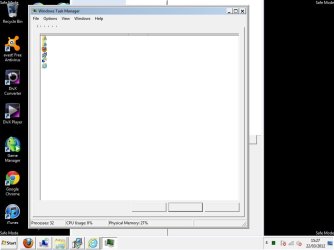
  • task mgr.jpg
    task mgr.jpg
    96.8 KB · Views: 21
  • mbab.jpg
    mbab.jpg
    109.7 KB · Views: 14

My Computer

OS
windows 7
Sounds like you're still infected, and that it got into your System Restore points. Confirm if this is the case by installing Malwarebytes in Safe Mode with Networking to update and run a full scan. If this fails download Windows Defender Offline, writing to flash stick or burning to CD, booting to update and run a full scan.

If infection is found confirming your Restore points are infected, turn off System Protection and run another full scan with Malwarebytes, then Avast full scan or Boot Scan if available. http://www.sevenforums.com/tutorials/335-system-protection-change-disk-space-usage.html

Google the actual virus to see if it requires special tools for removal. Our Security forum experts can consult.

Once it's confirmed removed, run SFC -SCANNOW Command to check System file integrity.

Serious infections can sometimes require a Clean Reinstall - Factory OEM Windows 7 following or adapting these steps to get it perfect.
 
Last edited:
a system restore is not enough to remove a virusinfection do what gregrocker suggested that command will attempt to detect changes in windows integrety and attempt to fix them if it fails then i'm verry sorry but your only option is to reinstall

do you know the virusname ? did you scan with a up2date scanner ? also when the system is infected no antivirusscanner can be 100% trusted since some virusses are able to hide themself from scanners.You do have a backup do you ?
 

My Computer

Computer Manufacturer/Model Number
Medion Akoya p6634
OS
Windows 7 Ultimate x64
CPU
Intel Core i3 2.30 GHz
Motherboard
Medion® P6634
Memory
4096mb
Graphics Card(s)
nVidea GeForce GT630M (1024 MB dedicated memory)
Sound Card
Conexant Smart Audio (Dolby Advanced Audio)
Monitor(s) Displays
15,6 inch LCD
Screen Resolution
1366x768
Hard Drives
Seagate st9500325AS
Keyboard
azerty build in
Mouse
touchpad :-)
Internet Speed
100mbps
Thanks for the quick response...

I've not been able to run Malwarebytes as the second screenshot i can't get to install it. I ran a full scan with Avast and Micrsoft Defendor as well as Microsoft Security Essentials and nothing was found.
 

My Computer

OS
windows 7
How about in Safe Mode ?

What about the other steps given? You're not going to resolve this without utter thoroughness.
 
Yeah the screenshots are from safe mode so no luck.

I will have a go with the Windows Defender Offline iso method

Shall i use the SFC/Scannow command first?
 

My Computer

OS
windows 7
Right click on MBam installer, choose to run as Administrator. See if it installs.
 

My Computer

Computer type
PC/Desktop
Computer Manufacturer/Model Number
Bruce ... somewhere in his 40's
OS
Windows 7 Ultimate 32bit SP1
CPU
Intel(R) Core(TM)2 Quad CPU @ 2.40GHz, 2400 MHz
Motherboard
INTEL/D975XBX2
Memory
4 GB
Graphics Card(s)
ATI Radeon HD 2600 Pro
Monitor(s) Displays
Samsung SyncMaster 914v
Screen Resolution
1280 x 1024
Hard Drives
2/500GB each ... ST3500630AS ATA Device.
One is not connected
PSU
Rocketfish 700 W
Case
G.Skill Gigabyte Chassis
Keyboard
Standard PS/2 Keyboard
Mouse
Microsoft PS/2 Mouse
Internet Speed
DSL
Antivirus
Avira Internet Security
Browser
IE 11
Other Info
ATI HDMI Audio
Thanks - tried install as admin but same screen as before.

Sorry Greg not good at this stuff...so what is the suggested route, run the windows defender offline?
 

My Computer

OS
windows 7
Thanks for your help :)

Are there any other programs i could try to install which are like Malwarebytes?
 

My Computer

OS
windows 7

My Computer

Computer type
PC/Desktop
Computer Manufacturer/Model Number
Bruce ... somewhere in his 40's
OS
Windows 7 Ultimate 32bit SP1
CPU
Intel(R) Core(TM)2 Quad CPU @ 2.40GHz, 2400 MHz
Motherboard
INTEL/D975XBX2
Memory
4 GB
Graphics Card(s)
ATI Radeon HD 2600 Pro
Monitor(s) Displays
Samsung SyncMaster 914v
Screen Resolution
1280 x 1024
Hard Drives
2/500GB each ... ST3500630AS ATA Device.
One is not connected
PSU
Rocketfish 700 W
Case
G.Skill Gigabyte Chassis
Keyboard
Standard PS/2 Keyboard
Mouse
Microsoft PS/2 Mouse
Internet Speed
DSL
Antivirus
Avira Internet Security
Browser
IE 11
Other Info
ATI HDMI Audio
Hello,

Anybody thinking about a rootkit yet ? I am those signs the op is having make me think he/she got a rootkit.edgie what happens when you try to search for virus removal information via Google ? does it work or do you get redirected to some parasite ?.Also rightclick commandpromp => run as administrator type netstat -an what do you see while being connected to the net ? any strange connections ?
 

My Computer

Computer Manufacturer/Model Number
Medion Akoya p6634
OS
Windows 7 Ultimate x64
CPU
Intel Core i3 2.30 GHz
Motherboard
Medion® P6634
Memory
4096mb
Graphics Card(s)
nVidea GeForce GT630M (1024 MB dedicated memory)
Sound Card
Conexant Smart Audio (Dolby Advanced Audio)
Monitor(s) Displays
15,6 inch LCD
Screen Resolution
1366x768
Hard Drives
Seagate st9500325AS
Keyboard
azerty build in
Mouse
touchpad :-)
Internet Speed
100mbps
He has one of the top experts in the world Jacee here now who can help him with any infection.
 
You may have luck with a bootable live CD. Many anti-virus products come with a (usually free) Linux live CD available for download.. I've had particular luck with this AVG.
 

My Computer

Computer Manufacturer/Model Number
HP
OS
Windows 7 Home Premium x64; Slackware Linux 13 x86 (kernel 2.6.37.6)
Download DDS from one of these links:
Mirror 1 Mirror 2 Mirror 3
Put it on a "Clean" flash drive then install it on the infected computer. Right click to run as Administrator.
  • Disable any script blocking protection
  • Double click the dds icon to run the tool.
  • When done, DDS will open two (2) logs:
    1. DDS.txt
    2. Attach.txt <--- will be minimized in the task tray
  • Save both reports to your desktop.
Include the contents of both logs in your next post.
 

My Computer

Computer type
PC/Desktop
Computer Manufacturer/Model Number
Bruce ... somewhere in his 40's
OS
Windows 7 Ultimate 32bit SP1
CPU
Intel(R) Core(TM)2 Quad CPU @ 2.40GHz, 2400 MHz
Motherboard
INTEL/D975XBX2
Memory
4 GB
Graphics Card(s)
ATI Radeon HD 2600 Pro
Monitor(s) Displays
Samsung SyncMaster 914v
Screen Resolution
1280 x 1024
Hard Drives
2/500GB each ... ST3500630AS ATA Device.
One is not connected
PSU
Rocketfish 700 W
Case
G.Skill Gigabyte Chassis
Keyboard
Standard PS/2 Keyboard
Mouse
Microsoft PS/2 Mouse
Internet Speed
DSL
Antivirus
Avira Internet Security
Browser
IE 11
Other Info
ATI HDMI Audio
Back
Top