Prompted to format external HD after reinstalling Windows 7 on laptop

MZaccardo

New member
Local time
10:03 AM
Messages
2
Please tell me I didn't lose everything!

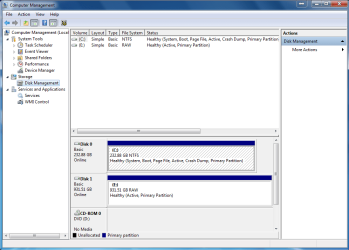
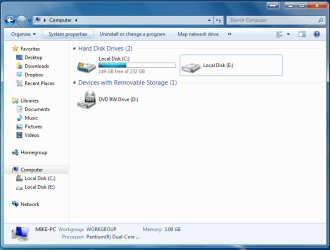
I thought I got a virus on my laptop so I reinstalled Windows 7. My 1TB iomega external harddrive was working fine before the reinstall and held approximately 4-500GB of family photos, documents, home videos and music. After the reinstall, I get a prompt stating I need to reformat the external drive before I use it. Please help! I am sick just thinking about loosing all that stuff.


Specs:
Windows 7 Home
iomega 1TB external HD Model LDHD-UP2 S/N: WJAL177817
 

Attachments
  • Capture 1.PNG
    Capture 1.PNG
    35.4 KB · Views: 6
  • Capture 2.PNG
    Capture 2.PNG
    30.1 KB · Views: 9
Last edited:

My Computer My Computer

At a glance

Windows 7 Home Premium 32 bit
OS
Windows 7 Home Premium 32 bit
Welcome to Windows Seven Forums.

I don't quite know what you've done, but you've deleted the partition that was on your external drive, hence the reason it's showing as a RAW drive.

Check this tutorial for a method of recovering your lost files.

Free data recovery software - recover files from RAW hard drive with EaseUS Data Recovery Wizard Free Edition.

If the files are successfully recovered you will need another drive to save them to. Do not try and save to the drive you are recovering from. You risk losing your data permanently that way.

Once you've recovered your data you can create a new partition on the drive, give it a quick format then move your data back onto it.

You may also want to check this link, which looks promising.

http://www.recovermyfiles.com/

It's just a great pity you didn't disconnect this drive before you reinstalled Windows. We always recommend that you do so for the very reason you are in trouble now.

If you don't feel confident enough to carry out this task you can get specialist data recovery experts to recover your data, but they are expensive to use.
 

My Computer My Computer

At a glance

Windows 7 Ultimate SP1 64-BitIntel Core i7 870 @ 2.93GHz8Gb Dual-Channel DDR3 @ 664MHznVidia GeForce GTX 460 1024MB dedicated RAM
Computer Manufacturer/Model Number
HP Pavilion Elite 495UK
OS
Windows 7 Ultimate SP1 64-Bit
CPU
Intel Core i7 870 @ 2.93GHz
Motherboard
MSI 2A9C (CPU1)
Memory
8Gb Dual-Channel DDR3 @ 664MHz
Graphics Card(s)
nVidia GeForce GTX 460 1024MB dedicated RAM
Sound Card
Realtek HD Audio
Monitor(s) Displays
HP2310i
Screen Resolution
1920 x 1080
Hard Drives
1x1954GB Hitachi HDS22020ALA 330 (RAID), 1x1954GB Hitachi External for backup and storage
PSU
460W
Case
HP Elite
Cooling
Air cooled
Keyboard
Logitech K750 solar-powered keyboard
Mouse
Logitech Wireless M180 mouse
Internet Speed
2Mb
Other Info
Pure Avanti Flow Internet Radio with iPod Dock, 64Gb iPod, HP USB Speakers, Sony MDR-V500 Headphones, Sony Vaio F-Series Laptop
Thanks a lot for your help. I don't know why I didn't think of finding a data recovery program myself. I ended up going with testdisk. I'm still in the process but things are looking good so far (and its unlimited data recovery). :D
 

My Computer My Computer

At a glance

Windows 7 Home Premium 32 bit
OS
Windows 7 Home Premium 32 bit
Back
Top