Puran's Boot time defrag & Intelligent Optimizer

Which Disk defragger do you prefer?

  • Win7

    Votes: 1 7.1%
  • Auslogics

    Votes: 5 35.7%
  • Defraggler

    Votes: 1 7.1%
  • Puran

    Votes: 7 50.0%

  • Total voters
    14

gregrocker

New member
Guru
Local time
7:29 AM
Messages
50,634
I have been testing Defraggler and Puran against my old favorite Auslogics defragger, which I've installed hundreds of times over ten years with great user satisfaction.

It's unmistakeable that Defraggler and Puran do more than Auslogics, sometimes finding twice as much or more fragmentation. They also do more to make files contiguous, with Puran moving files for more compactness.

Most impressive is Puran's boot time defrag which includes System Files, and it's Intelligent Optimizer option on Operations tab which improves performance by how it positions files. Performance no longer will lag on a 1gb RAM Celeron.

I plan to test these for several more months but Puran is winning my vote. I'd like to hear other's views - sorry the poll only allowed four.
 
yes its seems real good so far
 

My Computer

OS
windows 7 home premuim 64 bit
CPU
amd fx 8120 @4ghz
Motherboard
asrock 970 extreme 3
Memory
16 gbs gskill
Graphics Card(s)
msi radeon hd 6670
PSU
seasonic m12ll
Case
antec 300
Cooling
prolimatech panther
Used Puran for a couple of years now - I love the functionality and dislike the interface - for instance, part of the window remains hidden below my netbook's little screen, and it doesn't look like an XP, Vista or Win 7 App - more like something from the Chromium stable. The early documentation was very Indlish, I don't know if it has been rewritten.

There are great features like those in the sysinternals pagedefrag and contig utilities, in that not only are the pagefile and registry hives defragmented at boot time, there is the right-click option to defragment individual files and folders on demand, as well as options to run a disk check before and to exclude certain files.

I'd still give it 9/10 though.
 
Last edited:

My Computer

Computer Manufacturer/Model Number
Acer 7520, Packard Bell dot se, Acer travelmate 2423
OS
Win 7 Ult + Starter, XP Pro +Home, 2kAS, Linux Mint 8, SuperOS
CPU
AMD 64 Athlon X2 , Intel Atom N450, Intel Celeron M 1.50 Ghz
Motherboard
Acer Fuquene
Memory
2.5GB ; 1GB; 2GB
Graphics Card(s)
Nvidia GeForce7000m; Intel; Intel
Sound Card
Realtek AC57
Monitor(s) Displays
17" ;10.1"; 19"
Screen Resolution
1440x900;1024x600;1440x900;
Hard Drives
WD 80, WD 320;
PSU
19v
Case
Laptop
Cooling
Air
Internet Speed
9.7Mb/s down 0.99Mb/s up
Other Info
ISP VIRGINMEDIA 10M cable broadband - D-Link DIR615 wireless router, 3Com OfficeConnect ASDL router used as wireless extender switch
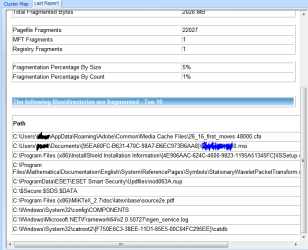
I admit I have never before heard of Puran. I got curious, installed the free version and ran the analysis. Mind you, I have never defragmented this drive. I've got this computer three years ago, during this time I did re-partition the disk a couple of times, last time a couple of months ago, but I have never defragmented, since the Windows 7 defrag tool has never reported fragmentation larger than 1%. By what I see in this Puran analysis, I still don't need to degragment anything.

Now, is there a way to analyze for the possible effects of the boot-time optimization, such as moving Windows files around the drive - that's what Puran is supposed to do, right?
 

Attachments

  • Capture.PNG
    Capture.PNG
    58.5 KB · Views: 156

My Computer

Computer Manufacturer/Model Number
Dell Inspiron 530
OS
Windows 7 Ultimate (x64)
CPU
Q6600
Memory
8 GB
Graphics Card(s)
ATI Radeon HD 2600 XT
Monitor(s) Displays
Samsung Syncmaster P2450
Screen Resolution
1920x1080
Hard Drives
Samsung HD103UJ
Samsung HD501LJ
Internet Speed
25 Mb/s
I like Defraggler's UI and CLI options more, but I've used Puran and there's nothing wrong with it (other than it is pretty ugly).
 

My Computer

Computer type
PC/Desktop
Computer Manufacturer/Model Number
Custom
OS
Windows 10 Pro x64
CPU
Intel Core i7 4790K @ 4.5GHz
Motherboard
Asus Maximus Hero VII
Memory
32GB DDR3
Graphics Card(s)
Nvidia GeForce GTX970
Sound Card
Realtek HD Audio
Screen Resolution
1920x1200
Hard Drives
1x Samsung 250GB SSD
4x WD RE 2TB (RAIDZ)
PSU
Corsair AX760i
Case
Fractal Design Define R4
Cooling
Noctua NH-D15
Back
Top