Question about the default browser of a program

MartinYonko

New member
Local time
10:02 AM
Messages
15
Hey guys.I have recently downloaded a bot program that would win me a flash browser game with the max score.The program itself is a bit old being created in 2009-2010 but it's still working.The problem is that whenever I open it I get the message"Outdated browser please update." message from the site which contains the flash game and also a white image in the place whee the flash gae should have been.I have also clicked on proprieties and I could clearly see that Internet Explorer was the browser which the program uses.So I was wondering,is there any way to change the default browser to chrome or mozilla(the recommended browsers for that site)?Thanks.
 

My Computer My Computer

OS
Windows 7
Could you not right click the file and select open with then select alternative browser
 

My Computer My Computer

Computer type
PC/Desktop
Computer Manufacturer/Model Number
Pauly Special
OS
Win7 Ultimate X64
CPU
Intel i5 3570K
Motherboard
Gigabyte Z77X-DS3H
Memory
8GB DDR3 1600
Graphics Card(s)
Onboard
Sound Card
Onboard
Screen Resolution
1280x1024
Hard Drives
Samsung 840 Evo SSD (OS)
1TB Spinner (Data)
PSU
800W Arctic
Case
Cooler Master
Cooling
3x120mm Fans
Keyboard
MS Wireless
Mouse
MS Wireless
Internet Speed
20M
You don't have that option for exe files.
 

My Computer My Computer

OS
Windows 7
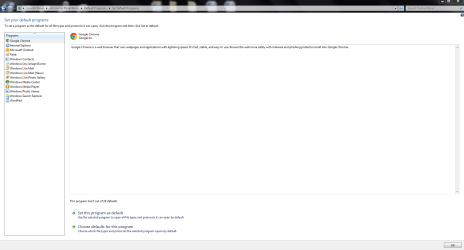
Control Panel>default programs>set your default programs>google chrome>set this program as default
Capture.PNG
 

My Computer My Computer

Computer type
PC/Desktop
Computer Manufacturer/Model Number
Pauly Special
OS
Win7 Ultimate X64
CPU
Intel i5 3570K
Motherboard
Gigabyte Z77X-DS3H
Memory
8GB DDR3 1600
Graphics Card(s)
Onboard
Sound Card
Onboard
Screen Resolution
1280x1024
Hard Drives
Samsung 840 Evo SSD (OS)
1TB Spinner (Data)
PSU
800W Arctic
Case
Cooler Master
Cooling
3x120mm Fans
Keyboard
MS Wireless
Mouse
MS Wireless
Internet Speed
20M
Sorry I forgot to answer as I had enough of that program and I quit trying to make it work.I did all you mentioned but still it would tell me that the browser is outdated.I downloaded an old version of firefox(from 2010 I think) and I tried to access the site as I would normally do.Though I used an old version of the browser I didn't get the "outdated browser" message,meaning that the program itself is the problem. Thanks for the support anyway.
 

My Computer My Computer

OS
Windows 7
Back
Top