
quick question about NVIDIA optimus

jonnyhotchkiss

New member
Member
VIP
Local time
12:06 AM
Messages
260
I have a quick question to the NVIDIA optimus gang!

I know (now!) that the workaround is to underclock. My problem is that these settings aren't being respected, the GPU reverts to 672 and NVIDIA (or sometimes Intel) service stops and restarts... system is unstable (and can crash) until application is terminated...

Using dell l502x (8 gb ram) windows 7 (ultimate, x64) running rocksmith - currently not running (without crashing) on nvidia gfx even on laptop screen....
**(trying to get stable settings to play on samsung hdmi - this has been done, on same system with same drivers and same config... not sure why now it is so unstable)

RE clock / memory speeds, I've noticed that if I change "3d emphasising" to performance, the clock settings remain as set (550, 850 MH)...

can anyone with similar setup confirm if this step was necessary for them?
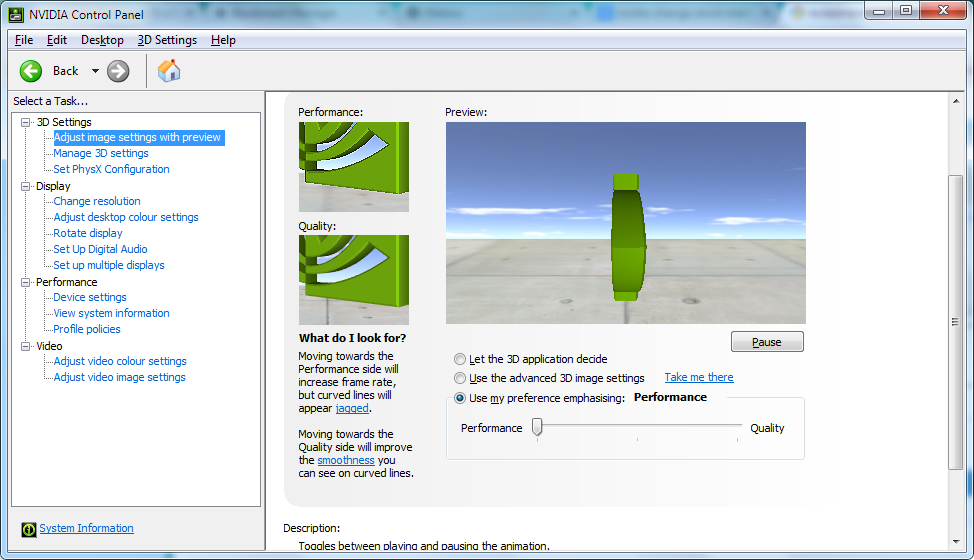
eAgv2M6.png


thanks

video BIOS 70.08.44.00.11
gfx/memory/gpu processor clocks = 550,850,1100MHz
geforce v347.09, intel 8.15.10.2342
 

My Computer

Computer type
Laptop
Computer Manufacturer/Model Number
Dell
OS
Windows 7 Ultimate 64bit
CPU
2.2
Memory
8Gb
Graphics Card(s)
NVIDIA
Screen Resolution
1280/762
Mouse
built in pad || iphone || MS wireless
Internet Speed
100MB
Antivirus
Avast
Browser
Chrome, Chrome portable
The problem with most all laptops with switchable graphics is when they switch. The only option I have found that works is to disable one. My Nvidia Optimus, I disabled the onboard graphics and set the discrete graphics as the primary graphics in the Nvidia control panel. Your battery life will take a hit, but you won't get the 'graphics drivers crashed and failed to respond' error. Some have an option in bios to disable Optimus.
 

My Computers

System One System Two

  • Computer type
    PC/Desktop
    Computer Manufacturer/Model Number
    ALWAYS UNDER CONSTRUCTION
    OS
    Windows 11 Pro
    CPU
    Ryzen 9 5900X
    Motherboard
    Asus X570 Crosshair Viii Hero
    Memory
    32GB G Skill DDR4-3600
    Graphics Card(s)
    EVGA RTX 3080 FTW 3 Ultra
    Sound Card
    On Board/Sennheiser PC37X Headset
    Monitor(s) Displays
    3 X Asus 27"
    Screen Resolution
    2560x1440
    Hard Drives
    2 X 1 TB NVME drives
    PSU
    EVGA 850
    Case
    Phanteks Eclipse P400A
    Cooling
    EVGA 280 AIO
    Keyboard
    Logitech G510s/ Logitech G13
    Mouse
    Logitech G502
    Internet Speed
    24/1
    Antivirus
    ESET/MBAM Pro/SAS Pro
    Browser
    Chrome/ Firefox/ Edge
  • Computer type
    Laptop
    System Manufacturer/Model Number
    Dell 16 Plus
    OS
    Windows 11 Pro
    CPU
    Intel Ultra 9 288V
    Memory
    32 GB LPDDR5X 8533
    Monitor(s) Displays
    16" Mini-LED HDR600 Touch 90 Hz
    Screen Resolution
    2560X1600
    Hard Drives
    1 TB NVME
did you do that through device manager?

I thought my laptop display was powered by intel hd graphics; so disabling would cause no laptop display... haven't tried
(how would i undo that?!)
 

My Computer

Computer type
Laptop
Computer Manufacturer/Model Number
Dell
OS
Windows 7 Ultimate 64bit
CPU
2.2
Memory
8Gb
Graphics Card(s)
NVIDIA
Screen Resolution
1280/762
Mouse
built in pad || iphone || MS wireless
Internet Speed
100MB
Antivirus
Avast
Browser
Chrome, Chrome portable
If it has Optimus, it has Intel HD Graphics and a dedicated Nvidia card. It switches between the 2 depending on the graphics requirements of your activity. It is usually the switching part that causes the problems. If you have Optimus, try the easy way first. Right click on an empty section of the desktop and select Nvidia Control Panel. Then set it like this with the Primary graphics adapter as the Nvidia card.
IntegratedGraphicsin3DSettings_zps6be37eaa.jpg
 

My Computers

System One System Two

  • Computer type
    PC/Desktop
    Computer Manufacturer/Model Number
    ALWAYS UNDER CONSTRUCTION
    OS
    Windows 11 Pro
    CPU
    Ryzen 9 5900X
    Motherboard
    Asus X570 Crosshair Viii Hero
    Memory
    32GB G Skill DDR4-3600
    Graphics Card(s)
    EVGA RTX 3080 FTW 3 Ultra
    Sound Card
    On Board/Sennheiser PC37X Headset
    Monitor(s) Displays
    3 X Asus 27"
    Screen Resolution
    2560x1440
    Hard Drives
    2 X 1 TB NVME drives
    PSU
    EVGA 850
    Case
    Phanteks Eclipse P400A
    Cooling
    EVGA 280 AIO
    Keyboard
    Logitech G510s/ Logitech G13
    Mouse
    Logitech G502
    Internet Speed
    24/1
    Antivirus
    ESET/MBAM Pro/SAS Pro
    Browser
    Chrome/ Firefox/ Edge
  • Computer type
    Laptop
    System Manufacturer/Model Number
    Dell 16 Plus
    OS
    Windows 11 Pro
    CPU
    Intel Ultra 9 288V
    Memory
    32 GB LPDDR5X 8533
    Monitor(s) Displays
    16" Mini-LED HDR600 Touch 90 Hz
    Screen Resolution
    2560X1600
    Hard Drives
    1 TB NVME
Back
Top