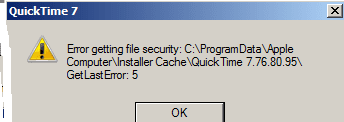
I fixed it. Figures after I created a new thread. I thought I would pass on how I got it uninstalled. I used takeownsership right click option on C:\ProgramData\Apple\Installer Cache\quicktime x.x.x.x. folder. Then I uninstalled quicktime using programs and features.
Was then able to use the apple updater to install the updated quicktime version 7.7.8
As a precaution. The apple folders listed in the Installer cache folder. I used the takeownsership right click option on both folders before doing the update.
My Computer
Computer type
PC/Desktop
Computer Manufacturer/Model Number
Dell All in one Inspiron 2020
OS
W10 32 bit, XUbuntu 18.xx 64 bit
CPU
Intel(R) Celeron(R) CPU G1620T @ 2.40GHz, 2400 Mhz
Motherboard
Dell
Memory
4GB
Graphics Card(s)
Intel HD graphics
Sound Card
High Definition Audio Device
Monitor(s) Displays
20 inch Screen
Screen Resolution
W7=1280 x 720 & Linux Mint Xfce=1360 x 768
Hard Drives
500 GB hard drive
Keyboard
Usb
Mouse
Usb
Internet Speed
High-Speed
Antivirus
MSE
Browser
Main Browser Firefox
Other Info
I have done a clean install of Windows 7 using Dell re-installation disk (Dell sent me one). I also use Free Macrium reflect backup and restore.
That is a good question GokAy. I am not sure but I do think iTunes does requires quicktime. I don't use itunes at all. Most vidoes/music if I wanted I could get on Amazon.
I ended up having to do an image restore because I installed itunes awhile back. It caused my system to slow down. Those free apps, free movies sometimes didn't work.
My Computer
Computer type
PC/Desktop
Computer Manufacturer/Model Number
Dell All in one Inspiron 2020
OS
W10 32 bit, XUbuntu 18.xx 64 bit
CPU
Intel(R) Celeron(R) CPU G1620T @ 2.40GHz, 2400 Mhz
Motherboard
Dell
Memory
4GB
Graphics Card(s)
Intel HD graphics
Sound Card
High Definition Audio Device
Monitor(s) Displays
20 inch Screen
Screen Resolution
W7=1280 x 720 & Linux Mint Xfce=1360 x 768
Hard Drives
500 GB hard drive
Keyboard
Usb
Mouse
Usb
Internet Speed
High-Speed
Antivirus
MSE
Browser
Main Browser Firefox
Other Info
I have done a clean install of Windows 7 using Dell re-installation disk (Dell sent me one). I also use Free Macrium reflect backup and restore.
Thanks for the info. I just wanted to make sure you weren't installing QuickTime just to play local files.
Hmmm, I wonder if one could install just the QT plug-in/add-on/extension without installing the entire player. But it doesn't much matter - since you would still need to keep QT up to date. Apple is slow to patch flaws :-(