R3dfox some settings not working & possibly causing graphics issues?

meesh

New member
R3dfox some settings not working & possibly causing graphics issues?

Last month when Firefox ESR updates stopped I switched to R3dfox (I'm not a fan of chromium browsers).
It pretty much looks just like my FF browser (seems a tad slower) but some settings don't work.. I set a single site to zoom but unlike FF it doesn't seem to remember the setting.. I have to manually zoom every time I visit that site - has this happened to anyone else?

Also, some streaming sites aren't working - I was told it might be due to outdated certificates but after successfully downloading the updated root certificates from Github those sites still don't work (Is it not the certificates but forks not playing DRM content?)

After a week of use, I had a LOT of tabs open (something I always do with FF) and suddenly my laptop monitor went black.. all power was on, it was just the monitor. After a few minutes it finally came back on (showing evidence of all the key strokes I had been pressing to get it to come back).. I know this sounds like a graphics/hardware issue but it never happened before and I immediately shut down R3dfox and switched back to FF and it hasn't happened since.. has anyone else had this happen?

Are there any FF forks that do play DRM content?
Thanks.
 

My Computers

System One System Two

  • Computer type
    Laptop
    Computer Manufacturer/Model Number
    Lenovo Thinkpad
    OS
    W7 professional 64
    CPU
    i5 2.3GHz
    Memory
    8 gb
    Graphics Card(s)
    Intel HD 520
    Monitor(s) Displays
    15.6 HD LED AG
    Screen Resolution
    1366x768
    Hard Drives
    500GB SATA HDD
    Internet Speed
    100+
    Antivirus
    Malwarebytes Premium
    Browser
    Firefox
  • Computer type
    PC/Desktop
I set a single site to zoom but unlike FF it doesn't seem to remember the setting.. I have to manually zoom every time I visit that site - has this happened to anyone else?

I have no such issues. With my aging eyes, I'm having to magnify screen content more and more often, and R3dfox has been remembering that for me.

If I were to try and troubleshoot this, my first suspect would be to look at app/file permissions. There may be config changes not being saved because of inadequate permissions. When installing the app, did you untick the "Mark Of The Web" checkbox on the download's Properties (where it indicates the download came from an untrusted source)?

Also, some streaming sites aren't working

Is it DRM content? R3dfox doesn't play DRM content.

If not DRM, it might be due to streaming sites blocking Windows 7. R3dfox will behave like a more modern Firefox version, but by itself won't mask the OS you're using. Try adding Ray's "User Agent Switcher" extension and set it to mimic Windows 10 and the latest Firefox version. See if that makes any difference.

After a week of use, I had a LOT of tabs open (something I always do with FF) and suddenly my laptop monitor went black
[...]
I know this sounds like a graphics/hardware issue but it never happened before and I immediately shut down R3dfox and switched back to FF and it hasn't happened since.. has anyone else had this happen?

I've never understood people who leave tons of tabs open. It just offends my OCD sensibilities, like a messy desk. I have to close tabs if I'm not using them or it makes me agitated.

If I were to try troubleshooting something like that, though, I don't think it sounds like a graphics issue. You might try monitoring the browser's memory usage in Task Manager for awhile and see if it's ballooning uncontrollably over time.

I was told it might be due to outdated certificates but after successfully downloading the updated root certificates from Github those sites still don't work (Is it not the certificates but forks not playing DRM content?)
[...]
Are there any FF forks that do play DRM content?

Not that I'm aware of. I've read the main problem is the cost of licensing fees to support DRM, and for the forks that's not sustainable. There might be one or two (maybe Opera?), but the problem with most of those would be their versions compatible with Win7 ceased development after FF 115. IOW, using those might not offer any more compatibility than sticking with Firefox 115 ESR on Win7.

If you want to stick with Win7, your options for a modern browser are becoming limited. I think it comes down to which is more important: staying on Win7 and forgoing DRM content? Or forgoing Win7 so you can get DRM support?
 

My Computer

Computer type
PC/Desktop
Computer Manufacturer/Model Number
Dell Optiplex 7050
OS
Windows 7/8.1/10 multiboot
CPU
Intel Core i7-7700
Motherboard
Dell, Intel Q270 chipset
Memory
48GB (2x16GB Crucial DDR4-3200 + 2x8GB Hynix DDR4-2400)
Graphics Card(s)
Intel HD630 + AMD Radeon R7 450 PCIe
Monitor(s) Displays
Asus VC279 (27")
Screen Resolution
1920x1080
Hard Drives
Toshiba M.2 NVMe (256GB),
Samsung 960 Evo (500GB),
WD Red Plus 80EFBX (8TB)
Thanks so much for responding. Sorry I couldn't figure out how to quote...

[FONT=&quot]If I were to try and troubleshoot this, my first suspect would be to look at app/file permissions. There may be config changes not being saved because of inadequate permissions. When installing the app, did you untick the "Mark Of The Web" checkbox on the download's Properties (where it indicates the download came from an untrusted source)? -[/FONT]
I really have no idea if I unticked anything.. I don't recall I think I just saved the installer to my desktop and ran it. When you say you have to zoom do you mean the browser default zoom in general? Because I have the default at 90% and that remains throughout all sites.. it's just one site that I set to 110% but it doesn't remember it after I close the browser but always does on FF.

[FONT=&quot]If not DRM, it might be due to streaming sites blocking Windows 7.[/FONT] - but if that's the case wouldn't I not be able to view it on FF? But I did try the same video on Supermium and it doesn't play there either so I suspect it's the DRM.

[FONT=&quot]I don't think it sounds like a graphics issue. -[/FONT] I didn't think so either because I've ever had an issue before with any browser until that one day and never since but someone on the Reddit/R3dfox said that.

[FONT=&quot]I've never understood people who leave tons of tabs open. It just offends my OCD sensibilities, like a messy desk. I have to close tabs if I'm not using them[/FONT] - believe me I was using them.. I don't normally but when I'm researching something I do go back and forth between them.. normally i have two max..
 

My Computers

System One System Two

  • Computer type
    Laptop
    Computer Manufacturer/Model Number
    Lenovo Thinkpad
    OS
    W7 professional 64
    CPU
    i5 2.3GHz
    Memory
    8 gb
    Graphics Card(s)
    Intel HD 520
    Monitor(s) Displays
    15.6 HD LED AG
    Screen Resolution
    1366x768
    Hard Drives
    500GB SATA HDD
    Internet Speed
    100+
    Antivirus
    Malwarebytes Premium
    Browser
    Firefox
  • Computer type
    PC/Desktop
If not DRM, it might be due to streaming sites blocking Windows 7. - but if that's the case wouldn't I not be able to view it on FF? But I did try the same video on Supermium and it doesn't play there either so I suspect it's the DRM.

I think you're right. It's probably a DRM issue.


I really have no idea if I unticked anything.. I don't recall I think I just saved the installer to my desktop and ran it.

When you download something from the web, it will often be marked as untrusted. This seems to have gained the moniker "MOTW" (Mark Of The Web) -- a phrase I find cringeworthy, but if everyone understands it the same way, who am I to complain.

Right-click and view Properties, and click the [Unblock] button. Then install.
2.jpg


I don't normally [have lots of tabs open] but when I'm researching something I do go back and forth between them

When I've needed to do something similar, I'll bookmark all the tabs and drop them all into a Bookmarks folder, and when the project is over I toss the folder. That way, I can close all the tabs so they're not in my face when I'm not working on the project, but easy to recall by clicking the Bookmark folder and selecting "Open All in Tabs".

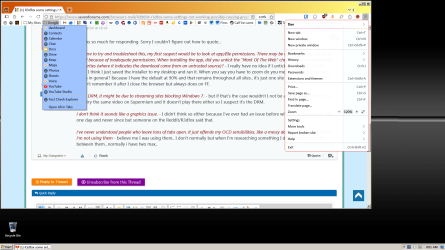
This screenshot shows how I've grouped all the Google sites in one folder on my Bookmarks Toolbar. I have, for instance, another folder with bookmarks for my household utility and banking/credit card sites, and once a month when I do the bills I'll "Open All in Tabs" and work through them all in one sitting. But the tabs are not in my face the rest of the month.

3.png

When you say you have to zoom do you mean the browser default zoom in general? Because I have the default at 90% and that remains throughout all sites.. it's just one site that I set to 110% but it doesn't remember it after I close the browser but always does on FF.

My default is 100%. I'm talking about the per-site zoom, which in the above screenshot is 120%. The browser remembers it for each site I change.

Maybe some of these tips give you some ideas, but I don't know what you can do about the DRM content issue.
 

My Computer

Computer type
PC/Desktop
Computer Manufacturer/Model Number
Dell Optiplex 7050
OS
Windows 7/8.1/10 multiboot
CPU
Intel Core i7-7700
Motherboard
Dell, Intel Q270 chipset
Memory
48GB (2x16GB Crucial DDR4-3200 + 2x8GB Hynix DDR4-2400)
Graphics Card(s)
Intel HD630 + AMD Radeon R7 450 PCIe
Monitor(s) Displays
Asus VC279 (27")
Screen Resolution
1920x1080
Hard Drives
Toshiba M.2 NVMe (256GB),
Samsung 960 Evo (500GB),
WD Red Plus 80EFBX (8TB)
So in order to watch those sites I have to use FF I guess..
I don't know why it doesn't save my zoomed page.. I clicked unblock from the already downloaded exe before running it but it did nothing to save the zoomed page.. I guess I'll try re-downloading the exe.
Thank you for your help.
 

My Computers

System One System Two

  • Computer type
    Laptop
    Computer Manufacturer/Model Number
    Lenovo Thinkpad
    OS
    W7 professional 64
    CPU
    i5 2.3GHz
    Memory
    8 gb
    Graphics Card(s)
    Intel HD 520
    Monitor(s) Displays
    15.6 HD LED AG
    Screen Resolution
    1366x768
    Hard Drives
    500GB SATA HDD
    Internet Speed
    100+
    Antivirus
    Malwarebytes Premium
    Browser
    Firefox
  • Computer type
    PC/Desktop
Back
Top