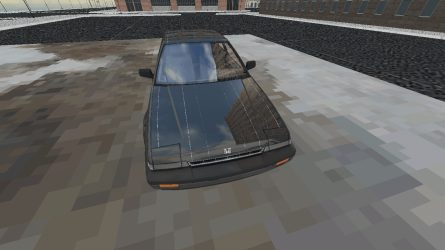
Random 3D Pixalation while playing ROBLOX, Rigs of Rods ETC

Chris7

New member
Local time
3:50 PM
Messages
17
Now, where do I start..?

So I downgraded from Windows 8 to Windows 7 back in October of 2013.
And I must say, ever since that downgrade, I had pixalation while playing my favorite games D:
Here is some examples.
 

Attachments

  • RobloxScreenShot08142014_065941226.png
    RobloxScreenShot08142014_065941226.png
    331 KB · Views: 2
  • screenshot_1.png
    screenshot_1.png
    250.3 KB · Views: 1
  • RobloxScreenShot08142014_065936048.png
    RobloxScreenShot08142014_065936048.png
    113.8 KB · Views: 1

My Computer My Computer

At a glance

Windows 7 Pro x642.40GHz4.00GB
Computer type
Laptop
Computer Manufacturer/Model Number
Dell
OS
Windows 7 Pro x64
CPU
2.40GHz
Memory
4.00GB
Antivirus
360 Total Security
Browser
Chrome
:/

Still no reply qq
 

My Computer My Computer

At a glance

Windows 7 Pro x642.40GHz4.00GB
Computer type
Laptop
Computer Manufacturer/Model Number
Dell
OS
Windows 7 Pro x64
CPU
2.40GHz
Memory
4.00GB
Antivirus
360 Total Security
Browser
Chrome
Have you tried running the games in Compatibility mode?
 

My Computer My Computer

At a glance

8 Pro x64i7 3770K 4.6GHz16GB G.Skill Trident X 2666mhzx2 EVGA 780 Ti Superclocked SLI
Computer type
PC/Desktop
Computer Manufacturer/Model Number
Systems by SmartEyeball
OS
8 Pro x64
CPU
i7 3770K 4.6GHz
Motherboard
ASUS P8Z77 WS
Memory
16GB G.Skill Trident X 2666mhz
Graphics Card(s)
x2 EVGA 780 Ti Superclocked SLI
Sound Card
SB X-FI Surround 5.1 PRO USB / ATH-AD900 Headphones
Monitor(s) Displays
x3 Dell U2410 / 58" Samsung
Screen Resolution
5760*1200/ 1920*1200
Hard Drives
2x Intel 520 240GB (RAID 0) * 2x WD Caviar Blacks 2TB (RAID 0) * 2TB WD Caviar Black * Sony Optirac DVD
PSU
Silverstone Strider Evolution 1200W
Case
Thermaltake Level 10 GT Snow Edition
Cooling
Noctua NH-D14
Keyboard
Topre Realforce // Ducky Shine MX Black // Filco Ninja TKL
Mouse
Thermaltake Theron (Highly Recommended) + Razer Imperator
Antivirus
MSE
Browser
IE, FF, WaterFox
Other Info
GT Extreme V2 Sim Racing Cockpit + 40" LCD and K/B Mouse stand ▼
Fanatec CSR Elite Wheel + Clubsport V1 Pedals + CSR shifter/7G-H ▼Saitek X52 Pro ▼ TrackIR 5 Pro
Buttkicker v2 Seat Rumbler with Dedicated 5.1 and Sub Woofer attached to frame ▼
=
Bloody Big Grin
Reply.

I haven't yet, but I'm going to try .
 

My Computer My Computer

At a glance

Windows 7 Pro x642.40GHz4.00GB
Computer type
Laptop
Computer Manufacturer/Model Number
Dell
OS
Windows 7 Pro x64
CPU
2.40GHz
Memory
4.00GB
Antivirus
360 Total Security
Browser
Chrome

My Computer My Computer

At a glance

Windows 7 Pro x642.40GHz4.00GB
Computer type
Laptop
Computer Manufacturer/Model Number
Dell
OS
Windows 7 Pro x64
CPU
2.40GHz
Memory
4.00GB
Antivirus
360 Total Security
Browser
Chrome
:/

Well, still now answer.
Oh, and I have a question.

So is the Problem I'm currently having non-existing? or the scale of other people having the SAME exact problem low?
 

My Computer My Computer

At a glance

Windows 7 Pro x642.40GHz4.00GB
Computer type
Laptop
Computer Manufacturer/Model Number
Dell
OS
Windows 7 Pro x64
CPU
2.40GHz
Memory
4.00GB
Antivirus
360 Total Security
Browser
Chrome
Just a thought but have you manually installed the latest DirectX 9.0c version?

The only reason i ask is because Windows 7 doesn't come with all the DX 9 components pre-installed as many are led to believe.

The only other thing i can think of is temps of your hardware. Have you monitored them while your system is under load?
 

My Computer My Computer

At a glance

Windows 10 Pro x64Intel i7 2600K @ 4.4GHz16GB Corsair Vengeance Pro DDR3 1600 MHzZOTAC GTX 1070 AMP Edition
Computer type
PC/Desktop
Computer Manufacturer/Model Number
Self Built
OS
Windows 10 Pro x64
CPU
Intel i7 2600K @ 4.4GHz
Motherboard
Asus P8Z77-V LX2
Memory
16GB Corsair Vengeance Pro DDR3 1600 MHz
Graphics Card(s)
ZOTAC GTX 1070 AMP Edition
Sound Card
Asus Xonar D2
Monitor(s) Displays
Viewsonic 24" VX2439WM LCD/LG 22" W2261VP LCD
Screen Resolution
1920x1080 DVI 1080p 16:9 on both screens
Hard Drives
1x SanDisk Extreme 120GB SSD SATA III (OS), 1x Samsung EVO 250GB SSD SATA III (Games), 1x Seagate Barracuda 1TB SATA III (Storage)
PSU
Corsair TX850W
Case
Corsair Carbide 200R
Cooling
3x 120mm Fans (Front, Bottom and Rear)
Keyboard
Roccat Isku
Mouse
Corsair M65 RGB
Internet Speed
Virgin Media 100Mb
Antivirus
Windows Defender
Browser
Firefox
Other Info
Logitech Z640 5.1 Speakers. Kingston HyperX Cloud Headset. M-Audio Oxygen 25/88 Keystation ES Midi Keyboard's
:/

I think DirectX 9.0c is installed when I installed City Car Driving.


I really don't monitor my hardware that much:o
To be Honest, I'm just 13.
 

My Computer My Computer

At a glance

Windows 7 Pro x642.40GHz4.00GB
Computer type
Laptop
Computer Manufacturer/Model Number
Dell
OS
Windows 7 Pro x64
CPU
2.40GHz
Memory
4.00GB
Antivirus
360 Total Security
Browser
Chrome
Hmm.

Just a thought but have you manually installed the latest DirectX 9.0c version?

The only reason i ask is because Windows 7 doesn't come with all the DX 9 components pre-installed as many are led to believe.

The only other thing i can think of is temps of your hardware. Have you monitored them while your system is under load?

Turns out I don't have DirectX 9.0c
 

My Computer My Computer

At a glance

Windows 7 Pro x642.40GHz4.00GB
Computer type
Laptop
Computer Manufacturer/Model Number
Dell
OS
Windows 7 Pro x64
CPU
2.40GHz
Memory
4.00GB
Antivirus
360 Total Security
Browser
Chrome
May be an idea just to check your temps then, say of your CPU/GPU if by installing DirextX 9 hasn't solved your issue.

It can be done easily with something like HWMonitor HWMonitor CPUID - System & hardware benchmark, monitoring, reporting

If you leave it running while you are playing a game you can then see what min/max temps you are getting once you drop out of the game.

Good luck
 

My Computer My Computer

At a glance

Windows 10 Pro x64Intel i7 2600K @ 4.4GHz16GB Corsair Vengeance Pro DDR3 1600 MHzZOTAC GTX 1070 AMP Edition
Computer type
PC/Desktop
Computer Manufacturer/Model Number
Self Built
OS
Windows 10 Pro x64
CPU
Intel i7 2600K @ 4.4GHz
Motherboard
Asus P8Z77-V LX2
Memory
16GB Corsair Vengeance Pro DDR3 1600 MHz
Graphics Card(s)
ZOTAC GTX 1070 AMP Edition
Sound Card
Asus Xonar D2
Monitor(s) Displays
Viewsonic 24" VX2439WM LCD/LG 22" W2261VP LCD
Screen Resolution
1920x1080 DVI 1080p 16:9 on both screens
Hard Drives
1x SanDisk Extreme 120GB SSD SATA III (OS), 1x Samsung EVO 250GB SSD SATA III (Games), 1x Seagate Barracuda 1TB SATA III (Storage)
PSU
Corsair TX850W
Case
Corsair Carbide 200R
Cooling
3x 120mm Fans (Front, Bottom and Rear)
Keyboard
Roccat Isku
Mouse
Corsair M65 RGB
Internet Speed
Virgin Media 100Mb
Antivirus
Windows Defender
Browser
Firefox
Other Info
Logitech Z640 5.1 Speakers. Kingston HyperX Cloud Headset. M-Audio Oxygen 25/88 Keystation ES Midi Keyboard's

My Computer My Computer

At a glance

Windows 7 Pro x642.40GHz4.00GB
Computer type
Laptop
Computer Manufacturer/Model Number
Dell
OS
Windows 7 Pro x64
CPU
2.40GHz
Memory
4.00GB
Antivirus
360 Total Security
Browser
Chrome
So...

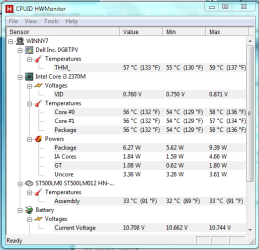
This is the Temp I get while playing ROBLOX lol.PNG


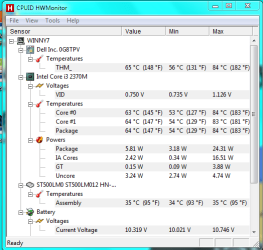
and this is what I get while playing rigs of rods.lol1.PNG
 

My Computer My Computer

At a glance

Windows 7 Pro x642.40GHz4.00GB
Computer type
Laptop
Computer Manufacturer/Model Number
Dell
OS
Windows 7 Pro x64
CPU
2.40GHz
Memory
4.00GB
Antivirus
360 Total Security
Browser
Chrome
A max of 84c is worrying for sure. The only other thing that isn't being detected by HWMonitor is your GPU which is the piece of hardware that i am more concerned about due it being graphical issues. That is probably down to it being a Laptop, right?

May be try some other software like Realtemp (Which is more for CPU monitoring but does show GPU temp also.
 

My Computer My Computer

At a glance

Windows 10 Pro x64Intel i7 2600K @ 4.4GHz16GB Corsair Vengeance Pro DDR3 1600 MHzZOTAC GTX 1070 AMP Edition
Computer type
PC/Desktop
Computer Manufacturer/Model Number
Self Built
OS
Windows 10 Pro x64
CPU
Intel i7 2600K @ 4.4GHz
Motherboard
Asus P8Z77-V LX2
Memory
16GB Corsair Vengeance Pro DDR3 1600 MHz
Graphics Card(s)
ZOTAC GTX 1070 AMP Edition
Sound Card
Asus Xonar D2
Monitor(s) Displays
Viewsonic 24" VX2439WM LCD/LG 22" W2261VP LCD
Screen Resolution
1920x1080 DVI 1080p 16:9 on both screens
Hard Drives
1x SanDisk Extreme 120GB SSD SATA III (OS), 1x Samsung EVO 250GB SSD SATA III (Games), 1x Seagate Barracuda 1TB SATA III (Storage)
PSU
Corsair TX850W
Case
Corsair Carbide 200R
Cooling
3x 120mm Fans (Front, Bottom and Rear)
Keyboard
Roccat Isku
Mouse
Corsair M65 RGB
Internet Speed
Virgin Media 100Mb
Antivirus
Windows Defender
Browser
Firefox
Other Info
Logitech Z640 5.1 Speakers. Kingston HyperX Cloud Headset. M-Audio Oxygen 25/88 Keystation ES Midi Keyboard's
Hmmm,

A max of 84c is worrying for sure. The only other thing that isn't being detected by HWMonitor is your GPU which is the piece of hardware that i am more concerned about due it being graphical issues. That is probably down to it being a Laptop, right?

May be try some other software like Realtemp (Which is more for CPU monitoring but does show GPU temp also.

I'm going to try Realtemp.
 

My Computer My Computer

At a glance

Windows 7 Pro x642.40GHz4.00GB
Computer type
Laptop
Computer Manufacturer/Model Number
Dell
OS
Windows 7 Pro x64
CPU
2.40GHz
Memory
4.00GB
Antivirus
360 Total Security
Browser
Chrome
Back
Top