Random BSODs, memory access violations and more

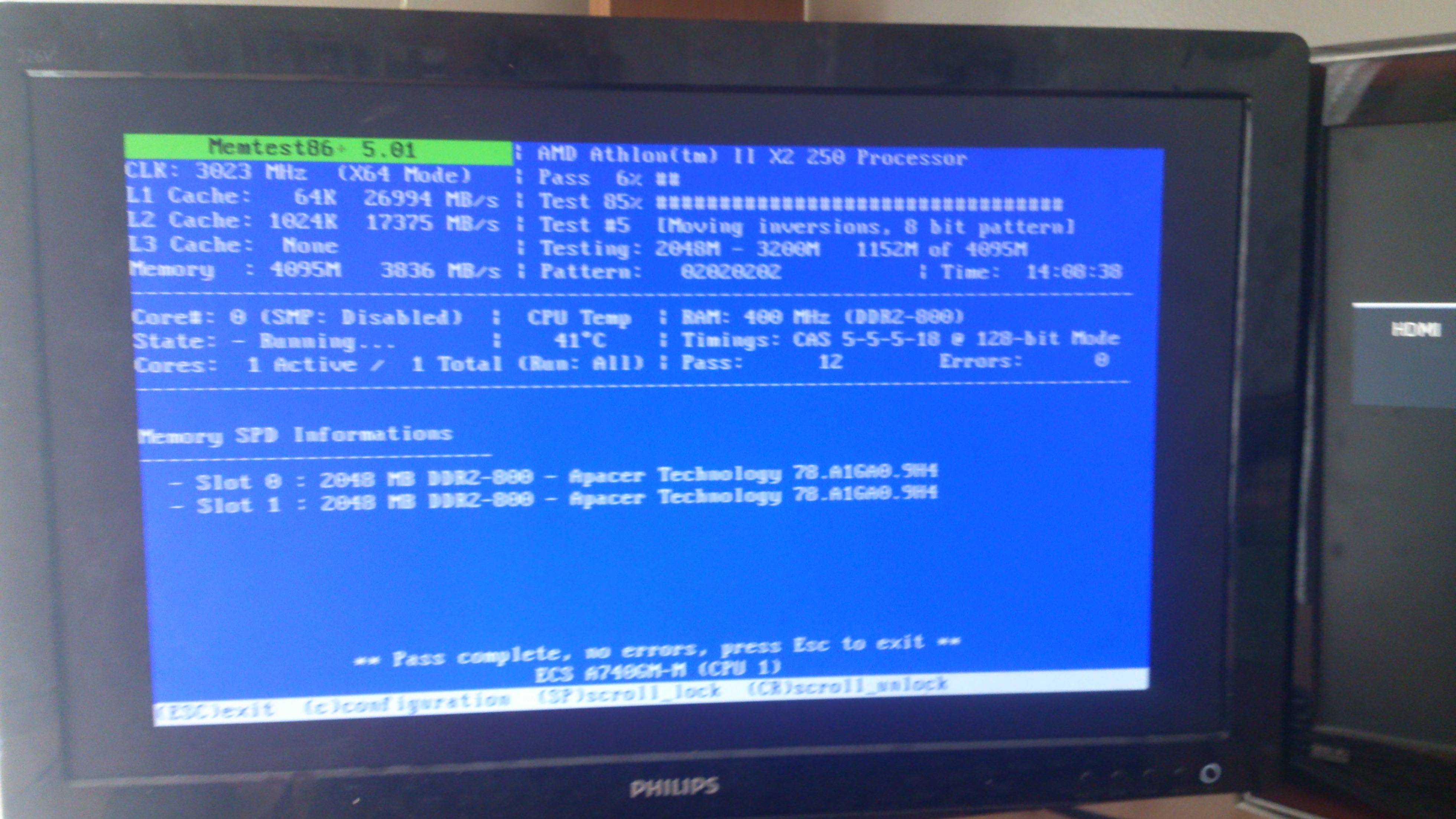
I did one about a month ago, about 1-2 weeks or so before I posted this thread I think. It came up with nothing after 8 passes.

I'm running it again soon if I can remember it, going to install it now and leave the usb stick on the desk to remind me.
 

My Computer My Computer

Computer type
PC/Desktop
Computer Manufacturer/Model Number
Ordi
OS
Windows 7 Home Premium SP1, 64 bit
CPU
Athlon 2 x2 250
Motherboard
ECS A740GM-M
Memory
4GB DDR2
Graphics Card(s)
nVida Geforce GT-440
Sound Card
onboard
Monitor(s) Displays
21'' Philips @ 1080p, 19,5''' Samsung @ 1440x900
Hard Drives
500GB SAMSUNG HD502HJ (SATA)
PSU
400w thermaltake
Cooling
Stock CPU fan, one fan on the back
Keyboard
A keyboard
Mouse
A mouse
Internet Speed
7 down 1 up
Antivirus
KIS 2014
Browser
Chrome
12 passes, 14 hours, no errors

..

BnVCllY.jpg


remembered to run it after a bsod yesterday night.

On Mon 12.05.2014 19:09:38 GMT your computer crashed
crash dump file: C:\Windows\Minidump\051214-17643-01.dmp
This was probably caused by the following module: win32k.sys (win32k+0x7CC17)
Bugcheck code: 0x3B (0xC0000005, 0xFFFFF9600010CC17, 0xFFFFF88008051FA0, 0x0)
Error: SYSTEM_SERVICE_EXCEPTION
file path: C:\Windows\system32\win32k.sys
product: Microsoft® Windows® Operating System
company: Microsoft Corporation
description: Multi-User Win32 Driver
 

My Computer My Computer

Computer type
PC/Desktop
Computer Manufacturer/Model Number
Ordi
OS
Windows 7 Home Premium SP1, 64 bit
CPU
Athlon 2 x2 250
Motherboard
ECS A740GM-M
Memory
4GB DDR2
Graphics Card(s)
nVida Geforce GT-440
Sound Card
onboard
Monitor(s) Displays
21'' Philips @ 1080p, 19,5''' Samsung @ 1440x900
Hard Drives
500GB SAMSUNG HD502HJ (SATA)
PSU
400w thermaltake
Cooling
Stock CPU fan, one fan on the back
Keyboard
A keyboard
Mouse
A mouse
Internet Speed
7 down 1 up
Antivirus
KIS 2014
Browser
Chrome
Code:
BugCheck 3B, {c0000005, fffff9600010cc17, fffff88008051fa0, 0}

Probably caused by : memory_corruption

Followup: memory_corruption
---------
Memtest is clean, but still it is saying a memory corruption. In such a situation, it is better to enable Driver Verifier to monitor the drivers.
Driver Verifier - Enable and Disable
Run Driver Verifier for 24 hours or the occurrence of the next crash, whichever is earlier.

   Information
Why Driver Verifier:
It puts a stress on the drivers, ans so it makes the unstable drivers crash. Hopefully the driver that crashes is recorded in the memory dump.

How Can we know that DV is enabled:
It will make the system bit of slow, laggy.

   Warning
Before enabling DV, make it sure that you have earlier System restore points made in your computer. You can check it easily by using CCleaner looking at Tools > System Restore.

If there is no points, make a System Restore Point manually before enabling DV.

   Tip


Let us know the results, with the subsequent crash dumps, if any.
 

My Computer My Computer

Computer type
PC/Desktop
Computer Manufacturer/Model Number
Self Assembled
OS
Microsoft Windows 10 Pro Insider Preview 64-bit
CPU
Intel(R) Core(TM) i3-4130 CPU @ 3.40GHz
Motherboard
Gigabyte Technology Co., Ltd. B85M-D3H
Memory
Corsair Vengence 4GB x2 (8.00GB Dual-Channel DDR3 @ 798MHz)
Graphics Card(s)
2047MB GeForce GTS 450 (ZOTAC International)
Sound Card
Onboard (Realtek High Definition Audio)
Monitor(s) Displays
LG Flatron E2040T
Screen Resolution
1600x900
Hard Drives
Western Digital 1 TB
Seagate 500 GB
PSU
Corsair VS550
Case
Cooler Master K380
Cooling
Cooler Master Seidon 120V Plus
Keyboard
Logitech MK260r
Mouse
Logitech MK260r
Internet Speed
PMPL Broadband
Antivirus
Windows Defender + MBAM
Browser
Firefox
Other Info
Dell Studio 15" Laptop
Instant BSODs after the restart, couldn't even reach the login form.

whocrashed.
Code:
This was probably caused by the following module: emvscard.sys (EMVSCARD+0x22D0) 
Bugcheck code: 0xC9 (0x226, 0xFFFFF88003DFB2D0, 0xFFFFF9800792CCF0, 0x0)
Error: DRIVER_VERIFIER_IOMANAGER_VIOLATION 
file path: C:\Windows\system32\drivers\emvscard.sys
product: USB Smart Card Reader
company: USB Smart Card Reader
description: USB Smart Card Reader


dump file linked.
 

My Computer My Computer

Computer type
PC/Desktop
Computer Manufacturer/Model Number
Ordi
OS
Windows 7 Home Premium SP1, 64 bit
CPU
Athlon 2 x2 250
Motherboard
ECS A740GM-M
Memory
4GB DDR2
Graphics Card(s)
nVida Geforce GT-440
Sound Card
onboard
Monitor(s) Displays
21'' Philips @ 1080p, 19,5''' Samsung @ 1440x900
Hard Drives
500GB SAMSUNG HD502HJ (SATA)
PSU
400w thermaltake
Cooling
Stock CPU fan, one fan on the back
Keyboard
A keyboard
Mouse
A mouse
Internet Speed
7 down 1 up
Antivirus
KIS 2014
Browser
Chrome
This time Whocrashed gave the right analysis. It is Alcor Micro, Corp. USB Smart Card Reader.
Code:
BugCheck C9, {226, fffff88003dfb2d0, fffff9800792ccf0, 0}

Unable to load image \SystemRoot\System32\Drivers\EMVSCARD.sys, Win32 error 0n2
*** WARNING: Unable to verify timestamp for EMVSCARD.sys
*** ERROR: Module load completed but symbols could not be loaded for EMVSCARD.sys
[COLOR=Red]Probably caused by : EMVSCARD.sys[/COLOR] ( EMVSCARD+22d0 )

Followup: MachineOwner
---------
And the driver is extremely old.
Code:
fffff880`03df9000 fffff880`03dfff80   EMVSCARD T (no symbols)           
    Loaded symbol image file: EMVSCARD.sys
    Image path: \SystemRoot\System32\Drivers\EMVSCARD.sys
[COLOR=Red]    Image name: EMVSCARD.sys
    Timestamp:        Wed Dec 13 13:12:07 2006[/COLOR] (457FAECF)
    CheckSum:         000080AD
    ImageSize:        00006F80
    Translations:     0000.04b0 0000.04e4 0409.04b0 0409.04e4
Better you stop using the card reader. Disable it in Device Manager and see if it does any change there.

Disable Driver Verifier now, and see how it goes.
 

My Computer My Computer

Computer type
PC/Desktop
Computer Manufacturer/Model Number
Self Assembled
OS
Microsoft Windows 10 Pro Insider Preview 64-bit
CPU
Intel(R) Core(TM) i3-4130 CPU @ 3.40GHz
Motherboard
Gigabyte Technology Co., Ltd. B85M-D3H
Memory
Corsair Vengence 4GB x2 (8.00GB Dual-Channel DDR3 @ 798MHz)
Graphics Card(s)
2047MB GeForce GTS 450 (ZOTAC International)
Sound Card
Onboard (Realtek High Definition Audio)
Monitor(s) Displays
LG Flatron E2040T
Screen Resolution
1600x900
Hard Drives
Western Digital 1 TB
Seagate 500 GB
PSU
Corsair VS550
Case
Cooler Master K380
Cooling
Cooler Master Seidon 120V Plus
Keyboard
Logitech MK260r
Mouse
Logitech MK260r
Internet Speed
PMPL Broadband
Antivirus
Windows Defender + MBAM
Browser
Firefox
Other Info
Dell Studio 15" Laptop
What card driver is that even? I dont have any external readers... I have one SD Card reader ("smart card reader") in one of my 3,5'' trays and that's all I have used.

Im going to look for updates for the driver and if none are available Im just removing it.
 

My Computer My Computer

Computer type
PC/Desktop
Computer Manufacturer/Model Number
Ordi
OS
Windows 7 Home Premium SP1, 64 bit
CPU
Athlon 2 x2 250
Motherboard
ECS A740GM-M
Memory
4GB DDR2
Graphics Card(s)
nVida Geforce GT-440
Sound Card
onboard
Monitor(s) Displays
21'' Philips @ 1080p, 19,5''' Samsung @ 1440x900
Hard Drives
500GB SAMSUNG HD502HJ (SATA)
PSU
400w thermaltake
Cooling
Stock CPU fan, one fan on the back
Keyboard
A keyboard
Mouse
A mouse
Internet Speed
7 down 1 up
Antivirus
KIS 2014
Browser
Chrome
Possibly there is no available driver update. I search for it, but I could not manage any. May be you will have a better luck. :)

And it is that Smart Card reader that you are mentioning.
 

My Computer My Computer

Computer type
PC/Desktop
Computer Manufacturer/Model Number
Self Assembled
OS
Microsoft Windows 10 Pro Insider Preview 64-bit
CPU
Intel(R) Core(TM) i3-4130 CPU @ 3.40GHz
Motherboard
Gigabyte Technology Co., Ltd. B85M-D3H
Memory
Corsair Vengence 4GB x2 (8.00GB Dual-Channel DDR3 @ 798MHz)
Graphics Card(s)
2047MB GeForce GTS 450 (ZOTAC International)
Sound Card
Onboard (Realtek High Definition Audio)
Monitor(s) Displays
LG Flatron E2040T
Screen Resolution
1600x900
Hard Drives
Western Digital 1 TB
Seagate 500 GB
PSU
Corsair VS550
Case
Cooler Master K380
Cooling
Cooler Master Seidon 120V Plus
Keyboard
Logitech MK260r
Mouse
Logitech MK260r
Internet Speed
PMPL Broadband
Antivirus
Windows Defender + MBAM
Browser
Firefox
Other Info
Dell Studio 15" Laptop
But wait, there's more!

Code:
On Sun 8.06.2014 19:38:53 GMT your computer crashed
crash dump file: C:\Windows\Minidump\060814-18517-01.dmp
This was probably caused by the following module: ntoskrnl.exe (nt+0x75BC0) 
Bugcheck code: 0x109 (0xA3A039D898F4E824, 0xB3B7465EEB71B77A, 0xFFFFF800030DB800, 0x1)
Error: CRITICAL_STRUCTURE_CORRUPTION
file path: C:\Windows\system32\ntoskrnl.exe
product: Microsoft® Windows® Operating System
company: Microsoft Corporation
description: NT Kernel & System

Code:
On Tue 24.06.2014 15:27:08 GMT your computer crashed
crash dump file: C:\Windows\Minidump\062414-18423-01.dmp
This was probably caused by the following module: nvlddmkm.sys (nvlddmkm+0x4331F) 
Bugcheck code: 0x50 (0xFFFFFFFF8B416047, 0x1, 0xFFFFF880053DCC17, 0x5)
Error: PAGE_FAULT_IN_NONPAGED_AREA
file path: C:\Windows\system32\drivers\nvlddmkm.sys
product: NVIDIA Windows Kernel Mode Driver, Version 314.22 
company: NVIDIA Corporation
description: NVIDIA Windows Kernel Mode Driver, Version 314.22

Code:
On Tue 24.06.2014 15:27:08 GMT your computer crashed
crash dump file: C:\Windows\memory.dmp
This was probably caused by the following module: dxgmms1.sys (dxgmms1+0x38C17) 
Bugcheck code: 0x50 (0xFFFFFFFF8B416047, 0x1, 0xFFFFF880053DCC17, 0x5)
Error: PAGE_FAULT_IN_NONPAGED_AREA
file path: C:\Windows\system32\drivers\dxgmms1.sys
product: Microsoft® Windows® Operating System
company: Microsoft Corporation
description: DirectX Graphics MMS
Bug check description: This indicates that invalid system memory has been referenced.
This appears to be a typical software driver bug and is not likely to be caused by a hardware problem. 
The crash took place in a standard Microsoft module. Your system configuration may be incorrect. Possibly this problem is caused by another driver on your system that cannot be identified at this time.

Code:
On Tue 24.06.2014 13:14:01 GMT your computer crashed
crash dump file: C:\Windows\Minidump\062414-20280-01.dmp
This was probably caused by the following module: win32k.sys (win32k+0x137C59) 
Bugcheck code: 0x3B (0xC0000005, 0xFFFFF96000147C59, 0xFFFFF8800B8410F0, 0x0)
Error: SYSTEM_SERVICE_EXCEPTION
file path: C:\Windows\system32\win32k.sys
product: Microsoft® Windows® Operating System
company: Microsoft Corporation
description: Multi-User Win32 Driver

these are just 3, occured at random. I have included 5 most recent BSODs in the ZIP file.

I just ignored them for a while.. but they have once again began to be more frequent and I'm doing much more creative work that can be lost every time a BSOD occurs.

Thank you! :)
 

My Computer My Computer

Computer type
PC/Desktop
Computer Manufacturer/Model Number
Ordi
OS
Windows 7 Home Premium SP1, 64 bit
CPU
Athlon 2 x2 250
Motherboard
ECS A740GM-M
Memory
4GB DDR2
Graphics Card(s)
nVida Geforce GT-440
Sound Card
onboard
Monitor(s) Displays
21'' Philips @ 1080p, 19,5''' Samsung @ 1440x900
Hard Drives
500GB SAMSUNG HD502HJ (SATA)
PSU
400w thermaltake
Cooling
Stock CPU fan, one fan on the back
Keyboard
A keyboard
Mouse
A mouse
Internet Speed
7 down 1 up
Antivirus
KIS 2014
Browser
Chrome
Code:
BugCheck 50, {ffffffff8b416047, 1, fffff880053dcc17, 5}


Could not read faulting driver name
*** WARNING: Unable to verify timestamp for win32k.sys
*** ERROR: Module load completed but symbols could not be loaded for win32k.sys
Probably caused by : memory_corruption

Followup: memory_corruption
---------
Code:
BugCheck 3B, {c0000005, fffff96000147c59, fffff8800b8410f0, 0}

Probably caused by : memory_corruption

Followup: memory_corruption
---------
Code:
BugCheck 1E, {ffffffffc0000005, 28f800000000, 8, 28f800000000}

Probably caused by : ntkrnlmp.exe ( nt! ?? ::FNODOBFM::`string'+487ed )

Followup: MachineOwner
---------
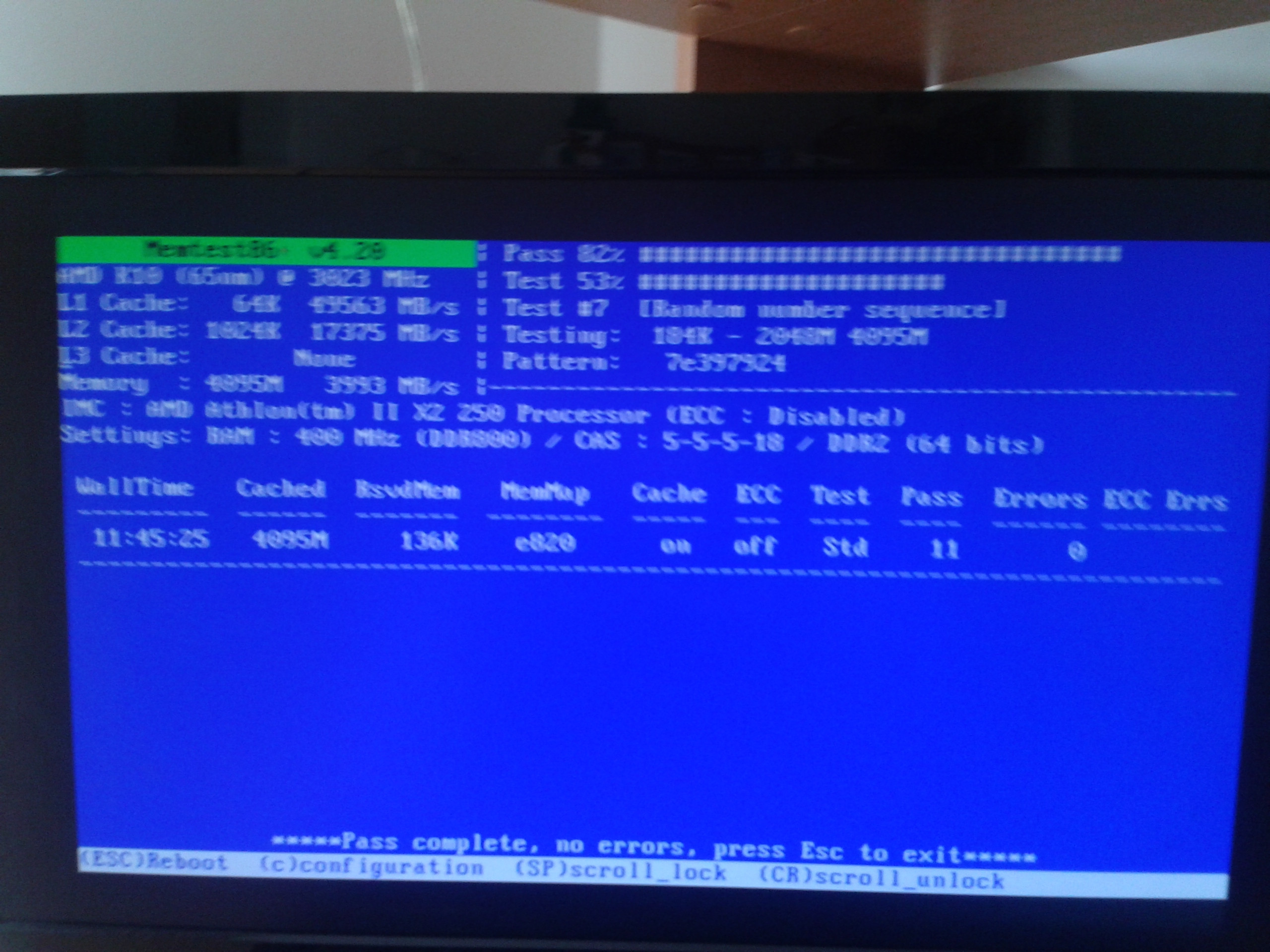
Actually .... can you run memtest86+ once again with an older version like 4.20? There is still a high possibility of memory failure.
 

My Computer My Computer

Computer type
PC/Desktop
Computer Manufacturer/Model Number
Self Assembled
OS
Microsoft Windows 10 Pro Insider Preview 64-bit
CPU
Intel(R) Core(TM) i3-4130 CPU @ 3.40GHz
Motherboard
Gigabyte Technology Co., Ltd. B85M-D3H
Memory
Corsair Vengence 4GB x2 (8.00GB Dual-Channel DDR3 @ 798MHz)
Graphics Card(s)
2047MB GeForce GTS 450 (ZOTAC International)
Sound Card
Onboard (Realtek High Definition Audio)
Monitor(s) Displays
LG Flatron E2040T
Screen Resolution
1600x900
Hard Drives
Western Digital 1 TB
Seagate 500 GB
PSU
Corsair VS550
Case
Cooler Master K380
Cooling
Cooler Master Seidon 120V Plus
Keyboard
Logitech MK260r
Mouse
Logitech MK260r
Internet Speed
PMPL Broadband
Antivirus
Windows Defender + MBAM
Browser
Firefox
Other Info
Dell Studio 15" Laptop
4.20, overnight. Nothing found.
uwH4aH2.png


i'm guessing more driver verifying is on the way? :P
 

My Computer My Computer

Computer type
PC/Desktop
Computer Manufacturer/Model Number
Ordi
OS
Windows 7 Home Premium SP1, 64 bit
CPU
Athlon 2 x2 250
Motherboard
ECS A740GM-M
Memory
4GB DDR2
Graphics Card(s)
nVida Geforce GT-440
Sound Card
onboard
Monitor(s) Displays
21'' Philips @ 1080p, 19,5''' Samsung @ 1440x900
Hard Drives
500GB SAMSUNG HD502HJ (SATA)
PSU
400w thermaltake
Cooling
Stock CPU fan, one fan on the back
Keyboard
A keyboard
Mouse
A mouse
Internet Speed
7 down 1 up
Antivirus
KIS 2014
Browser
Chrome
OK, let DV have another go. :) Best of luck.
 

My Computer My Computer

Computer type
PC/Desktop
Computer Manufacturer/Model Number
Self Assembled
OS
Microsoft Windows 10 Pro Insider Preview 64-bit
CPU
Intel(R) Core(TM) i3-4130 CPU @ 3.40GHz
Motherboard
Gigabyte Technology Co., Ltd. B85M-D3H
Memory
Corsair Vengence 4GB x2 (8.00GB Dual-Channel DDR3 @ 798MHz)
Graphics Card(s)
2047MB GeForce GTS 450 (ZOTAC International)
Sound Card
Onboard (Realtek High Definition Audio)
Monitor(s) Displays
LG Flatron E2040T
Screen Resolution
1600x900
Hard Drives
Western Digital 1 TB
Seagate 500 GB
PSU
Corsair VS550
Case
Cooler Master K380
Cooling
Cooler Master Seidon 120V Plus
Keyboard
Logitech MK260r
Mouse
Logitech MK260r
Internet Speed
PMPL Broadband
Antivirus
Windows Defender + MBAM
Browser
Firefox
Other Info
Dell Studio 15" Laptop
Verifier is running, and i booted right back into windows! So far good.

I also reinstalled all the motherboard drivers before enabling verifier. Maybe there was a corrupted driver, who knows.

Going to run it for the whole day today. We shall see how it goes.
 

My Computer My Computer

Computer type
PC/Desktop
Computer Manufacturer/Model Number
Ordi
OS
Windows 7 Home Premium SP1, 64 bit
CPU
Athlon 2 x2 250
Motherboard
ECS A740GM-M
Memory
4GB DDR2
Graphics Card(s)
nVida Geforce GT-440
Sound Card
onboard
Monitor(s) Displays
21'' Philips @ 1080p, 19,5''' Samsung @ 1440x900
Hard Drives
500GB SAMSUNG HD502HJ (SATA)
PSU
400w thermaltake
Cooling
Stock CPU fan, one fan on the back
Keyboard
A keyboard
Mouse
A mouse
Internet Speed
7 down 1 up
Antivirus
KIS 2014
Browser
Chrome
Back
Top