Random Pop Up Ad "Empowering Your Opinions"

ecko69x

New member
Member
Local time
3:43 PM
Messages
50
I keep getting a random ad pop up which brings me to a site called Empowering Your Opinions. I can't see anything on the page due to the Adblocker extention via FireFox, but I have scanned my computer with Norton 360 and Malwarebytes and they have not detected it.
 

My Computer My Computer

At a glance

Windows 8 64biti7 4770kKingston Beast Series 16GB 2400mhz CL11EVGA GTX 770 Classified ACX 4GB
Computer type
PC/Desktop
Computer Manufacturer/Model Number
Custom Build
OS
Windows 8 64bit
CPU
i7 4770k
Motherboard
Asus Maximus VI Formula
Memory
Kingston Beast Series 16GB 2400mhz CL11
Graphics Card(s)
EVGA GTX 770 Classified ACX 4GB
Sound Card
N/A
Monitor(s) Displays
ASUS VG248QE 24" LED
Screen Resolution
1920x1080
Hard Drives
Western Digital Caviar Black 2TB HDD
Samsung EVO 840 1TB SSD
PSU
Corsair AX760w
Case
Coolermaster CM Storm Stryker
Cooling
Be Quiet Dark Rock Pro 2 Silentwings
Download AdWareCleaner AdwCleaner Download to your desktop
1.Right-click on adwcleaner.exe and select Run As Administrator to launch the application.
2.Click on Delete button.
3.Confirm each time with OK.
4.Your computer will be rebooted automatically. A text file will open after the restart. Please post the content of that logfile in your reply.
Note: You can find the logfile at C:\AdwCleaner[Sn].txt as well - n is the order number.
AdwareCleaner.jpg
 

My Computer My Computer

At a glance

Windows 7 Ultimate 32bit SP1Intel(R) Core(TM)2 Quad CPU @ 2.40GHz, 2400 MHz4 GBATI Radeon HD 2600 Pro
Computer type
PC/Desktop
Computer Manufacturer/Model Number
Bruce ... somewhere in his 40's
OS
Windows 7 Ultimate 32bit SP1
CPU
Intel(R) Core(TM)2 Quad CPU @ 2.40GHz, 2400 MHz
Motherboard
INTEL/D975XBX2
Memory
4 GB
Graphics Card(s)
ATI Radeon HD 2600 Pro
Monitor(s) Displays
Samsung SyncMaster 914v
Screen Resolution
1280 x 1024
Hard Drives
2/500GB each ... ST3500630AS ATA Device.
One is not connected
PSU
Rocketfish 700 W
Case
G.Skill Gigabyte Chassis
Keyboard
Standard PS/2 Keyboard
Mouse
Microsoft PS/2 Mouse
Internet Speed
DSL
Antivirus
Avira Internet Security
Browser
IE 11
Other Info
ATI HDMI Audio
# AdwCleaner v2.303 - Logfile created 06/09/2013 at 20:55:08
# Updated 08/06/2013 by Xplode
# Operating system : Windows 7 Home Premium Service Pack 1 (64 bits)
# User : Ecko - ECKO-PC
# Boot Mode : Normal
# Running from : C:\Users\Ecko\Downloads\AdwCleaner.exe
# Option [Search]


***** [Services] *****


***** [Files / Folders] *****


***** [Registry] *****


***** [Internet Browsers] *****

-\\ Internet Explorer v10.0.9200.16576

[OK] Registry is clean.

-\\ Mozilla Firefox v21.0 (en-US)

File : C:\Users\Ecko\AppData\Roaming\Mozilla\Firefox\Profiles\5b40a668.default\prefs.js

[OK] File is clean.

*************************

AdwCleaner[R1].txt - [793 octets] - [09/06/2013 20:51:35]
AdwCleaner[R2].txt - [725 octets] - [09/06/2013 20:55:08]

########## EOF - C:\AdwCleaner[R2].txt - [784 octets] ##########
 

My Computer My Computer

At a glance

Windows 8 64biti7 4770kKingston Beast Series 16GB 2400mhz CL11EVGA GTX 770 Classified ACX 4GB
Computer type
PC/Desktop
Computer Manufacturer/Model Number
Custom Build
OS
Windows 8 64bit
CPU
i7 4770k
Motherboard
Asus Maximus VI Formula
Memory
Kingston Beast Series 16GB 2400mhz CL11
Graphics Card(s)
EVGA GTX 770 Classified ACX 4GB
Sound Card
N/A
Monitor(s) Displays
ASUS VG248QE 24" LED
Screen Resolution
1920x1080
Hard Drives
Western Digital Caviar Black 2TB HDD
Samsung EVO 840 1TB SSD
PSU
Corsair AX760w
Case
Coolermaster CM Storm Stryker
Cooling
Be Quiet Dark Rock Pro 2 Silentwings
Please download TFC by Old Timer TFC - Temp File Cleaner by OldTimer - Geeks to Go Forums and save it to your desktop.
Save any unsaved work. TFC will close ALL open programs including your browser!
Double-click on TFC.exe to run it. If you are using Vista/Windows 7 right-click on the file and choose Run As Administrator.
Click the Start button to begin the cleaning process and let it run uninterrupted to completion.
Important! If TFC prompts you to reboot, please do so immediately. If not prompted, manually reboot the machine anyway to ensure a complete clean.

After rebooting, flush the DNS cache and restore MS's Hosts file.
Copy and paste these lines in Note pad.

@Echo on
pushd\windows\system32\drivers\etc
attrib -h -s -r hosts
echo 127.0.0.1 localhost>HOSTS
attrib +r +h +s hosts
popd
ipconfig /release
ipconfig /renew
ipconfig /flushdns
netsh winsock reset all
netsh int ip reset all
shutdown -r -t 1
del %0


Save as flush.bat to your desktop.
Double click on the flush.bat file to run it.Vista and Windows 7... right click the .bat file and choose to run as Administrator. Your computer will reboot itself.

Tell me if you're still getting the pop-up redirection.
 

My Computer My Computer

At a glance

Windows 7 Ultimate 32bit SP1Intel(R) Core(TM)2 Quad CPU @ 2.40GHz, 2400 MHz4 GBATI Radeon HD 2600 Pro
Computer type
PC/Desktop
Computer Manufacturer/Model Number
Bruce ... somewhere in his 40's
OS
Windows 7 Ultimate 32bit SP1
CPU
Intel(R) Core(TM)2 Quad CPU @ 2.40GHz, 2400 MHz
Motherboard
INTEL/D975XBX2
Memory
4 GB
Graphics Card(s)
ATI Radeon HD 2600 Pro
Monitor(s) Displays
Samsung SyncMaster 914v
Screen Resolution
1280 x 1024
Hard Drives
2/500GB each ... ST3500630AS ATA Device.
One is not connected
PSU
Rocketfish 700 W
Case
G.Skill Gigabyte Chassis
Keyboard
Standard PS/2 Keyboard
Mouse
Microsoft PS/2 Mouse
Internet Speed
DSL
Antivirus
Avira Internet Security
Browser
IE 11
Other Info
ATI HDMI Audio
Haven't seen it pop up again, so I think it worked. Thank you.
 

My Computer My Computer

At a glance

Windows 8 64biti7 4770kKingston Beast Series 16GB 2400mhz CL11EVGA GTX 770 Classified ACX 4GB
Computer type
PC/Desktop
Computer Manufacturer/Model Number
Custom Build
OS
Windows 8 64bit
CPU
i7 4770k
Motherboard
Asus Maximus VI Formula
Memory
Kingston Beast Series 16GB 2400mhz CL11
Graphics Card(s)
EVGA GTX 770 Classified ACX 4GB
Sound Card
N/A
Monitor(s) Displays
ASUS VG248QE 24" LED
Screen Resolution
1920x1080
Hard Drives
Western Digital Caviar Black 2TB HDD
Samsung EVO 840 1TB SSD
PSU
Corsair AX760w
Case
Coolermaster CM Storm Stryker
Cooling
Be Quiet Dark Rock Pro 2 Silentwings
Hope that was all it was and you're welcome :)
 

My Computer My Computer

At a glance

Windows 7 Ultimate 32bit SP1Intel(R) Core(TM)2 Quad CPU @ 2.40GHz, 2400 MHz4 GBATI Radeon HD 2600 Pro
Computer type
PC/Desktop
Computer Manufacturer/Model Number
Bruce ... somewhere in his 40's
OS
Windows 7 Ultimate 32bit SP1
CPU
Intel(R) Core(TM)2 Quad CPU @ 2.40GHz, 2400 MHz
Motherboard
INTEL/D975XBX2
Memory
4 GB
Graphics Card(s)
ATI Radeon HD 2600 Pro
Monitor(s) Displays
Samsung SyncMaster 914v
Screen Resolution
1280 x 1024
Hard Drives
2/500GB each ... ST3500630AS ATA Device.
One is not connected
PSU
Rocketfish 700 W
Case
G.Skill Gigabyte Chassis
Keyboard
Standard PS/2 Keyboard
Mouse
Microsoft PS/2 Mouse
Internet Speed
DSL
Antivirus
Avira Internet Security
Browser
IE 11
Other Info
ATI HDMI Audio
It's popping back up again. :|
 

My Computer My Computer

At a glance

Windows 8 64biti7 4770kKingston Beast Series 16GB 2400mhz CL11EVGA GTX 770 Classified ACX 4GB
Computer type
PC/Desktop
Computer Manufacturer/Model Number
Custom Build
OS
Windows 8 64bit
CPU
i7 4770k
Motherboard
Asus Maximus VI Formula
Memory
Kingston Beast Series 16GB 2400mhz CL11
Graphics Card(s)
EVGA GTX 770 Classified ACX 4GB
Sound Card
N/A
Monitor(s) Displays
ASUS VG248QE 24" LED
Screen Resolution
1920x1080
Hard Drives
Western Digital Caviar Black 2TB HDD
Samsung EVO 840 1TB SSD
PSU
Corsair AX760w
Case
Coolermaster CM Storm Stryker
Cooling
Be Quiet Dark Rock Pro 2 Silentwings
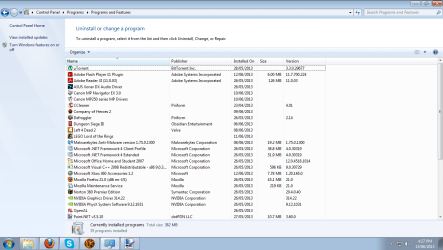
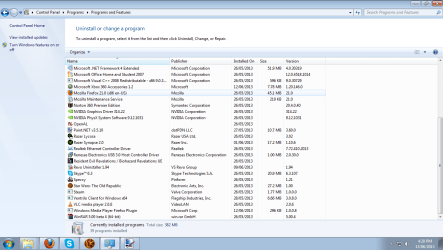
Can you show a prnt screen of your Programs and Features window ?

Click on :orb: click on Control Panel choose Uninstall a program under Programs .

Another options :

Click on :orb: type programs and features inside
2nqbqes.png
and press [ENTER] .

Upload a File
Click on the Go Advanced button under the Message box . Scroll down to Additional Options then click on Manage Attachments in the Attach Files sections . Click the Browse button locate the file then click on the Open button . In the Upload File from your Computer section click on the Upload button . Wait until it finishes uploading then close the window . Then click Submit Reply .
 

My Computer My Computer

At a glance

Windows 7 Ultimate 32-Bit & Windows 7 Ultimat...Intel Core i7 CPU 950 @ 3.07GHzOCZ 6GB (3 x 2GB) 240-Pin DDR3 SDRAM DDR3 160...ATI Radeon HD 5700 Series
Computer Manufacturer/Model Number
Custom Built
OS
Windows 7 Ultimate 32-Bit & Windows 7 Ultimate 64-Bit
CPU
Intel Core i7 CPU 950 @ 3.07GHz
Motherboard
ASUS P6T DELUXE V2
Memory
OCZ 6GB (3 x 2GB) 240-Pin DDR3 SDRAM DDR3 1600 OCZ3X1600R2
Graphics Card(s)
ATI Radeon HD 5700 Series
Sound Card
OnBoard
Hard Drives
WD6400AACS-00M3B0 (640GB SATA )
PSU
CORSAIR 850w
Case
NZXT LEXA
Cooling
Intel Stock Heatsink Fan
Keyboard
Microsoft Wireless Laser Keyboard 7000
Mouse
Microsoft Wireless Laser Mouse 7000
Attached.
 

Attachments

  • PF.png
    PF.png
    58.7 KB · Views: 6
  • PF2.png
    PF2.png
    63.2 KB · Views: 6

My Computer My Computer

At a glance

Windows 8 64biti7 4770kKingston Beast Series 16GB 2400mhz CL11EVGA GTX 770 Classified ACX 4GB
Computer type
PC/Desktop
Computer Manufacturer/Model Number
Custom Build
OS
Windows 8 64bit
CPU
i7 4770k
Motherboard
Asus Maximus VI Formula
Memory
Kingston Beast Series 16GB 2400mhz CL11
Graphics Card(s)
EVGA GTX 770 Classified ACX 4GB
Sound Card
N/A
Monitor(s) Displays
ASUS VG248QE 24" LED
Screen Resolution
1920x1080
Hard Drives
Western Digital Caviar Black 2TB HDD
Samsung EVO 840 1TB SSD
PSU
Corsair AX760w
Case
Coolermaster CM Storm Stryker
Cooling
Be Quiet Dark Rock Pro 2 Silentwings
When does it pop up when you open up Firefox ? Did you take a look inside the Add-ons for Firefox ?
 

My Computer My Computer

At a glance

Windows 7 Ultimate 32-Bit & Windows 7 Ultimat...Intel Core i7 CPU 950 @ 3.07GHzOCZ 6GB (3 x 2GB) 240-Pin DDR3 SDRAM DDR3 160...ATI Radeon HD 5700 Series
Computer Manufacturer/Model Number
Custom Built
OS
Windows 7 Ultimate 32-Bit & Windows 7 Ultimate 64-Bit
CPU
Intel Core i7 CPU 950 @ 3.07GHz
Motherboard
ASUS P6T DELUXE V2
Memory
OCZ 6GB (3 x 2GB) 240-Pin DDR3 SDRAM DDR3 1600 OCZ3X1600R2
Graphics Card(s)
ATI Radeon HD 5700 Series
Sound Card
OnBoard
Hard Drives
WD6400AACS-00M3B0 (640GB SATA )
PSU
CORSAIR 850w
Case
NZXT LEXA
Cooling
Intel Stock Heatsink Fan
Keyboard
Microsoft Wireless Laser Keyboard 7000
Mouse
Microsoft Wireless Laser Mouse 7000
3133y8w.png


1. Open Internet Explorer.
2. Go to Tools > Options.
3. On General tab, proceed to ”Change search defaults” and click the “Settings” button.
4. You will see a list of search providers. Select your desired search provider and click the button “Set as default” to replace Web Assistant.
5. You may now remove Remove anything with Empowering from the list.

5b5jza.png


1. Open Mozilla Firefox .
2. On Google’s Search box, click the “arrow down” beside the logo.
3. Select “Manage Search Engine” from the drop-down list.
4. Choose your desired search default (like Google) and click the button “Move up.” It should be on the top of the list to set it as default.
5. You can now remove other installed search engine.

4l6ro8.png


1. Open Google Chrome.
2. Click on the Wrench icon on top right corner of the browser.
3. Choose “Settings” from the drop down list.
4. Click on “Manage search engines” under SEARCH settings area.
5. Hover your mouse to a preferred search engine and click “Make default.”
6. Remove anything with Empowering from this list by clicking on the X mark.


Disable any Toolbar in
3133y8w.png

1. Open Internet Explorer.
2. On top menu, click on Tools > Manage Add-ons.
3. Select ‘Toolbars and Extensions’ on left window. Remove anything with Empowering from this list name on right window.
4. Click on ‘Disable’.

Disable any Toolbar in
5b5jza.png

1. Open Mozilla Firefox.
2. Press Ctrl+Shift+A on your keyboard.
3. You will see a list of Extensions. Remove anything with Empowering from this list.

Disable any Toolbar in
4l6ro8.png

1. Open Google Chrome.
2. Click on the Wrench icon on top right corner of the browser.
3. Select ‘Settings’ from the drop-down list.
4. On left sidebar, click on Extensions.
5. Select the program you want to remove.
 

My Computer My Computer

At a glance

Windows 7 Ultimate 32-Bit & Windows 7 Ultimat...Intel Core i7 CPU 950 @ 3.07GHzOCZ 6GB (3 x 2GB) 240-Pin DDR3 SDRAM DDR3 160...ATI Radeon HD 5700 Series
Computer Manufacturer/Model Number
Custom Built
OS
Windows 7 Ultimate 32-Bit & Windows 7 Ultimate 64-Bit
CPU
Intel Core i7 CPU 950 @ 3.07GHz
Motherboard
ASUS P6T DELUXE V2
Memory
OCZ 6GB (3 x 2GB) 240-Pin DDR3 SDRAM DDR3 1600 OCZ3X1600R2
Graphics Card(s)
ATI Radeon HD 5700 Series
Sound Card
OnBoard
Hard Drives
WD6400AACS-00M3B0 (640GB SATA )
PSU
CORSAIR 850w
Case
NZXT LEXA
Cooling
Intel Stock Heatsink Fan
Keyboard
Microsoft Wireless Laser Keyboard 7000
Mouse
Microsoft Wireless Laser Mouse 7000
I only get it when Firefox is up. The ad opens a new tab and redirects me to the site. The only thing I have for add on/extentions are Adblock Plus, My Wot, Adobe Flash Player, Shockwave Player.
 

My Computer My Computer

At a glance

Windows 8 64biti7 4770kKingston Beast Series 16GB 2400mhz CL11EVGA GTX 770 Classified ACX 4GB
Computer type
PC/Desktop
Computer Manufacturer/Model Number
Custom Build
OS
Windows 8 64bit
CPU
i7 4770k
Motherboard
Asus Maximus VI Formula
Memory
Kingston Beast Series 16GB 2400mhz CL11
Graphics Card(s)
EVGA GTX 770 Classified ACX 4GB
Sound Card
N/A
Monitor(s) Displays
ASUS VG248QE 24" LED
Screen Resolution
1920x1080
Hard Drives
Western Digital Caviar Black 2TB HDD
Samsung EVO 840 1TB SSD
PSU
Corsair AX760w
Case
Coolermaster CM Storm Stryker
Cooling
Be Quiet Dark Rock Pro 2 Silentwings
Ok . Lets see something . Right click on Firefox on the desktop and choose Properties inside the General tap in the Target section what does it say ?
 

My Computer My Computer

At a glance

Windows 7 Ultimate 32-Bit & Windows 7 Ultimat...Intel Core i7 CPU 950 @ 3.07GHzOCZ 6GB (3 x 2GB) 240-Pin DDR3 SDRAM DDR3 160...ATI Radeon HD 5700 Series
Computer Manufacturer/Model Number
Custom Built
OS
Windows 7 Ultimate 32-Bit & Windows 7 Ultimate 64-Bit
CPU
Intel Core i7 CPU 950 @ 3.07GHz
Motherboard
ASUS P6T DELUXE V2
Memory
OCZ 6GB (3 x 2GB) 240-Pin DDR3 SDRAM DDR3 1600 OCZ3X1600R2
Graphics Card(s)
ATI Radeon HD 5700 Series
Sound Card
OnBoard
Hard Drives
WD6400AACS-00M3B0 (640GB SATA )
PSU
CORSAIR 850w
Case
NZXT LEXA
Cooling
Intel Stock Heatsink Fan
Keyboard
Microsoft Wireless Laser Keyboard 7000
Mouse
Microsoft Wireless Laser Mouse 7000
Ok . Lets see something . Right click on Firefox on the desktop and choose Properties inside the General tap in the Target section what does it say ?

"C:\Program Files (x86)\Mozilla Firefox\firefox.exe"
 

My Computer My Computer

At a glance

Windows 8 64biti7 4770kKingston Beast Series 16GB 2400mhz CL11EVGA GTX 770 Classified ACX 4GB
Computer type
PC/Desktop
Computer Manufacturer/Model Number
Custom Build
OS
Windows 8 64bit
CPU
i7 4770k
Motherboard
Asus Maximus VI Formula
Memory
Kingston Beast Series 16GB 2400mhz CL11
Graphics Card(s)
EVGA GTX 770 Classified ACX 4GB
Sound Card
N/A
Monitor(s) Displays
ASUS VG248QE 24" LED
Screen Resolution
1920x1080
Hard Drives
Western Digital Caviar Black 2TB HDD
Samsung EVO 840 1TB SSD
PSU
Corsair AX760w
Case
Coolermaster CM Storm Stryker
Cooling
Be Quiet Dark Rock Pro 2 Silentwings
Ok that's good . Thought it will have a website or another path after it .

Run DDS

Click here DDS

:ar: Click on Download Now button

:ar: When the download is complete . Drag the DDS program from the Downloads folder to your Desktop

:ar: Double click the DDS icon on the Desktop then click the Run button to run the tool.

:ar: Place a check next to attact.txt and click Start . When done, DDS will open two logs
DDS.txt
Attach.txt

:ar: Save two logs onto your desktop and upload them with your reply
 

My Computer My Computer

At a glance

Windows 7 Ultimate 32-Bit & Windows 7 Ultimat...Intel Core i7 CPU 950 @ 3.07GHzOCZ 6GB (3 x 2GB) 240-Pin DDR3 SDRAM DDR3 160...ATI Radeon HD 5700 Series
Computer Manufacturer/Model Number
Custom Built
OS
Windows 7 Ultimate 32-Bit & Windows 7 Ultimate 64-Bit
CPU
Intel Core i7 CPU 950 @ 3.07GHz
Motherboard
ASUS P6T DELUXE V2
Memory
OCZ 6GB (3 x 2GB) 240-Pin DDR3 SDRAM DDR3 1600 OCZ3X1600R2
Graphics Card(s)
ATI Radeon HD 5700 Series
Sound Card
OnBoard
Hard Drives
WD6400AACS-00M3B0 (640GB SATA )
PSU
CORSAIR 850w
Case
NZXT LEXA
Cooling
Intel Stock Heatsink Fan
Keyboard
Microsoft Wireless Laser Keyboard 7000
Mouse
Microsoft Wireless Laser Mouse 7000
Back
Top