re; a search engine problem in chrome

reble

New member
Member
VIP
Local time
6:53 AM
Messages
326
Location
Kennewick, Wa
I have the default search engine set to Google in Chrome version 55.0.2883.87. Even with Google set to the default search engine. When I click on a link in a web page. Chrome is randomly picking which search engine it want's to use. How do I stop that?


Steve
 

My Computer

Computer type
Laptop
Computer Manufacturer/Model Number
Dell Inspiron 3541
OS
windows 7 home 32 bit, I just changed back from 64 to 32bit
CPU
amc a6-6310, radon r4 graphics 1800mhz with 4 cores
Memory
6.8gb
Graphics Card(s)
not sure off hand
Sound Card
not shure off hand
Monitor(s) Displays
built in lcd
Screen Resolution
1366 x 768
Hard Drives
1 500gb sata internal HDD and 1 250 gb's sata HDD in a USB external USB case.
Keyboard
Wifi with attached wifi mouse
Internet Speed
don't know
Antivirus
Zone Alarm
Browser
Firefox
Other Info
The gateway laptop model MD2614U died because a voltage regulator on the motherboard went poof. The Gateway laptop has been scraped.
Hi:

Until someone who uses Chrome comes along, perhaps these articles have some information that might help:

Make Google my default search engine - Search Help
Set your default search engine - Computer - Chrome Help
Make Google your default search provider – Google
5 Easy Ways to Make Google Your Default Search Engine

If you've already done that, but the selection does not "stick", then perhaps you might need to reset Chome to default and start again with the default search engine selection?

Reset Chrome settings to default - Chrome Help
How to Reset Your Web Browser To Its Default Settings

Please let us know how it goes, so that we can all learn.

Cheers,
MM
 
Last edited:

My Computer

Computer type
PC/Desktop
Computer Manufacturer/Model Number
Dell Studio XPS 8500
OS
OEM Windows 7 Ult (x64) SP1
CPU
Intel Core-i7 3770 @ 3.4 GHz
Motherboard
"Dell" branded
Memory
16 GB DDR3 SDRAM @ 1333 MHz
Graphics Card(s)
NVidia GeForce GT620 1 GB
Sound Card
THX TruStudio PC
Monitor(s) Displays
Dell U2410 Full HD
Hard Drives
2.0 TB SATA2 @ 7200 RPM
PSU
350W
Keyboard
MS 4000 Ergon - Wired
Mouse
Logitech Anywhere MX
Internet Speed
Cable HSI w/Turbo (router)
Antivirus
KIS-MBAM Premium-MBAE Premium
Browser
Fx (current version); IE
Other Info
And a Win7/64 Pro laptop; And a Win10/64 Pro desktop.
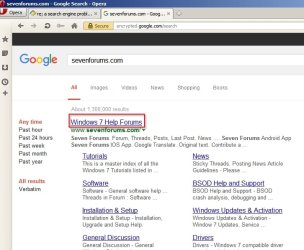
What happens if you highlight some text and right click? What is the search engine that shows up?

Google Search - Iron.jpg

If you type:

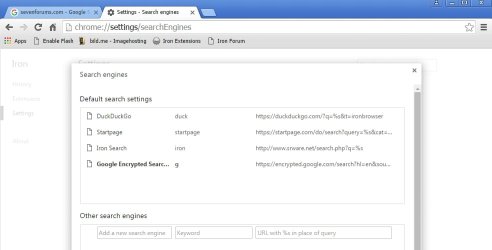
chrome://settings/searchEngines

into the address bar you should be able to manage search engines.

Settings - Search engines - Iron.jpg

What happens when you click a link? It should open the link for the site that you clicked on.

Google Search 2.jpg

You could try a reset:


My Computer

Computer type
Laptop
Computer Manufacturer/Model Number
ASUS
OS
Microsoft Windows 7 Home Premium 64-bit 7601 Multiprocessor Free Service Pack 1
CPU
AMD C-60 APU with Radeon(tm) HD Graphics
Motherboard
ASUSTeK COMPUTER INC. X501U
Memory
4.00 GB
Graphics Card(s)
AMD Radeon HD 6290 Graphics
Sound Card
(1) AMD High Definition Audio Device (2) Realtek High Defi
Screen Resolution
1366 x 768 x 32 bits (4294967296 colors) @ 60 Hz
Hard Drives
Hitachi HTS545050A7E380 SATA Disk Device
Antivirus
Comodo CIS & FW, SecureAplus App Whitelisting, Threatfire
Browser
Cyberfox 64bit, Opera 64bit, Airfox
Other Info
Spy-The-Spy, HitmanPro.Alert, Norton Connect Safe, MJRegWatcher, BitDefender TrafficLight, Voodoo Shield, Zemana AntiMalware
Back
Top