Really Messed up HDD, Data Needs Saving

Toydotgam

Person (I think)
Local time
7:41 AM
Messages
33
Location
Gold Coast
(I don't know what forum to put this in exactly. Mods, feel free to move it! :D)


I don't use Windows 7 anymore, and my last install of it had over 11 years of data which - unsurprisingly - I really need back. I wanted to throw attempt #2 at trying out Linux, but I had no spare drive to put in my laptop instead of my current HDD (WD Scorpio Blue (480GiBs or so)). I used gparted to half the size of my Windows partition, and I could use the other half of it to put GRUB and Arch Linux on it.
That install failed, so I went back to Windows. It wouldn't boot.


I used my install DVD to get access to a cmd window to try and see what was going on. Lo and behold, my former NTFS partition of 455GB was at half it's size - just like I had changed it. But, the filesystem said RAW. Stupidly, I created a new C: starting and ending on the same blocks as my original 455GB NTFS partition.
None of this worked, and so I forcefully went over to Ubuntu temporarily on a backup drive. I lost a bunch of my backups from the last two years, but that was better than losing my non-backed-up 11 years' worth of files.


My 11 year HDD was nicely organised, and due to how HDDs work, I think I'm okay. All I've done is really severely messed up my filesystem table and possibly a bit of C:\Windows. The Windows 7 install was like 20GBs, so I could have done a serious amount of additional damage and C:\Users would still be fine. (This drive was recently defragged, I might add)


I really want to recover C:\Users\Matthew (I think my username was Matthew, at least). I have the same laptop but with a WB Blue 1TB SSD and Arch Linux. Don't worry about finding Linux-compatible methods of fixing this; I still have a home server PC with Windows 7. I can run software on that.


This is a mess of a post, but having this drive sitting here and having so much valuable data sitting so precariously on the brink of oblivion is driving me insane. :p
Any help I can get will be greatly appreciated! Thanks!
 

My Computer

Computer type
Laptop
Computer Manufacturer/Model Number
Dell Inspiron 1545
OS
Arch Linux (5.11.6-arch1-1) x86_64
CPU
Intel Pentium T9900 (3.06GHz)
Memory
8GB (2x 4GB) DDR2 (800MHz) SO-DIMM
Graphics Card(s)
Mobile Intel(R) 4 Series Express Chipset
Monitor(s) Displays
Acer K242HQL
Screen Resolution
1920x1080
Hard Drives
1TB WD Blue SSD G5 BICS4 (415000WD)
Keyboard
HP Business Slim Keyboard
Mouse
Fnova M88 Gaming Mouse
Internet Speed
10Mbps Download / 5Mbps Upload
Browser
Mozilla Firefox
Other Info
Pending eGPU upgrade.
Is that "RAW" partition have ext4 or ext3 as the file system now?

You may not be able to find out if it is but if that partition is a Linux formatted partition then try using this application called DiskInternals Linux Reader.

Here is the download link: Access to Ext 2/3/4, HFS and ReiserFS from Windows| DiskInternals

Let me know if you eventually get that installed on your other Windows 7 machine.

You can try this if you can plug your drive with the "RAW" partition into your other Windows 7 machine.

I've been there before, almost losing a bunch of really important data, so I do know what it is like to be in a situation like yours.

Hope you get your files back soon!

Have a nice day!
 

My Computer

OS
N/A
After the Arch installer failed and I went back to Windows' DVD installer so I could have access to cmd; I saw that RAW partition and instead created a NTFS partition in its place. In it's final state, there are no Ext partitions.
 

My Computer

Computer type
Laptop
Computer Manufacturer/Model Number
Dell Inspiron 1545
OS
Arch Linux (5.11.6-arch1-1) x86_64
CPU
Intel Pentium T9900 (3.06GHz)
Memory
8GB (2x 4GB) DDR2 (800MHz) SO-DIMM
Graphics Card(s)
Mobile Intel(R) 4 Series Express Chipset
Monitor(s) Displays
Acer K242HQL
Screen Resolution
1920x1080
Hard Drives
1TB WD Blue SSD G5 BICS4 (415000WD)
Keyboard
HP Business Slim Keyboard
Mouse
Fnova M88 Gaming Mouse
Internet Speed
10Mbps Download / 5Mbps Upload
Browser
Mozilla Firefox
Other Info
Pending eGPU upgrade.
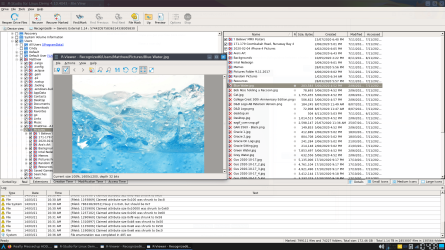
Update: Nothing is overwritten on my drive. File structure is intact! :D My version of R-Studio is a demo one though, I can't recover >256KB files.

MY DATA IS FINE!.png
 
Last edited:

My Computer

Computer type
Laptop
Computer Manufacturer/Model Number
Dell Inspiron 1545
OS
Arch Linux (5.11.6-arch1-1) x86_64
CPU
Intel Pentium T9900 (3.06GHz)
Memory
8GB (2x 4GB) DDR2 (800MHz) SO-DIMM
Graphics Card(s)
Mobile Intel(R) 4 Series Express Chipset
Monitor(s) Displays
Acer K242HQL
Screen Resolution
1920x1080
Hard Drives
1TB WD Blue SSD G5 BICS4 (415000WD)
Keyboard
HP Business Slim Keyboard
Mouse
Fnova M88 Gaming Mouse
Internet Speed
10Mbps Download / 5Mbps Upload
Browser
Mozilla Firefox
Other Info
Pending eGPU upgrade.
OKay, stop right now and DON'T write ANYTHING to the drive. No new partitions or otherwise. I wouldn't even let a mouse fart near the drive.

Now this should be a very easy recovery, but changing the partition twice (from what I gather in your post) may complicate things.

Since the partition table is the only thing that's whacked here, that's all you have to fix. The data its self would still be there.

Give TestDisk a try. If you don't know anything about it then read everything there and maybe watch a few YouTube videos so you know damn well what you're doing. Ideally I'd make a raw clone of that drive to another drive BEFORE I stared any recovery operation. Roadkil has a raw copier program that may do the job.

TestDisk - CGSecurity

Roadkil.Net - Roadkil's Raw Copy Program Download

Now a reviewer here says TestDisk literally saved his "ass" which is very important otherwise you'd have to stand all your life. I can't imagine what fresh hell that would be like...

At any rate, you may have to use a SATA to USB adapter or just plug the drive into a desktop SATA port unless this is a laptop drive. Amazon.com

Use fakespot.com to weed out fake BS reviews.
 

My Computer

Computer type
PC/Desktop
OS
Windows 7 Ultimate x64
Next time use a good, reputable cloning software every now and then (I use Clonezilla) to create a 1:1 clone to another drive. I store my backup drives, USB sticks and optical media backups in a $35 fireproof safe.
 

My Computer

Computer type
PC/Desktop
OS
Windows 7 Ultimate x64
Right. I haven't written to this drive since November. R-Studio is showing me the correct folder tree as well, and it's previewing files fine. To my knowledge, everything on this drive is in 100% perfect condition - possible excluding a small piece of the Windows installation.


R-Studio - albeit incredibly powerful and a really good application - is only a demo for me. It's $80 for the full version.
I'll do a lot of good research into how to use TestDisk. And of course afterwards, I'm going to make a lot of backups. Thanks! :D
 

My Computer

Computer type
Laptop
Computer Manufacturer/Model Number
Dell Inspiron 1545
OS
Arch Linux (5.11.6-arch1-1) x86_64
CPU
Intel Pentium T9900 (3.06GHz)
Memory
8GB (2x 4GB) DDR2 (800MHz) SO-DIMM
Graphics Card(s)
Mobile Intel(R) 4 Series Express Chipset
Monitor(s) Displays
Acer K242HQL
Screen Resolution
1920x1080
Hard Drives
1TB WD Blue SSD G5 BICS4 (415000WD)
Keyboard
HP Business Slim Keyboard
Mouse
Fnova M88 Gaming Mouse
Internet Speed
10Mbps Download / 5Mbps Upload
Browser
Mozilla Firefox
Other Info
Pending eGPU upgrade.
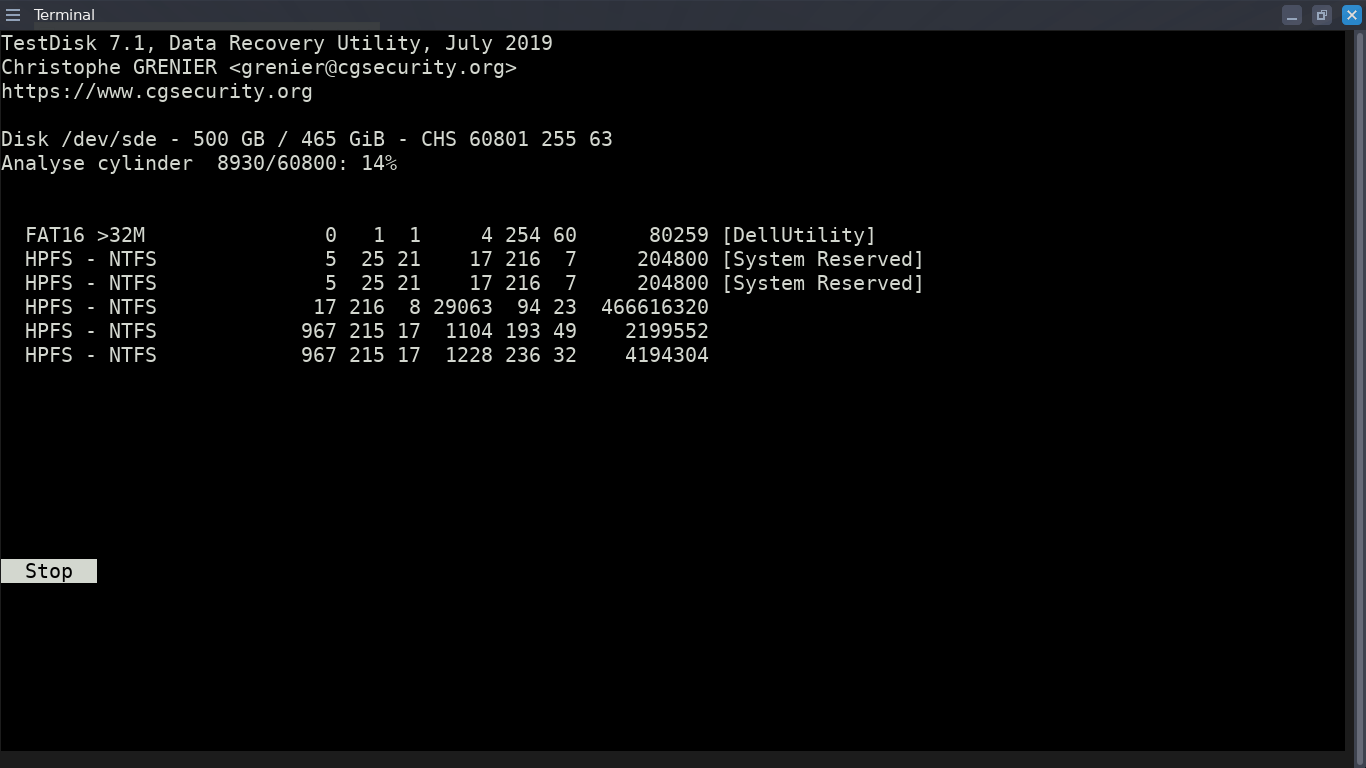
So far TestDisk hasn't found the right partition that R-Studio had found. I'm running a full scan.

FGaeOJE.png
 

My Computer

Computer type
Laptop
Computer Manufacturer/Model Number
Dell Inspiron 1545
OS
Arch Linux (5.11.6-arch1-1) x86_64
CPU
Intel Pentium T9900 (3.06GHz)
Memory
8GB (2x 4GB) DDR2 (800MHz) SO-DIMM
Graphics Card(s)
Mobile Intel(R) 4 Series Express Chipset
Monitor(s) Displays
Acer K242HQL
Screen Resolution
1920x1080
Hard Drives
1TB WD Blue SSD G5 BICS4 (415000WD)
Keyboard
HP Business Slim Keyboard
Mouse
Fnova M88 Gaming Mouse
Internet Speed
10Mbps Download / 5Mbps Upload
Browser
Mozilla Firefox
Other Info
Pending eGPU upgrade.
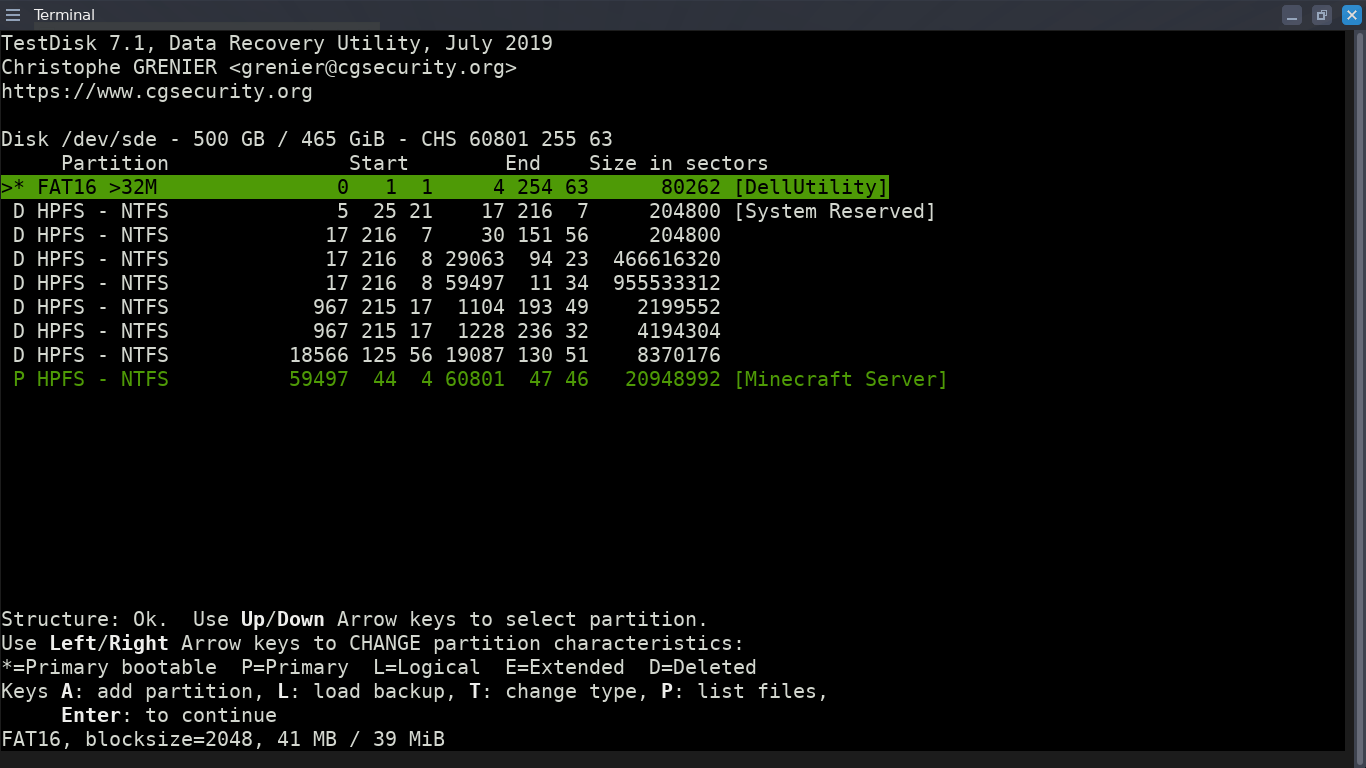
Right, I've finished the full scan but the wiki and every tutorial I've found don't cover my situation:
2x2QiXA.png


The green partitions are fine, but they're not the ones I need. The ones with the block sizes starting with 4666 and 9555 show this when I press P:
zBvNzET.png


All other partitions say that they "seem damaged".


None of the disks show the label [OS], which is my C: drive.
I'm scared to take another step for fear of overwriting any filesystem tables or whatnot...
 
Last edited:

My Computer

Computer type
Laptop
Computer Manufacturer/Model Number
Dell Inspiron 1545
OS
Arch Linux (5.11.6-arch1-1) x86_64
CPU
Intel Pentium T9900 (3.06GHz)
Memory
8GB (2x 4GB) DDR2 (800MHz) SO-DIMM
Graphics Card(s)
Mobile Intel(R) 4 Series Express Chipset
Monitor(s) Displays
Acer K242HQL
Screen Resolution
1920x1080
Hard Drives
1TB WD Blue SSD G5 BICS4 (415000WD)
Keyboard
HP Business Slim Keyboard
Mouse
Fnova M88 Gaming Mouse
Internet Speed
10Mbps Download / 5Mbps Upload
Browser
Mozilla Firefox
Other Info
Pending eGPU upgrade.
"...R-Studio - albeit incredibly powerful and a really good application - is only a demo for me. It's $80 for the full version..."
As powerful as R-Studio is, Network version or not network version, if the license covers more than one computer, -- that will be the best $80.00 you ever spent. And, I think you can even still get a free copy of R-Undelete, Recuva-type program on steroids. R-Undelete, if you do spend money on R-Studio, and you do get a free copy, can be installed -- after you have solved the immediate situation.

F22Simpilot mentioned a very powerful, geeky, program: TestDisk Step By Step - CGSecurity
It has great reviews.
 

My Computer

Computer type
PC/Desktop
Computer Manufacturer/Model Number
Antec desktop; Acer Aspire laptops
OS
Windows 7 Professional 64-bit
CPU
Desktop i5; Acers i5 & i7
Memory
desktop 16GB; 1 Acer 8GB & 1 Acer 16GB
Hard Drives
1TB split into 2 equal partitions [OS and data] usable by RJS
Internet Speed
AT&T DSL
Browser
FF, GChrome, msIE
Other Info
Windows 7 Firewall, Emsisoft AM/AV, MSE [scan-only], SpywareBlaster, Ruiware/BillP combine
There are free datarecovery programs available. Recuva is one. Or try active@ filerecovery. If it finds your data, the license is $29
 

My Computers

System One System Two

  • Computer type
    PC/Desktop
    OS
    7 X64
    CPU
    i5 8400
    Motherboard
    gigabyte b365m ds3h
    Memory
    2x8gb 3200mhz
    Hard Drives
    various
    PSU
    pure power 11 400w cm
    Case
    Coolermaster
    Cooling
    cryorig m9i
  • Computer type
    PC/Desktop
    OS
    7x64
    CPU
    g5400
    Motherboard
    ga b365m ds3h
    Memory
    8gb ddr4 2400
    PSU
    xfx pro 450w
As others have pointed out, there are many very good free and fee data recovery programs, many are cheaper than R-Studio and R-Undelete combined. Choose what you believe is best for you and your hardware, and let us know how things worked out.
 

My Computer

Computer type
PC/Desktop
Computer Manufacturer/Model Number
Antec desktop; Acer Aspire laptops
OS
Windows 7 Professional 64-bit
CPU
Desktop i5; Acers i5 & i7
Memory
desktop 16GB; 1 Acer 8GB & 1 Acer 16GB
Hard Drives
1TB split into 2 equal partitions [OS and data] usable by RJS
Internet Speed
AT&T DSL
Browser
FF, GChrome, msIE
Other Info
Windows 7 Firewall, Emsisoft AM/AV, MSE [scan-only], SpywareBlaster, Ruiware/BillP combine
See if you could recover the files on your disk with this app: Complete Data Protection Solution - Veeam Availability Suite v11

It should be a free trial for 30 days so maybe you could recover your files this way!

Good luck!
That looks more like a backup software without a focus on recovery from messed up partitions. Are you sure it does work for such specific file recovery like this?


Have you followed these specific instructions? TestDisk Step By Step - CGSecurity

There's also a help forum. cgsecurity.org - Index page
I have, in fact. The wiki has me quite confused near the end as I can't preview any files from the partitions that look familiar. As you can see in my previous post's screenshots, they show up as empty. :(


"...R-Studio - albeit incredibly powerful and a really good application - is only a demo for me. It's $80 for the full version..."
As powerful as R-Studio is, Network version or not network version, if the license covers more than one computer, -- that will be the best $80.00 you ever spent. And, I think you can even still get a free copy of R-Undelete, Recuva-type program on steroids. R-Undelete, if you do spend money on R-Studio, and you do get a free copy, can be installed -- after you have solved the immediate situation.

F22Simpilot mentioned a very powerful, geeky, program: TestDisk Step By Step - CGSecurity
It has great reviews.
Not to sound too tight on money, but I'd prefer to try my real best with TestDisk before spending a whole $80 on R-Studio. I don't know if it's worth it if TestDisk can do the same but I just need to learn...


There are free datarecovery programs available. Recuva is one. Or try active@ filerecovery. If it finds your data, the license is $29
I've used Recuva in the past (Quite long ago - in internet terms - sometime in 2016. I don't know if it's changed in a major way since), but I didn't like it because it didn't do well at organising results and with recovering file structures. Active@ File Recovery seems like I could look into it though...


I'm honestly in a state of confusion with so many of these different softwares on the market. (I also most likely am nervous about trusting near-random software to write to this disk, for fear of putting the files on it in danger)
Thank you all so far for the help, though! :D
 
Last edited:

My Computer

Computer type
Laptop
Computer Manufacturer/Model Number
Dell Inspiron 1545
OS
Arch Linux (5.11.6-arch1-1) x86_64
CPU
Intel Pentium T9900 (3.06GHz)
Memory
8GB (2x 4GB) DDR2 (800MHz) SO-DIMM
Graphics Card(s)
Mobile Intel(R) 4 Series Express Chipset
Monitor(s) Displays
Acer K242HQL
Screen Resolution
1920x1080
Hard Drives
1TB WD Blue SSD G5 BICS4 (415000WD)
Keyboard
HP Business Slim Keyboard
Mouse
Fnova M88 Gaming Mouse
Internet Speed
10Mbps Download / 5Mbps Upload
Browser
Mozilla Firefox
Other Info
Pending eGPU upgrade.
R-Studio, especially the Network one, fully licensed, is used by many businesses, companies, agencies, etc. When it comes to data recovery, it is one of the finest, albeit with a learning curve. I was going to post a precis directory report of the R-Studio directories, my Directory Report utility needs to be reActivated, go figure.
 

My Computer

Computer type
PC/Desktop
Computer Manufacturer/Model Number
Antec desktop; Acer Aspire laptops
OS
Windows 7 Professional 64-bit
CPU
Desktop i5; Acers i5 & i7
Memory
desktop 16GB; 1 Acer 8GB & 1 Acer 16GB
Hard Drives
1TB split into 2 equal partitions [OS and data] usable by RJS
Internet Speed
AT&T DSL
Browser
FF, GChrome, msIE
Other Info
Windows 7 Firewall, Emsisoft AM/AV, MSE [scan-only], SpywareBlaster, Ruiware/BillP combine
That looks more like a backup software without a focus on recovery from messed up partitions. Are you sure it does work for such specific file recovery like this?


I have, in fact. The wiki has me quite confused near the end as I can't preview any files from the partitions that look familiar. As you can see in my previous post's screenshots, they show up as empty. :(


Not to sound too tight on money, but I'd prefer to try my real best with TestDisk before spending a whole $80 on R-Studio. I don't know if it's worth it if TestDisk can do the same but I just need to learn...


I've used Recuva in the past (Quite long ago - in internet terms - sometime in 2016. I don't know if it's changed in a major way since), but I didn't like it because it didn't do well at organising results and with recovering file structures. Active@ File Recovery seems like I could look into it though...


I'm honestly in a state of confusion with so many of these different softwares on the market. (I also most likely am nervous about trusting near-random software to write to this disk, for fear of putting the files on it in danger)
Thank you all so far for the help, though! :D

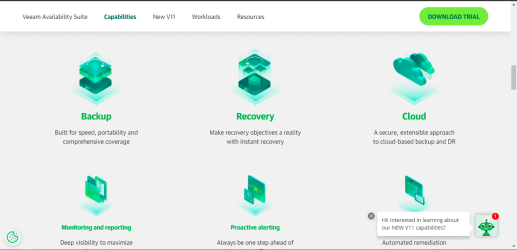
Well I think it does have recovery tools built in from this screenshot:

recovery.PNG

But also you can use these other recovery tools from these other very professional people if you want to stick with something that you trust.

I don't mind.

There are free datarecovery programs available. Recuva is one. Or try active@ filerecovery. If it finds your data, the license is $29

"...R-Studio - albeit incredibly powerful and a really good application - is only a demo for me. It's $80 for the full version..."
As powerful as R-Studio is, Network version or not network version, if the license covers more than one computer, -- that will be the best $80.00 you ever spent. And, I think you can even still get a free copy of R-Undelete, Recuva-type program on steroids. R-Undelete, if you do spend money on R-Studio, and you do get a free copy, can be installed -- after you have solved the immediate situation.

F22Simpilot mentioned a very powerful, geeky, program: TestDisk Step By Step - CGSecurity
It has great reviews.

Hope we get this resolved soon! :D :p
 

My Computer

OS
N/A
Back
Top