Realtek drivers no sound present

Anyone help,problem still exists :(
Hi.
I have the exact same problem, with the same symptoms. And I'm pissed. I "upgraded" my Vista to W7, and the big X appeared over my Realtek Audio symbol. But not instantly. It happened after I turned off my computer. So I tried basically everything, and came up with "Ok, I will reistall the W7 upgrade". So I did. And the sound came back. And stayed. Until I turned off my PC. Anyway, a reinstallation of W7 may help you more than it did for me? However, I read somewhere in this forum, that the Vista version of the driver may work. I'm going to give it a try.

Stig
 

My Computer My Computer

At a glance

Windows 7
Computer Manufacturer/Model Number
LG E500-SPEXV
OS
Windows 7
Sound Card
Realtek
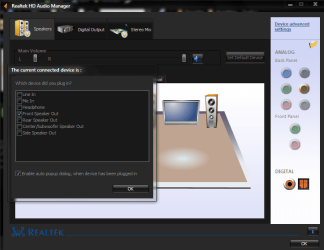
when my sound dissapeared i eventually found a list of check boxes in realtek hd audio manager .if you double click on the highlighted jack in backpanel audio, assuming you are using an amp or suchlike as i do. the check list shows
what you have configured to that jack. on install of win 7 the check box had unchecked itself this also happened in vista when i installed sp1.that was when i discovered the fix.
hope this helps
 

Attachments

  • realtek.PNG
    realtek.PNG
    41.7 KB · Views: 89

My Computer My Computer

At a glance

Microsoft Windows 7 Home Premium 64-bit 7600IIx4 amd athelon 635 processor2x2gbati radeon HD 5450
Computer Manufacturer/Model Number
Hewlett packard/p6512uk
OS
Microsoft Windows 7 Home Premium 64-bit 7600
CPU
IIx4 amd athelon 635 processor
Motherboard
FOXCONN 2AA9
Memory
2x2gb
Graphics Card(s)
ati radeon HD 5450
Sound Card
(1) Realtek High Definition Audio (2) AMD High Definition
Monitor(s) Displays
samsung lcd tv 32"
Screen Resolution
1360x 768
Hard Drives
(1) WDC WD10 01FAES-60Z2A0 SATA Disk Device (2) Maxtor OneTouch USB Device (3) ST310003 33AS USB Device (4) WD My Book 1111 USB Device
PSU
?
Cooling
air!
Keyboard
wireless hp
Mouse
wireless Hp,optical
Internet Speed
1.10mb/s
Antivirus
MSE
Browser
Firefox
Back
Top