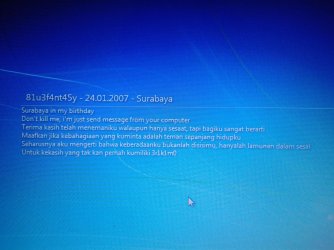
Solved Receving Odd Message at Windows Startup

Ijas619

New member
Local time
3:46 PM
Messages
33
Location
KOTTAYAM,KERELA
Hi,
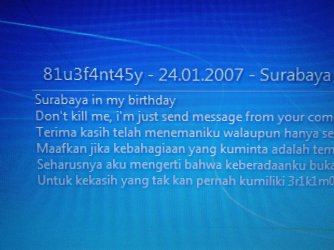
one of My office pc is showing odd message during windows startup. i have attached photos of it below.
 

Attachments

  • 2015-07-05 15.45.36.jpg
    2015-07-05 15.45.36.jpg
    984.9 KB · Views: 1
  • 2015-07-05 15.45.47.jpg
    2015-07-05 15.45.47.jpg
    675 KB · Views: 0
  • 2015-07-05 15.46.02.jpg
    2015-07-05 15.46.02.jpg
    1 MB · Views: 0

My Computer

Computer type
PC/Desktop
Computer Manufacturer/Model Number
Custom build
OS
Windows 7 ultimate x64
CPU
Intel core i3
Motherboard
Asus P8h61mlx
Memory
2 gb ddr3
Graphics Card(s)
Inbuild 843 mb
Monitor(s) Displays
Veiwsonic
Hard Drives
Segate 80gb
samsung 150gb
Case
Iball
Keyboard
Logitech
Mouse
Logitech
Internet Speed
2 mbps
Antivirus
Kaspersky internet security 2015
Browser
Mozilla firefox
Obviously that is not a windows message. Download and run the free MalwareBytes (antivirus software) https://www.malwarebytes.org/
on the same site is some other free programs you should run - see "Anti-Rootkit" under Other Tools.
 

My Computer

OS
Windows 7 Home Premium
CPU
i3 2100T
Motherboard
ASRock H67M-ITX

My Computer

Computer type
PC/Desktop
Computer Manufacturer/Model Number
Custom assembled by me :}
OS
Win-7-Pro64bit 7-H-Prem-64bit
CPU
i7-5930K 2nd i9-9940x both water blocked VRM's too
Motherboard
ASUS SABERTOOTH X99 2nd ASUS x299 Apex
Memory
Trident-z 3200C14 2nd Trident-z 3600C16
Graphics Card(s)
EVGA 1080ti ftw3 2nd Titan Xp both water blocked
Sound Card
Built-in Realtek
Monitor(s) Displays
1-AOC G2460PG 24"G-Sync 144Hz/ 2nd 1-ASUS VG248QE 24" 144Hz
Screen Resolution
1920 x 1080 144Hz
Hard Drives
2-Samsung M.2 Evo & Evo Plus
2-Samsung 850 EVO 500GB SSD's/ 3-2.5 W.D. Black 1tb-&3-1tb/3-3.5 WD Black 1tb hdd's
PSU
EVGA SuperNOVA 1000-P2 2nd 1200-P2
Case
2-Corsair Obsidian Series 450D Black ATX Mid Tower
Cooling
Custom water loops
Keyboard
Logitech G710+/ 2nd Logitech G910
Mouse
2-RedDragon M901 Perdition 16400 dpi Gaming mouse = wired
Internet Speed
Comcast Ping 19ms 89.31mbps download speed 6.12mbps upload
Antivirus
Malwarebytes Pro/ Superantispyware Pro
Browser
FireFox & Pale moon
Other Info
2nd ASUS X299 Apex/Intel i9-9940x with Custom water loop/7H-Prem-x64/Corsair 450D case/Ram Trident-z 3600C16 4x8gb / Samsung970Evo plus 500gb SSD/Dual ssd EZ swap evo/PSU EVGA SuperNova 1200w-P2 80+Platinum/GPU Titan Xp /8-ML-140 on push-pull on 2-280GTX rads
Have you downloaded anything from a USB drive .... the drive was probably infected, and this will load because you have not disabled "autorun/autoplay". http://www.sevenforums.com/tutorials/216706-autoplay-enable-disable.html

Malwarebytes should take care of it.
Download (free version) Malwarebytes' Anti-Malware to your desktop
Malwarebytes | Free Anti-Malware Detection & Removal Software
* Double-click mbam-setup.exe and follow the prompts to install the program.Right click to run as Administrator, using Windows 7 or Vista.
* At the end, be sure a checkmark is placed next to Update Malwarebytes' Anti-Malware and Launch Malwarebytes' Anti-Malware, then click Finish.
* If an update is found, it will download and install the latest version.
* Once the program has loaded, select Perform full scan, then click Scan.
* When the scan is complete, click OK, then Show Results to view the results.
* Be sure that everything is checked, and click Remove Selected.
* When completed, a log will open in Notepad. Please save it to a convenient location. Copy and Paste that log into your next reply.

 

My Computer

Computer type
PC/Desktop
Computer Manufacturer/Model Number
Bruce ... somewhere in his 40's
OS
Windows 7 Ultimate 32bit SP1
CPU
Intel(R) Core(TM)2 Quad CPU @ 2.40GHz, 2400 MHz
Motherboard
INTEL/D975XBX2
Memory
4 GB
Graphics Card(s)
ATI Radeon HD 2600 Pro
Monitor(s) Displays
Samsung SyncMaster 914v
Screen Resolution
1280 x 1024
Hard Drives
2/500GB each ... ST3500630AS ATA Device.
One is not connected
PSU
Rocketfish 700 W
Case
G.Skill Gigabyte Chassis
Keyboard
Standard PS/2 Keyboard
Mouse
Microsoft PS/2 Mouse
Internet Speed
DSL
Antivirus
Avira Internet Security
Browser
IE 11
Other Info
ATI HDMI Audio
Thanks 4 ur replies...
I have bought kaspersky internet sequirity.... Problem solved.
 

My Computer

Computer type
PC/Desktop
Computer Manufacturer/Model Number
Custom build
OS
Windows 7 ultimate x64
CPU
Intel core i3
Motherboard
Asus P8h61mlx
Memory
2 gb ddr3
Graphics Card(s)
Inbuild 843 mb
Monitor(s) Displays
Veiwsonic
Hard Drives
Segate 80gb
samsung 150gb
Case
Iball
Keyboard
Logitech
Mouse
Logitech
Internet Speed
2 mbps
Antivirus
Kaspersky internet security 2015
Browser
Mozilla firefox
The message you're seeing is a standard Windows feature intended to display a custom message at startup. It certainly doesn't comes from a virus, directly at least. Here is how to use it:
Adding messages to Windows 7's logon screen - TechRepublic

That said, it's entirely possible that a malware is enabling this feature and it's a good indicator of its presence if you didn't set it yourself. Anyway, disabling it again is very easy, just changing 2 registry values.
 

My Computer

Computer type
Laptop
Computer Manufacturer/Model Number
Toshiba Sattelite A665-S6092
OS
Windows 7 Ultimate x64
CPU
Intel Core i7-740QM
Memory
8 GB DDR3
Graphics Card(s)
NVIDIA GeForce 330GT
Screen Resolution
1366x768
Hard Drives
Samsung 840 SSD 500GB
1TB USB3 external HD
Cooling
Coolermaster Notepal U3 notebook cooling pad
Internet Speed
3mbps ASDL
Antivirus
ClamWin 0.98.7
Browser
Opera 12.17 x86 (main), Firefox 38 (sec), IE11 (last resort)
I recommend completing Jacee's post # 4.

Anything that pops up on my computer that I didn't instruct to is a infection of some kind as far as I'm concerned.

I can't read the language in the pop up so I have no idea what it states.
 

My Computer

Computer type
PC/Desktop
Computer Manufacturer/Model Number
Home made Desktop
OS
Windows 10 Pro. 64/ version 1709 Windows 7 Pro/64
CPU
Intel i7-6800K @ 4.3
Motherboard
ASUS X-99 Deluxe II
Memory
Corsair Platinum 16 gig @2400
Graphics Card(s)
EVGA GTX 1070 OC
Monitor(s) Displays
Asus 27" LED LCD/VE278Q
Screen Resolution
1920-1080 or 1280-720 HDMI
Hard Drives
INTEL SSD 730-240 Gb Sata 3.0/
PSU
EVGA Platium 1200W
Case
Phanteks Luxe Tempered Glass 8 fans/ one radiator
Cooling
XSPC/ Water Cooled CPU
Keyboard
Das 4 Professional
Mouse
Logitech M705/MX Anywhere 2-S
Internet Speed
100 mbits
Antivirus
Microsoft Security Essentials/ Malwarebytes Premium 3.0/ SAS
Browser
I.E. 11 default/Firefox/ ISP Time Warner Cable/Spectrum
Other Info
LG BluRay Burner/
Sound system-KLipsch-THX/
Icy Dock ssd Hot Swap bays.
Back
Top