Recommendations for CCleaner settings

glennc

New member
Hello,
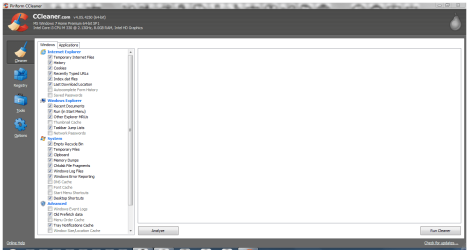
I have been using CCleaner for a long time and have basically checked everything but browser passwords for removal. I have lately been attempting to use some more W7 features that may require error logs and such. I was wondering what informed and experienced users, use for the settings.
Thanks for any assistance!
Glenn
 

My Computer

Computer type
PC/Desktop
Computer Manufacturer/Model Number
Self-Built
OS
Windows 7 Ultimate
CPU
AMD Phenom-II X4 965
Motherboard
Gigabyte GA-MA785GM-US2H
Memory
8192 MB DDR2-SDRAM
Graphics Card(s)
ATI Radeon HD 4200
Sound Card
ATI Radeon HD 4200 High Definition Audo
Monitor(s) Displays
LG Electronics W1943
Screen Resolution
1360 X 768
Hard Drives
C: 500 GB Caviar Black SATA
E: 500 GB Caviar Black SATA
PSU
Ultra LSP 750
Case
Ultra XBlaster
Cooling
2 Fans, CPU Fan, PS Fan
Keyboard
Acer
Mouse
Logitech
Internet Speed
6 MB
Hello,
I have been using CCleaner for a long time and have basically checked everything but browser passwords for removal. I have lately been attempting to use some more W7 features that may require error logs and such. I was wondering what informed and experienced users, use for the settings.
Thanks for any assistance!
Glenn

I always check for save password, compact database, save form information, auto complete form history for security in windows and application.
I would not check the network password.
 

My Computer

Computer type
PC/Desktop
OS
Window 7 x64 , Home Premium
Do not use the registry cleaner. Registry cleaners (all of them) tend to cause more problems than they solve and should be avoided.
 

My Computer

Computer type
PC/Desktop
Computer Manufacturer/Model Number
HP
OS
Windows 7 Pro 64 bit
CPU
Xeon W3520
Memory
8 GB
Graphics Card(s)
Nvidia Geforce 210
Do not use the registry cleaner. Registry cleaners (all of them) tend to cause more problems than they solve and should be avoided.

I agree with you that registry cleaners always make trouble.
But with CC i use it in every 2 or 3 months and i never faced any kind of problem.
CCleaner is the safest registry cleaner i found for me.

@ glennc

I dont know if you are aware of CCEnhancer Which adds
several extra rules to CCleaner.
But always be careful what you check. Only mark a box if you are
sure about it.
 

My Computer

Computer type
Laptop
Computer Manufacturer/Model Number
Dell Insperon N5010
OS
Windows 7 Ultimate x64
CPU
i3 M380 2.53GHz
Motherboard
TOSHIBA MK5076GSX
Memory
4 Gb
Graphics Card(s)
intel HD
Sound Card
IDT
Screen Resolution
1366x768
Keyboard
Standerd PS2
Antivirus
ESET Smart Security 7
Browser
Google Chrome
Hello,
I have been using CCleaner for a long time and have basically checked everything but browser passwords for removal. I have lately been attempting to use some more W7 features that may require error logs and such. I was wondering what informed and experienced users, use for the settings.
Thanks for any assistance!
Glenn

I always check for save password, compact database, save form information, auto complete form history for security in windows and application.
I would not check the network password.

Hello Win78,
Thanks for your info on the question!
Glenn
 

My Computer

Computer type
PC/Desktop
Computer Manufacturer/Model Number
Self-Built
OS
Windows 7 Ultimate
CPU
AMD Phenom-II X4 965
Motherboard
Gigabyte GA-MA785GM-US2H
Memory
8192 MB DDR2-SDRAM
Graphics Card(s)
ATI Radeon HD 4200
Sound Card
ATI Radeon HD 4200 High Definition Audo
Monitor(s) Displays
LG Electronics W1943
Screen Resolution
1360 X 768
Hard Drives
C: 500 GB Caviar Black SATA
E: 500 GB Caviar Black SATA
PSU
Ultra LSP 750
Case
Ultra XBlaster
Cooling
2 Fans, CPU Fan, PS Fan
Keyboard
Acer
Mouse
Logitech
Internet Speed
6 MB
Do not use the registry cleaner. Registry cleaners (all of them) tend to cause more problems than they solve and should be avoided.

Howdy LMiller7,
Appreciate you weighting in on the subject, thanks. I have heard this before, but have used it for a number of years. Agree that I can't tell if it did indeed cause any issues...
Glenn
 

My Computer

Computer type
PC/Desktop
Computer Manufacturer/Model Number
Self-Built
OS
Windows 7 Ultimate
CPU
AMD Phenom-II X4 965
Motherboard
Gigabyte GA-MA785GM-US2H
Memory
8192 MB DDR2-SDRAM
Graphics Card(s)
ATI Radeon HD 4200
Sound Card
ATI Radeon HD 4200 High Definition Audo
Monitor(s) Displays
LG Electronics W1943
Screen Resolution
1360 X 768
Hard Drives
C: 500 GB Caviar Black SATA
E: 500 GB Caviar Black SATA
PSU
Ultra LSP 750
Case
Ultra XBlaster
Cooling
2 Fans, CPU Fan, PS Fan
Keyboard
Acer
Mouse
Logitech
Internet Speed
6 MB
Do not use the registry cleaner. Registry cleaners (all of them) tend to cause more problems than they solve and should be avoided.

I agree with you that registry cleaners always make trouble.
But with CC i use it in every 2 or 3 months and i never faced any kind of problem.
CCleaner is the safest registry cleaner i found for me.

@ glennc

I dont know if you are aware of CCEnhancer Which adds
several extra rules to CCleaner.
But always be careful what you check. Only mark a box if you are
sure about it.

Hello aakshat,
I have been depending on your point of view, either lucky or ignorant. I use it more often than that. I hope that I haven't caused problems.
I have heard of the CCEnhancer, but my question is on the plain CCleaner, what should I check for removal, that just makes the problem even more complex. Thank you for your help!
Glenn
 

My Computer

Computer type
PC/Desktop
Computer Manufacturer/Model Number
Self-Built
OS
Windows 7 Ultimate
CPU
AMD Phenom-II X4 965
Motherboard
Gigabyte GA-MA785GM-US2H
Memory
8192 MB DDR2-SDRAM
Graphics Card(s)
ATI Radeon HD 4200
Sound Card
ATI Radeon HD 4200 High Definition Audo
Monitor(s) Displays
LG Electronics W1943
Screen Resolution
1360 X 768
Hard Drives
C: 500 GB Caviar Black SATA
E: 500 GB Caviar Black SATA
PSU
Ultra LSP 750
Case
Ultra XBlaster
Cooling
2 Fans, CPU Fan, PS Fan
Keyboard
Acer
Mouse
Logitech
Internet Speed
6 MB
Shoot, I've wondered myself about cleaning out things that may affect a needed log,etc. & was hoping for more input here. Guess I'll just have to wait for more replies.
 

My Computer

Computer type
PC/Desktop
Computer Manufacturer/Model Number
emachines
OS
Microsoft Windows 7 Home Premium 64-bit 7601 Multiprocessor Free Service Pack 1
CPU
AMD Athlon(tm) II X2 220 Processor
Motherboard
eMachines EL1358G
Memory
3.00 GB
Graphics Card(s)
NVIDIA GeForce 6150SE nForce 430
Sound Card
Realtek High Definition Audio
Screen Resolution
1280 x 1024 x 32 bits (4294967296 colors) @ 60 Hz
Hard Drives
(1) WDC WD10 EADX-22TDHB0 SCSI Disk Device (2) Generic- Multi-Card USB Device
Keyboard
came with PC
Mouse
came with PC
Antivirus
Avast
Browser
IE 9
Other Info
don't know how to get info for the other 5 areas
There is very little evidence that registry cleaning is beneficial. On the other hand there is quite a bit of evidence that it can be harmful. I expect that most people using CCleaner have no problems, at least not yet. Considering that the benefits are so questionable I am not going to take the chance. So far my policy has served me well (some 15 years using Windows).
 

My Computer

Computer type
PC/Desktop
Computer Manufacturer/Model Number
HP
OS
Windows 7 Pro 64 bit
CPU
Xeon W3520
Memory
8 GB
Graphics Card(s)
Nvidia Geforce 210
I've been running WIn7-64 for a long time (years) and have always used CCleaner, both to clean up junk files and to clean out my registry. I have never, ever, once had any problem with this.

I happen to install, test, and delete lots of software. Because of this I use Uninstaller Pro to delete software; it first runs the application's regular uninstaller, then does 2 more steps: (1) scan registry for leftover entries and offer to delete them, and (2) scan for any left over files & directories and offer to delete them. In almost every case I accept the default options and delete everything.

But i also run CCleaner's Registry Cleanup about once a month, and it always finds more stuff to delete. In almost every case I can recognize what it's wanting to delete, but I've finally come to trust it enough to just delete all the junk it identifies.

I'm sure I've deleted thousands of registry entries over the years, and as I said, I've never had a problem.

My sense is that there is a lot of fear and trepidation out there about messing with the registry. I agree it does need to be handled carefully. CCleaner seems to know how to do that.
 

My Computer

Computer type
PC/Desktop
Computer Manufacturer/Model Number
Custom built
OS
Win7-64
CPU
Intel i7-3770S
Motherboard
ASUS P8Z77-M
Memory
16GB
Graphics Card(s)
nVidia GT630
Sound Card
onboard
Monitor(s) Displays
dual
Screen Resolution
1920x1200 (primary) 1050x1680 (secondary)
Hard Drives
128GB SSD (boot)
64GB SSD (Temp/My Documents)
500GB (photos/videos)
1TB (rendered video, backups)
PSU
650W
Case
Thermaltake A30
Cooling
Thermaltake
Keyboard
Logitech Lighted
Mouse
Kensington Expert Mouse (trackball)
Internet Speed
FIOS 35/35
Antivirus
MS Security Essentials
Browser
Chrome (beta)
There is very little evidence that registry cleaning is beneficial. On the other hand there is quite a bit of evidence that it can be harmful. I expect that most people using CCleaner have no problems, at least not yet. Considering that the benefits are so questionable I am not going to take the chance. So far my policy has served me well (some 15 years using Windows).

Hello again and again thanks for your knowledgeable and sincere concern. I do appreciate the time you take to try to impart your history of use. I of course have not had that much knowledge of it, but I see what gets left on systems from normal Windows use. For instance I used Google Chrome for two days. I uninstalled it with an even more invasive registry and program cleaner Revo Pro. Then ran CCleaner on it. Several days later I was looking at the services and processes and found that Google had left an updater running and a number of files in my appdata Roaming account. So even after what I consider strong non Window intervention, it still left running processes. I can only in my limited capacity wonder what would be left on my computer if I in 3 years had never run a registry cleaner. I did for a while at the advice of a knowledgeable person, start using Advanced System Care. It was finding tens of thousand of problems, but it scared me too much and I quite using it.
I do take your advice in mind!
Thanks
Glenn
 

My Computer

Computer type
PC/Desktop
Computer Manufacturer/Model Number
Self-Built
OS
Windows 7 Ultimate
CPU
AMD Phenom-II X4 965
Motherboard
Gigabyte GA-MA785GM-US2H
Memory
8192 MB DDR2-SDRAM
Graphics Card(s)
ATI Radeon HD 4200
Sound Card
ATI Radeon HD 4200 High Definition Audo
Monitor(s) Displays
LG Electronics W1943
Screen Resolution
1360 X 768
Hard Drives
C: 500 GB Caviar Black SATA
E: 500 GB Caviar Black SATA
PSU
Ultra LSP 750
Case
Ultra XBlaster
Cooling
2 Fans, CPU Fan, PS Fan
Keyboard
Acer
Mouse
Logitech
Internet Speed
6 MB
I highly recommend not using anything from IOBit and that includes Advanced System Care. IOBit does not have a very good reputation in my opinion. Please read this. You might already be infected.

http://www.sevenforums.com/security-news/302177-eset-reports-trojan-orbit-downloader.html

I have use Ccleaner for years but like any other program that changes or removes thing it must be used wisely.
When and if you use the Registry part of Ccleaner it will ask you if you want to save the changes. Select yes. The changes will be saved and if need be you can put the saved changes back where they belong in the Registry.

When you use the Cleaner section of Ccleaner read what it is recommending to remove. If you don't understand or agree then just uncheck the questioned item. I will not remove it.

I use the Cleaner part of Ccleaner at default except I uncheck Memory Dumps. You will need these Memory Dumps if you have problems with your system. If I haven't had any problems I clean Memory Dumps about once a month. Probably not needed but I do it anyway.
*** Any program that moves or changes your system must be used with knowledge and wisdom. They should not be used as a one tick will fix everything.
 

My Computer

Computer type
PC/Desktop
Computer Manufacturer/Model Number
Home made Desktop
OS
Windows 10 Pro. 64/ version 1709 Windows 7 Pro/64
CPU
Intel i7-6800K @ 4.3
Motherboard
ASUS X-99 Deluxe II
Memory
Corsair Platinum 16 gig @2400
Graphics Card(s)
EVGA GTX 1070 OC
Monitor(s) Displays
Asus 27" LED LCD/VE278Q
Screen Resolution
1920-1080 or 1280-720 HDMI
Hard Drives
INTEL SSD 730-240 Gb Sata 3.0/
PSU
EVGA Platium 1200W
Case
Phanteks Luxe Tempered Glass 8 fans/ one radiator
Cooling
XSPC/ Water Cooled CPU
Keyboard
Das 4 Professional
Mouse
Logitech M705/MX Anywhere 2-S
Internet Speed
100 mbits
Antivirus
Microsoft Security Essentials/ Malwarebytes Premium 3.0/ SAS
Browser
I.E. 11 default/Firefox/ ISP Time Warner Cable/Spectrum
Other Info
LG BluRay Burner/
Sound system-KLipsch-THX/
Icy Dock ssd Hot Swap bays.
I've been running WIn7-64 for a long time (years) and have always used CCleaner, both to clean up junk files and to clean out my registry. I have never, ever, once had any problem with this.

I happen to install, test, and delete lots of software. Because of this I use Uninstaller Pro to delete software; it first runs the application's regular uninstaller, then does 2 more steps: (1) scan registry for leftover entries and offer to delete them, and (2) scan for any left over files & directories and offer to delete them. In almost every case I accept the default options and delete everything.

But i also run CCleaner's Registry Cleanup about once a month, and it always finds more stuff to delete. In almost every case I can recognize what it's wanting to delete, but I've finally come to trust it enough to just delete all the junk it identifies.

I'm sure I've deleted thousands of registry entries over the years, and as I said, I've never had a problem.

My sense is that there is a lot of fear and trepidation out there about messing with the registry. I agree it does need to be handled carefully. CCleaner seems to know how to do that.


Hello bbinnard,
I myself use Revo Pro Uninstaller that does the program uninstall and when it's finished it does a scan for leftovers. Been using it for a while but have recently been warned against it's use, by members who I consider very knowledgeable. I also have been using CCleaner which is why I wanted to know what should not be removed, for Windows logs and such. I can not trace a problem to either of them, yet I have made a number of my own!! I found that even they do not get all the stuff off. But I did draw a line with an extreme IMH registry cleaner, defrag system cleaner. That just made me too nervous :rolleyes:
Thanks for the info on your experiences. Maybe you can help with the settings???
Glenn
 

My Computer

Computer type
PC/Desktop
Computer Manufacturer/Model Number
Self-Built
OS
Windows 7 Ultimate
CPU
AMD Phenom-II X4 965
Motherboard
Gigabyte GA-MA785GM-US2H
Memory
8192 MB DDR2-SDRAM
Graphics Card(s)
ATI Radeon HD 4200
Sound Card
ATI Radeon HD 4200 High Definition Audo
Monitor(s) Displays
LG Electronics W1943
Screen Resolution
1360 X 768
Hard Drives
C: 500 GB Caviar Black SATA
E: 500 GB Caviar Black SATA
PSU
Ultra LSP 750
Case
Ultra XBlaster
Cooling
2 Fans, CPU Fan, PS Fan
Keyboard
Acer
Mouse
Logitech
Internet Speed
6 MB
I highly recommend not using anything from IOBit and that includes Advanced System Care. IOBit does not have a very good reputation in my opinion. Please read this. You might already be infected.

http://www.sevenforums.com/security-news/302177-eset-reports-trojan-orbit-downloader.html

I have use Ccleaner for years but like any other program that changes or removes thing it must be used wisely.
When and if you use the Registry part of Ccleaner it will ask you if you want to save the changes. Select yes. The changes will be saved and if need be you can put the saved changes back where they belong in the Registry.

When you use the Cleaner section of Ccleaner read what it is recommending to remove. If you don't understand or agree then just uncheck the questioned item. I will not remove it.

I use the Cleaner part of Ccleaner at default except I uncheck Memory Dumps. You will need these Memory Dumps if you have problems with your system. If I haven't had any problems I clean Memory Dumps about once a month. Probably not needed but I do it anyway.
*** Any program that moves or changes your system must be used with knowledge and wisdom. They should not be used as a one tick will fix everything.

Hello Layback Bear,
Thanks for stopping in!! As to IObit, I stopped a while ago. Thanks for the heads up, thou! And many thanks regarding the CCleaner settings. Not knowing any better, I began adding items to the list to delete until it was everything. Will uncheck the Memory Dumps for a longer period of time, appreciate it. How often do you use it regularly?
Take care
Glenn
 

My Computer

Computer type
PC/Desktop
Computer Manufacturer/Model Number
Self-Built
OS
Windows 7 Ultimate
CPU
AMD Phenom-II X4 965
Motherboard
Gigabyte GA-MA785GM-US2H
Memory
8192 MB DDR2-SDRAM
Graphics Card(s)
ATI Radeon HD 4200
Sound Card
ATI Radeon HD 4200 High Definition Audo
Monitor(s) Displays
LG Electronics W1943
Screen Resolution
1360 X 768
Hard Drives
C: 500 GB Caviar Black SATA
E: 500 GB Caviar Black SATA
PSU
Ultra LSP 750
Case
Ultra XBlaster
Cooling
2 Fans, CPU Fan, PS Fan
Keyboard
Acer
Mouse
Logitech
Internet Speed
6 MB

My Computer

Computer type
PC/Desktop
Computer Manufacturer/Model Number
Home made Desktop
OS
Windows 10 Pro. 64/ version 1709 Windows 7 Pro/64
CPU
Intel i7-6800K @ 4.3
Motherboard
ASUS X-99 Deluxe II
Memory
Corsair Platinum 16 gig @2400
Graphics Card(s)
EVGA GTX 1070 OC
Monitor(s) Displays
Asus 27" LED LCD/VE278Q
Screen Resolution
1920-1080 or 1280-720 HDMI
Hard Drives
INTEL SSD 730-240 Gb Sata 3.0/
PSU
EVGA Platium 1200W
Case
Phanteks Luxe Tempered Glass 8 fans/ one radiator
Cooling
XSPC/ Water Cooled CPU
Keyboard
Das 4 Professional
Mouse
Logitech M705/MX Anywhere 2-S
Internet Speed
100 mbits
Antivirus
Microsoft Security Essentials/ Malwarebytes Premium 3.0/ SAS
Browser
I.E. 11 default/Firefox/ ISP Time Warner Cable/Spectrum
Other Info
LG BluRay Burner/
Sound system-KLipsch-THX/
Icy Dock ssd Hot Swap bays.
I use the Cleaner section of Ccleaner daily. Have done so for years. I do not use the new updated Ccleaner. I still use version 4.04.4197.
Did you read this?
ESET reports trojan in Orbit Downloader

If it was my computer I would use the free scan from here.

Free Virus Scan | Online Virus Scanner from ESET

Wow Layback Bear,
That is interesting and chilling. Luckily I have never used that program, but that is just creepy.
Two questions Sir, first is I have an aversion to cloud based anything. This is just a knee jerk reaction to having other people scan my computer and it's stuff. I just feel it is another avenue to my stuff. Please advise why you feel differently if you don't mind!
Second is why do you not use the updated version of Ccleaner? I mean I haven't been keeping track and just install the latest as I have always done. Is there a problem.
This is a strange occurrence that I noticed and research a little bit, I was having my cousin download CDBurnerXP to gather up and transfer photos from his machine. Malwarebytes IIRC would not allow it. So I tried and got it downloaded and found this OpenCandy stuff on it. Got it off out of principal, and as I use other software it wasn't a problem.
It seems that harmless computing is getting more hazardous, institutionally...
Thanks for the insight and warning! Much appreciated!
Glenn
 

My Computer

Computer type
PC/Desktop
Computer Manufacturer/Model Number
Self-Built
OS
Windows 7 Ultimate
CPU
AMD Phenom-II X4 965
Motherboard
Gigabyte GA-MA785GM-US2H
Memory
8192 MB DDR2-SDRAM
Graphics Card(s)
ATI Radeon HD 4200
Sound Card
ATI Radeon HD 4200 High Definition Audo
Monitor(s) Displays
LG Electronics W1943
Screen Resolution
1360 X 768
Hard Drives
C: 500 GB Caviar Black SATA
E: 500 GB Caviar Black SATA
PSU
Ultra LSP 750
Case
Ultra XBlaster
Cooling
2 Fans, CPU Fan, PS Fan
Keyboard
Acer
Mouse
Logitech
Internet Speed
6 MB
If you are not sure what a selection does check it and press the Analyse button. Open up the display in details view and you will get a list of files to be deleted. Only you can decide what you need to keep on your system.
 

My Computer

Computer type
Laptop
Computer Manufacturer/Model Number
Hewlett-Packard/G62-107SA Notebook
OS
Microsoft Windows 7 Home Premium 64-bit Service Pack 1
CPU
Intel(R) Core(TM) i3 CPU M 330 @ 2.13GHz
Motherboard
Hewlett-Packard 1425
Memory
8 GB DDR3
Graphics Card(s)
Intel(R) HD Graphics
Sound Card
Realtek High Definition Audio
Monitor(s) Displays
Builtin
Screen Resolution
1366 x 768 x 32 bits (4294967296 colors) @ 60 Hz
Hard Drives
250 GB SATA Hard Disk Drive 7200 rpm
2TB Seagate GoFlex USB 2 Drive
1TB Iomega Prestige USB 2 Drive
1.5TB Iomega Prestige USB 2 Drive (Samsung)
2TB WD MyBook Live NAS.
Mouse
Logitech Anywhere MX
Internet Speed
152 Mbs download 10 Mbs upload
Antivirus
Norton 360
Browser
Chrome
If you are not sure what a selection does check it and press the Analyse button. Open up the display in details view and you will get a list of files to be deleted. Only you can decide what you need to keep on your system.

Good Day kado897,
That is a good way to check, didn't think of it. I guess my question should be that since I personally don't know what to keep in reference to windows error reports, logs and such, which would a knowledgeable user keep for say Windows Event Viewer or other W7 diagnostics.
Thanks
Glenn
 

My Computer

Computer type
PC/Desktop
Computer Manufacturer/Model Number
Self-Built
OS
Windows 7 Ultimate
CPU
AMD Phenom-II X4 965
Motherboard
Gigabyte GA-MA785GM-US2H
Memory
8192 MB DDR2-SDRAM
Graphics Card(s)
ATI Radeon HD 4200
Sound Card
ATI Radeon HD 4200 High Definition Audo
Monitor(s) Displays
LG Electronics W1943
Screen Resolution
1360 X 768
Hard Drives
C: 500 GB Caviar Black SATA
E: 500 GB Caviar Black SATA
PSU
Ultra LSP 750
Case
Ultra XBlaster
Cooling
2 Fans, CPU Fan, PS Fan
Keyboard
Acer
Mouse
Logitech
Internet Speed
6 MB
As I said it is really your choice. This is mine for the Windows settings. I tend to keep caches and event logs. You should probably keep dump files which I don't.

screenshot274_2013-09-16.png
 

My Computer

Computer type
Laptop
Computer Manufacturer/Model Number
Hewlett-Packard/G62-107SA Notebook
OS
Microsoft Windows 7 Home Premium 64-bit Service Pack 1
CPU
Intel(R) Core(TM) i3 CPU M 330 @ 2.13GHz
Motherboard
Hewlett-Packard 1425
Memory
8 GB DDR3
Graphics Card(s)
Intel(R) HD Graphics
Sound Card
Realtek High Definition Audio
Monitor(s) Displays
Builtin
Screen Resolution
1366 x 768 x 32 bits (4294967296 colors) @ 60 Hz
Hard Drives
250 GB SATA Hard Disk Drive 7200 rpm
2TB Seagate GoFlex USB 2 Drive
1TB Iomega Prestige USB 2 Drive
1.5TB Iomega Prestige USB 2 Drive (Samsung)
2TB WD MyBook Live NAS.
Mouse
Logitech Anywhere MX
Internet Speed
152 Mbs download 10 Mbs upload
Antivirus
Norton 360
Browser
Chrome
As I said it is really your choice. This is mine for the Windows settings. I tend to keep caches and event logs. You should probably keep dump files which I don't.

View attachment 286118

Mille Grazie kado897,
BTW that means like a thousand thank Sir! I appreciate the shot and explanation. Helps me get the idea!
Glenn
 

My Computer

Computer type
PC/Desktop
Computer Manufacturer/Model Number
Self-Built
OS
Windows 7 Ultimate
CPU
AMD Phenom-II X4 965
Motherboard
Gigabyte GA-MA785GM-US2H
Memory
8192 MB DDR2-SDRAM
Graphics Card(s)
ATI Radeon HD 4200
Sound Card
ATI Radeon HD 4200 High Definition Audo
Monitor(s) Displays
LG Electronics W1943
Screen Resolution
1360 X 768
Hard Drives
C: 500 GB Caviar Black SATA
E: 500 GB Caviar Black SATA
PSU
Ultra LSP 750
Case
Ultra XBlaster
Cooling
2 Fans, CPU Fan, PS Fan
Keyboard
Acer
Mouse
Logitech
Internet Speed
6 MB
Back
Top