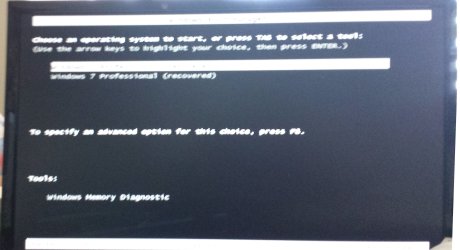
Recovery Panel displays instead of going into Windows

theaudioanalyst

New member
Power User
Local time
1:41 PM
Messages
91
I replaced the hard drive and had to recover Windows - a simple process. However, now Windows stops at the recovery panel and is confused. There are two options and the 1st doesn't work and the 2nd does work. How do I edit something so that Windows 7 x64 Pro just starts. I am sorry, it must be right in front of me but I don't see it. Please see attachment.

Thanks Stu
 

Attachments

  • Win 7.jpg
    Win 7.jpg
    515.2 KB · Views: 0

My Computer My Computer

At a glance

windows 7Intelcorsairnvidia
Computer Manufacturer/Model Number
gigabyte
OS
windows 7
CPU
Intel
Motherboard
gigbyte
Memory
corsair
Graphics Card(s)
nvidia
Sound Card
HD
Monitor(s) Displays
Samsung
Hard Drives
seagate
Delete the surplus listing in msconfig>Boot.

Then rightclick Computer>Advanced>Advanced Tools>System Protection, highlight the old C drive listing to Configure and turn it off. Then highlight the new C Recovered listing and turn it On. Otherwise you'll not have Restore points. While there adjust to make as much space for Restore points as you can afford:
http://www.sevenforums.com/tutorials/335-system-protection-change-disk-space-usage.html

If you have any other problems post them back. I'd also go over my install most thoroughly using the Troubleshooting steps under my picture below.
 
Grerocker

Kindest thanks! You just doubled the speed of a fast boot up!

I can't right click computer and find these command strings "Then rightclick Computer>Advanced>Advanced Tools>System Protection".

I have manage and properties when I right click computer.
Thanks Stu
 

My Computer My Computer

At a glance

windows 7Intelcorsairnvidia
Computer Manufacturer/Model Number
gigabyte
OS
windows 7
CPU
Intel
Motherboard
gigbyte
Memory
corsair
Graphics Card(s)
nvidia
Sound Card
HD
Monitor(s) Displays
Samsung
Hard Drives
seagate
trying to create a 10% area on the C drive gets error 0x8007007B and no info on MS website except on activation and I am activated.
 

My Computer My Computer

At a glance

windows 7Intelcorsairnvidia
Computer Manufacturer/Model Number
gigabyte
OS
windows 7
CPU
Intel
Motherboard
gigbyte
Memory
corsair
Graphics Card(s)
nvidia
Sound Card
HD
Monitor(s) Displays
Samsung
Hard Drives
seagate
I guess you discovered that System Protection - Change Disk Space Usage
takes you to the same place, and were you able to Configure the old C which is now defunct to turn it off, then Configure the Recovered C for default amount of disk space? That should be sufficient.

When getting errors like that what I do is google the exact title and text to find how others have resolved them. This is how to also resolve repeat errors in logs as explained in Troubleshooting Steps for Windows 7
 
Kool! Fixed! Fantastic! Kindest thanks!
 

My Computer My Computer

At a glance

windows 7Intelcorsairnvidia
Computer Manufacturer/Model Number
gigabyte
OS
windows 7
CPU
Intel
Motherboard
gigbyte
Memory
corsair
Graphics Card(s)
nvidia
Sound Card
HD
Monitor(s) Displays
Samsung
Hard Drives
seagate
Back
Top