Recurring "Limited access" error.

JakeC

New member
Hi guys.
So, for the past 3 weeks, my laptop has been displaying a caution sign on my internet connection on my task bar at between quarter-past and twenty-past (and sometimes quarter-to) of every hour.
The caution sign and "limited access" error stays there for roughly 40 minutes, so I get about 15-20 minutes of internet access before the error comes back the next hour.
I've noticed that when the connection does die, this is the connection I get from Google chrome...

"The server at --website-- can't be found because the DNS look-up failed. DNS is the network service that translates a website's name to its Internet address. This error is most often caused by having no connection to the Internet or a misconfigured network. It can also be caused by an unresponsive DNS server or a firewall preventing Google Chrome from accessing the network."

I originally thought this was an error with my actual wireless until today when I noticed that my internet worked on my phone when it didn't on my laptop.

Anyway, I finally remembered about the troubleshoot thing.
It did some tests and said that it had made some adjustments to my system, and hey presto, my internet returned again.

I've noticed again though that the "limited access" error and caution sign keep appearing again at the same times of each hour.
I am able to keep clicking troubleshoot and fix the problem, but I can see it becoming quite annoying having to do that each time it goes offline.

For anybody wondering, I own a Sony VAIO VPCEB3F4E with Windows 7 home premium 64bit.
I can provide other information if it is needed.

Thanks for reading and sorry if I didnt provide enough info, I'm not that great with computers :)
 

My Computer

OS
Windows 7 64bit
Hi JakeC and Welcome to Seven Forums,

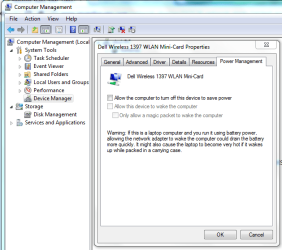
See if disabling the Power Management from your Wi-Fi adapter helps. You do this from Device Manager by right clicking Computer, choose Manage, choose Device Manager, expand Network Adapters and locate your wireless adapter right click on it choose Properties then click on Power Management tab, see image attached.

If that didn't help at all please download and install Xirrus Wi-Fi Inspector. After the installation double click the shortcut icon from your dekstop, do a screen capture of it then attach and post it here. Let's find out if there's any interference or signal issue.
Wi-Fi Inspector | Xirrus

An update will be nice.
 

Attachments

  • Power Mgmt-Capture.PNG
    Power Mgmt-Capture.PNG
    89.4 KB · Views: 57

My Computer

Computer Manufacturer/Model Number
Lenovo Desktop/Samsung Laptop
OS
Win7 & Win8 64bit
CPU
Intel i5
Internet Speed
Charter-20 Mbps
Antivirus
Avast
Browser
FF, IE9 and Chrome
Hi, thanks for replying.
I did the first thing you told me to do and unclicked the "allow computer to turn off this device to save power" button.

Ill wait to see if the error comes back :)
 

My Computer

OS
Windows 7 64bit
Hi, that didnt help, so I got a screenshot for you...

error.png
 

My Computer

OS
Windows 7 64bit
Jake 2 things are a problem here with the Xirrus read out.

First, you aren't using any encryption or security for this connection for some reason? You should definitely turn on the security and encryption for this connection, WPA personal, WPA2 security and AES encryption tend to work best with drivers that are made for Windows 7.

Secondly, you can see that your neighbor is using the same channel as you are which is channel 11, this will cause connection drops on a regular basis. You need to change the channel to 1 which is unused in your area.

Your connection should be working much better after making those adjustments. :)
 

My Computer

Computer type
PC/Desktop
Computer Manufacturer/Model Number
Home built
OS
Windows 7 Ult, Windows 8.1 Pro,
CPU
Q9650-4.275GHz, E8600 4.5GHz, E6750-3.8GHz
Motherboard
Evga 780i FTW
Memory
G.Skill PC2 9600 1200Mhz 5 5 5 15 2T
Graphics Card(s)
GTX480
Sound Card
Asus Xonar D2
Monitor(s) Displays
HannsG
Screen Resolution
1680X1050
Hard Drives
GSkill Phoenix Pro 120GB SSD
PSU
ThermalTake Toughpower 1000Watt modular
Case
ThermalTake XaserV
Cooling
Xigmatek S1283
Keyboard
Logitech G15
Mouse
Logitech G9
Internet Speed
T1
Hi, this is complicated to explain, and I'd rather not do it publicly, but I couldnt find a PM feature on here...

I have no access over the encryption - its never had an access key since I've had it (around 4 years).
The CORP_SSID and DCCWireless are both for my house so I think thats why they're running on the same channel, but I've had both of them for four years, so I dont know why they're causing problems only now.

And I have noticed that this limited access error is only happening on this laptop - the other three laptops/computers in the house are all working fine.
 

My Computer

OS
Windows 7 64bit
Do you have AVG or iTunes installed on this laptop?

Can you post a screen shot of the ipconfig/all from this laptop?

Photo bucket seems to be down for the time being.
 

My Computer

Computer type
PC/Desktop
Computer Manufacturer/Model Number
Home built
OS
Windows 7 Ult, Windows 8.1 Pro,
CPU
Q9650-4.275GHz, E8600 4.5GHz, E6750-3.8GHz
Motherboard
Evga 780i FTW
Memory
G.Skill PC2 9600 1200Mhz 5 5 5 15 2T
Graphics Card(s)
GTX480
Sound Card
Asus Xonar D2
Monitor(s) Displays
HannsG
Screen Resolution
1680X1050
Hard Drives
GSkill Phoenix Pro 120GB SSD
PSU
ThermalTake Toughpower 1000Watt modular
Case
ThermalTake XaserV
Cooling
Xigmatek S1283
Keyboard
Logitech G15
Mouse
Logitech G9
Internet Speed
T1
iTunes installs a service called Bonjour which causes connection problems on Windows systems on a regular basis.

If you can look in Windows services there should be a service running called Bonjour, you will want to disable that service then reboot and see if that has any effect on your network connection. iTunes should still work without bonjour.
 

My Computer

Computer type
PC/Desktop
Computer Manufacturer/Model Number
Home built
OS
Windows 7 Ult, Windows 8.1 Pro,
CPU
Q9650-4.275GHz, E8600 4.5GHz, E6750-3.8GHz
Motherboard
Evga 780i FTW
Memory
G.Skill PC2 9600 1200Mhz 5 5 5 15 2T
Graphics Card(s)
GTX480
Sound Card
Asus Xonar D2
Monitor(s) Displays
HannsG
Screen Resolution
1680X1050
Hard Drives
GSkill Phoenix Pro 120GB SSD
PSU
ThermalTake Toughpower 1000Watt modular
Case
ThermalTake XaserV
Cooling
Xigmatek S1283
Keyboard
Logitech G15
Mouse
Logitech G9
Internet Speed
T1
I uninstalled the Bonjour, but the problem still persists :/
 
Last edited:

My Computer

OS
Windows 7 64bit
This is the message diagnosis of the troubleshoot when it fixes the problem...

Windows Network Diagnostics Publisher details

Issues found
Problem with wireless adapter or access pointProblem with wireless adapter or access point Fixed
Reset the wireless adapter Completed
Investigate router or access point issues Not run
Refer to Windows Help and Support for more information about wireless connectivity problems Not run


Issues found Detection details

5 Problem with wireless adapter or access point Fixed

Reset the wireless adapter Completed

Network Diagnostics Log
File Name: 069E9E07-5387-426D-81C7-685334D2913B.Repair.1.etl


Investigate router or access point issues Not run

If you're connected to a hotspot or domain network, contact the network administrator. Otherwise: 1. Unplug or turn off the device. 2. After all the lights on the device are off, wait at least 10 seconds. 3. Turn the device back on or plug it back into the power outlet. To restart a router or access point that has a built-in battery, press and quickly release the Reset button.
Refer to Windows Help and Support for more information about wireless connectivity problems Not run

Windows cannot resolve your wireless connectivity issue.


Detection details

Diagnostics Information (Network Adapter)

Details about network adapter diagnosis:

Network adapter Wireless Network Connection driver information:

Description . . . . . . . . . . : Atheros AR9285 Wireless Network Adapter
Manufacturer . . . . . . . . . : Atheros Communications Inc.
Provider . . . . . . . . . . . : Microsoft
Version . . . . . . . . . . . : 2.0.0.74
Inf File Name . . . . . . . . . : C:\Windows\INF\netathrx.inf
Inf File Date . . . . . . . . . : 13 July 2009 20:37:24
Section Name . . . . . . . . . : ATHR_DEV_OS61_S30A1.ndi
Hardware ID . . . . . . . . . . : pci\ven_168c&dev_002b&subsys_e017105b
Instance Status Flags . . . . . : 0x180200a
Device Manager Status Code . . : 0
IfType . . . . . . . . . . . . : 71
Physical Media Type . . . . . . : 9


Diagnostics Information (Wireless Connectivity)
Details about wireless connectivity diagnosis:

Information for connection being diagnosed
Interface GUID: c3fa99c0-6d20-46d3-a571-87208c430cb4
Interface name: Atheros AR9285 Wireless Network Adapter
Interface type: Native WiFi

Connection incident diagnosed
Auto Configuration ID: 1
Connection ID: 1

Connection status summary
Connection started at: 2012-07-03 21:27:30-419
Profile match: Success
Pre-Association: Success
Association: Success
Security and Authentication: Success

List of visible access point(s): 4 item(s) total, 4 item(s) displayed
BSSID BSS Type PHY Signal(dB) Chnl/freq SSID
-------------------------------------------------------------------------
00-11-50-91-E8-8A Infra g -92 6 soumi07
00-21-56-CD-FB-40 Infra g -80 11 CORP_SSID1
00-21-56-CD-FB-43 Infra g -80 11 DCCWireless
1C-BD-B9-BA-56-E2 Infra <unknown> -72 6 Van Ryssen

Connection History

Information for Auto Configuration ID 1

List of visible networks: 4 item(s) total, 4 item(s) displayed
BSS Type PHY Security Signal(RSSI) Compatible SSID
------------------------------------------------------------------------------
Infra g Yes 10 Yes soumi07
Infra g Yes 40 Yes CORP_SSID1
Infra g No 38 Yes DCCWireless
Infra <unknown> Yes 56 Yes Van Ryssen

List of preferred networks: 3 item(s)
Profile: SKY20511
SSID: SKY20511
SSID length: 8
Connection mode: Infra
Security: Yes
Set by group policy: No
Connect even if network is not broadcasting: No
Connectable: No
Reason: 0x00028002
Profile: BTHomeHub-6D61
SSID: BTHomeHub-6D61
SSID length: 14
Connection mode: Infra
Security: Yes
Set by group policy: No
Connect even if network is not broadcasting: No
Connectable: No
Reason: 0x00028002
Profile: DCCWireless
SSID: DCCWireless
SSID length: 11
Connection mode: Infra
Security: No
Set by group policy: No
Connect even if network is not broadcasting: No
Connectable: Yes

Information for Connection ID 1
Connection started at: 2012-07-03 21:27:30-419
Auto Configuration ID: 1
Profile: DCCWireless
SSID: DCCWireless
SSID length: 11
Connection mode: Infra
Security: No
Pre-Association and Association
Connectivity settings provided by hardware manufacturer (IHV): No
Security settings provided by hardware manufacturer (IHV): No
Profile matches network requirements: Success
Pre-association status: Success
Association status: Success
Last AP: 00-21-56-cd-fb-43
Security and Authentication
Configured security type: Open
Configured encryption type: None
802.1X protocol: No
Key exchange initiated: Yes
Unicast key received: No
Multicast key received: No
Number of security packets received: 0
Number of security packets sent: 0
Security attempt status: Success
Connectivity
Packet statistics
Ndis Rx: 29019
Ndis Tx: 25903
Unicast decrypt success: 0
Multicast decrypt success: 0
Unicast decrypt failure: 0
Multicast decrypt failure: 0
Rx success: 5
Rx failure: 6278
Tx success: 44
Tx failure: 0
Tx retry: 9
Tx multiple retry: 0
Tx max lifetime exceeded: 0
Tx ACK failure: 4864
Roaming history: 3 item(s)
Times: 2012-07-03 22:32:16-598
Roamed from BSSID: 00-21-56-cd-fb-43
Reason: 0x00010007
Times: 2012-07-03 22:30:04-045
Roamed from BSSID: 00-21-56-cd-fb-43
Reason: 0x00010007
Times: 2012-07-03 22:27:51-148
Roamed from BSSID: 00-21-56-cd-fb-43
Reason: 0x00010001


Diagnostics Information (Wireless Connectivity)
Details about wireless connectivity diagnosis:

For complete information about this session see the wireless connectivity information event.

Helper Class: Auto Configuration
Initialize status: Success

Information for connection being diagnosed
Interface GUID: c3fa99c0-6d20-46d3-a571-87208c430cb4
Interface name: Atheros AR9285 Wireless Network Adapter
Interface type: Native WiFi

Result of diagnosis: There may be problem
 

My Computer

OS
Windows 7 64bit
Jake - I can't find anywhere if you have done the driver's update. Uninstall your Wi-Fi adapter first then manually install the driver. Here's Atheros site for you to download the latest driver.

You may also uninstall Avast using this Uninstall Utility and re-install it back if you wish.
 

My Computer

Computer Manufacturer/Model Number
Lenovo Desktop/Samsung Laptop
OS
Win7 & Win8 64bit
CPU
Intel i5
Internet Speed
Charter-20 Mbps
Antivirus
Avast
Browser
FF, IE9 and Chrome
Jake - I can't find anywhere if you have done the driver's update. Uninstall your Wi-Fi adapter first then manually install the driver. Here's Atheros site for you to download the latest driver.

You may also uninstall Avast using this Uninstall Utility and re-install it back if you wish.

Yes an updated and working driver is always good, although the complete lack of security on his wireless network is even more scary lol.

And I agree, pretty much ANY antivirus can and will cause connection problems at times.
 

My Computer

Computer type
PC/Desktop
Computer Manufacturer/Model Number
Home built
OS
Windows 7 Ult, Windows 8.1 Pro,
CPU
Q9650-4.275GHz, E8600 4.5GHz, E6750-3.8GHz
Motherboard
Evga 780i FTW
Memory
G.Skill PC2 9600 1200Mhz 5 5 5 15 2T
Graphics Card(s)
GTX480
Sound Card
Asus Xonar D2
Monitor(s) Displays
HannsG
Screen Resolution
1680X1050
Hard Drives
GSkill Phoenix Pro 120GB SSD
PSU
ThermalTake Toughpower 1000Watt modular
Case
ThermalTake XaserV
Cooling
Xigmatek S1283
Keyboard
Logitech G15
Mouse
Logitech G9
Internet Speed
T1
Hi,
I just looked for an update and it said this...

update.png

Do I still need to manually uninstall then reinstall again?
 

My Computer

OS
Windows 7 64bit
Hi,
I just looked for an update and it said this...

update.png

Do I still need to manually uninstall then reinstall again?

I have a question, is the so called access point just another router or is it a dedicated access point?

I ask this because getting two routers to work on a single network is not what I would call reliable. It greatly depends on the settings that the secondary router is using. You just can't plug them all in and expect everything to be working fine. Even if you get all the settings correct it still may not work correctly. That is why I always suggest using a dedicated access point. ;)

Here is some info on how to set up a secondary router as an access point on a single network.
http://compnetworking.about.com/od/routers/a/how-to-connect-two-routers-on-a-home-network.htm
 

My Computer

Computer type
PC/Desktop
Computer Manufacturer/Model Number
Home built
OS
Windows 7 Ult, Windows 8.1 Pro,
CPU
Q9650-4.275GHz, E8600 4.5GHz, E6750-3.8GHz
Motherboard
Evga 780i FTW
Memory
G.Skill PC2 9600 1200Mhz 5 5 5 15 2T
Graphics Card(s)
GTX480
Sound Card
Asus Xonar D2
Monitor(s) Displays
HannsG
Screen Resolution
1680X1050
Hard Drives
GSkill Phoenix Pro 120GB SSD
PSU
ThermalTake Toughpower 1000Watt modular
Case
ThermalTake XaserV
Cooling
Xigmatek S1283
Keyboard
Logitech G15
Mouse
Logitech G9
Internet Speed
T1
I have no idea what that means, but I still think this is a problem with my laptop, not the router.
I have had absolutely no problem on the other laptops or my phone when trying to connect to the internet.

Just this one.
 

My Computer

OS
Windows 7 64bit
It might be a good idea to uninstall your Atheros network adapter, then manually install the updated one, might want to do this is Safe Mode or Safe Mode with Networking. In some occasions doing this technique do help. ;)

Have you also removed Avast by using the Utility Tool?
 

My Computer

Computer Manufacturer/Model Number
Lenovo Desktop/Samsung Laptop
OS
Win7 & Win8 64bit
CPU
Intel i5
Internet Speed
Charter-20 Mbps
Antivirus
Avast
Browser
FF, IE9 and Chrome
Ill give that a go.
And yes, I have.

The problem has subsided, though not completely.
Ive now found that my wireless LAN is being turned off by itself whenever my laptop goes to sleep or is in screensaver.
It never did that before :huh:
 

My Computer

OS
Windows 7 64bit
Ill give that a go.
And yes, I have.

The problem has subsided, though not completely.
Ive now found that my wireless LAN is being turned off by itself whenever my laptop goes to sleep or is in screensaver.
It never did that before :huh:

You should be able to turn off the power saving feature by going into Device Manager then to network adaptor, right click on properties then to the power management tab and uncheck the power saving feature. ;)
 

My Computer

Computer type
PC/Desktop
Computer Manufacturer/Model Number
Home built
OS
Windows 7 Ult, Windows 8.1 Pro,
CPU
Q9650-4.275GHz, E8600 4.5GHz, E6750-3.8GHz
Motherboard
Evga 780i FTW
Memory
G.Skill PC2 9600 1200Mhz 5 5 5 15 2T
Graphics Card(s)
GTX480
Sound Card
Asus Xonar D2
Monitor(s) Displays
HannsG
Screen Resolution
1680X1050
Hard Drives
GSkill Phoenix Pro 120GB SSD
PSU
ThermalTake Toughpower 1000Watt modular
Case
ThermalTake XaserV
Cooling
Xigmatek S1283
Keyboard
Logitech G15
Mouse
Logitech G9
Internet Speed
T1
Okay, the limited access error is no longer happening but my wireless lan does keep turning itself off.
That option wasnt already checked Chev.
 

My Computer

OS
Windows 7 64bit
Back
Top