
Solved Reinstall Win 7 to a partitioned drive?

CBM

New member
Power User
Local time
7:36 PM
Messages
104
Location
Ohio
My new laptop came with two independent internal drives (1TB 500GB x 2), drives C and D. I have since partitioned Drive C. If I use the reinstallation DVD that came with the computer will I be able to reinstall the OS to the OS partition or will I have to delete the C and F partitions and format C as one single drive and install the OS to it instead.

Would it be better to use the Recovery partition to reinstall and if so will it reformat Drive C during the process, leaving me with a single, non-partitioned drive. I suppose it doesn't really matter since I can always partition the drive after installation.

Thank you in advance for your time and any assistance provided.

C.B.
 

Attachments
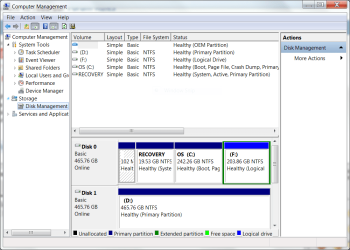
  • Laptop Partitioned Drive.PNG
    Laptop Partitioned Drive.PNG
    41 KB · Views: 16

My Computer My Computer

At a glance

1.Windows 7 Ultimate x64; 2.Windows 7 Ultimat...1.AMD Phenom II X6 1075T; 2.Intel Core i7-272...1.8GB DDR3; 2.8GB DDR31.AMD HD 5670 1GB; 2.NVIDIA GeForce GT 555M 3GB
Computer Manufacturer/Model Number
1.Dell Studio XPS 7100 Desktop; 2.Dell XPS 17 Laptop
OS
1.Windows 7 Ultimate x64; 2.Windows 7 Ultimate x64
CPU
1.AMD Phenom II X6 1075T; 2.Intel Core i7-2720QM 2.20 GHz
Memory
1.8GB DDR3; 2.8GB DDR3
Graphics Card(s)
1.AMD HD 5670 1GB; 2.NVIDIA GeForce GT 555M 3GB
Monitor(s) Displays
1.Samsung SyncMaster; 2.17.3in FHD
Screen Resolution
1.1600X900; 2.1920X1080
Hard Drives
1.1TB; 2.1TB 500GB X2
Keyboard
1.Microsoft Wireless; 2.Backlit
Mouse
Microsoft Wireless; 2.Microsoft Wireless Mobile 3500
Internet Speed
10.0 Mbps
It depends whether you have a recovery disc or a Windows DVD.

If it is a recovery disc it would have the same effect as using the recovery partition, i.e. your hard drive will be formatted and the computer will be put back to its factory state.

If you have a Windows DVD, then you can reinstall Windows on the C drive without affecting your existing disk layout.
 

My Computer My Computer

At a glance

Windows 7 Ultimate SP1 64-BitIntel Core i7 870 @ 2.93GHz8Gb Dual-Channel DDR3 @ 664MHznVidia GeForce GTX 460 1024MB dedicated RAM
Computer Manufacturer/Model Number
HP Pavilion Elite 495UK
OS
Windows 7 Ultimate SP1 64-Bit
CPU
Intel Core i7 870 @ 2.93GHz
Motherboard
MSI 2A9C (CPU1)
Memory
8Gb Dual-Channel DDR3 @ 664MHz
Graphics Card(s)
nVidia GeForce GTX 460 1024MB dedicated RAM
Sound Card
Realtek HD Audio
Monitor(s) Displays
HP2310i
Screen Resolution
1920 x 1080
Hard Drives
1x1954GB Hitachi HDS22020ALA 330 (RAID), 1x1954GB Hitachi External for backup and storage
PSU
460W
Case
HP Elite
Cooling
Air cooled
Keyboard
Logitech K750 solar-powered keyboard
Mouse
Logitech Wireless M180 mouse
Internet Speed
2Mb
Other Info
Pure Avanti Flow Internet Radio with iPod Dock, 64Gb iPod, HP USB Speakers, Sony MDR-V500 Headphones, Sony Vaio F-Series Laptop
It depends whether you have a recovery disc or a Windows DVD.

If it is a recovery disc it would have the same effect as using the recovery partition, i.e. your hard drive will be formatted and the computer will be put back to its factory state.

If you have a Windows DVD, then you can reinstall Windows on the C drive without affecting your existing disk layout.

Thank you for your prompt reply. It's an OEM reinstallation DVD. By the way, is there any advantage to using either the Recovery partition or the DVD? Is one better than the other or do they both contain the same information?

C.B.
 

My Computer My Computer

At a glance

1.Windows 7 Ultimate x64; 2.Windows 7 Ultimat...1.AMD Phenom II X6 1075T; 2.Intel Core i7-272...1.8GB DDR3; 2.8GB DDR31.AMD HD 5670 1GB; 2.NVIDIA GeForce GT 555M 3GB
Computer Manufacturer/Model Number
1.Dell Studio XPS 7100 Desktop; 2.Dell XPS 17 Laptop
OS
1.Windows 7 Ultimate x64; 2.Windows 7 Ultimate x64
CPU
1.AMD Phenom II X6 1075T; 2.Intel Core i7-2720QM 2.20 GHz
Memory
1.8GB DDR3; 2.8GB DDR3
Graphics Card(s)
1.AMD HD 5670 1GB; 2.NVIDIA GeForce GT 555M 3GB
Monitor(s) Displays
1.Samsung SyncMaster; 2.17.3in FHD
Screen Resolution
1.1600X900; 2.1920X1080
Hard Drives
1.1TB; 2.1TB 500GB X2
Keyboard
1.Microsoft Wireless; 2.Backlit
Mouse
Microsoft Wireless; 2.Microsoft Wireless Mobile 3500
Internet Speed
10.0 Mbps
You're very welcome.

The advantage of using the recovery partition as opposed to the recovery disc is that it is a lot quicker, but using either will restore your system to its factory state.

You say you have an OEM reinstallation DVD. Does it state on the DVD exactly what it is? You need to be sure that it is either a Windows 7 DVD or a factory restore DVD as there is a crucial difference.
 

My Computer My Computer

At a glance

Windows 7 Ultimate SP1 64-BitIntel Core i7 870 @ 2.93GHz8Gb Dual-Channel DDR3 @ 664MHznVidia GeForce GTX 460 1024MB dedicated RAM
Computer Manufacturer/Model Number
HP Pavilion Elite 495UK
OS
Windows 7 Ultimate SP1 64-Bit
CPU
Intel Core i7 870 @ 2.93GHz
Motherboard
MSI 2A9C (CPU1)
Memory
8Gb Dual-Channel DDR3 @ 664MHz
Graphics Card(s)
nVidia GeForce GTX 460 1024MB dedicated RAM
Sound Card
Realtek HD Audio
Monitor(s) Displays
HP2310i
Screen Resolution
1920 x 1080
Hard Drives
1x1954GB Hitachi HDS22020ALA 330 (RAID), 1x1954GB Hitachi External for backup and storage
PSU
460W
Case
HP Elite
Cooling
Air cooled
Keyboard
Logitech K750 solar-powered keyboard
Mouse
Logitech Wireless M180 mouse
Internet Speed
2Mb
Other Info
Pure Avanti Flow Internet Radio with iPod Dock, 64Gb iPod, HP USB Speakers, Sony MDR-V500 Headphones, Sony Vaio F-Series Laptop
You're very welcome.

The advantage of using the recovery partition as opposed to the recovery disc is that it is a lot quicker, but using either will restore your system to its factory state.

You say you have an OEM reinstallation DVD. Does it state on the DVD exactly what it is? You need to be sure that it is either a Windows 7 DVD or a factory restore DVD as there is a crucial difference.

The DVD says Windows 7 reinstallation DVD. Dell tells me that there is no preloaded 3rd party software on it. We'll see. I'm running it now in the laptop. I'm not concerned about how long it takes as I also have this desktop.

C.B.
 

My Computer My Computer

At a glance

1.Windows 7 Ultimate x64; 2.Windows 7 Ultimat...1.AMD Phenom II X6 1075T; 2.Intel Core i7-272...1.8GB DDR3; 2.8GB DDR31.AMD HD 5670 1GB; 2.NVIDIA GeForce GT 555M 3GB
Computer Manufacturer/Model Number
1.Dell Studio XPS 7100 Desktop; 2.Dell XPS 17 Laptop
OS
1.Windows 7 Ultimate x64; 2.Windows 7 Ultimate x64
CPU
1.AMD Phenom II X6 1075T; 2.Intel Core i7-2720QM 2.20 GHz
Memory
1.8GB DDR3; 2.8GB DDR3
Graphics Card(s)
1.AMD HD 5670 1GB; 2.NVIDIA GeForce GT 555M 3GB
Monitor(s) Displays
1.Samsung SyncMaster; 2.17.3in FHD
Screen Resolution
1.1600X900; 2.1920X1080
Hard Drives
1.1TB; 2.1TB 500GB X2
Keyboard
1.Microsoft Wireless; 2.Backlit
Mouse
Microsoft Wireless; 2.Microsoft Wireless Mobile 3500
Internet Speed
10.0 Mbps
OK, that confirms you can use that DVD to reinstall Windows without affecting your current setup. You would just need to make sure you install to the C drive as you will be given a choice during the process as to which partition you install it to.

You should also have the facility to create a set of Dell recovery discs. You can either check the Start folder, read the instruction manual or have a look on Dell's support site.

Dell - Drivers and Downloads

Just enter your Dell Service Tag to see what software and drivers are available for your computer.
 

My Computer My Computer

At a glance

Windows 7 Ultimate SP1 64-BitIntel Core i7 870 @ 2.93GHz8Gb Dual-Channel DDR3 @ 664MHznVidia GeForce GTX 460 1024MB dedicated RAM
Computer Manufacturer/Model Number
HP Pavilion Elite 495UK
OS
Windows 7 Ultimate SP1 64-Bit
CPU
Intel Core i7 870 @ 2.93GHz
Motherboard
MSI 2A9C (CPU1)
Memory
8Gb Dual-Channel DDR3 @ 664MHz
Graphics Card(s)
nVidia GeForce GTX 460 1024MB dedicated RAM
Sound Card
Realtek HD Audio
Monitor(s) Displays
HP2310i
Screen Resolution
1920 x 1080
Hard Drives
1x1954GB Hitachi HDS22020ALA 330 (RAID), 1x1954GB Hitachi External for backup and storage
PSU
460W
Case
HP Elite
Cooling
Air cooled
Keyboard
Logitech K750 solar-powered keyboard
Mouse
Logitech Wireless M180 mouse
Internet Speed
2Mb
Other Info
Pure Avanti Flow Internet Radio with iPod Dock, 64Gb iPod, HP USB Speakers, Sony MDR-V500 Headphones, Sony Vaio F-Series Laptop
OK, that confirms you can use that DVD to reinstall Windows without affecting your current setup. You would just need to make sure you install to the C drive as you will be given a choice during the process as to which partition you install it to.

You should also have the facility to create a set of Dell recovery discs. You can either check the Start folder, read the instruction manual or have a look on Dell's support site.

Dell - Drivers and Downloads

Just enter your Dell Service Tag to see what software and drivers are available for your computer.

Thanks for the reply, seavixen32. I was in fact offered the opportunity to install to the OS partition, which is what I am now doing. I'm fairly certain that I'll be given the opportunity to create a recovery disc, as that option was given when I received the laptop and fired it up for the first time.

C.B.
 

My Computer My Computer

At a glance

1.Windows 7 Ultimate x64; 2.Windows 7 Ultimat...1.AMD Phenom II X6 1075T; 2.Intel Core i7-272...1.8GB DDR3; 2.8GB DDR31.AMD HD 5670 1GB; 2.NVIDIA GeForce GT 555M 3GB
Computer Manufacturer/Model Number
1.Dell Studio XPS 7100 Desktop; 2.Dell XPS 17 Laptop
OS
1.Windows 7 Ultimate x64; 2.Windows 7 Ultimate x64
CPU
1.AMD Phenom II X6 1075T; 2.Intel Core i7-2720QM 2.20 GHz
Memory
1.8GB DDR3; 2.8GB DDR3
Graphics Card(s)
1.AMD HD 5670 1GB; 2.NVIDIA GeForce GT 555M 3GB
Monitor(s) Displays
1.Samsung SyncMaster; 2.17.3in FHD
Screen Resolution
1.1600X900; 2.1920X1080
Hard Drives
1.1TB; 2.1TB 500GB X2
Keyboard
1.Microsoft Wireless; 2.Backlit
Mouse
Microsoft Wireless; 2.Microsoft Wireless Mobile 3500
Internet Speed
10.0 Mbps
OK, just post back if you need further advice.
 

My Computer My Computer

At a glance

Windows 7 Ultimate SP1 64-BitIntel Core i7 870 @ 2.93GHz8Gb Dual-Channel DDR3 @ 664MHznVidia GeForce GTX 460 1024MB dedicated RAM
Computer Manufacturer/Model Number
HP Pavilion Elite 495UK
OS
Windows 7 Ultimate SP1 64-Bit
CPU
Intel Core i7 870 @ 2.93GHz
Motherboard
MSI 2A9C (CPU1)
Memory
8Gb Dual-Channel DDR3 @ 664MHz
Graphics Card(s)
nVidia GeForce GTX 460 1024MB dedicated RAM
Sound Card
Realtek HD Audio
Monitor(s) Displays
HP2310i
Screen Resolution
1920 x 1080
Hard Drives
1x1954GB Hitachi HDS22020ALA 330 (RAID), 1x1954GB Hitachi External for backup and storage
PSU
460W
Case
HP Elite
Cooling
Air cooled
Keyboard
Logitech K750 solar-powered keyboard
Mouse
Logitech Wireless M180 mouse
Internet Speed
2Mb
Other Info
Pure Avanti Flow Internet Radio with iPod Dock, 64Gb iPod, HP USB Speakers, Sony MDR-V500 Headphones, Sony Vaio F-Series Laptop
OK, just post back if you need further advice.

You guys are great. I'm reinstalling, even though the laptop is less than two weeks old, because I made several registry changes trying to get my 32-bit gadgets working in this 64-bit OS. I don't have any short term memory so I don't really remember what I did in the registry. The 32- bit gadgets work perfectly in this desktop, which is also x64, but only two of them work in the laptop and I don't understand why.

Thank you.

C.B.

Update: Well, the installation is finished, except for all the updating. The only difference I notice is that my previous F partition on Disk 0 has changed to E and I'm showing Disk 1 as Drive D, which is as it was; however, I'm also showing, at the bottom of the list in Disk Management CD-ROM O DVD 5.23 GB Online and W7SP1_ULTIMATE (F) 5.23 GB UDF Healthy (Primary Partition). I've never seen this happen before during any other installation I've done.
 

My Computer My Computer

At a glance

1.Windows 7 Ultimate x64; 2.Windows 7 Ultimat...1.AMD Phenom II X6 1075T; 2.Intel Core i7-272...1.8GB DDR3; 2.8GB DDR31.AMD HD 5670 1GB; 2.NVIDIA GeForce GT 555M 3GB
Computer Manufacturer/Model Number
1.Dell Studio XPS 7100 Desktop; 2.Dell XPS 17 Laptop
OS
1.Windows 7 Ultimate x64; 2.Windows 7 Ultimate x64
CPU
1.AMD Phenom II X6 1075T; 2.Intel Core i7-2720QM 2.20 GHz
Memory
1.8GB DDR3; 2.8GB DDR3
Graphics Card(s)
1.AMD HD 5670 1GB; 2.NVIDIA GeForce GT 555M 3GB
Monitor(s) Displays
1.Samsung SyncMaster; 2.17.3in FHD
Screen Resolution
1.1600X900; 2.1920X1080
Hard Drives
1.1TB; 2.1TB 500GB X2
Keyboard
1.Microsoft Wireless; 2.Backlit
Mouse
Microsoft Wireless; 2.Microsoft Wireless Mobile 3500
Internet Speed
10.0 Mbps

My Computer My Computer

At a glance

Windows 7 Ultimate SP1 64-BitIntel Core i7 870 @ 2.93GHz8Gb Dual-Channel DDR3 @ 664MHznVidia GeForce GTX 460 1024MB dedicated RAM
Computer Manufacturer/Model Number
HP Pavilion Elite 495UK
OS
Windows 7 Ultimate SP1 64-Bit
CPU
Intel Core i7 870 @ 2.93GHz
Motherboard
MSI 2A9C (CPU1)
Memory
8Gb Dual-Channel DDR3 @ 664MHz
Graphics Card(s)
nVidia GeForce GTX 460 1024MB dedicated RAM
Sound Card
Realtek HD Audio
Monitor(s) Displays
HP2310i
Screen Resolution
1920 x 1080
Hard Drives
1x1954GB Hitachi HDS22020ALA 330 (RAID), 1x1954GB Hitachi External for backup and storage
PSU
460W
Case
HP Elite
Cooling
Air cooled
Keyboard
Logitech K750 solar-powered keyboard
Mouse
Logitech Wireless M180 mouse
Internet Speed
2Mb
Other Info
Pure Avanti Flow Internet Radio with iPod Dock, 64Gb iPod, HP USB Speakers, Sony MDR-V500 Headphones, Sony Vaio F-Series Laptop
Back
Top