
Reinstall win7 from windows.old

PaulVdB

New member
Member
Local time
12:52 PM
Messages
93
Location
Antwerp
Maybe this is not the right place to put my question, nevertheless I give it a shot ! ;)
When I start the Repair Option from the DVD it asks me if I want to repair the OS which is on drive H ! When I check drive H, there's NO windows (I never put it there anyhow!) When I "DIR" my C: windows is there, windows.old is there... So when I start copying like the tutorial describes, nothing can be found ... nothing can be copied...
The reason why I want to reinstall the .old version is that I "accidentally" did a clean install over my "old (and defective)" Windows.
Windows didn't start anymore, so I wanted to do a "repair" with my original DVD. Too bad I didn't notice immediatly that there's no repair option on my (OEM!) disk, and thought that at some point it would ask me to repair or clean install. But it didn't ask me anything, and before I knew it was doing a clean install. Now I downloaded the "repair-including-DVD" through a link I found here.
So first I want to reinstall my old (and defective)version, and then (try to!) do a repair.
What went wrong in the first place ... I guess I'll have to post it in another forum :) but if you want, I'll explain it here... it has something to do with putting the computer in sleep mode / energy saving mode ...
If any one has a sollution for (at first) putting my "old" OS (on H: ?!) back, then I can TRY to repair it.
Thanks in advance, guys !

Maybe someting to mention : I have a bad HD in my system, it's been there for a loooong time, I never disconnected it out because "everything" kept working (of course I lost everything what was on it, but I had a backup... :) )
 

My Computer My Computer

Computer type
PC/Desktop
Computer Manufacturer/Model Number
Custom
OS
Windows 7 Pro x64
CPU
AMD 8-core FX 8150
Motherboard
GYGABYTE GA 990FXA-UD3
Memory
32MB
Graphics Card(s)
on mobo
Sound Card
on mobo
Hard Drives
SSD(120G) + 1 TB + 2TB + SSD(60G)
PSU
Cooler Master 750W
Case
Cooler Master
Cooling
original AMD cpu fan, + HDfan + 2x Sys fan + PSU fan
Keyboard
yes
Mouse
yes
Internet Speed
ADSL +/-40Down, +/-20Up
Antivirus
AVAST (+ZoneAlarm)
Browser
FIREFOX
Other Info
Started with Sinclair Spectrum 48KB with MASS storage : 2x microdrive 100KB
Then to ATARI : 520ST, 1040ST/4MB (with 30MB HDD), MegaSTe, TT (with 2GB HDD), Falcon
Then PC : win98, win98², winXP, win7
It seems that the Windows boot loader is on H: and Windows is on C:

Please post a snapshot of Disk Manager.
Disk Management - Post a Screen Capture Image

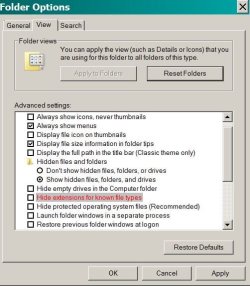
Go to Control Panel\All Control Panel Items- Folder Options - View tab
Select show hidden files folders and drives.
Unselect hide extensions of know file types (for security, this item should always be unselected )
Unselect Hide protected operating system files.
Apply
Open Explorer and on windows.old.
Post a snapshot of Explorer - expanded windows.old.
 

Attachments

  • Expl_opt.JPG
    Expl_opt.JPG
    52.6 KB · Views: 39

My Computers My Computers

System One System Two

  • Computer type
    PC/Desktop
    Computer Manufacturer/Model Number
    custom build
    OS
    Windows 7 HP 64
    CPU
    i5 6600K - 800MHz to 4200MHz
    Motherboard
    GA-Z170-HD3P
    Memory
    4+4G GSkill DDR4 3000
    Graphics Card(s)
    IG - Intel 530
    Monitor(s) Displays
    Samsung 226BW
    Screen Resolution
    1680x1050
    Hard Drives
    (1) -1 SM951 – 128GB M.2 AHCI PCIe SSD drive for Windows 7 and Lubuntu
    (2) -1 WD SATA 3 - 1T for Data
    (3) -1 WD SATA 3 - 1T for backup
    PSU
    Thermaltake 450W TR2 gold
    Keyboard
    Old and good Chicony mechanical keyboard
    Mouse
    Logitech mX performance - 9 buttons (had to disable some)
    Internet Speed
    500Mb/s
    Browser
    Firefox 64
    Other Info
    TinyWall firewall
  • Computer type
    Laptop
    System Manufacturer/Model Number
    Asus Q550LF
    OS
    Windows 7 Pro
    CPU
    i7-4500U 800MHz to 3.0GHz
    Motherboard
    Asus Q550LF
    Memory
    (4+4)G DDR3 1600
    Graphics Card(s)
    IG intel 4400 + NVIDIA GeForce GT 745M
    Sound Card
    Realtek
    Monitor(s) Displays
    LG Display LP156WF4-SPH1
    Screen Resolution
    1920 x 1080
    Hard Drives
    BX500 120G SSD for Windows and programs +
    1T HDD for data
    Internet Speed
    500 Mb/s
    Browser
    Firefox
    Other Info
    TinyWall firewall
Thanks for your fast reply, MegaHerz !
I think it's safe that I don't install anything in the "Clean Install". Because of this, I can't go on the internet (LAN not installed!...) to post screenshots. So I hope that PICTURES will help.
Please let me know if there's anything else you need.

Thank you so much for helping me ! (Gracias?) :)

Dropbox - 2016-10-19 15.25.32.jpg
Dropbox - 2016-10-19 15.29.18.jpg
Dropbox - 2016-10-19 15.30.25.jpg

2016-10-19%2015.30.25.jpg

2016-10-19%2015.29.18.jpg

2016-10-19%2015.25.32.jpg
 

My Computer My Computer

Computer type
PC/Desktop
Computer Manufacturer/Model Number
Custom
OS
Windows 7 Pro x64
CPU
AMD 8-core FX 8150
Motherboard
GYGABYTE GA 990FXA-UD3
Memory
32MB
Graphics Card(s)
on mobo
Sound Card
on mobo
Hard Drives
SSD(120G) + 1 TB + 2TB + SSD(60G)
PSU
Cooler Master 750W
Case
Cooler Master
Cooling
original AMD cpu fan, + HDfan + 2x Sys fan + PSU fan
Keyboard
yes
Mouse
yes
Internet Speed
ADSL +/-40Down, +/-20Up
Antivirus
AVAST (+ZoneAlarm)
Browser
FIREFOX
Other Info
Started with Sinclair Spectrum 48KB with MASS storage : 2x microdrive 100KB
Then to ATARI : 520ST, 1040ST/4MB (with 30MB HDD), MegaSTe, TT (with 2GB HDD), Falcon
Then PC : win98, win98², winXP, win7
Paul,
First of all, you should make your actual (New) windows work properly.
Open device manager, find what items has drivers missing. Make them search on the old windows. As the old was working, all drivers are under C:\windows.old\windows.
Can you please expand the C: drive on the left side so we can see the tree 2016-10-19 15.29.18.jpg?
I've never done a Windows roll back from Windows.old so I'll do some search to find some answers.
Already did https://support.microsoft.com/en-us/kb/971760
In Brazil we speak Portuguese, not Spanish. As my father was Belgium, I also speak some french.
à bientôt

Edit.: When tying to recover, disconnect all other drives, living only the C: drive connected to the MB
 

My Computers My Computers

System One System Two

  • Computer type
    PC/Desktop
    Computer Manufacturer/Model Number
    custom build
    OS
    Windows 7 HP 64
    CPU
    i5 6600K - 800MHz to 4200MHz
    Motherboard
    GA-Z170-HD3P
    Memory
    4+4G GSkill DDR4 3000
    Graphics Card(s)
    IG - Intel 530
    Monitor(s) Displays
    Samsung 226BW
    Screen Resolution
    1680x1050
    Hard Drives
    (1) -1 SM951 – 128GB M.2 AHCI PCIe SSD drive for Windows 7 and Lubuntu
    (2) -1 WD SATA 3 - 1T for Data
    (3) -1 WD SATA 3 - 1T for backup
    PSU
    Thermaltake 450W TR2 gold
    Keyboard
    Old and good Chicony mechanical keyboard
    Mouse
    Logitech mX performance - 9 buttons (had to disable some)
    Internet Speed
    500Mb/s
    Browser
    Firefox 64
    Other Info
    TinyWall firewall
  • Computer type
    Laptop
    System Manufacturer/Model Number
    Asus Q550LF
    OS
    Windows 7 Pro
    CPU
    i7-4500U 800MHz to 3.0GHz
    Motherboard
    Asus Q550LF
    Memory
    (4+4)G DDR3 1600
    Graphics Card(s)
    IG intel 4400 + NVIDIA GeForce GT 745M
    Sound Card
    Realtek
    Monitor(s) Displays
    LG Display LP156WF4-SPH1
    Screen Resolution
    1920 x 1080
    Hard Drives
    BX500 120G SSD for Windows and programs +
    1T HDD for data
    Internet Speed
    500 Mb/s
    Browser
    Firefox
    Other Info
    TinyWall firewall
Hey thanks again Megahertz !
I reinstalled all drivers. e.g. I can go on the internet now :)
I'm not sure what you mean by expanding the C: drive... Nevetheless here's a few screenshots. Lemme know if know if it's what you need or not ...
This (2016-10-19 15.29.18.jpg) picture is a picture from the diskmanagement, and there's no left column that can be expanded...

Dropbox - Screenshot 2016-10-20 06.36.48.png
Dropbox - Screenshot 2016-10-20 06.46.00.png

Here is a pic from what I get when I want to "repair"
Dropbox - 2016-10-20 16.04.34.jpg
Dropbox - 2016-10-20 16.03.33.jpg
 
Last edited:

My Computer My Computer

Computer type
PC/Desktop
Computer Manufacturer/Model Number
Custom
OS
Windows 7 Pro x64
CPU
AMD 8-core FX 8150
Motherboard
GYGABYTE GA 990FXA-UD3
Memory
32MB
Graphics Card(s)
on mobo
Sound Card
on mobo
Hard Drives
SSD(120G) + 1 TB + 2TB + SSD(60G)
PSU
Cooler Master 750W
Case
Cooler Master
Cooling
original AMD cpu fan, + HDfan + 2x Sys fan + PSU fan
Keyboard
yes
Mouse
yes
Internet Speed
ADSL +/-40Down, +/-20Up
Antivirus
AVAST (+ZoneAlarm)
Browser
FIREFOX
Other Info
Started with Sinclair Spectrum 48KB with MASS storage : 2x microdrive 100KB
Then to ATARI : 520ST, 1040ST/4MB (with 30MB HDD), MegaSTe, TT (with 2GB HDD), Falcon
Then PC : win98, win98², winXP, win7

My Computer My Computer

Computer type
PC/Desktop
Computer Manufacturer/Model Number
Custom
OS
Windows 7 Pro x64
CPU
AMD 8-core FX 8150
Motherboard
GYGABYTE GA 990FXA-UD3
Memory
32MB
Graphics Card(s)
on mobo
Sound Card
on mobo
Hard Drives
SSD(120G) + 1 TB + 2TB + SSD(60G)
PSU
Cooler Master 750W
Case
Cooler Master
Cooling
original AMD cpu fan, + HDfan + 2x Sys fan + PSU fan
Keyboard
yes
Mouse
yes
Internet Speed
ADSL +/-40Down, +/-20Up
Antivirus
AVAST (+ZoneAlarm)
Browser
FIREFOX
Other Info
Started with Sinclair Spectrum 48KB with MASS storage : 2x microdrive 100KB
Then to ATARI : 520ST, 1040ST/4MB (with 30MB HDD), MegaSTe, TT (with 2GB HDD), Falcon
Then PC : win98, win98², winXP, win7
Backup all your data from C: drive. Your old data is under Windows.old\users\Paul
Disconnect all other drives from MB. Very important
Boot from the installation disk. Go to repair and launch the command prompt. type dir h: If it shows a Windows.old folder, yes you're on the right drive. Then do what was on the link I gave you.
 

My Computers My Computers

System One System Two

  • Computer type
    PC/Desktop
    Computer Manufacturer/Model Number
    custom build
    OS
    Windows 7 HP 64
    CPU
    i5 6600K - 800MHz to 4200MHz
    Motherboard
    GA-Z170-HD3P
    Memory
    4+4G GSkill DDR4 3000
    Graphics Card(s)
    IG - Intel 530
    Monitor(s) Displays
    Samsung 226BW
    Screen Resolution
    1680x1050
    Hard Drives
    (1) -1 SM951 – 128GB M.2 AHCI PCIe SSD drive for Windows 7 and Lubuntu
    (2) -1 WD SATA 3 - 1T for Data
    (3) -1 WD SATA 3 - 1T for backup
    PSU
    Thermaltake 450W TR2 gold
    Keyboard
    Old and good Chicony mechanical keyboard
    Mouse
    Logitech mX performance - 9 buttons (had to disable some)
    Internet Speed
    500Mb/s
    Browser
    Firefox 64
    Other Info
    TinyWall firewall
  • Computer type
    Laptop
    System Manufacturer/Model Number
    Asus Q550LF
    OS
    Windows 7 Pro
    CPU
    i7-4500U 800MHz to 3.0GHz
    Motherboard
    Asus Q550LF
    Memory
    (4+4)G DDR3 1600
    Graphics Card(s)
    IG intel 4400 + NVIDIA GeForce GT 745M
    Sound Card
    Realtek
    Monitor(s) Displays
    LG Display LP156WF4-SPH1
    Screen Resolution
    1920 x 1080
    Hard Drives
    BX500 120G SSD for Windows and programs +
    1T HDD for data
    Internet Speed
    500 Mb/s
    Browser
    Firefox
    Other Info
    TinyWall firewall
Hey thanx, Megahertz !
Making the backup will take some time I guess, so I'll do it in this weekend. (In the meanwhile I got a few important progs working again.)
The link https://support.microsoft.com/en-us/kb/971760 only gives me a blanco page, but Instead I'll follow the tutorial that I found here on Sevenforums. (Windows.old folder - Restore into a new installation)
I'll be back here after the weekend.
Again : thanks alot for your help.
Let's keep our fingers X'ed...

PS.Although I'm in the northern (Flemish/Dutch speaking) part of Belgium, lemme know if you visit you father's country of origin ;)
 

My Computer My Computer

Computer type
PC/Desktop
Computer Manufacturer/Model Number
Custom
OS
Windows 7 Pro x64
CPU
AMD 8-core FX 8150
Motherboard
GYGABYTE GA 990FXA-UD3
Memory
32MB
Graphics Card(s)
on mobo
Sound Card
on mobo
Hard Drives
SSD(120G) + 1 TB + 2TB + SSD(60G)
PSU
Cooler Master 750W
Case
Cooler Master
Cooling
original AMD cpu fan, + HDfan + 2x Sys fan + PSU fan
Keyboard
yes
Mouse
yes
Internet Speed
ADSL +/-40Down, +/-20Up
Antivirus
AVAST (+ZoneAlarm)
Browser
FIREFOX
Other Info
Started with Sinclair Spectrum 48KB with MASS storage : 2x microdrive 100KB
Then to ATARI : 520ST, 1040ST/4MB (with 30MB HDD), MegaSTe, TT (with 2GB HDD), Falcon
Then PC : win98, win98², winXP, win7
Paul, if you disconnected all other drives from MB, (Very important) as I recommended, the windows installation should be on C: not H:, but as I wrote, type dir c: to find out.
The Microsoft and the tutorial on the forums do the same, but it's for win 7 32 bits, not 64.

I'll will do a batch file for you with all commands. Will attach later.
Good week end.
 
Last edited:

My Computers My Computers

System One System Two

  • Computer type
    PC/Desktop
    Computer Manufacturer/Model Number
    custom build
    OS
    Windows 7 HP 64
    CPU
    i5 6600K - 800MHz to 4200MHz
    Motherboard
    GA-Z170-HD3P
    Memory
    4+4G GSkill DDR4 3000
    Graphics Card(s)
    IG - Intel 530
    Monitor(s) Displays
    Samsung 226BW
    Screen Resolution
    1680x1050
    Hard Drives
    (1) -1 SM951 – 128GB M.2 AHCI PCIe SSD drive for Windows 7 and Lubuntu
    (2) -1 WD SATA 3 - 1T for Data
    (3) -1 WD SATA 3 - 1T for backup
    PSU
    Thermaltake 450W TR2 gold
    Keyboard
    Old and good Chicony mechanical keyboard
    Mouse
    Logitech mX performance - 9 buttons (had to disable some)
    Internet Speed
    500Mb/s
    Browser
    Firefox 64
    Other Info
    TinyWall firewall
  • Computer type
    Laptop
    System Manufacturer/Model Number
    Asus Q550LF
    OS
    Windows 7 Pro
    CPU
    i7-4500U 800MHz to 3.0GHz
    Motherboard
    Asus Q550LF
    Memory
    (4+4)G DDR3 1600
    Graphics Card(s)
    IG intel 4400 + NVIDIA GeForce GT 745M
    Sound Card
    Realtek
    Monitor(s) Displays
    LG Display LP156WF4-SPH1
    Screen Resolution
    1920 x 1080
    Hard Drives
    BX500 120G SSD for Windows and programs +
    1T HDD for data
    Internet Speed
    500 Mb/s
    Browser
    Firefox
    Other Info
    TinyWall firewall
Paul, Print this instructions so you're able to follow later.

Attached is the Restore.cmd.txt file.
Download it and place at the root of C:.
Rename it to Restore.cmd
Do NOT execute it under Windows or it will screw all your installation.

Backup all your data from C: drive. Your old data is under Windows.old\users\Paul
Shutdown
Disconnect all other drives from MB. Very important

Boot with the Windows installation disk.
In the Install Windows window, select a language, a time, a currency, a keyboard input method or other input method, and then click Next.
In the Install Windows window, click Repair your computer.
In the System Recovery Options window, click the version of the Windows 7 operating system that you want to repair, and then click Next.
In the System Recovery Options window, click Command Prompt.

The Command Prompt window opens, and it displays the command prompt. The command prompt is where you will type the commands that are described in the following steps.

C: (enter)
dir (enter)

If you see a Windows.old folder you're on the right disk.
type Restore.cmd (enter)

It will restore your old Windows
I don't think you will need to execute the command D:\boot\bootsect /nt60 C: as you are restoring from Win 7 to Win 7.

Type exit (enter)

Reboot
If everything was correct, you will be booting on the old installation.
 

Attachments

Last edited:

My Computers My Computers

System One System Two

  • Computer type
    PC/Desktop
    Computer Manufacturer/Model Number
    custom build
    OS
    Windows 7 HP 64
    CPU
    i5 6600K - 800MHz to 4200MHz
    Motherboard
    GA-Z170-HD3P
    Memory
    4+4G GSkill DDR4 3000
    Graphics Card(s)
    IG - Intel 530
    Monitor(s) Displays
    Samsung 226BW
    Screen Resolution
    1680x1050
    Hard Drives
    (1) -1 SM951 – 128GB M.2 AHCI PCIe SSD drive for Windows 7 and Lubuntu
    (2) -1 WD SATA 3 - 1T for Data
    (3) -1 WD SATA 3 - 1T for backup
    PSU
    Thermaltake 450W TR2 gold
    Keyboard
    Old and good Chicony mechanical keyboard
    Mouse
    Logitech mX performance - 9 buttons (had to disable some)
    Internet Speed
    500Mb/s
    Browser
    Firefox 64
    Other Info
    TinyWall firewall
  • Computer type
    Laptop
    System Manufacturer/Model Number
    Asus Q550LF
    OS
    Windows 7 Pro
    CPU
    i7-4500U 800MHz to 3.0GHz
    Motherboard
    Asus Q550LF
    Memory
    (4+4)G DDR3 1600
    Graphics Card(s)
    IG intel 4400 + NVIDIA GeForce GT 745M
    Sound Card
    Realtek
    Monitor(s) Displays
    LG Display LP156WF4-SPH1
    Screen Resolution
    1920 x 1080
    Hard Drives
    BX500 120G SSD for Windows and programs +
    1T HDD for data
    Internet Speed
    500 Mb/s
    Browser
    Firefox
    Other Info
    TinyWall firewall
I'm sorry for the late reply.
Reading stuff about the "Windows.old - restore" I found out that chances are good that I have to reinstall a lot of stuff after I did the restore. Now most of my programs are on my E: drive. I saw that alot that just work. I "only" have to reinstall a few "heavy" progs like Windows Office. So I decided to NOT do the "old.windows" retore, but just reinstall the progs I need one by one on my "new" Windows 7 installation.
Nevertheless, I bookmarked this page because I'm sure it will be very useable in the future. I also want to express my thanks to all the people that helped me with this issue (especially MHz07!)
 

My Computer My Computer

Computer type
PC/Desktop
Computer Manufacturer/Model Number
Custom
OS
Windows 7 Pro x64
CPU
AMD 8-core FX 8150
Motherboard
GYGABYTE GA 990FXA-UD3
Memory
32MB
Graphics Card(s)
on mobo
Sound Card
on mobo
Hard Drives
SSD(120G) + 1 TB + 2TB + SSD(60G)
PSU
Cooler Master 750W
Case
Cooler Master
Cooling
original AMD cpu fan, + HDfan + 2x Sys fan + PSU fan
Keyboard
yes
Mouse
yes
Internet Speed
ADSL +/-40Down, +/-20Up
Antivirus
AVAST (+ZoneAlarm)
Browser
FIREFOX
Other Info
Started with Sinclair Spectrum 48KB with MASS storage : 2x microdrive 100KB
Then to ATARI : 520ST, 1040ST/4MB (with 30MB HDD), MegaSTe, TT (with 2GB HDD), Falcon
Then PC : win98, win98², winXP, win7
Back
Top