Remnants of Cyberlink/Powerdvd everywhere. Cant get rid of

rocks911

New member
Member
VIP
Local time
5:13 AM
Messages
100
I run a W7 64 bit PC

So I used an automated program to update my Bluray player firmware and unfortunately Cyberlink's suite of "tools" came with it. When I first installed the Bluray player I had the same problem, getting entirely rid of all the bloatware is difficult at best. I totally forgot that with the automated program the whole Cyberlink suite would install again and now I cant get rid of it.

I went to their site but found no help. They are tremendous at pushing their products but dont offer much help in getting their products entirely off a machine once installed.

I managed to get rid of most of the suite with CC Cleaner (Cyberlinks suite components dont even show up in Windows Uninstall list) but cant get rid of PowerDVD. I go to uninstall and the progress bar zooms across the screen but then stops with an error 1316 message and the progress bar zooms back to start and I am left with PowerDVD in the CCCleaner uninstall list.

I suppose I will have to reinstall the whole suite again to maybe get it to uninstall completely?

Anybody have this problem besides me?
 

My Computer My Computer

At a glance

Windows 7 home premium 64 bitAMD Phenom IIx6 1065T 2.90 GHz8 GBATI Radeon HD 5570
Computer Manufacturer/Model Number
HP model HPE-519C
OS
Windows 7 home premium 64 bit
CPU
AMD Phenom IIx6 1065T 2.90 GHz
Motherboard
Foxconn H-RS880-UATX (ALOE)
Memory
8 GB
Graphics Card(s)
ATI Radeon HD 5570

My Computer My Computer

At a glance

Windows 7 ultimate 64-bitIntel I7 2600K 3.4ghzCorsair 16gb ddr3 1600mhzNvidia Geforce gt 430
Computer type
PC/Desktop
Computer Manufacturer/Model Number
custom built
OS
Windows 7 ultimate 64-bit
CPU
Intel I7 2600K 3.4ghz
Motherboard
Asus Evo P8P67
Memory
Corsair 16gb ddr3 1600mhz
Graphics Card(s)
Nvidia Geforce gt 430
Sound Card
Sound Blaster Titanium x-fi pci express
Monitor(s) Displays
Dell E198WFP
Hard Drives
1 western digital 2TB drive.
PSU
Antec 1200 watt
Case
Inwin Dragon Rider
Cooling
6 case supplied cooling fans
Keyboard
logitech mk700
Mouse
logitech m705
Internet Speed
25-50mbps download; 10mbps upload(i think)
Antivirus
avg free 2014
Browser
mozilla firefox
Other Info
Also have a pretty bad speaker setup which is a klipsch promedia 5.1 surround speaker setup with huge subwoofer and lg blu ray player/writer. Also a hp officejet pro 8600 plus wireless all in one and a logitech s7500 webcam.
After reinstalling the program, using Revo uninstaller as suggested by Matts, you can also download autoruns to make sure no other startup files are present

Autoruns for Windows

Download Autoruns, unzip the folder, extract Autoruns.exe to the Desktop > Right-click + Run as Administrator > Right-click and delete all entries that are in Yellow.
 

My Computer My Computer

At a glance

Dual Boot: Windows 8.1 & Server 2012r2 VMs: K...A10 7700 Kavari SteamRoller8GB DDR3 SDRAM PC3-85001024MB ATI AMD Radeon R7 Graphics
Computer type
PC/Desktop
Computer Manufacturer/Model Number
Custom
OS
Dual Boot: Windows 8.1 & Server 2012r2 VMs: Kali Linux, Backbox, Matriux, Windows 8.1
CPU
A10 7700 Kavari SteamRoller
Motherboard
ASUS A88XM-PLUS (FM2+ )
Memory
8GB DDR3 SDRAM PC3-8500
Graphics Card(s)
1024MB ATI AMD Radeon R7 Graphics
Sound Card
Realtek High Definition Audio
Monitor(s) Displays
Samsung
Hard Drives
SSD Crucial 120gb
WD VelociRaptor 1tb
PSU
Rosewill Gaming 650w
Case
Rosewill Galaxy 2
Internet Speed
55/12
Antivirus
Malwarebytes, MSE, SAS
Browser
FireFox, Chrome
Cyberlink products removal

Here's my thoughts. Revo Uninstaller works fine on 32bit machines but for 64bit machines you need the paid for version. A better alternative for 64bit machines is Geek Uninstaller. Personally I wouldn't rely on Ccleaner to remove programs.

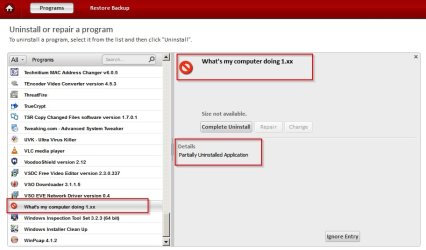
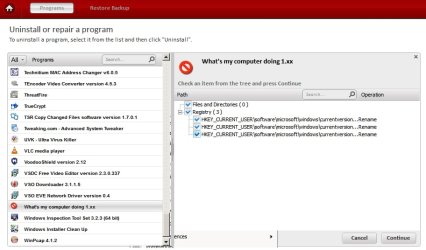
If you like you can try running Comodo Programs Manager as it will detect and remove partially installed applications and force delete files on the next boot if they're in use and can't be deleted.

Partially installed application:

COMODO Programs Manager.jpg

Removal of leftovers:

COMODO Programs Manager 2.jpg

Links:

Comodo Programs Manager

Geek Uninstaller with 64bit support
 

My Computer My Computer

At a glance

Microsoft Windows 7 Home Premium 64-bit 7601 ...AMD C-60 APU with Radeon(tm) HD Graphics4.00 GBAMD Radeon HD 6290 Graphics
Computer type
Laptop
Computer Manufacturer/Model Number
ASUS
OS
Microsoft Windows 7 Home Premium 64-bit 7601 Multiprocessor Free Service Pack 1
CPU
AMD C-60 APU with Radeon(tm) HD Graphics
Motherboard
ASUSTeK COMPUTER INC. X501U
Memory
4.00 GB
Graphics Card(s)
AMD Radeon HD 6290 Graphics
Sound Card
(1) AMD High Definition Audio Device (2) Realtek High Defi
Screen Resolution
1366 x 768 x 32 bits (4294967296 colors) @ 60 Hz
Hard Drives
Hitachi HTS545050A7E380 SATA Disk Device
Antivirus
Comodo CIS & FW, SecureAplus App Whitelisting, Threatfire
Browser
Cyberfox 64bit, Opera 64bit, Airfox
Other Info
Spy-The-Spy, HitmanPro.Alert, Norton Connect Safe, MJRegWatcher, BitDefender TrafficLight, Voodoo Shield, Zemana AntiMalware
Thanks for the suggestion Callender. I'll give it a shot.
 

My Computer My Computer

At a glance

Dual Boot: Windows 8.1 & Server 2012r2 VMs: K...A10 7700 Kavari SteamRoller8GB DDR3 SDRAM PC3-85001024MB ATI AMD Radeon R7 Graphics
Computer type
PC/Desktop
Computer Manufacturer/Model Number
Custom
OS
Dual Boot: Windows 8.1 & Server 2012r2 VMs: Kali Linux, Backbox, Matriux, Windows 8.1
CPU
A10 7700 Kavari SteamRoller
Motherboard
ASUS A88XM-PLUS (FM2+ )
Memory
8GB DDR3 SDRAM PC3-8500
Graphics Card(s)
1024MB ATI AMD Radeon R7 Graphics
Sound Card
Realtek High Definition Audio
Monitor(s) Displays
Samsung
Hard Drives
SSD Crucial 120gb
WD VelociRaptor 1tb
PSU
Rosewill Gaming 650w
Case
Rosewill Galaxy 2
Internet Speed
55/12
Antivirus
Malwarebytes, MSE, SAS
Browser
FireFox, Chrome
Back
Top