Remote Control (Teamviewer) + Aero/Basic woes

Echo147

New member
Local time
9:41 PM
Messages
15
Is there any way I can explicitly force 7 to not switch back to the basic theme when things get a bit slow?

I'm remote controlling it with Teamviewer through a wireless broadband dongle, so the connection does sometimes get a bit patchy - then 7 is all too eager to drop Aero, thinking the local machine is struggling.

I can't try an RDP server unfortunately, 'cause MS stung me on Home Premium! Although I'm guessing the same would happen.

Cheers :D
 

My Computer

OS
Windows 7 Home Premium (x64)
CPU
Intel i7 920 @ 3.6ghz
Motherboard
Asus P6T Deluxe
Memory
OCZ 6GB Gold
Graphics Card(s)
Sapphire 5870 Vapor-X
Sound Card
Asus Xonar D1
Monitor(s) Displays
Dell 2408WFP
Screen Resolution
1920x1200
Hard Drives
[Boot: Intel X25-V] [Games / scratch disk: 3 x Samsung F3 500GB in RAID0] [Data: Several assorted drives]
PSU
BFG 800W ES
Case
LianLi PC-A71B
Keyboard
Logitech Illuminated Keyboard
Mouse
Razer Diamondback
I got the same problem, does someone has an idea?
 

My Computer

Computer Manufacturer/Model Number
Own Build
OS
Home Premium x64
CPU
Core2Quad Q6700
Motherboard
ASUS P5K Premium
Memory
4x1GB A-Data Vitesta Extreme DDR2-800
Graphics Card(s)
Sapphire ATI 4870
Sound Card
Creative X-Fi XtremeGamer
Monitor(s) Displays
hp w2408h & Samsung LE40B650
Hard Drives
2x Samsung HD502IJ 500GB
1x WD Green 500GB
PSU
BeQuiet StraightPower 500W
Case
Coolermaster CM610
Cooling
CPU: Water, Rest: Air
Keyboard
Logitech G15 (blue)
Mouse
Logitech MX518
Internet Speed
Cable with 25MBit/s Down and 1MBit/s Up
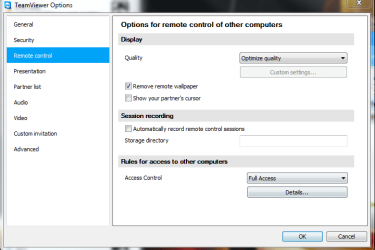
Try changing the quality setting to "Optimize for quality".

Capture.PNG
 

My Computer

Computer Manufacturer/Model Number
Custom
OS
Windows 7 Professional x64
CPU
Intel i7 2600K OC'd @ 4620 MHz
Motherboard
Asus P8Z68-V Pro
Memory
16GB GSkill Sniper 2133 Mhz (4x4GB)
Graphics Card(s)
EVGA GeForce GTX 480 SuperClocked+
Sound Card
Realtek High Definition Audio
Monitor(s) Displays
2x Acer S273HLbmii 27"
Screen Resolution
2 x 1920x1080
Hard Drives
64GB Crucial M4 SSD

Storage: Hitachi 1TB 5400RPM, Samsung 1.5TB 5400RPM
PSU
Corsair HW Series 750w (modular)
Case
Cooler Master HAF 932 Advanced Blue Edition
Cooling
CM Hyper 212+ CPU cooler, 3x 230mm + 1x 140mm case fans
Keyboard
Logitech MK320 (wireless)
Mouse
Logitech MK320 (wireless)
Internet Speed
30 Mb/s : 2 Mb/s
I would agree with Jonathan I had similar problem with MSN Messenger remote assistance until I changed for Optimal performance.


Steve
 

My Computer

Computer Manufacturer/Model Number
Over Clockers Ultima Viper 2.80Ghz
OS
Windows 7 Ultimate 64 - OEM Service Pack 1
CPU
Intel Core i7 930 2.80Ghz Bloomfield Socket LGA 1366
Motherboard
Gigabyte GA-X58A-UD3R Intel X58 Socket 1366 DDR3
Memory
Patriot Viper 6GB 3x2GB DDR3 PC3-1200C9 1600Mhz Tri Channel
Graphics Card(s)
Asus ATI Radeon HD 5770 CuCore 1024MB GDDR5 PCI Express
Sound Card
Realtek ALC889 @ Intel 82801JB ICH10 - High Definition Audio
Monitor(s) Displays
Samsung SyncMaster 920N 19"
Screen Resolution
1280*1024
Hard Drives
1 x OCZ Vertex2 Series 120GB 2.5" SATA-II SSD
1 x Seagate Barracuda 7200.12 1TB SATA-II 32MB Cache
1 x Western Digital Caviar Green 2TB SATA-II 64 MB Cache
PSU
Corsair TX 650W ATX SLi
Case
Antec 902 Ultimate Gaming Case Black
Cooling
Prolimatech Megahalems Rev B CPU Cooler Socket 775/1156/1366
Keyboard
Microsoft Comfort Curve Keyboard
Mouse
Microsoft Optical USB
Internet Speed
ADSL24 FTTC 34.2 Mbps Down 7.1Mbps Up
Other Info
OcUK 22x DVDSATA ReWriter Black
Akasa AK-FN058 Apache Black Super Silent 120mm Fan
Printer Epson Stylus Photo R300
Scanner Canon Canoscan 8000F

Back
Top