Remote Desktop

popwarfour

New member
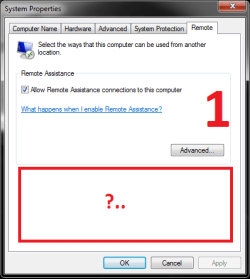
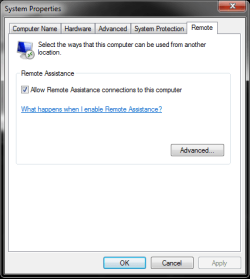
OS = Windows 7 Home premium. I can cannect from my windows 7 laptop (running wifi) to my Lan based XP using remote desktop however, i cannot connect from the XP to the windows 7. Even my windows mobile can connect to the Xp but not the windows 7. I suspect this The Image has something to do with the problem... No remote desktop only remote assistance...

I have remote desktop connection in my accesories folder but thats only for connected to other PC's...

Any ideas (updates / downloads)
 

Attachments
  • Untitled.png
    Untitled.png
    30.6 KB · Views: 5

My Computer

Computer Manufacturer/Model Number
HP / DV6-1259dx
OS
Windows 7 Home Premium
CPU
IntelCore 2 Duo CPU
Memory
6GB RAM
Hard Drives
500GB HD

My Computer

Computer Manufacturer/Model Number
built up
OS
windows 7
CPU
Phenom II AMD Dragon 3.5Ghz
Memory
DDR3 4GB
Graphics Card(s)
ATI Radeon 512Mb
Monitor(s) Displays
HP L1506
Screen Resolution
1152 x 864
Hard Drives
WDC 1 TB SATA-II Green Power
Keyboard
HP wireless keyboard
Mouse
HP Optic
Internet Speed
1GB
hello,
what suppose you want to be.. i'm little don't understand about your question,
if you want to remote desktop.http://www.sevenforums.com/tutorials/3922-remote-desktop-connection-rdc-network.html this may help you.
but if you just want to bring the data from other OS, you can use sharing one, http://www.sevenforums.com/tutorials/53830-file-sharing-between-xp-w7-vice-versa.html

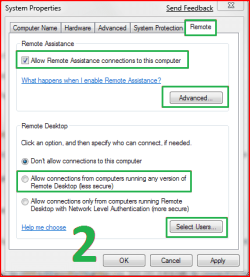
Ill look around your links. but as you can see from my first picture there is no option to allow remote connection from any computer to my windows 7 home premium because; remote desktop hosting isn't a part of home premium its only part of windows 7 ultimate (so you can view but you cant host, i need to host).

Does anyone have any links for download
 

My Computer

Computer Manufacturer/Model Number
HP / DV6-1259dx
OS
Windows 7 Home Premium
CPU
IntelCore 2 Duo CPU
Memory
6GB RAM
Hard Drives
500GB HD
to make it reallllllly simple,
I need Image 1 (Left) to look like Image 2 (Right)
 

Attachments

  • Untitled.png
    Untitled.png
    34.5 KB · Views: 1
  • Untitled2.png
    Untitled2.png
    44.1 KB · Views: 1

My Computer

Computer Manufacturer/Model Number
HP / DV6-1259dx
OS
Windows 7 Home Premium
CPU
IntelCore 2 Duo CPU
Memory
6GB RAM
Hard Drives
500GB HD
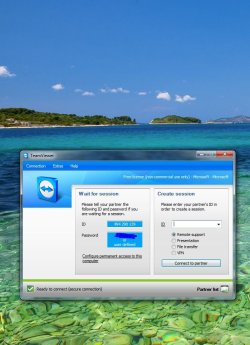
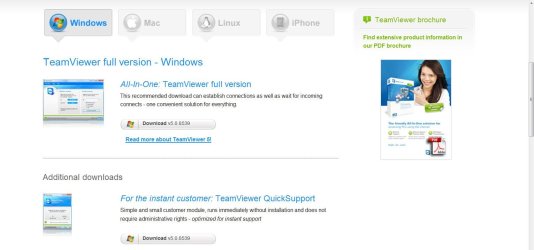
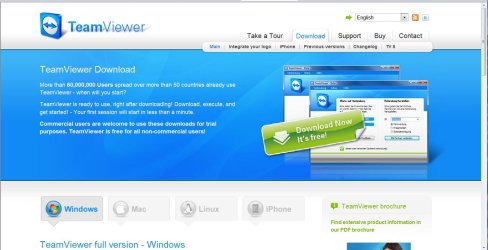
Have you considered using TeamViewer for a remote connection & transfers ? ;)
 

Attachments

  • TeamViewer_wait.JPG
    TeamViewer_wait.JPG
    109.5 KB · Views: 4
  • TeamV-003.JPG
    TeamV-003.JPG
    175.7 KB · Views: 3
  • TeamV_002.JPG
    TeamV_002.JPG
    103.6 KB · Views: 3
  • TeamV_001.JPG
    TeamV_001.JPG
    149.1 KB · Views: 3

My Computer

Computer type
PC/Desktop
Computer Manufacturer/Model Number
Built them myself, Science Experiments !
OS
Win7 Enterprise, Win7 x86 (Ult 7600), Win7 x64 Ult 7600, TechNet RTM on AMD x64 (2.8Ghz)
CPU
AMD fx8350 4ghz, AMD-32 2400mhz, AMD-64 3200mhz, AMDx64 2.8G
Motherboard
SIS 755, ECS-K8M890M-M (Ult 7600), GigaByte & others
Memory
2gb, 4gb on the Ult 7600, 4gb on Technet RTM, 32gb on FX8350
Graphics Card(s)
Draw my own Graphics, several nVidia cards
Sound Card
on motherboard
Monitor(s) Displays
19" flat scr, 28" I-Inc widescr,22" Emprex Widescr, 23" Acer
Screen Resolution
1280 x 1024, 1440 x 900, 1920 x 1080
Hard Drives
6 pata Ide HD's & 2 Sata HD's
added 80gb external on Ult 7600 computer,
numerous extra 1tb, 2TB, 3Tb SATA HD's
A collection of ext HD Docks w/ HDs
PSU
430w, 550w, 600w, 700, 800, etc
Case
All Generic Full Towers
Cooling
Open Air & a few fans, some w/ colored LEDs
Keyboard
Compaq & Dell recycled from GoodWill
Mouse
Made in China Optical Wired Mouse
Internet Speed
Fast Cable InterNet
Antivirus
AVG Free on 24 different Desktops, NO Problems!
Browser
IE 8 is preferred, but use FireFox sometimes
Other Info
Linksys Routers, switches, & Hubs
Too Many USB Flash Drives to count, Biggest is 64GB !
Eight computers in my home network.
Sixteen computers at my business network.
Linked via TeamViewer !
Lots of old used spare computer parts everywhere!
Hi popwarfour,

Welcome to the forums.

In easy terms (I hope) there are two types of Remote Desktop Connectivity.
1. Client: Use this on your computer to connect to another computer and take control of it as if you were in front of it (Win7 Home premium has this, so does Starter, Home basic, professional, Enterprise, and Ultimate)
2. Host: use this to receive a client connection (In Win7 only Professional, Enterprise, and Ultimate have this and the Client Remote Desktop too).

What you need to do is upgrade or use an alternative solution such as TeamViewer, VNC e.g RealVNC, Dameware or any of the others around. I'd only recommend VNC on an internal network not over the WWW.

NOTE: There is a non MS patch out for this and I do know the link, however if I post it I may be breaking forum rules on hacking, license circumvention etc... so to be safe I won't. Although I will ask admin for clarification on the rule. Of course, you're welcome to just have a search for it yourself.
 

My Computer

Computer Manufacturer/Model Number
Custom Hack job
OS
Windows 7 Ultimate 64 bit
CPU
Intel(R) Core(TM)2 Quad CPU Q8200 @ 2.33GHz
Motherboard
GigaByte EP45-UD3
Memory
8 GB Kingston
Graphics Card(s)
Nvidia GeForce 9600GT
Sound Card
Soundblaster Audigy
Monitor(s) Displays
AOC x2 22"
Hard Drives
2 x Samsung 500GB (RAID)
2 x Samsung 2TB
1 x WD Green 2TB
1 x Seagate 1TB
1 x Samsung 500GB
PSU
Thermaltake QFan 750W
Case
CM Scout Gaming
Cooling
Coolermaster V10
Keyboard
Microsoft Wireless Keyboard 1000
Mouse
Microsoft Wireless Optical 2000
Internet Speed
320
Other Info
Winfast PVR2000CP
LG DVD-RAM DVD/RW/DL Super Multi
Linksys WMP300Nx2 Wireless Adapter
Tim, thanks for all the great information. None of the programs listed will work because my goal is to connect to my home premium through windows mobile 6.5 which cannot support the applications suggested. I've played around with VPN but never gotten it to fully connect. (Can i view my desktop just as i can windows remote desktop in VPN?) I would prefer to stick with remote desktop if it is possible to download a server host tool.
 

My Computer

Computer Manufacturer/Model Number
HP / DV6-1259dx
OS
Windows 7 Home Premium
CPU
IntelCore 2 Duo CPU
Memory
6GB RAM
Hard Drives
500GB HD
You need at least Windows 7 Professional to be able to enable remote desktop machines into Windows 7.

Since you have Windows 7 Home Premium..you are only allowed to make Remote Desktop connections from it...but not into it.
 

My Computer

Computer Manufacturer/Model Number
Self-Built in July 2009
OS
Windows 7 Ultimate x64
CPU
Intel Q9550 2.83Ghz OC'd to 3.40Ghz
Motherboard
Gigabyte GA-EP45-UD3R rev. 1.1, F12 BIOS
Memory
8GB G.Skill PI DDR2-800, 4-4-4-12 timings
Graphics Card(s)
EVGA 1280MB Nvidia GeForce GTX570
Sound Card
Realtek ALC899A 8 channel onboard audio
Monitor(s) Displays
23" Acer x233H
Screen Resolution
1920x1080
Hard Drives
Intel X25-M 80GB Gen 2 SSD
Western Digital 1TB Caviar Black, 32MB cache. WD1001FALS
PSU
Corsair 620HX modular
Case
Antec P182
Cooling
stock
Keyboard
ABS M1 Mechanical
Mouse
Logitech G9 Laser Mouse
Internet Speed
15/2 cable modem
Other Info
Windows and Linux enthusiast. Logitech G35 Headset.
I don't know if you have your network set for this, but most VNC servers allow access over the web on port 5800/5900 of the VNC machine. I have done this with TightVNC, but not using a mobile phone.

TightVNC Frequently Asked Questions


So you would do this from within a web browser.
 

My Computer

Computer Manufacturer/Model Number
Dell M6300
OS
Windows 7 Professional
CPU
Intel Duo 2.4
Motherboard
Dell
Memory
4 Gb
Graphics Card(s)
Nvidia Quadro FX1600M
Monitor(s) Displays
integrated 17 inch
Screen Resolution
1920x1200
Hard Drives
Seagate 320Gb
Mouse
Logitec VX nano
Internet Speed
DSL
Good news,

I just heard back from Brink our helpful Admin and I'm able to post the patch here for you. So here is how to enable Remote Desktop on Windows 7 Home Premium.

For the record Brink says "As long as it's not altering anything with the activation process of Windows 7, it will be fine".... so we're fine.:D

I haven't tried the patch; so please let me know if it's a complete, or partial workaround and any problems that you find with it.

Good Luck.

Timo

EDIT: TIP - Remember to open port 3389 on your firewall and router/modem's.
My advice here would be to pick a random number for the external port and port-forward this to 3389 internally (this is slightly safer and at least stops malicious bots that scan for open port 3389.). Note: Just make sure that the number is not a port that another useful service uses.... google your port-choice first to see.
E.g. If you forward port 54321 to 3389 and where connecting to ipaddress 222.111.222.111 then for your Remote Desktop Connection you'd type in 222.111.222.111:54321. Hope this helps.
 

My Computer

Computer Manufacturer/Model Number
Custom Hack job
OS
Windows 7 Ultimate 64 bit
CPU
Intel(R) Core(TM)2 Quad CPU Q8200 @ 2.33GHz
Motherboard
GigaByte EP45-UD3
Memory
8 GB Kingston
Graphics Card(s)
Nvidia GeForce 9600GT
Sound Card
Soundblaster Audigy
Monitor(s) Displays
AOC x2 22"
Hard Drives
2 x Samsung 500GB (RAID)
2 x Samsung 2TB
1 x WD Green 2TB
1 x Seagate 1TB
1 x Samsung 500GB
PSU
Thermaltake QFan 750W
Case
CM Scout Gaming
Cooling
Coolermaster V10
Keyboard
Microsoft Wireless Keyboard 1000
Mouse
Microsoft Wireless Optical 2000
Internet Speed
320
Other Info
Winfast PVR2000CP
LG DVD-RAM DVD/RW/DL Super Multi
Linksys WMP300Nx2 Wireless Adapter
Tim you are the freaking man! With a title so simple i can't believe i couldn't find that on my own. As of now she seems to be running smoothly. I can connect through from my windows mobile device locally with easy. However, it requires me to turn off my firewall and i can't find the program in the exception menu so unless i find that I wont be able to leave my firewall off. Semi off topic question do i still have to port farward if i where to connect through remote desktop without a local IP address (IE ones that not 192.168.X.XXX?)

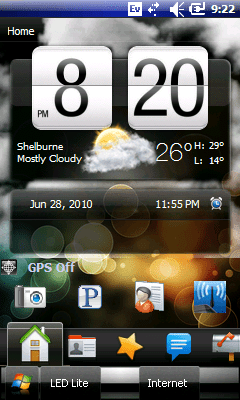
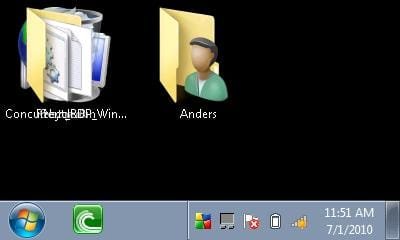
I think i have the worlds smallest resolution view of windows 7 :)
picture1 = remote desktop w/out full screen
picture2 = is my omnia i910 homescreen :)
picture3 = landscape view w/ full screen remote desktop
 

Attachments

  • ScreenShot1.Jpeg
    ScreenShot1.Jpeg
    22.9 KB · Views: 1
  • ScreenShot1.Png
    ScreenShot1.Png
    82.5 KB · Views: 1
  • ScreenShot2.Jpeg
    ScreenShot2.Jpeg
    10.7 KB · Views: 1

My Computer

Computer Manufacturer/Model Number
HP / DV6-1259dx
OS
Windows 7 Home Premium
CPU
IntelCore 2 Duo CPU
Memory
6GB RAM
Hard Drives
500GB HD
Tim you are the freaking man! With a title so simple i can't believe i couldn't find that on my own. As of now she seems to be running smoothly. I can connect through from my windows mobile device locally with easy. However, it requires me to turn off my firewall and i can't find the program in the exception menu so unless i find that I wont be able to leave my firewall off. Semi off topic question do i still have to port farward if i where to connect through remote desktop without a local IP address (IE ones that not 192.168.X.XXX?)

I think i have the worlds smallest resolution view of windows 7 :)
picture1 = remote desktop w/out full screen
picture2 = is my omnia i910 homescreen :)
picture3 = landscape view w/ full screen remote desktop

Wow that is the worlds smallest view of windows though probably not the worlds biggest window. :-) Glad I could come through for you.

Turning the firewall off is bad. Lets work on that. You have to port forward your router so that your router knows the target PC. How you configure it will depend on if it's just for internal use or if you want to connect from outside.

EG. My Windows Mobile Device (WMD) has the internal ipaddress of 192.168.1.10, I have one router that is also a modem. It has the internal address of 192.168.1.1 adn an external WAN address of 211.111.211.111. I want to connect to my windows 7 machine with the ipaddress of 192.168.1.20.

To do this:
INTERNALLY
On the windows 7 machine
  • In system properties - Allow Connections from computers running any version of windows
  • Poke a hole in your firewall for port 3389
  • Ensure that network discovery is turned on
On the Router
  • Most modern home routers will be ok with no changes as they will detect a Remote Desktop Connection attempt and open the port. Older routers may require you to configure port 3389 to be open (this is very unlikely).
On the WMD
  • Install a Remote Desktop Client
  • Run it and type in 192.168.1.20
  • Wait while it connects
  • Type in the credials when asked and connect

EXTERNALLY
If I take my WMD to work and want to connect, I need to make it as secure as possible. There are more secure ways like creating a VPN tunnel first however here's what we can do if we just use Remote Desktop Protocol (RDP) and make it as secure as possible.
On the windows 7 machine
  • In system properties - Allow Connections from computers running any version of windows
  • Poke a hole in your firewall for port 3389
  • Ensure that network discovery is turned on
On the Router
  • Pick a spare port that's not in use e.g. 54321
  • Open your router and find port forwarding (sometimes it's under NAT, your router configuration will vary slightly to the below steps)
  • Create a Application name such as RDP so that you remember why you forwarded that port
  • Set the start port to 54321
  • Set the End Port to 3389
  • Set the IPaddress to be the Windows 7 box 192.168.1.20
  • Tick Enable (if the option exists)
On the WMD
  • Install a Remote Desktop Client
  • Run it and type in 192.168.1.20:54321
  • Wait while it connects
  • Type in the credials when asked and connect

Does this answer all of your questions? :)

PS: EDIT
TIP: I would recommend a password of more than 12 digits, that you disable the administrator account, and update all antivirus software this will increase security a lot more.
 

My Computer

Computer Manufacturer/Model Number
Custom Hack job
OS
Windows 7 Ultimate 64 bit
CPU
Intel(R) Core(TM)2 Quad CPU Q8200 @ 2.33GHz
Motherboard
GigaByte EP45-UD3
Memory
8 GB Kingston
Graphics Card(s)
Nvidia GeForce 9600GT
Sound Card
Soundblaster Audigy
Monitor(s) Displays
AOC x2 22"
Hard Drives
2 x Samsung 500GB (RAID)
2 x Samsung 2TB
1 x WD Green 2TB
1 x Seagate 1TB
1 x Samsung 500GB
PSU
Thermaltake QFan 750W
Case
CM Scout Gaming
Cooling
Coolermaster V10
Keyboard
Microsoft Wireless Keyboard 1000
Mouse
Microsoft Wireless Optical 2000
Internet Speed
320
Other Info
Winfast PVR2000CP
LG DVD-RAM DVD/RW/DL Super Multi
Linksys WMP300Nx2 Wireless Adapter
Back
Top