Solved Remove an entry made in error.

Roderunner

Exterminator
Hi Folks,
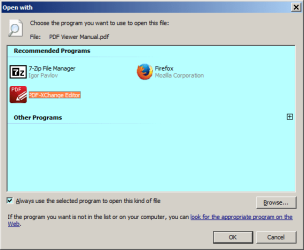
is it possible to remove the highlighted entry in my image as I only have the portable version.

RR.png
 

My Computer

Computer Manufacturer/Model Number
Look in my Signature.
OS
Win7 H.Prem. 32bit+SP1
If I understand you correctly all you have to do is remove the program PDF Xchange that you have installed and keep the portable version and use it as desired.

Jack
 

My Computer

Computer type
PC/Desktop
Computer Manufacturer/Model Number
Home made Desktop
OS
Windows 10 Pro. 64/ version 1709 Windows 7 Pro/64
CPU
Intel i7-6800K @ 4.3
Motherboard
ASUS X-99 Deluxe II
Memory
Corsair Platinum 16 gig @2400
Graphics Card(s)
EVGA GTX 1070 OC
Monitor(s) Displays
Asus 27" LED LCD/VE278Q
Screen Resolution
1920-1080 or 1280-720 HDMI
Hard Drives
INTEL SSD 730-240 Gb Sata 3.0/
PSU
EVGA Platium 1200W
Case
Phanteks Luxe Tempered Glass 8 fans/ one radiator
Cooling
XSPC/ Water Cooled CPU
Keyboard
Das 4 Professional
Mouse
Logitech M705/MX Anywhere 2-S
Internet Speed
100 mbits
Antivirus
Microsoft Security Essentials/ Malwarebytes Premium 3.0/ SAS
Browser
I.E. 11 default/Firefox/ ISP Time Warner Cable/Spectrum
Other Info
LG BluRay Burner/
Sound system-KLipsch-THX/
Icy Dock ssd Hot Swap bays.
I did read your post. I also read it again.
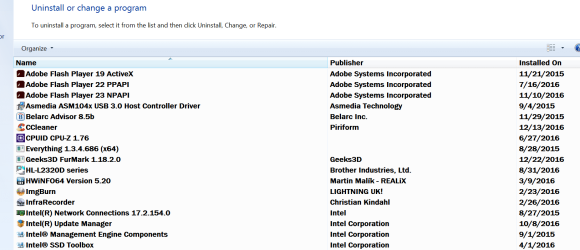
My understanding is, you want to remove "PDF EXchange Viewer" and keep the portable one.

If that is correct, can you remove "PDF EXchange Viewer" from here. This will remove the unwanted program from your computer.

If that is not what you are trying to do, I'm lost.


Remove programs.PNG


Maybe this is what you are looking for. A tutorial.


Open With - Change Default Program


Jack
 

My Computer

Computer type
PC/Desktop
Computer Manufacturer/Model Number
Home made Desktop
OS
Windows 10 Pro. 64/ version 1709 Windows 7 Pro/64
CPU
Intel i7-6800K @ 4.3
Motherboard
ASUS X-99 Deluxe II
Memory
Corsair Platinum 16 gig @2400
Graphics Card(s)
EVGA GTX 1070 OC
Monitor(s) Displays
Asus 27" LED LCD/VE278Q
Screen Resolution
1920-1080 or 1280-720 HDMI
Hard Drives
INTEL SSD 730-240 Gb Sata 3.0/
PSU
EVGA Platium 1200W
Case
Phanteks Luxe Tempered Glass 8 fans/ one radiator
Cooling
XSPC/ Water Cooled CPU
Keyboard
Das 4 Professional
Mouse
Logitech M705/MX Anywhere 2-S
Internet Speed
100 mbits
Antivirus
Microsoft Security Essentials/ Malwarebytes Premium 3.0/ SAS
Browser
I.E. 11 default/Firefox/ ISP Time Warner Cable/Spectrum
Other Info
LG BluRay Burner/
Sound system-KLipsch-THX/
Icy Dock ssd Hot Swap bays.
Hi Jack,
my first image showed the highlighted program that will open a pdf file. I wanted it removed from the list and have the portable option selected.
-
As PDF-Xchangeviewer portable is end of life, I am now using PDF-Xchange Editor

RR.png

Many thanks, Have a Merry Xmas & a Prosperous New Year.
 
Last edited:

My Computer

Computer Manufacturer/Model Number
Look in my Signature.
OS
Win7 H.Prem. 32bit+SP1
Hi

All you need is to ensure you mark the tick on the box "Always use the selected program to open this kind of file".

Then click on the program that you want to use.

Once you click, it will always use the same program to open.


Should you decide not to use that program and want to change to another program;

Then right click on the file and select "Open with" which will the same screen appear.

If there is no "Open with", then press+hold the Shift key and right click on the file, which will go to the same screen.


As for the other, it will always be there even you remove them at that screen, system decide.


Eric.
 

My Computer

Computer type
Laptop
Computer Manufacturer/Model Number
Toshiba L630 and L735
OS
Windows 7 x64
Hard Drives
240 GB SSD
Back
Top