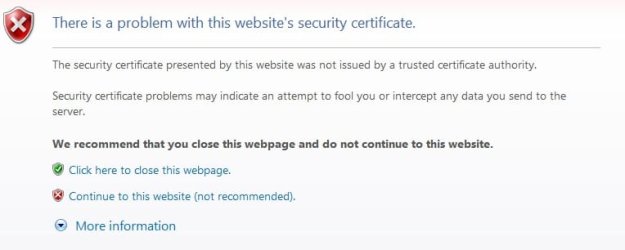
I'm pretty certain that you can't remove the ssl certificate message. If you could that would allow a malware app to trick you into going to look-alike sites for banking and such.
If you are receiving security warnings it basically means the site you are trying to access isn't trusted as a CA ('CA' is explained further on)..
SSL is mainly used for ensuring your not passing delicate data onto anybody trying to 'address spoof'
AFAIK you CAN bypass this but it could seriously effect your security. albeit from giving hackers access to your personal credit card numbers or just everyday site/forums passwords etc.
It's up to the site your visiting to ensure this screen doesn't appear (by paying money to a 'CA' (Certified Authority, such as Verisign etc.) but if you can 100 percent trust the site you can simply just install their certificate which will prevent it from appearing on the said address without effecting the safety on other address'.
It's very strongly advised you don't bypass this security feature, if you can't trust the site 100%!!!
My Computer
Computer Manufacturer/Model Number
Self Built
OS
XP Pro SP3 x86/Vista SP2 x64/Win7 x64 Triple-boot
CPU
AMD64 X2 AM2 5000+
Motherboard
Asus MSN-X Plus
Memory
Corsair TWX 2Gb (2x1Gb) DDR2 800Mhz
Graphics Card(s)
PCI-X 2.0 Inno3D (NVidia) 9500GT 1Gb DDR2
Sound Card
Onboard Realtec ALC662-GR
Monitor(s) Displays
Relisys 17' CRT (model unknown)
Screen Resolution
1024x768
Hard Drives
750Gb Samsung 7200-3Gb/s 32Mb Cache SATA
PSU
500W
Cooling
Standard AMD CPU Fan, One side, front and rear case fan.
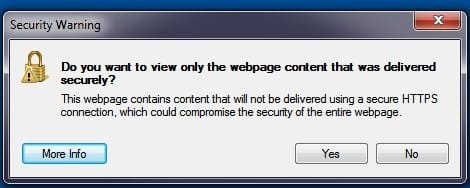
I trust the site 100%. How can the site doing something wrong to my security? Then how can i add the site to be trusted? I have been on many other site that dosent need that i I dont trust them a bit. In Gmail i get that to the second pics not the first one.
My Computer
Computer Manufacturer/Model Number
MY OWN
OS
Windows 7 x64
CPU
Intel Q9550 OVERCLOCKED 4.2Ghz
Motherboard
ASUS MAXIMUS FORMULA 2
Memory
CORSAIR 8GB
Graphics Card(s)
2X XFX 4890 1GB CROSSFIRE
Sound Card
SOUNDBLASTER X-FI 2
Monitor(s) Displays
TWO 26 INCH SAMUNG ROSE BLACK 26 + TWO 24 INCH ROSE BLACK
I trust the site 100%. How can the site doing something wrong to my security? Then how can i add the site to be trusted? I have been on many other site that doesn't need that i I don't trust them a bit. In Gmail i get that to the second pics not the first one.
I didn't say it was doing anything wrong, just it's not known by the authorities as 'trusted'.
The second screen-shot will appear if the site is providing a page from 'normal' insecure folders on there server but dragging it's pics or other content from the secure folders of the site.. Hence the warning about 'mixed' content.
If you really, really trust them, click 'Continue' then 'right-click' on a empty space of the site (like the background for example) and goto 'properties', then the 'Certificates' button and click on 'Install Cert...'
My Computer
Computer Manufacturer/Model Number
Self Built
OS
XP Pro SP3 x86/Vista SP2 x64/Win7 x64 Triple-boot
CPU
AMD64 X2 AM2 5000+
Motherboard
Asus MSN-X Plus
Memory
Corsair TWX 2Gb (2x1Gb) DDR2 800Mhz
Graphics Card(s)
PCI-X 2.0 Inno3D (NVidia) 9500GT 1Gb DDR2
Sound Card
Onboard Realtec ALC662-GR
Monitor(s) Displays
Relisys 17' CRT (model unknown)
Screen Resolution
1024x768
Hard Drives
750Gb Samsung 7200-3Gb/s 32Mb Cache SATA
PSU
500W
Cooling
Standard AMD CPU Fan, One side, front and rear case fan.