remove system reserve partition

without going into a lot of details i have a need to install win 7 again. what i want to do is shrink my current c partition and install a clean copy of 7 in the new partition. this way i can just take my time building it back up before deleting my current c. what i would like to do is get rid of the system reserve partition. i know i have installed 7 without getting this in the past, what i cannot seem to understand is why i got it on my current install. i just could not seem to opt out of it during the drive selection part of the install. i figure that before i shrink my partition i will need to get rid of the system reserve partition. so lets start there.
 
Last edited:

My Computer

OS
Windows 7 Ultimate
without going into a lot of details i have a need to install win 7 again. what i want to do is shrink my current c partition and install a clean copy of 7 in the new partition. this way i can just take my time building it back up before deleting my current c. what i would like to do is get rid of the system reserve partition. i know i have installed 7 without getting this in the past, what i cannot seem to understand is why i got it on my current install. i just could not seem to opt out of it during the drive selection part of the install. i figure that before i shrink my partition i will need to get rid of the system reserve partition. so lets start there.
Its the part that has bitlocker encryption etc (the 100mb partiton) and is usally hidden,if your using ultimate it was always there;)

As for needing to remove it to shrink the partiton,you dont have to.
Just shrink the partiton.Format the empty space as NTFS and primary and active.That will give oyu the partiton needed to install the new version of the OS.
 

My Computer

Computer Manufacturer/Model Number
Blue Shards 1.0
OS
Windows 7 Ultimate 64bit
CPU
AMD Phenom II 555 Black Edition Quad Core OC'd to 4.0GHz
Motherboard
ASUS M4A88T-M
Memory
G Skill RipJaw 1333MHz 4GB
Graphics Card(s)
ATI raideon 4250 HD/XFX ATI Radeon 1GB HD4650
Sound Card
Realteck HD Audio
Monitor(s) Displays
2x 22" Widescreen HD Monitors
Hard Drives
500GB Sata 7500RPM
80GB IDE
PSU
850W OCUK Modular
Case
Antec Dark Fleet DF-30
Cooling
Titan Fenrir Pro (CPU)
Keyboard
Logitech Wireless
Mouse
Logitech Wireless
Internet Speed
24Meg
Other Info
Getting soon-
2TB 7200RPM HDD
+8GB RAM
30GB SSD
HD6950/70
and when i boot the win bootloader will see both os's? as for the reserve partition i was under the impression that it had the boot files in it and those files could be transferred to c, which is what i would rather have.
 

My Computer

OS
Windows 7 Ultimate
and when i boot the win bootloader will see both os's? as for the reserve partition i was under the impression that it had the boot files in it and those files could be transferred to c, which is what i would rather have.
You should as both will be on the same drive,if not go into the OS and press Windows Key+R and type MSCONFIG and see ifit shows it up and if not EasyBCD shoulds be able to fix it.

No,as you can see in your drive map in the brackets it says "Boot"
 

My Computer

Computer Manufacturer/Model Number
Blue Shards 1.0
OS
Windows 7 Ultimate 64bit
CPU
AMD Phenom II 555 Black Edition Quad Core OC'd to 4.0GHz
Motherboard
ASUS M4A88T-M
Memory
G Skill RipJaw 1333MHz 4GB
Graphics Card(s)
ATI raideon 4250 HD/XFX ATI Radeon 1GB HD4650
Sound Card
Realteck HD Audio
Monitor(s) Displays
2x 22" Widescreen HD Monitors
Hard Drives
500GB Sata 7500RPM
80GB IDE
PSU
850W OCUK Modular
Case
Antec Dark Fleet DF-30
Cooling
Titan Fenrir Pro (CPU)
Keyboard
Logitech Wireless
Mouse
Logitech Wireless
Internet Speed
24Meg
Other Info
Getting soon-
2TB 7200RPM HDD
+8GB RAM
30GB SSD
HD6950/70
if the boot files are actually on c then the second copy of 7 should have no problem in seeing the first copy. wish me luck. i'm restarting to do the shrinking, and relaunch to see if i have to do a boot repair before installing the second copy.
 

My Computer

OS
Windows 7 Ultimate
if the boot files are actually on c then the second copy of 7 should have no problem in seeing the first copy. wish me luck. i'm restarting to do the shrinking, and relaunch to see if i have to do a boot repair before installing the second copy.
Good luck:)
 

My Computer

Computer Manufacturer/Model Number
Blue Shards 1.0
OS
Windows 7 Ultimate 64bit
CPU
AMD Phenom II 555 Black Edition Quad Core OC'd to 4.0GHz
Motherboard
ASUS M4A88T-M
Memory
G Skill RipJaw 1333MHz 4GB
Graphics Card(s)
ATI raideon 4250 HD/XFX ATI Radeon 1GB HD4650
Sound Card
Realteck HD Audio
Monitor(s) Displays
2x 22" Widescreen HD Monitors
Hard Drives
500GB Sata 7500RPM
80GB IDE
PSU
850W OCUK Modular
Case
Antec Dark Fleet DF-30
Cooling
Titan Fenrir Pro (CPU)
Keyboard
Logitech Wireless
Mouse
Logitech Wireless
Internet Speed
24Meg
Other Info
Getting soon-
2TB 7200RPM HDD
+8GB RAM
30GB SSD
HD6950/70
if the boot files are actually on c then the second copy of 7 should have no problem in seeing the first copy. wish me luck. i'm restarting to do the shrinking, and relaunch to see if i have to do a boot repair before installing the second copy.
Good luck:)

it is done. i did not even have to use the startup repair. i knew i was running a fifty / fifty chance of having to do so. it took so long because i had to uninstall rollback rx first. now i will go and in 7 on the other partition.
 

My Computer

OS
Windows 7 Ultimate
and when i boot the win bootloader will see both os's? as for the reserve partition i was under the impression that it had the boot files in it and those files could be transferred to c, which is what i would rather have.

Then use Partition Wizard bootable CD to Delete 100mb System reserved partition, Resize Win7 into its space then Modify>Set Active.

Now recover the MBR into Win7 partition by booting into Win7 DVD repair console, clicking through to recovery tools to run Startup Repair up to 3 separate times.

Now install Win7 to the second partition, which will update the MBR to set up a Dual Boot menu.
 
and when i boot the win bootloader will see both os's? as for the reserve partition i was under the impression that it had the boot files in it and those files could be transferred to c, which is what i would rather have.

Then use Partition Wizard bootable CD to Delete 100mb System reserved partition, Resize Win7 into its space then Modify>Set Active.

Now recover the MBR into Win7 partition by booting into Win7 DVD repair console, clicking through to recovery tools to run Startup Repair up to 3 separate times.

Now install Win7 to the second partition, which will update the MBR to set up a Dual Boot menu.

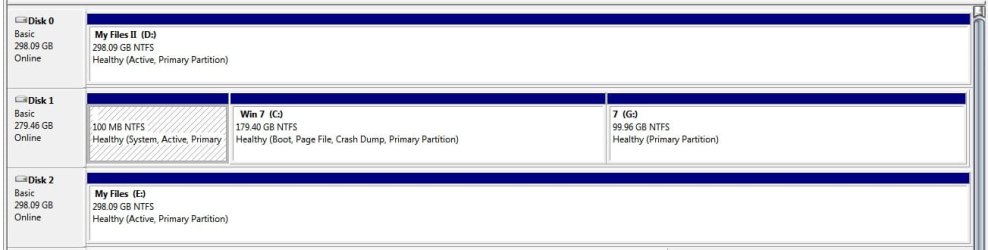
thanks for the info but i decided just to leave the system reserved partition alone. i now have the following. g is the new install. the only question i have left really is once i have the new install fully loaded and tweaked and i go to remove the old win 7, am i just going to have to run the startup repair console to fix the mbr after stretching the new install to include the partition that was used by the old install or is there something else i will have to do? thanks for the help so far guy's.:):):):):)
 

Attachments

  • dual win 7 partitions.jpg
    dual win 7 partitions.jpg
    98 KB · Views: 405

My Computer

OS
Windows 7 Ultimate
and when i boot the win bootloader will see both os's? as for the reserve partition i was under the impression that it had the boot files in it and those files could be transferred to c, which is what i would rather have.

Then use Partition Wizard bootable CD to Delete 100mb System reserved partition, Resize Win7 into its space then Modify>Set Active.

Now recover the MBR into Win7 partition by booting into Win7 DVD repair console, clicking through to recovery tools to run Startup Repair up to 3 separate times.

Now install Win7 to the second partition, which will update the MBR to set up a Dual Boot menu.

thanks for the info but i decided just to leave the system reserved partition alone. i now have the following. g is the new install. the only question i have left really is once i have the new install fully loaded and tweaked and i go to remove the old win 7, am i just going to have to run the startup repair console to fix the mbr after stretching the new install to include the partition that was used by the old install or is there something else i will have to do? thanks for the help so far guy's.:):):):):)
You should be fine as long as you run the start up repair.
If it fails use the command line in the Repair console and use
bootrec /fixmbr or bootrec /fixboot

Dan
 

My Computer

Computer Manufacturer/Model Number
Blue Shards 1.0
OS
Windows 7 Ultimate 64bit
CPU
AMD Phenom II 555 Black Edition Quad Core OC'd to 4.0GHz
Motherboard
ASUS M4A88T-M
Memory
G Skill RipJaw 1333MHz 4GB
Graphics Card(s)
ATI raideon 4250 HD/XFX ATI Radeon 1GB HD4650
Sound Card
Realteck HD Audio
Monitor(s) Displays
2x 22" Widescreen HD Monitors
Hard Drives
500GB Sata 7500RPM
80GB IDE
PSU
850W OCUK Modular
Case
Antec Dark Fleet DF-30
Cooling
Titan Fenrir Pro (CPU)
Keyboard
Logitech Wireless
Mouse
Logitech Wireless
Internet Speed
24Meg
Other Info
Getting soon-
2TB 7200RPM HDD
+8GB RAM
30GB SSD
HD6950/70
what is the difference between the two if any?

bootrec /fixmbr or bootrec /fixboot

edit:

guess i should have asked if either of these will remove the old os from the boot menu or will i still have to go to msconfig and do it maunally?
 

My Computer

OS
Windows 7 Ultimate
what is the difference between the two if any?

bootrec /fixmbr or bootrec /fixboot
The fixmbr command writes a new a new MBR

The fixboot command writes a boot sector to the partiton.
 

My Computer

Computer Manufacturer/Model Number
Blue Shards 1.0
OS
Windows 7 Ultimate 64bit
CPU
AMD Phenom II 555 Black Edition Quad Core OC'd to 4.0GHz
Motherboard
ASUS M4A88T-M
Memory
G Skill RipJaw 1333MHz 4GB
Graphics Card(s)
ATI raideon 4250 HD/XFX ATI Radeon 1GB HD4650
Sound Card
Realteck HD Audio
Monitor(s) Displays
2x 22" Widescreen HD Monitors
Hard Drives
500GB Sata 7500RPM
80GB IDE
PSU
850W OCUK Modular
Case
Antec Dark Fleet DF-30
Cooling
Titan Fenrir Pro (CPU)
Keyboard
Logitech Wireless
Mouse
Logitech Wireless
Internet Speed
24Meg
Other Info
Getting soon-
2TB 7200RPM HDD
+8GB RAM
30GB SSD
HD6950/70

guess i should have asked if either of these will remove the old os from the boot menu or will i still have to go to msconfig and do it maunally?
Start up repair should fix that,if not its not too much trouble to remove from msconfig though.
 

My Computer

Computer Manufacturer/Model Number
Blue Shards 1.0
OS
Windows 7 Ultimate 64bit
CPU
AMD Phenom II 555 Black Edition Quad Core OC'd to 4.0GHz
Motherboard
ASUS M4A88T-M
Memory
G Skill RipJaw 1333MHz 4GB
Graphics Card(s)
ATI raideon 4250 HD/XFX ATI Radeon 1GB HD4650
Sound Card
Realteck HD Audio
Monitor(s) Displays
2x 22" Widescreen HD Monitors
Hard Drives
500GB Sata 7500RPM
80GB IDE
PSU
850W OCUK Modular
Case
Antec Dark Fleet DF-30
Cooling
Titan Fenrir Pro (CPU)
Keyboard
Logitech Wireless
Mouse
Logitech Wireless
Internet Speed
24Meg
Other Info
Getting soon-
2TB 7200RPM HDD
+8GB RAM
30GB SSD
HD6950/70
shouldn't just running the repair console and scanning for errors find any mbr errors and offer to fix them? i have resized boot drives in 7 before and from time to time, and afterwards cound not boot in to 7. i ran the repair console and let it scan for errors, and it did. it offered to repair them, i let it and was able to boot back into windows.
 

My Computer

OS
Windows 7 Ultimate
shouldn't just running the repair console and scanning for errors find any mbr errors and offer to fix them? i have resized boot drives in 7 before and from time to time, and afterwards cound not boot in to 7. i ran the repair console and let it scan for errors, and it did. it offered to repair them, i let it and was able to boot back into windows.
I gave the command lines as an option if start up repair fails.
Start up repair should still be tried,sometimes it can be tricky so let it run 3 times as general rule.
 

My Computer

Computer Manufacturer/Model Number
Blue Shards 1.0
OS
Windows 7 Ultimate 64bit
CPU
AMD Phenom II 555 Black Edition Quad Core OC'd to 4.0GHz
Motherboard
ASUS M4A88T-M
Memory
G Skill RipJaw 1333MHz 4GB
Graphics Card(s)
ATI raideon 4250 HD/XFX ATI Radeon 1GB HD4650
Sound Card
Realteck HD Audio
Monitor(s) Displays
2x 22" Widescreen HD Monitors
Hard Drives
500GB Sata 7500RPM
80GB IDE
PSU
850W OCUK Modular
Case
Antec Dark Fleet DF-30
Cooling
Titan Fenrir Pro (CPU)
Keyboard
Logitech Wireless
Mouse
Logitech Wireless
Internet Speed
24Meg
Other Info
Getting soon-
2TB 7200RPM HDD
+8GB RAM
30GB SSD
HD6950/70
shouldn't just running the repair console and scanning for errors find any mbr errors and offer to fix them? i have resized boot drives in 7 before and from time to time, and afterwards cound not boot in to 7. i ran the repair console and let it scan for errors, and it did. it offered to repair them, i let it and was able to boot back into windows.
I gave the command lines as an option if start up repair fails.
Start up repair should still be tried,sometimes it can be tricky so let it run 3 times as general rule.

o.k. yeah once or twice i do not remember i ran it and it did not work so i decided to try it a second time and it worked. it is just like installing windows. no matter how good you wipe the drive from time to time setup will still freeze and have to be started all over again and work the second time.
 

My Computer

OS
Windows 7 Ultimate
now on to my next question. i need to know if i can keep each 7 from seeing the other. the reason is because i have software that if installed will change settings in both partitions.
 

My Computer

OS
Windows 7 Ultimate
thanks for the info but i decided just to leave the system reserved partition alone. i now have the following. g is the new install. the only question i have left really is once i have the new install fully loaded and tweaked and i go to remove the old win 7, am i just going to have to run the startup repair console to fix the mbr after stretching the new install to include the partition that was used by the old install or is there something else i will have to do? thanks for the help so far guy's.:):):):):)


To remove old Win7 partition, you need to mark new Win7 partition Active in Dsk Mgmt., then delete old Win7 partition using free bootable Partition Wizard CD., Resize new Win7 into its space, boot Win7 DVD Repair conosle to run Startup Repair up to 3 separate times if necessary to repair Win7.
 
thanks for the info but i decided just to leave the system reserved partition alone. i now have the following. g is the new install. the only question i have left really is once i have the new install fully loaded and tweaked and i go to remove the old win 7, am i just going to have to run the startup repair console to fix the mbr after stretching the new install to include the partition that was used by the old install or is there something else i will have to do? thanks for the help so far guy's.:):):):):)


To remove old Win7 partition, you need to mark new Win7 partition Active in Dsk Mgmt., then delete old Win7 partition using free bootable Partition Wizard CD., Resize new Win7 into its space, boot Win7 DVD Repair conosle to run Startup Repair up to 3 separate times if necessary to repair Win7.

this is fine. i have this info all ready. i need to know about my last question. how to hide each 7 completely from one another.
 

My Computer

OS
Windows 7 Ultimate
Back
Top