Remove Ubuntu from Windows 7 DualBoot

chromium

New member
Member
Local time
8:15 AM
Messages
56
I currently have a dual boot between windows 7 and ubuntu 12.10 (both x64)
Before this setup i had windows 7 and windows 8 dualbooting, but i decided to remove win8 and install ubuntu.

When i boot up my pc it goes to ubuntus grub bootloader, but in it i dont see a win7 entry. Instead i see a win8 entry(even though i removed it already). However when i click on it, the pc boots to win7 properly.

I now want to remove ubuntu and install win8 onto that partition. Is it as easy as deleting the ubuntu partition with disk management? Or is it necessary to do anything else? Im wondering since everything seems a bit weird with win8 showing up in the bootloader.

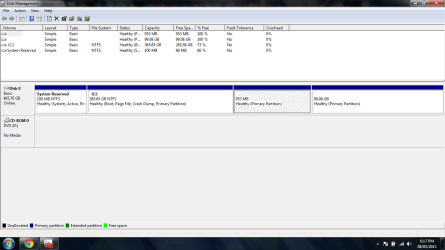
Ive also attached a screenshot of my diskmanagement.
1st partition is the 100mb partition that gets made when installing win7
2nd partition is win7
3rd partition is swap for ubuntu
4th partition is ubuntu

Thanks in advance. :)
 

Attachments

  • screen.png
    screen.png
    36.3 KB · Views: 24

My Computer My Computer

Computer type
Laptop
OS
Windows 7 Home Premium 64Bit
CPU
Intel Core i5-2450m @ 2.5GHz
Memory
6GB
Hi Chromium, and sorry for the wait.

You should be good to boot the Win8 installer, delete the last two partitions, format and install Win8 in that space. Dual Boot Installation - Windows 8 and Windows 7 or Vista - Windows 8 Forums

The only problem will be if GRUB corrupted the bootloader which sometimes requires wiping the HD with Diskpart Clean Command. Then you'd have to reinstall both.

But go ahead and install WIn8 to see if it's boot loader asserts itself with the Metro-style boot menu for both.
 
Thanks for the reply.

I REALLY want to avoid screwing up my mbr again, and having to wipe the whole hdd again if possible.
For now, is it possible to just remove the ubuntu partition through my win7 disk management, or will it mess up my mbr and stop windows from booting?
 

My Computer My Computer

Computer type
Laptop
OS
Windows 7 Home Premium 64Bit
CPU
Intel Core i5-2450m @ 2.5GHz
Memory
6GB
You should be okay since the System Active flags are on System Reserved, signifying that partition alone is booting Win7 on C. The last two partitions have no flags which need to be addressed before they can be deleted. If GRUB is on one of them, it should be delete with them.
 
is there any possibility that my pc wont boot windows after deleting the ubuntu and swap partitions?
 

My Computer My Computer

Computer type
Laptop
OS
Windows 7 Home Premium 64Bit
CPU
Intel Core i5-2450m @ 2.5GHz
Memory
6GB
This is impossible to say since GRUB is a wild card. But most of those problems with GRUB ruining Win7 boot until the HD is wiped went away with GRUB2.

You can save a backup image of the two partitions just in case.

If it doesn't boot then Startup Repair should repair it as long as the Active flag remains on System Reserved. Have your Win7 DVD or System Repair Disk standing by.
 
This is impossible to say since GRUB is a wild card. But most of those problems with GRUB ruining Win7 boot until the HD is wiped went away with GRUB2.

You can save a backup image of the two partitions just in case.

If it doesn't boot then Startup Repair should repair it as long as the Active flag remains on System Reserved. Have your Win7 DVD or System Repair Disk standing by.

Is there any chance that after deleting the ubuntu partition and after running the win7 startup repair, that it will still not boot?

Also could i use EasyBCD to write the win7 bootloader to the mbr, and then delete the ubuntu partition? Would that guarantee that my pc would boot windows after deleting ubuntu/grub?
 

My Computer My Computer

Computer type
Laptop
OS
Windows 7 Home Premium 64Bit
CPU
Intel Core i5-2450m @ 2.5GHz
Memory
6GB

My Computer My Computer

Computer type
Laptop
OS
Windows 7 Home Premium 64Bit
CPU
Intel Core i5-2450m @ 2.5GHz
Memory
6GB
Already posted one in the OP of this thread, here it is:
267236d1368051786-remove-ubuntu-windows-7-dualboot-screen.png


1st partition is the 100mb partition that gets made when installing Windows 7
2nd partition is Windows 7
3rd partition is swap for ubuntu
4th partition is ubuntu
 

My Computer My Computer

Computer type
Laptop
OS
Windows 7 Home Premium 64Bit
CPU
Intel Core i5-2450m @ 2.5GHz
Memory
6GB
So it's using GRUB to boot now? I would uninstall GRUB or delete the Ubuntu partitions and run Startup Repair - Run up to 3 Separate Times.

As stated GRUB is a wild card so there are no guarantees though this normally works. If you want to be able to go back then save a backup image of the entire HD. We can then help you try to recover just the WIn7 partition to a wiped HD, or restore the whole drive which should start up just the same as now.

Best imaging is Acronis which has a free edition for cloning or backup imaging for any WD or Seagate HD, otherwise I'd use Macrium - Image your system. Win7 backup imaging will only restore to the original offsets.
http://www.sevenforums.com/software/43219-image-your-system-free-macrium.html
 
So it's using GRUB to boot now? I would uninstall GRUB or delete the Ubuntu partitions and run Startup Repair - Run up to 3 Separate Times.

As stated GRUB is a wild card so there are no guarantees though this normally works. If you want to be able to go back then save a backup image of the entire HD. We can then help you try to recover just the WIn7 partition to a wiped HD, or restore the whole drive which should start up just the same as now.

Yep its using grub2 right now. I would just delete the ubuntu partition (which i have done in the past and it worked fine), but in this case my concern is that something seems a bit odd. In grub, it shows a windows 8 entry instead of windows 7. I currently dont have windows 8 installed. When i choose to boot windows 8 it boots windows 7 properly though. (read the op for clarification)

Also i would make a backup image of the whole drive, but my problem is that i dont have anywhere to put it, and I really dont want to make a bunch of dvd's.
 

My Computer My Computer

Computer type
Laptop
OS
Windows 7 Home Premium 64Bit
CPU
Intel Core i5-2450m @ 2.5GHz
Memory
6GB
There are very few reported problems we see here with GRUB 2 corrupting Win7 beyond repair. Most of those dried up after it was released.
 
There are very few reported problems we see here with GRUB 2 corrupting Win7 beyond repair. Most of those dried up after it was released.

Yeah everytime ive deleted ubuntu partitions with grub2 its been fine.
Im just concerned about this windows 8 entry. Do you think it'll affect anything?
 

My Computer My Computer

Computer type
Laptop
OS
Windows 7 Home Premium 64Bit
CPU
Intel Core i5-2450m @ 2.5GHz
Memory
6GB
I've not seen it before, so can't comment. It's possible it's just a wrong reading, if Win8 has never been on the HD and there aren't other symptoms.
 
It was once installed on my PC. I had a win7 and win8 dual boot, and I decided to delete win8 and install Ubuntu on that partition.
There doesnt seem to be any issues though. just the fact that it says win8 instead of win7, but it still boots win7 as it should without any probems. Any idea of what may have caused this?
 

My Computer My Computer

Computer type
Laptop
OS
Windows 7 Home Premium 64Bit
CPU
Intel Core i5-2450m @ 2.5GHz
Memory
6GB

Thanks. Is there any chance this wont work, and my PC wont boot win7?

Sorry for all the questions, i just want to be sure. Im a bit paranoid after messing up my mbr a while ago and having to completely wipe the hdd. :cry:

I personally have always deleted Linux this way, for 100's of people.
 

My Computer My Computer

OS
ME/XP/Vista/Win7
I decided to get myself together and finally do it, and everything worked fine.
I used this guide that you provided.

Thanks for all your help.
 

My Computer My Computer

Computer type
Laptop
OS
Windows 7 Home Premium 64Bit
CPU
Intel Core i5-2450m @ 2.5GHz
Memory
6GB
Back
Top