Solved remove unwanted boot-up OS choice

tpd15

New member
Local time
10:36 PM
Messages
4
Hi

(My first post, so be gentle, please! :) )

A few months ago I installed Jolicloud OS as an experiment (stupid me). I installed it onto a flash drive just so as not to mess up anything on my hdd. Anyway, when I tried to uninstall it the process failed (I later just reformatted the flash drive), but I am left with having to choose between Win7 & Jolicloud during boot up.

I have been into the Windows boot manager and JC isn't even listed, but at least I was able to set Win7 to the default so that it auto-choose that instead of JC. (I followed basically this procedure).

Can anyone tell me how to remove this boot-up menu?

thanks!
Toby.
 

My Computer My Computer

OS
Win 7 64 bit
I've always done it using msconfig under the boot tab you can just delete os's listed there.

Assuming it is windows generating the boot prompt.
 

My Computer My Computer

Computer Manufacturer/Model Number
Insane hobo technologies. ;-)
OS
Windows 7 x64
CPU
Intel i7 2600k
Motherboard
Asrock z68 extreme 4 gen 3
Memory
G.skill Ripjaw 16gigs @ 1866
Graphics Card(s)
Nvidia gtx580 (evga)
Sound Card
Integrated HD audio + hdmi
Monitor(s) Displays
24" ASUS widescreen + 42" insignia
Screen Resolution
1080p (1920x1080)
Hard Drives
128 Samsung 830
256 Samsung 840
3 x 1tb storage drive (various)
1 western digital 1tb (eSATA)
1 Seagate 1tb (eSATA)
PSU
1 kilowatt SLI/Crossfire rated Silverstone modular
Case
NZXT Phantom + additional 220 fan
Cooling
Zalmann
Keyboard
Microsoft wireless 3000 (v2)
Mouse
MS - wireless 5000 (bluetrack)
Internet Speed
depends on if you ask me or my provider.
Other Info
The above information is provided as is, and the author assumes no responsibility for issues it may cause with your sanity or fanboyism.

My Computer My Computer

Computer type
PC/Desktop
Computer Manufacturer/Model Number
Custom Build
OS
Windows 7 Home Premium 64 bit
CPU
Intel Core i7-4790
Motherboard
GA-Z87X-D3H
Memory
G.SKILL 8GB (2 x 4GB) DDR3 F3-10666CL9D-8GBNT
Graphics Card(s)
AMD Radeon R7 250
Sound Card
Realtek ALC892
Monitor(s) Displays
Samsung UN32EH5000, Dell 1703FPT
Screen Resolution
1920 x 1080, 1280 x 1024
Hard Drives
WD5003AZEX
WD10EZEX
Samsung HD103SJ
Samsung 128 GB 840 PRO
PSU
SeaSonic M12II SS-500GM
Case
Fractal Design Define R4
Cooling
Zalman CNPS9900ALED
Keyboard
Logitech K800
Mouse
Logitech M705
Internet Speed
16 Mbps
Antivirus
Avast
Browser
Firefox
Other Info
Bose Companion 2 Multimedia Speakers
That's where I was, and only Win7 is listed (see pic), but I definitely get the choice at boot.

boot_menu.png
 

My Computer My Computer

OS
Win 7 64 bit
set the timeout to zero. If that doesn't do it you'll need his app because it's likely not windows making the prompt.
 

My Computer My Computer

Computer Manufacturer/Model Number
Insane hobo technologies. ;-)
OS
Windows 7 x64
CPU
Intel i7 2600k
Motherboard
Asrock z68 extreme 4 gen 3
Memory
G.skill Ripjaw 16gigs @ 1866
Graphics Card(s)
Nvidia gtx580 (evga)
Sound Card
Integrated HD audio + hdmi
Monitor(s) Displays
24" ASUS widescreen + 42" insignia
Screen Resolution
1080p (1920x1080)
Hard Drives
128 Samsung 830
256 Samsung 840
3 x 1tb storage drive (various)
1 western digital 1tb (eSATA)
1 Seagate 1tb (eSATA)
PSU
1 kilowatt SLI/Crossfire rated Silverstone modular
Case
NZXT Phantom + additional 220 fan
Cooling
Zalmann
Keyboard
Microsoft wireless 3000 (v2)
Mouse
MS - wireless 5000 (bluetrack)
Internet Speed
depends on if you ask me or my provider.
Other Info
The above information is provided as is, and the author assumes no responsibility for issues it may cause with your sanity or fanboyism.

My Computer My Computer

Computer Manufacturer/Model Number
built up
OS
windows 7
CPU
Phenom II AMD Dragon 3.5Ghz
Memory
DDR3 4GB
Graphics Card(s)
ATI Radeon 512Mb
Monitor(s) Displays
HP L1506
Screen Resolution
1152 x 864
Hard Drives
WDC 1 TB SATA-II Green Power
Keyboard
HP wireless keyboard
Mouse
HP Optic
Internet Speed
1GB
You'll also want to cleanly delete the boot listing from EasyBCD Edit Boot OS menu or it will remain in the BCD. Install Easy from link in post #3.
 

Theog,

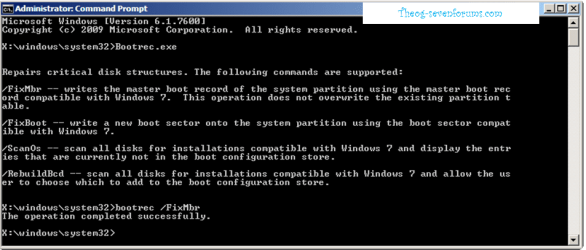
Thanks for the pointer -- I gave it a look, and I don't have the installation disk (I am pretty sure), but the ability to write a new boot record looks useful. Also, I had originally followed those same instructions that you linked to uninstall JoliCloud OS. But it failed, and left me with an inoperative JC OS.

thanks,
Toby.
 

My Computer My Computer

OS
Win 7 64 bit
Back
Top