Removing titlebar text

Canti

New member
Is it possible to remove the titlebar text? I want every window to look like the explorer windows, clean w/o text.

I was thinkin that there might be a registery value or something for this.
 

My Computer

OS
Windows 7 Ultimate SP1 x64
CPU
AMD Phenom II X4 955 BE @ 3,2Ghz
Motherboard
Gigabyte GA-MA770T-UD3P (Rev 1.0)
Memory
Corsair XMS3 8GB 1333Mhz
Graphics Card(s)
Sapphire AMD Radeon HD 7950 3GB
Monitor(s) Displays
Benq G2412HD
Screen Resolution
1920x1080 60hz
Hard Drives
Western Digital Caviar Black 500GB
PSU
Corsair VX 550W
Case
Antec 300
Cooling
Noctua NH-U12P SE2
Mouse
Logitech MX518
Other Info
Laptop: Lenovo ThinkPad X121e (3045-7KG)
how about removing the title bar altogether? i'd be all over that.
 

My Computer

Computer Manufacturer/Model Number
asus
OS
win7 64
CPU
c2d 2.2
Motherboard
laptop
Memory
4 gb
Graphics Card(s)
ati 4670 w/1gb
Sound Card
external audigy2 -> klipsch promedia ultra 5.1
Cooling
dortmunder gold
I'm also looking for something like this too...
 

My Computer

Computer Manufacturer/Model Number
Vaio VGN-NS150D
OS
Windows 7
CPU
Intel Core2 Duo T5800 2.00GHz
Memory
4 GB
Graphics Card(s)
Mobile Intel 4 Series Express Chipset Family
I'm assuming you mean from Internet Explorer.
I don't use IE8 (FF nowadays) but adding a REG_SZ key at [HKEY_CURRENT_USER\Software\Microsoft\Internet Explorer\Main] as below will remove the "Internet Explorer" scripting but sadly not the page name appearing in the title bar. But it's a start!!
NAME Window Title TYPE REG_SZ DATA Blank
 

My Computer

OS
Windows 7 Ultimatum
I'm assuming you mean from Internet Explorer.
I don't use IE8 (FF nowadays) but adding a REG_SZ key at [HKEY_CURRENT_USER\Software\Microsoft\Internet Explorer\Main] as below will remove the "Internet Explorer" scripting but sadly not the page name appearing in the title bar. But it's a start!!
NAME Window Title TYPE REG_SZ DATA Blank
I don't use Internet Explorer either. I just wanted to remove the title bar text from every window and any window that shows a text. E.g. Firefox, Thunderbird.
 

My Computer

Computer Manufacturer/Model Number
Vaio VGN-NS150D
OS
Windows 7
CPU
Intel Core2 Duo T5800 2.00GHz
Memory
4 GB
Graphics Card(s)
Mobile Intel 4 Series Express Chipset Family
I don't use Internet Explorer either. I just wanted to remove the title bar text from every window and any window that shows a text. E.g. Firefox, Thunderbird.
With Firefox do a search for Titlebar Tweaks 1.8.3.6. Whether that has "soul bros" for different browsers I don't know, but it works well in FF
 

My Computer

OS
Windows 7 Ultimatum
I don't use Internet Explorer either. I just wanted to remove the title bar text from every window and any window that shows a text. E.g. Firefox, Thunderbird.
With Firefox do a search for Titlebar Tweaks 1.8.3.6. Whether that has "soul bros" for different browsers I don't know, but it works well in FF
Thanks! But do you know what I could do about other applications that also display a title bar text?
 

My Computer

Computer Manufacturer/Model Number
Vaio VGN-NS150D
OS
Windows 7
CPU
Intel Core2 Duo T5800 2.00GHz
Memory
4 GB
Graphics Card(s)
Mobile Intel 4 Series Express Chipset Family
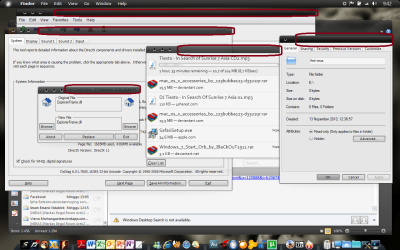
you mean this, right??
 

Attachments

  • Upload.png
    Upload.png
    262.8 KB · Views: 369

My Computer

Computer Manufacturer/Model Number
Compaq Presario CQ40-419TX Notebook PC
OS
Windows 7 Home Premium 32bit.
CPU
Intel Dual Core 2.0 GHZ
Motherboard
Intergrated Motherboard
Memory
4 GB
Graphics Card(s)
nVidia GeForce 103 M
Sound Card
Intergrated Sound Card
Monitor(s) Displays
Intergrated Monitor
Hard Drives
Fujitsu 250 GB
Segate Portable hard Drive 320 GB
PSU
-
Case
-
Cooling
Fan Cooler
If you change the font colour for the title bar (Personalize > Window color) to the same as the colour for the title bar (Active title bar and inactive title bar), you will see no text. It's there, but not visible.
 

My Computer

OS
Windows 7
If you change the font colour for the title bar (Personalize > Window color) to the same as the colour for the title bar (Active title bar and inactive title bar), you will see no text. It's there, but not visible.

plus,,, change the font size... into the smallest that available there,,,( se at DXDIAG window, at the top right side of window)
 

My Computer

Computer Manufacturer/Model Number
Compaq Presario CQ40-419TX Notebook PC
OS
Windows 7 Home Premium 32bit.
CPU
Intel Dual Core 2.0 GHZ
Motherboard
Intergrated Motherboard
Memory
4 GB
Graphics Card(s)
nVidia GeForce 103 M
Sound Card
Intergrated Sound Card
Monitor(s) Displays
Intergrated Monitor
Hard Drives
Fujitsu 250 GB
Segate Portable hard Drive 320 GB
PSU
-
Case
-
Cooling
Fan Cooler
I Want remove or change title bar text just for a software
I replace windows explorer whit Xplorer2
For example In title bar that Show "C:\Windows\... _ xplorer2" or any file path name _ Xplorer2
I want remove Xplorer2 From the end of title bar
is it possible
 

My Computer

Computer type
Laptop
Computer Manufacturer/Model Number
HP
OS
Windows 98 & Windows 7
CPU
Core I 5
Motherboard
I will P4 2002
Graphics Card(s)
NVIDIA 740M
Sound Card
Sound Blaster
Monitor(s) Displays
CTX SVGA CRT 1998 Monitor
Screen Resolution
1280*1024
Hard Drives
Maxtore
Antivirus
NOD32
Browser
Firefox
In a general sense it is not possible to remove the title bar text. Applications have the ultimate control over their window titles. They write whatever they wish in the title bar and usually provide no options for the user to change this.
 

My Computer

Computer type
PC/Desktop
Computer Manufacturer/Model Number
HP
OS
Windows 7 Pro 64 bit
CPU
Xeon W3520
Memory
8 GB
Graphics Card(s)
Nvidia Geforce 210
Finally i can remove it
just open Xplorer2.exe with resource hacker
press ctrl+F to find xplorer2 in string table
delete it
compile script
then save it
after restart windows you can see changes

now i want change "Autocad 2005" title bar to "Autocad R14"
but after searching autocad.exe and all of autocad dll files in program files with res hack i cant find any thing
 

My Computer

Computer type
Laptop
Computer Manufacturer/Model Number
HP
OS
Windows 98 & Windows 7
CPU
Core I 5
Motherboard
I will P4 2002
Graphics Card(s)
NVIDIA 740M
Sound Card
Sound Blaster
Monitor(s) Displays
CTX SVGA CRT 1998 Monitor
Screen Resolution
1280*1024
Hard Drives
Maxtore
Antivirus
NOD32
Browser
Firefox
May I ask? Why would you want to do such a change?

"Autocad 2005" title bar to "Autocad R14"
 

My Computer

Computer type
PC/Desktop
Computer Manufacturer/Model Number
Home made Desktop
OS
Windows 10 Pro. 64/ version 1709 Windows 7 Pro/64
CPU
Intel i7-6800K @ 4.3
Motherboard
ASUS X-99 Deluxe II
Memory
Corsair Platinum 16 gig @2400
Graphics Card(s)
EVGA GTX 1070 OC
Monitor(s) Displays
Asus 27" LED LCD/VE278Q
Screen Resolution
1920-1080 or 1280-720 HDMI
Hard Drives
INTEL SSD 730-240 Gb Sata 3.0/
PSU
EVGA Platium 1200W
Case
Phanteks Luxe Tempered Glass 8 fans/ one radiator
Cooling
XSPC/ Water Cooled CPU
Keyboard
Das 4 Professional
Mouse
Logitech M705/MX Anywhere 2-S
Internet Speed
100 mbits
Antivirus
Microsoft Security Essentials/ Malwarebytes Premium 3.0/ SAS
Browser
I.E. 11 default/Firefox/ ISP Time Warner Cable/Spectrum
Other Info
LG BluRay Burner/
Sound system-KLipsch-THX/
Icy Dock ssd Hot Swap bays.
May I ask? Why would you want to do such a change?

"Autocad 2005" title bar to "Autocad R14"

I like old things in my life i use old cars (benz 280S 1971) old computers (386DX100 & Pentiom 1) / old Radio Casset Player Systems / i have many old money / i listen 1970's - 1990's pop music and classic music /
I like windows 98 but my laptop has core I7 cpu and SATA HDD and i cant install windows 98 on it
I change all of my windows 7 appearance 95% look like windows 98 i change all shell32 and imageres.dll icons / use classic xplorer2 / use classic shell / change logon screen / change boot screen
use old software like office 97 / Autocad 2000 / Windows media player 9 / Photoshop 8 (first cs version)
and for the softwares i cant use old versions i change they appearance look like they old versions
 

My Computer

Computer type
Laptop
Computer Manufacturer/Model Number
HP
OS
Windows 98 & Windows 7
CPU
Core I 5
Motherboard
I will P4 2002
Graphics Card(s)
NVIDIA 740M
Sound Card
Sound Blaster
Monitor(s) Displays
CTX SVGA CRT 1998 Monitor
Screen Resolution
1280*1024
Hard Drives
Maxtore
Antivirus
NOD32
Browser
Firefox
Back
Top