
Repair Install fails due to WinSetup.dll error

EWG

New member
Member
Local time
5:11 AM
Messages
42
Hi all,

I've been having issues with my computer, which are detailed in the following thread:

http://www.sevenforums.com/windows-...pdate-sfc-scannow-checksur-logs-included.html

I've finally decided to bite the bullet and perform a repair install of Windows 7, 64-bit. I do have my Windows registration code, but I could not find my copy of the Windows 7 CD/DVD, so I followed the instructions in the following article to create a DVD and USB boot device:

http://www.sevenforums.com/tutorials/3413-repair-install.html

I chose the USA "Windows 7 Home Premium x64 SP1 U (media refresh) X17-58997.iso" file from Windows 7 Direct Download Links.

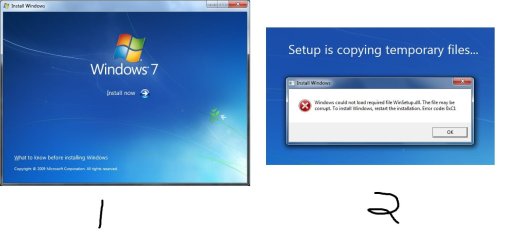
When trying to run setup, either from the DVD or from my USB drive, I'm getting the following error:

"Windows could not load required file WinSetup.dll. The file may be corrupt. To install Windows, restart the installation. Error code 0xC1.

Any help would be appreciated.

Thanks,
EWG
 

Attachments
  • error.jpg
    error.jpg
    50.6 KB · Views: 10

My Computer My Computer

At a glance

Windows 7 Home Edition, 64bitPentium i516GB
Computer type
PC/Desktop
Computer Manufacturer/Model Number
iBuyPower
OS
Windows 7 Home Edition, 64bit
CPU
Pentium i5
Motherboard
Asus
Memory
16GB
Antivirus
avast!
Browser
Firefox
Hi EWG

Did you try using another USB port ?

You could even try to recreate the USB drive .

Manually : click on :orb: type CMD inside Search programs and files . Right click on CMD under Programs (1) and choose Run as administrator . When the User Access Control window comes up click on the Yes button . Once the command prompt opens up . Path should be C:\Windows\System32>_ . Type the commands below press <ENTER> after each line .

DISKPART LIST DISK SELECT DISK 1 CLEAN CREATE PARTITION PRIMARY SELECT PARTITION 1 ACTIVE FORMAT FS=NTFS QUICK ASSIGN EXIT EXIT


   Note
Disk 1 is usually the USB drive if you have only one hard drive inside the PC


Once you have that completed copy the contents of the DVD to the USB Flash Drive .
 

My Computer My Computer

At a glance

Windows 7 Ultimate 32-Bit & Windows 7 Ultimat...Intel Core i7 CPU 950 @ 3.07GHzOCZ 6GB (3 x 2GB) 240-Pin DDR3 SDRAM DDR3 160...ATI Radeon HD 5700 Series
Computer Manufacturer/Model Number
Custom Built
OS
Windows 7 Ultimate 32-Bit & Windows 7 Ultimate 64-Bit
CPU
Intel Core i7 CPU 950 @ 3.07GHz
Motherboard
ASUS P6T DELUXE V2
Memory
OCZ 6GB (3 x 2GB) 240-Pin DDR3 SDRAM DDR3 1600 OCZ3X1600R2
Graphics Card(s)
ATI Radeon HD 5700 Series
Sound Card
OnBoard
Hard Drives
WD6400AACS-00M3B0 (640GB SATA )
PSU
CORSAIR 850w
Case
NZXT LEXA
Cooling
Intel Stock Heatsink Fan
Keyboard
Microsoft Wireless Laser Keyboard 7000
Mouse
Microsoft Wireless Laser Mouse 7000
Thanks VK. I tried using another USB port, as well as recreating/copying data to the USB drive per your suggestions, but neither made a difference. I've also tried running the install directly from the DVD, with the same result as when running from the USB drive.

--EWG
 

My Computer My Computer

At a glance

Windows 7 Home Edition, 64bitPentium i516GB
Computer type
PC/Desktop
Computer Manufacturer/Model Number
iBuyPower
OS
Windows 7 Home Edition, 64bit
CPU
Pentium i5
Motherboard
Asus
Memory
16GB
Antivirus
avast!
Browser
Firefox
Last edited:

My Computer My Computer

At a glance

Windows 7 Ultimate 32-Bit & Windows 7 Ultimat...Intel Core i7 CPU 950 @ 3.07GHzOCZ 6GB (3 x 2GB) 240-Pin DDR3 SDRAM DDR3 160...ATI Radeon HD 5700 Series
Computer Manufacturer/Model Number
Custom Built
OS
Windows 7 Ultimate 32-Bit & Windows 7 Ultimate 64-Bit
CPU
Intel Core i7 CPU 950 @ 3.07GHz
Motherboard
ASUS P6T DELUXE V2
Memory
OCZ 6GB (3 x 2GB) 240-Pin DDR3 SDRAM DDR3 1600 OCZ3X1600R2
Graphics Card(s)
ATI Radeon HD 5700 Series
Sound Card
OnBoard
Hard Drives
WD6400AACS-00M3B0 (640GB SATA )
PSU
CORSAIR 850w
Case
NZXT LEXA
Cooling
Intel Stock Heatsink Fan
Keyboard
Microsoft Wireless Laser Keyboard 7000
Mouse
Microsoft Wireless Laser Mouse 7000
Gave it a shot, but trying to run the extracted files from my desktop results in the same error.
 

My Computer My Computer

At a glance

Windows 7 Home Edition, 64bitPentium i516GB
Computer type
PC/Desktop
Computer Manufacturer/Model Number
iBuyPower
OS
Windows 7 Home Edition, 64bit
CPU
Pentium i5
Motherboard
Asus
Memory
16GB
Antivirus
avast!
Browser
Firefox
Okay, this time I downloaded the USA "Windows 7 Home Premium x64 SP1 (old) X17-24209.iso" file from Windows 7 Direct Download Links.

I then used UltraISO to create a bootable USB flash drive, formatting first.

Unfortunately I'm still getting exactly the same error.
 

My Computer My Computer

At a glance

Windows 7 Home Edition, 64bitPentium i516GB
Computer type
PC/Desktop
Computer Manufacturer/Model Number
iBuyPower
OS
Windows 7 Home Edition, 64bit
CPU
Pentium i5
Motherboard
Asus
Memory
16GB
Antivirus
avast!
Browser
Firefox
X17-24209.iso says Windows 7 Home Premium x64 SP1 (old). Why did you pick that one.

I've used the first one you tried successfully: Windows 7 Home Premium x64 SP1 U (media refresh) X17-58997.iso

The MD5 checksum for X17-58997.iso is: da319b5826162829c436306bebea7f0f

See if the one you downloaded matches.
 

My Computer My Computer

At a glance

Windows 10 Pro X64Intel Quad Core i7-4770 @ 3.4Ghz16.0GB PC3-12800 DDR3 SDRAM 1600 MHzIntel Integrated HD Graphics
Computer type
PC/Desktop
Computer Manufacturer/Model Number
Lenovo IdeaCenter 450
OS
Windows 10 Pro X64
CPU
Intel Quad Core i7-4770 @ 3.4Ghz
Memory
16.0GB PC3-12800 DDR3 SDRAM 1600 MHz
Graphics Card(s)
Intel Integrated HD Graphics
Sound Card
Realtek HD Audio
Monitor(s) Displays
HP 22" LCD
Screen Resolution
1680 x 1050
Hard Drives
250GB Samsung EVO SATA-3 SSD
2TB Seagate ST2000DM001 SATA-2
1.5TB Seagate ST3150041AS SATA
Keyboard
Dell USB
Mouse
Lenovo USB
Internet Speed
Cable via Road Runner 3MB Upload, 30MB Download
Antivirus
Windows Defender, MBAM Pro, MBAE
Browser
Seamonkey
Other Info
UEFI/GPT
PLDS DVD-RW DH16AERSH
I looked at the MD5 checksum of X17-58997.iso, and it appears to match what you have: da319b5826162829c436306bebea7f0f.

The reason I attempted to use X17-24209.iso is because gregrocker suggested downloading a "new" ISO before using UltraISO to create the bootable flash drive. I assumed that re-downloading X17-58997.iso would change nothing, so I tried the next closest thing...

However, just to be safe, I have created the bootable flash drive using UltraISO and the X17-58997.iso file with no change in the results.
 

My Computer My Computer

At a glance

Windows 7 Home Edition, 64bitPentium i516GB
Computer type
PC/Desktop
Computer Manufacturer/Model Number
iBuyPower
OS
Windows 7 Home Edition, 64bit
CPU
Pentium i5
Motherboard
Asus
Memory
16GB
Antivirus
avast!
Browser
Firefox
I would be tempted to clean install on another partition.

Then you can boot into the new install and copy over anything you need.

You can get rid of the sick installation when you have done that.
 

My Computers My Computers

  • At a glance

    7 X64i5 84002x8gb 3200mhz
    Computer type
    PC/Desktop
    OS
    7 X64
    CPU
    i5 8400
    Motherboard
    gigabyte b365m ds3h
    Memory
    2x8gb 3200mhz
    Hard Drives
    various
    PSU
    pure power 11 400w cm
    Case
    Coolermaster
    Cooling
    cryorig m9i
  • At a glance

    7x64g54008gb ddr4 2400
    Computer type
    PC/Desktop
    OS
    7x64
    CPU
    g5400
    Motherboard
    ga b365m ds3h
    Memory
    8gb ddr4 2400
    PSU
    xfx pro 450w
Back
Top