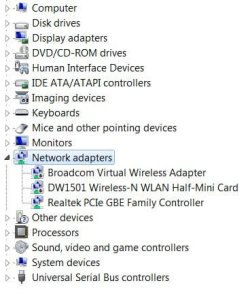
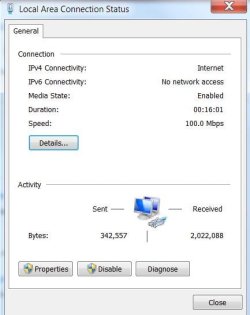
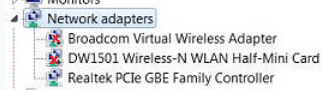
You mentioned earlier the adapters were disabled, but I needed to make sure.
I take it from your reply, that there has been no change or improvement in your connectivity.
[FONT=Verdana, sans-serif]You can try t[/FONT][FONT=Verdana, sans-serif]hose settings I was talking about. You need to get to the Advance tab found in the Realtek LAN properties window.[/FONT]
[FONT=Verdana, sans-serif]
Here is one way.[/FONT]
[FONT=Verdana, sans-serif]Type ncpa.cpl into the search box and hit enter, select it when it shows up.[/FONT]
[FONT=Verdana, sans-serif]
Select then right click your [/FONT][FONT=Verdana, sans-serif]Realtek[/FONT][FONT=Verdana, sans-serif] adapter, and choose properties.[/FONT]
[FONT=Verdana, sans-serif]
Click the configure button near the top right.[/FONT]
[FONT=Verdana, sans-serif]
Select the advanced tab.[/FONT]
[FONT=Verdana, sans-serif]
In the left "Property" column, look for something called Speed & Duplex (may be worded slightly differently "Link Speed / Duplex Mode", etc. Here is what mine says.[/FONT]
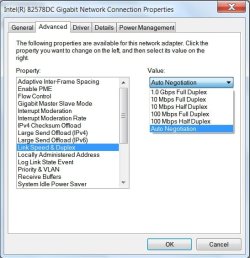
[FONT=Verdana, sans-serif]In the right "Value" column select the drop down arrow and change Auto Negotiation to 10Mbps/Half Duplex.[/FONT]
[FONT=Verdana, sans-serif]
OK your way back out of there and reboot.
[/FONT][FONT=Verdana, sans-serif]See if that resolves the disconnect issue, [/FONT][FONT=Verdana, sans-serif]if it does okay.[/FONT]
[FONT=Verdana, sans-serif]
[/FONT]
[FONT=Verdana, sans-serif]Experiment with different settings, ideally you would want 1000/Full if you have a gig network (router, cabling, etc.), alternatively you would probably want 100/Full but don't be afraid to settle for 100/half if that resolves your issues.[/FONT]
Other than that, the only other suggestions I would have would be to check for something with the hardware, like the service from the street to your machine, pinched or broken cable, frayed CAT5 connectors, or a loose card.
What gets me is, you can go for stretches at a time, and be okay, then it starts acting up again.



 , and a hi to you to DustSailor!