restoration from systems image will it effect the non back up drives

dazzlerboy

New member
Local time
5:43 AM
Messages
3
Hi all,

I have dual boot windows systems (windows XP in c: drive and windows 7 in d: drive) and e,f,g and h drives (all are type basic ) are for my personnal data (not concerning with Operating systems) now i want to make systems image of c and d drive.

but i dont know what will happen when i try to restore the systems using this systems image. I mean will it effect the data in e,f,g or h drive or just re-format the c and d drive and restore the systems image from DVD.

does anyone has a concrete answer. i dont want to loose my data in e,f,g or h drive.

thanks in advance.
 

My Computer My Computer

At a glance

windows 7 Professional 32 bitintel i3 21004GBIntel HD graphics family
Computer Manufacturer/Model Number
Intel
OS
windows 7 Professional 32 bit
CPU
intel i3 2100
Motherboard
intel dh61ww
Memory
4GB
Graphics Card(s)
Intel HD graphics family
Sound Card
realtek high defination
Hard Drives
500 GB with 6 patitions C,D,E,F,G,H
Hi dazzlerboy,

Are these separate hard drives or partitions? Anyway, restoring your drives from a CD shouldn't mess with your other drives if you do i correctly. But if these other drives have important files on them, I recommend backing up onto an External HDD before restoring to the image.

Hope this helps,
Jaidyn
 

My Computer My Computer

At a glance

Windows 7 Ultimate x64/Windows 8 Consumer Pre...Intel Pentium Dual Core E6700 3.2GHzStrontium 8192MB DDR3 1333Mhzmsi GeForce N560GTX-M2D1GD5 1GB
Computer Manufacturer/Model Number
Custom Build
OS
Windows 7 Ultimate x64/Windows 8 Consumer Preview x64/Ubuntu 11.04
CPU
Intel Pentium Dual Core E6700 3.2GHz
Motherboard
ASUS P5G41T-M LX
Memory
Strontium 8192MB DDR3 1333Mhz
Graphics Card(s)
msi GeForce N560GTX-M2D1GD5 1GB
Sound Card
Realtek HD Audio
Monitor(s) Displays
CHIMEI CMV 221D 22"
Screen Resolution
1680x1050
Hard Drives
Seagate Barracuda LP Green 3.5'' 2TB Internal HDD 5900RPM + WD Elements Desktop 1TB External HDD 7200RPM
PSU
SHAW Viper-1500w Gaming PSU
Case
Black eMaxx ATX Mini Tower Case
Keyboard
Microsoft Wireless Keyboard 1000
Mouse
Microsoft Wireless Optical Mouse 2000
Internet Speed
100GB @ 4.76Mbps
Please post diskmanagement snapshot. Procedure follows:


HOW TO POST A SNAPSHOT OF DISK MANAGEMENT DISPLAY

Run disk management:
WIN | type DISKMGMT.MSC | ENTER
WIN is the key with the wavy flag.

Maximize the output of Disk Management:
ALT-Spacebar key combo (this pops up a menu) |
X key (selects Maximize) |
Drag the field separators (such as between Status and Capacity) to show entire field. This is very important, otherwise, needed info is not visible.

Make a snapshot:
WIN | type SNIPPING | ENTER
Click the New button.
Drag the cursor around the area you want to snip.
File | Save as | select save location and name | Save button

Post the snapshot:
· Click on the paperclip icon in that row of icons at the top of the message box.
· Click on a BROWSE button. There are 5 of them.
· Navigate to the folder containing the snapshot.
· Click on the snapshot.
· Click on the OPEN button.
· Click on the UPLOAD button adjacent to the 5th BROWSE button.
· Close the MANAGE ATTACHMENTS window.
· Position the cursor at the spot in the message where you want the
snapshot to appear.
· Click on the PaperClip again.
· Click on the file which you want to insert
· Attach code will be inserted into your message.
 

My Computer My Computer

At a glance

MS Windows 7 Ultimate SP1 64-bitAMD A10-4600M6.00 GB Dual-Channel DDR3 @ 798MHz (11-11-12-28)AMD Radeon HD 7660G
Computer Manufacturer/Model Number
Toshiba Satellite S875D-S7239 laptop
OS
MS Windows 7 Ultimate SP1 64-bit
CPU
AMD A10-4600M
Motherboard
AMD Pumori (Socket FT1)
Memory
6.00 GB Dual-Channel DDR3 @ 798MHz (11-11-12-28)
Graphics Card(s)
AMD Radeon HD 7660G
Sound Card
High Definition Audio Device
Monitor(s) Displays
Generic PnP Monitor (1600x900@60Hz)
Screen Resolution
1600x900@60Hz
Hard Drives
SSD 119GB Corsair CSSD-V128GB2 ATA Device
Keyboard
Standard PS/2 Keyboard
Mouse
HP Wireless Optical Mobile Mouse Model FHA-3410
Internet Speed
What the local pub, local coffee shop offers.
Other Info
Optical Drive:MATSHITA BD-CMB UJ160B ATA Device


Also have an Asus ha1002xp netbook with Win 7 Ultimate installed.
Hi
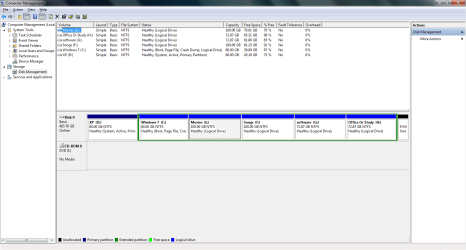
I have 6 partition on one HDD.
With dual boot (WIndows Xp and Windows 7 professional ). I will backup only c and d drives as only these two derive has the OS.
Screen shot is attached for your reference
 

Attachments

  • disk_manager.png
    disk_manager.png
    35 KB · Views: 4

My Computer My Computer

At a glance

windows 7 Professional 32 bitintel i3 21004GBIntel HD graphics family
Computer Manufacturer/Model Number
Intel
OS
windows 7 Professional 32 bit
CPU
intel i3 2100
Motherboard
intel dh61ww
Memory
4GB
Graphics Card(s)
Intel HD graphics family
Sound Card
realtek high defination
Hard Drives
500 GB with 6 patitions C,D,E,F,G,H
Back
Top