Restore/Redownload Windows 7 Fonts?

Status
Not open for further replies.

foggy

New member
Local time
7:26 PM
Messages
11
Hi,

I was deleting a lot of the unused fonts from my system (and "hiding" others) and found that I (naturally) deleted a few that I did NOT want to delete. But I didn't realize this until some months after my 'purge.' I know a system restore is an option, but for me it's too much for too little. I don't want to risk losing things in a restore to recover less than half a dozen fonts (which I would like back).

In searching, I saw this thread at the official MS site where the OP basically took the words right out of my mouth! The problem is that the very unhelpful response from the official rep was "try 1001freefonts.com." Duh! The fonts that I (and likely the OP) are missing are NOT 'free.'

But since I'm in the same boat now as he was then, I thought it wouldn't hurt to ask here. And, to use his own wording, "Is there no place where existing licensed OS users can go to download the font files and then install it themselves ?" I mean, if MS verifies proper/valid ownership of a Windows OS to do updates, they could surely allow for a re-downloading/installation of missing/corrupt/deleted fonts, right? :sarc:

So, is there a way or a place to reacquire missing (or even all) Windows 7 (or to be more precise, Word 2007) fonts without using a system restore?

Thanks for any suggestions! :D

Foggy
 

My Computer My Computer

Computer type
PC/Desktop
Computer Manufacturer/Model Number
Custom
OS
Windows 7 Pro 64-bit
Foggy, if you'd like I could post my fonts folder to Google Drive and provide you with a link
 

My Computer My Computer

Computer type
PC/Desktop
Computer Manufacturer/Model Number
custom build
OS
Microsoft Windows 7 Ultimate 64-bit 7601 Multiprocessor Free Service Pack 1
CPU
AMD FX(tm)-6100 Six-Core Processor
Motherboard
ASUSTeK Computer INC. M5A78L-M LX PLUS
Memory
4.00 GB
Graphics Card(s)
AMD Radeon HD 6450
Sound Card
(1) AMD High Definition Audio Device (2) Realtek High Defi
Monitor(s) Displays
Toshiba 47ZV650U 47" LCD 240Hz
Screen Resolution
1920 x 1080 x 32 bits (4294967296 colors) @ 60 Hz
Hard Drives
(1) HDT722516DLA380 ATA Device (2) Hitachi HDS721025CLA382 ATA Device (3) ST4000VN000-1H4168 ATA Device (4) Generic STORAGE DEVICE USB Device (5) Generic STORAGE DEVICE USB Device (6) Generic STORAGE DEVICE USB Device (7) Generic STORAGE
PSU
Corsair CX430M
Case
WMI (Waste Management Incorporated)
Cooling
Yes, it's very cool.
Keyboard
Bluetooth KB & Mousepad
Internet Speed
Fios 15/5 and it sucks when Verizon is throttling it down
Antivirus
Avast, MSE and Malwarebytes
Browser
Firefox v.41.0.2 and IE 11
Other Info
2 years old and so far this rig still kicks butt

My Computer My Computer

Computer type
PC/Desktop
OS
Microsoft Windows 7 Home Premium 64-bit 7601 Multiprocessor Free Service Pack 1
CPU
Intel(R) Core(TM) i7-3770 CPU @ 3.40GHz
Motherboard
ASUSTeK COMPUTER INC. P8H77-M
Memory
8.00 GB
Graphics Card(s)
Intel(R) HD Graphics 4000
Sound Card
On Board
Monitor(s) Displays
Dell 24"
Screen Resolution
1920 x 1080
Hard Drives
(1) INTEL SSDSC2CT180A3 ATA Device (2) ST500DM002-1BD142 ATA Device (3) WDC WD3200AAKS-75L9A0 ATA Device (4) Generic- Compact Flash USB Device (5) Generic- MS/MS-Pro USB Device (6) Generic- SD/MMC USB Device (7) Generic- SM/xD-Picture USB
PSU
500w Corsair
Case
Cooler Master
Cooling
3 Fans
Keyboard
Logitech MK300
Mouse
Logitech WOM
Internet Speed
75Mb
Antivirus
Norton 360
Browser
Firefox, Opera, IE

Thanks, mitchell, for that reply.

Unfortunately, it doesn't address my issue. The OP's problem has to do with many additional fonts that were installed and his/her concern about losing the Windows fonts upon removing all the additional ones. And most of the replies there were either more drastic than I wish to be (restore point, reinstall Windows, etc.) or were about manual procedures or downloadable programs that remove the fonts, leaving Windows fonts alone.

My problem, however, is about having some deleted Windows own fonts that I want to have back. I'd love to have an easy MS-endorsed download link to a program that would restore just the Windows 7 (and/or Office 2007) fonts, something a few of the respondents to the thread you linked to also wanted. But, strangely, there seems to be no such link.

But thanks again for the reply! :D
 

My Computer My Computer

Computer type
PC/Desktop
Computer Manufacturer/Model Number
Custom
OS
Windows 7 Pro 64-bit
Foggy, if you'd like I could post my fonts folder to Google Drive and provide you with a link

That's a very generous offer! :o

But I don't want to put you to the trouble (yet). I've got a few other things I'm looking into. I'll let you know. (This is really something MS itself should be doing for its users, don't you think?) ;)
 

My Computer My Computer

Computer type
PC/Desktop
Computer Manufacturer/Model Number
Custom
OS
Windows 7 Pro 64-bit
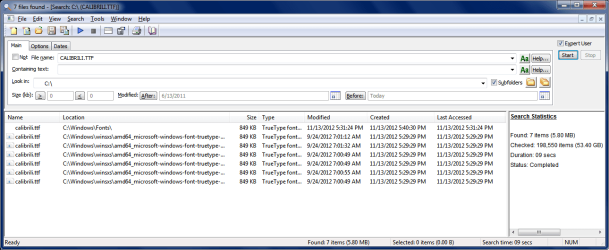
The OP PC might have a copy of the missing fonts in WINSXS.
If so, they could be could be copied (restored) from there.

I use File Locator Lite (free) for searching.
My screen print example shows results of what i find searching for a specific font (CALIBRILI.TTF).
I could use other search criteria to find other files.

Font_Find.png
 

My Computer My Computer

Computer type
PC/Desktop
Computer Manufacturer/Model Number
home built
OS
Multi-Boot W7_Pro_x64 W8.1_Pro_x64 W10_Pro_x64 +Linux_VMs +Chromium_VM
CPU
AMD Athlon II x4 620
Motherboard
Gigabyte GA-MA785G-UD3H
Memory
6GB GSkill DDR2 800
Graphics Card(s)
AMD 4670 GPU + AMD 4200 IGP
Sound Card
on board Realtek ALC889A
Monitor(s) Displays
RCA 40" LCD TV, Insignia 32" LCD TV, HP 15" LCD monitor
Screen Resolution
1680 x 1050
Hard Drives
OCZ Vertex 3 120GB,
Samsung F3 1TB (3),
Several others - WD, Seagate, Hitachi, ...
PSU
Corsair 500 W
Case
Rosewill mid tower
Cooling
CM 90mm rifle
Keyboard
Gyration wireless, Logitech wireless, Dell USB wired
Mouse
Gyration wireless, Logitech wireless, V7 USB wired
Internet Speed
Spectrum - 100Mbps D / 10Mbps U
Antivirus
Avast, MBAM3, EMET, WinPatrol
Browser
Pale Moon, Firefox, IE
Other Info
2 multi-boot PC's
Mainly HTPC/Office/Gen purpose (no gaming).
Trendnet USB KVM.
LG DVD burner/Blue Ray Player.
Tray system for removable SATA backup drives.

Not currently OCd, under-volted.
I use Hybrid sleep, rarely re-boot or shutdown.

Hauppauge HD-PVR, Avermedia PCIe TV Tuner, Hauppauge PCI TV Tuner.
This is getting a little confusing. First it is the Windows 7 fonts, now it seems to be the fonts installed with MS Office 2007 as well. We do not know what other programs the OP has installed that may have their own fonts. Some image editing programs install their own fonts automatically when you install the program. Perhaps if Foggy could produce a list of fonts he has missing we might be able to help further!
 

My Computer My Computer

Computer type
PC/Desktop
OS
Microsoft Windows 7 Home Premium 64-bit 7601 Multiprocessor Free Service Pack 1
CPU
Intel(R) Core(TM) i7-3770 CPU @ 3.40GHz
Motherboard
ASUSTeK COMPUTER INC. P8H77-M
Memory
8.00 GB
Graphics Card(s)
Intel(R) HD Graphics 4000
Sound Card
On Board
Monitor(s) Displays
Dell 24"
Screen Resolution
1920 x 1080
Hard Drives
(1) INTEL SSDSC2CT180A3 ATA Device (2) ST500DM002-1BD142 ATA Device (3) WDC WD3200AAKS-75L9A0 ATA Device (4) Generic- Compact Flash USB Device (5) Generic- MS/MS-Pro USB Device (6) Generic- SD/MMC USB Device (7) Generic- SM/xD-Picture USB
PSU
500w Corsair
Case
Cooler Master
Cooling
3 Fans
Keyboard
Logitech MK300
Mouse
Logitech WOM
Internet Speed
75Mb
Antivirus
Norton 360
Browser
Firefox, Opera, IE
mitchell65,

Yes, my apologies for the confusion. Actually, it's a bit confusing to me, too. :o

To clarify: I predominantly use MS Outlook and Word 2007, so whatever fonts I'm familiar with on my Windows 7 Pro system are the ones I see in those Office program font menus. But when I did my purge of unwanted fonts a few months back I did so by manually deleting them from the C:\\Windows\Fonts folder. Since I myself had never added fonts, I had assumed (wrongly) that whatever fonts were in that folder were simply the default fonts supplied by the Windows operating system. But upon checking, it seems that Baskerville Old Face, Californian FB, Goudy Old Style, and some others are found in/supplied by Office 2007 but not part of Windows 7 itself.

Well, now knowing that I was missing fonts from two sources (Windows 7 and Office 2007), I downloaded the MS PowerPoint Viewer 2007 after (again) reading through the message board link you provided in your first reply to me. Someone there said doing so would restore missing Windows fonts, since that program comes with them. Well, some of my desired fonts (e.g. Constantia) which were part of Windows 7 fonts list were, indeed, restored! So, that part's delightfully solved. (Thanks again for that link!)

It would seem -- after having unnecessarily introduced confusion into this whole situation of mine -- that now I'm really looking for a way to restore deleted Office 2007 fonts, a problem which undoubtedly does not have as easy a solution.

If worse comes to worst, I can live with the fonts I have that were restored already.


DavidE,

Thanks for the link. I did a search on my own (based on your screenshot) and later also downloaded your suggested program. It didn't find any of the Office 2007 fonts I'm looking for, but it did help me confirm that some of the Windows fonts that I was missing have been restored by the PowerPoint 2007 download mentioned above. :) But I guess the Office 2007 ones I deleted are truly gone.


General comment: I checked -- my system restore points only go back a few weeks, but I deleted these fonts back in July/August or so, so that wouldn't help me anyway. Oh, well.
 

My Computer My Computer

Computer type
PC/Desktop
Computer Manufacturer/Model Number
Custom
OS
Windows 7 Pro 64-bit
Foggy, I am not sure if this will work, but if you want to try I am willing to work with you.
I have Office 2003 running on Windows 7 Ultimate. Fonts may or may not be compatible, but I think a font, is a font, is a font.
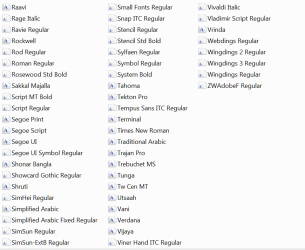
Here are screens of all of the fonts on my system. Make a list of what you need and I could find and put them into a folder on my Google Drive online storage. Then I could post a link to that on here for you to fetch them from.

Font1.PNG
Font2.PNG
Font3.PNG

Let me know if you wish to proceed.
 

My Computer My Computer

Computer type
PC/Desktop
Computer Manufacturer/Model Number
custom build
OS
Microsoft Windows 7 Ultimate 64-bit 7601 Multiprocessor Free Service Pack 1
CPU
AMD FX(tm)-6100 Six-Core Processor
Motherboard
ASUSTeK Computer INC. M5A78L-M LX PLUS
Memory
4.00 GB
Graphics Card(s)
AMD Radeon HD 6450
Sound Card
(1) AMD High Definition Audio Device (2) Realtek High Defi
Monitor(s) Displays
Toshiba 47ZV650U 47" LCD 240Hz
Screen Resolution
1920 x 1080 x 32 bits (4294967296 colors) @ 60 Hz
Hard Drives
(1) HDT722516DLA380 ATA Device (2) Hitachi HDS721025CLA382 ATA Device (3) ST4000VN000-1H4168 ATA Device (4) Generic STORAGE DEVICE USB Device (5) Generic STORAGE DEVICE USB Device (6) Generic STORAGE DEVICE USB Device (7) Generic STORAGE
PSU
Corsair CX430M
Case
WMI (Waste Management Incorporated)
Cooling
Yes, it's very cool.
Keyboard
Bluetooth KB & Mousepad
Internet Speed
Fios 15/5 and it sucks when Verizon is throttling it down
Antivirus
Avast, MSE and Malwarebytes
Browser
Firefox v.41.0.2 and IE 11
Other Info
2 years old and so far this rig still kicks butt
Thanks again for your generosity, cyclops!

To be honest, I'd be happy just getting back some of the serifs:

Baskerville Old Face Regular
Bell MT
Californian FB
Goudy Old Style

Incidentally, you have some coveted serif fonts on your list:

Adobe Caslon Pro
Adobe Garamond Pro
Minion Pro

They're obviously not Windows 7 or Office 2007 fonts. They're premium fonts, AFAIK. Did you buy them or do they come with some (free or premium) software you have? For example, do they come with Adobe Reader or another Adobe product? (I use FF's built in .pdf reader or SumatraPDF and don't have Adobe myself. But I could download Adobe Reader if I knew it brought some nice fonts along with it.)

Anyway, thanks for all your assistance!
 

My Computer My Computer

Computer type
PC/Desktop
Computer Manufacturer/Model Number
Custom
OS
Windows 7 Pro 64-bit
I will gladly set up the folder to share with you any of the listed fonts. The coveted serif fonts are associated with Adobe CS4 Master Collection. Would you like me to include them in the share folder? You could try to see if they'll work on your system and if they do that's great. Shall I proceed to do this?
 

My Computer My Computer

Computer type
PC/Desktop
Computer Manufacturer/Model Number
custom build
OS
Microsoft Windows 7 Ultimate 64-bit 7601 Multiprocessor Free Service Pack 1
CPU
AMD FX(tm)-6100 Six-Core Processor
Motherboard
ASUSTeK Computer INC. M5A78L-M LX PLUS
Memory
4.00 GB
Graphics Card(s)
AMD Radeon HD 6450
Sound Card
(1) AMD High Definition Audio Device (2) Realtek High Defi
Monitor(s) Displays
Toshiba 47ZV650U 47" LCD 240Hz
Screen Resolution
1920 x 1080 x 32 bits (4294967296 colors) @ 60 Hz
Hard Drives
(1) HDT722516DLA380 ATA Device (2) Hitachi HDS721025CLA382 ATA Device (3) ST4000VN000-1H4168 ATA Device (4) Generic STORAGE DEVICE USB Device (5) Generic STORAGE DEVICE USB Device (6) Generic STORAGE DEVICE USB Device (7) Generic STORAGE
PSU
Corsair CX430M
Case
WMI (Waste Management Incorporated)
Cooling
Yes, it's very cool.
Keyboard
Bluetooth KB & Mousepad
Internet Speed
Fios 15/5 and it sucks when Verizon is throttling it down
Antivirus
Avast, MSE and Malwarebytes
Browser
Firefox v.41.0.2 and IE 11
Other Info
2 years old and so far this rig still kicks butt
Adobe CS4 Master Collection is a copyrighted commercial suite and "sharing" of part or all of the contents of the suite would be piracy

Thread Closed
 

My Computers My Computers

System One System Two

  • Computer type
    PC/Desktop
    Computer Manufacturer/Model Number
    ChillBlast - Custom to my design
    OS
    Windows 11 Pro x64 [Latest Release and Release Preview]
    CPU
    Ryzen 9 5950X, 3.8 - 5.2 MHz
    Motherboard
    Asus Prime X570-Pro
    Memory
    64GB [2 x 32GB] DDR4 3200MHz
    Graphics Card(s)
    4GB NVIDIA GEFORCE GTX 1650 Ti
    Sound Card
    On-board SPDIF to 5.1 System + HDMI [5.1 system]
    Monitor(s) Displays
    32" UHD 32 Bit HDR Monitor + 43" UHD 4K 32Bit HDR TV
    Screen Resolution
    2 x 3840 x 2160 @60Hz
    Hard Drives
    1TB M2 SSD OS, 500GB Fast Access SSD, 2 x 8TB Data + Various Externals from 1TB to 4TB, 10TB NAS
    PSU
    NZXT C750 80 PLUS Gold 750W Modular PSU
    Case
    Workstation Case [Matt Black]
    Cooling
    NZXT Kraken X63 280mm CPU Cooler +2x Quiet Case fans
    Keyboard
    Logitech Wireless MX Keys & K400 + others
    Mouse
    Logitech Wireless MX Master 3S
    Internet Speed
    920 MB Down 50 MB Up
    Antivirus
    BitDefender Total Security Pro
    Browser
    Chrome (always run latest Non-Beta)
    Other Info
    Also run ...
    Laptop - Quad 8GB - Windows 10 Pro x64
    Nexus 7 Android tablet x2
    Samsung 10.2" tablet
    Blackview TAB 8 4G Android Tablet c/w Keyboard
    Wacom Intuos Pro Medium Pen Pad
    Wacom Intuos Pro Small Pen Pad
    Wacom Expresskeys Remote
    Loopdeck+ Graphics Controller
    Shuttle Pro v2 Control
  • Computer type
    Laptop
    System Manufacturer/Model Number
    Dell XPS 17 10750H
    OS
    Windows 11 Pro x64 Latest RP
    CPU
    Intel I7 10750H 5.0GHz
    Motherboard
    Dell XPS
    Memory
    32GB [2x16GB] DDR4 2933 MHz
    Graphics Card(s)
    nVidia GTX1650Ti 4 GB GDDR6
    Sound Card
    Stock [Realtek] 4 Speaker
    Monitor(s) Displays
    17" IPS UHD+ Infinity Edge Touchscreen
    Screen Resolution
    3840 x 2400
    Hard Drives
    2TB M2 NVMe, 4TB External + various 500GB & 1TB External NVMe (also have access to spinner HDD from
    PSU
    Stock
    Case
    Stock XPS Aluminium & Carbon Fibre
    Cooling
    Stock - Active Fan Control
    Keyboard
    Backlit + Various Logitech
    Mouse
    Stock Track Pad + Logitech MX Trackball
    Internet Speed
    72 MB Down 18MB Up
    Browser
    Chrome
    Other Info
    Also run ...
    Laptop - Quad 8GB - Windows 10 Pro x64
    Nexus 7 Android tablet x2
    10.2" tablet
    Sony Z3 Android Smartphone
    Wacom Intuos Pro Medium Pen Pad
    Wacom Intuos Pro Small Pen Pad
    Wacom Expresskeys Remote
    Loopdeck+ Graphics Controller
    Shuttle Pro v2 Control Pad
    10TB NAS
Status
Not open for further replies.
Back
Top