Right Click Menu Resembles XP?

Wrinkledlion

New member
A few weeks ago, my computer crashed for reasons that I'm still unsure of, and I had to reinstall using a USB key. (See this topic if you want to read about that in detail.)

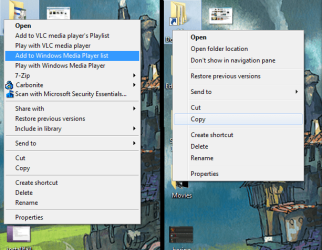
After the reinstall, it's mostly been working, but it's been treating my right-click menus very oddly. They look normal inside of programs and on the "My Documents" and "Recycle Bin" desktop icons, but all the folders and documents that don't come built into the OS have flat menus that turn blue as you mouse over them, exactly like in XP and earlier systems. Any idea how I can remedy this?
 

Attachments
  • menus.png
    menus.png
    312.2 KB · Views: 60

My Computer

OS
Windows 7
Motherboard
Shuttle FB61 (Springdale-G-6A79AH2AC-00)
Graphics Card(s)
NVIDIA GeForce 8400 GS
Sound Card
Realtek AC'97 Audio
Monitor(s) Displays
Samsung SyncMaster 2243SWX
Screen Resolution
1920 x 1080
It's caused by some 3rd party software you installed.
 

My Computer

Computer Manufacturer/Model Number
self built
OS
7600.20510 x86
CPU
P4 550 3.4 GHz HT running at 3.5 GHz
Motherboard
MSI PM8M3-V (MS-7211 v1.x) Micro-ATX mainboard
Memory
OCZ 2 GB(2x1GB) DDR400mHz running @ 414 mHz
Graphics Card(s)
HIS Radeon HD 3850 IceQ 3 Turbo HDMI Dual DL-DVI AGP
Sound Card
MOTU Traveler firewire studio interface 192 kHz 24 bit
Monitor(s) Displays
22" widescreen Acer X223W LCD, 17" Compaq P75 CRT
Screen Resolution
1680x1050 and 1280x1024
Hard Drives
SATA I x2 WD, 400 GB and 120 GB, SATA 2 WD Caviar Black 1 TB
PSU
350W generic
Case
Cybertronpc, it glows blue
Cooling
stock cpu fan, Ice-Q 3 gpu and system, many case fans
Keyboard
Logitch Classical Keyboard 200
Mouse
Logitech Mediaplay cordless
Internet Speed
1792/448 kbits/sec
Other Info
SATA II PCI fake RAID adapter, 1 GB Readyboost, original ATI Remote Wonder (even works with WMC perfectly), Logitech Rumblepad 2 game controller x2
Most probably, its caused by that Carbonite Context menu, from a google search, i think its an online backup app, so get the latest version (win7 supporting version, if there is one) from their website and reinstall that app.

And also update VLC, 7Zip to there latest version.
 
Last edited:

My Computer

Computer Manufacturer/Model Number
Apple - MBP 5,4
OS
Win 7 64, OSX Snow Leopard
CPU
Intel Core 2 Duo P8700
Memory
4 GB 1066 MHz DDR3
Graphics Card(s)
nVidia 9400 M
Screen Resolution
1440x900
Hard Drives
WD Caviar Black 500GB 7200RPM
I downloaded the latest 7Zip, and I already have the latest version of VLC, but I can't find any way to update Carbonite on their webpage.
 

My Computer

OS
Windows 7
Motherboard
Shuttle FB61 (Springdale-G-6A79AH2AC-00)
Graphics Card(s)
NVIDIA GeForce 8400 GS
Sound Card
Realtek AC'97 Audio
Monitor(s) Displays
Samsung SyncMaster 2243SWX
Screen Resolution
1920 x 1080
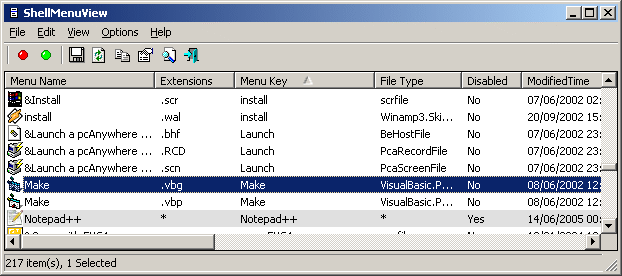
Give this app a try:

ShellMenuView v1.12

Description

ShellMenuView is a small utility that display the list of static menu items that appeared in the context menu when you right-click a file/folder on Windows Explorer, and allows you to easily disable unwanted menu items.

System Requirements

ShellMenuView works properly on Windows 2000 and Windows XP. You can also use ShellMenuView on Windows 98 for viewing the menu items list, but the disable/enable feature won't work on this version of Windows. (The disabling feature is achieved by adding 'LegacyDisable' key to the desired menu item in the Registry, and this Registry key is not supported by Windows 98)

Search for other utilities in NirSoft


shellmenuview.gif


Or Autoruns:
Autoruns for Windows v9.57
 

My Computer

Computer Manufacturer/Model Number
Cheap $399.00 E-Machine
OS
Windows 7 Pro & Vista Home Premium
CPU
Athlon 64 3800+ (Orleans) 2.40GHz
Motherboard
Winfast
Memory
2GB DDR2 RAM DIMM
Graphics Card(s)
NVIDIA GeForce 8500 GT 512 MB memory HDMI out
Sound Card
creative X-Fi Exteme 7..1 channel
Monitor(s) Displays
Acer V223W 22" widescreen DVI
Screen Resolution
1680x1050
Hard Drives
WDC WD5 500GB
WDC WD25 250GB
PSU
OCZ 550 watt
Case
Gateway
Cooling
2 fans
Keyboard
Dell
Mouse
Sony Vaio
Internet Speed
18MB/s down - .72MB /s up
That says 2000 and XP. Does it work on 7?
 

My Computer

OS
Windows 7
Motherboard
Shuttle FB61 (Springdale-G-6A79AH2AC-00)
Graphics Card(s)
NVIDIA GeForce 8400 GS
Sound Card
Realtek AC'97 Audio
Monitor(s) Displays
Samsung SyncMaster 2243SWX
Screen Resolution
1920 x 1080
Yes, sure does.
 

My Computer

Computer Manufacturer/Model Number
Cheap $399.00 E-Machine
OS
Windows 7 Pro & Vista Home Premium
CPU
Athlon 64 3800+ (Orleans) 2.40GHz
Motherboard
Winfast
Memory
2GB DDR2 RAM DIMM
Graphics Card(s)
NVIDIA GeForce 8500 GT 512 MB memory HDMI out
Sound Card
creative X-Fi Exteme 7..1 channel
Monitor(s) Displays
Acer V223W 22" widescreen DVI
Screen Resolution
1680x1050
Hard Drives
WDC WD5 500GB
WDC WD25 250GB
PSU
OCZ 550 watt
Case
Gateway
Cooling
2 fans
Keyboard
Dell
Mouse
Sony Vaio
Internet Speed
18MB/s down - .72MB /s up
Okay, by deleting the Carbonite registry value in HKEY_CLASSES_ROOT\*\shellex\ContextMenuHandlers, I've got pictures and program context menus looking normal, but when I click on a folder it still looks bad and shows the Carbonite option. How can I fix the folders?
 

My Computer

OS
Windows 7
Motherboard
Shuttle FB61 (Springdale-G-6A79AH2AC-00)
Graphics Card(s)
NVIDIA GeForce 8400 GS
Sound Card
Realtek AC'97 Audio
Monitor(s) Displays
Samsung SyncMaster 2243SWX
Screen Resolution
1920 x 1080
You need to do a search in the registry and remove all instances of Carbonite
 

My Computer

Computer Manufacturer/Model Number
Cheap $399.00 E-Machine
OS
Windows 7 Pro & Vista Home Premium
CPU
Athlon 64 3800+ (Orleans) 2.40GHz
Motherboard
Winfast
Memory
2GB DDR2 RAM DIMM
Graphics Card(s)
NVIDIA GeForce 8500 GT 512 MB memory HDMI out
Sound Card
creative X-Fi Exteme 7..1 channel
Monitor(s) Displays
Acer V223W 22" widescreen DVI
Screen Resolution
1680x1050
Hard Drives
WDC WD5 500GB
WDC WD25 250GB
PSU
OCZ 550 watt
Case
Gateway
Cooling
2 fans
Keyboard
Dell
Mouse
Sony Vaio
Internet Speed
18MB/s down - .72MB /s up
All instances? Wouldn't that uninstall it?
 

My Computer

OS
Windows 7
Motherboard
Shuttle FB61 (Springdale-G-6A79AH2AC-00)
Graphics Card(s)
NVIDIA GeForce 8400 GS
Sound Card
Realtek AC'97 Audio
Monitor(s) Displays
Samsung SyncMaster 2243SWX
Screen Resolution
1920 x 1080
Well, what exactly is Carbonite?

OK, now I know what it is..

let me look over your screen shot again.

What type of file are you right-clicking on to bring up those different menus?
 

My Computer

Computer Manufacturer/Model Number
Cheap $399.00 E-Machine
OS
Windows 7 Pro & Vista Home Premium
CPU
Athlon 64 3800+ (Orleans) 2.40GHz
Motherboard
Winfast
Memory
2GB DDR2 RAM DIMM
Graphics Card(s)
NVIDIA GeForce 8500 GT 512 MB memory HDMI out
Sound Card
creative X-Fi Exteme 7..1 channel
Monitor(s) Displays
Acer V223W 22" widescreen DVI
Screen Resolution
1680x1050
Hard Drives
WDC WD5 500GB
WDC WD25 250GB
PSU
OCZ 550 watt
Case
Gateway
Cooling
2 fans
Keyboard
Dell
Mouse
Sony Vaio
Internet Speed
18MB/s down - .72MB /s up
Okay, I'm in HKEY_CLASSES_ROOT\Folder\ShellEx\ContextMenuHandlers, where I assume the Carbonite value should be, but I can't find it, even though Carbonite, 7Zip, and VLC all still show up on the context menus for my folders. The only two values in there are "Briefcase Menu" and "Library Location."
 

Attachments

My Computer

OS
Windows 7
Motherboard
Shuttle FB61 (Springdale-G-6A79AH2AC-00)
Graphics Card(s)
NVIDIA GeForce 8400 GS
Sound Card
Realtek AC'97 Audio
Monitor(s) Displays
Samsung SyncMaster 2243SWX
Screen Resolution
1920 x 1080
It copuld be under this key:

HKEY_CLASSES_ROOT\AllFilesystemObjects
 

My Computer

Computer Manufacturer/Model Number
Cheap $399.00 E-Machine
OS
Windows 7 Pro & Vista Home Premium
CPU
Athlon 64 3800+ (Orleans) 2.40GHz
Motherboard
Winfast
Memory
2GB DDR2 RAM DIMM
Graphics Card(s)
NVIDIA GeForce 8500 GT 512 MB memory HDMI out
Sound Card
creative X-Fi Exteme 7..1 channel
Monitor(s) Displays
Acer V223W 22" widescreen DVI
Screen Resolution
1680x1050
Hard Drives
WDC WD5 500GB
WDC WD25 250GB
PSU
OCZ 550 watt
Case
Gateway
Cooling
2 fans
Keyboard
Dell
Mouse
Sony Vaio
Internet Speed
18MB/s down - .72MB /s up
No, the context handlers in there are just "{596AB062-B4D2-4215-9F74-E9109B0A8153}" (which appears to be empty), "CopyAsPathMenu" and "SendTo."
 

My Computer

OS
Windows 7
Motherboard
Shuttle FB61 (Springdale-G-6A79AH2AC-00)
Graphics Card(s)
NVIDIA GeForce 8400 GS
Sound Card
Realtek AC'97 Audio
Monitor(s) Displays
Samsung SyncMaster 2243SWX
Screen Resolution
1920 x 1080
I have 8,. but 6 are 3rd party programs.

What exactly are you trying to do?
 

My Computer

Computer Manufacturer/Model Number
Cheap $399.00 E-Machine
OS
Windows 7 Pro & Vista Home Premium
CPU
Athlon 64 3800+ (Orleans) 2.40GHz
Motherboard
Winfast
Memory
2GB DDR2 RAM DIMM
Graphics Card(s)
NVIDIA GeForce 8500 GT 512 MB memory HDMI out
Sound Card
creative X-Fi Exteme 7..1 channel
Monitor(s) Displays
Acer V223W 22" widescreen DVI
Screen Resolution
1680x1050
Hard Drives
WDC WD5 500GB
WDC WD25 250GB
PSU
OCZ 550 watt
Case
Gateway
Cooling
2 fans
Keyboard
Dell
Mouse
Sony Vaio
Internet Speed
18MB/s down - .72MB /s up
Remove Carbonite from appearing on the context menus for my desktop folders. See the picture in the first post.
 

My Computer

OS
Windows 7
Motherboard
Shuttle FB61 (Springdale-G-6A79AH2AC-00)
Graphics Card(s)
NVIDIA GeForce 8400 GS
Sound Card
Realtek AC'97 Audio
Monitor(s) Displays
Samsung SyncMaster 2243SWX
Screen Resolution
1920 x 1080
Check here also:

HKEY_CLASSES_ROOT\*\shellex\ContextMenuHandlers
 

My Computer

Computer Manufacturer/Model Number
Cheap $399.00 E-Machine
OS
Windows 7 Pro & Vista Home Premium
CPU
Athlon 64 3800+ (Orleans) 2.40GHz
Motherboard
Winfast
Memory
2GB DDR2 RAM DIMM
Graphics Card(s)
NVIDIA GeForce 8500 GT 512 MB memory HDMI out
Sound Card
creative X-Fi Exteme 7..1 channel
Monitor(s) Displays
Acer V223W 22" widescreen DVI
Screen Resolution
1680x1050
Hard Drives
WDC WD5 500GB
WDC WD25 250GB
PSU
OCZ 550 watt
Case
Gateway
Cooling
2 fans
Keyboard
Dell
Mouse
Sony Vaio
Internet Speed
18MB/s down - .72MB /s up
Okay, by deleting the Carbonite registry value in HKEY_CLASSES_ROOT\*\shellex\ContextMenuHandlers, I've got pictures and program context menus looking normal, but when I click on a folder it still looks bad and shows the Carbonite option. How can I fix the folders?

That's what I tried first.
 

My Computer

OS
Windows 7
Motherboard
Shuttle FB61 (Springdale-G-6A79AH2AC-00)
Graphics Card(s)
NVIDIA GeForce 8400 GS
Sound Card
Realtek AC'97 Audio
Monitor(s) Displays
Samsung SyncMaster 2243SWX
Screen Resolution
1920 x 1080
Okay, I found the fix. It's in HKEY_CLASSES_ROOT\Directory\shellex\ContextMenuHandlers for the folders, and HKEY_CLASSES_ROOT\*\shellex\ContextMenuHandlers for individual documents.
I think we can call this solved.
 
Last edited:

My Computer

OS
Windows 7
Motherboard
Shuttle FB61 (Springdale-G-6A79AH2AC-00)
Graphics Card(s)
NVIDIA GeForce 8400 GS
Sound Card
Realtek AC'97 Audio
Monitor(s) Displays
Samsung SyncMaster 2243SWX
Screen Resolution
1920 x 1080
Good,.

Glad to hear it!
 

My Computer

Computer Manufacturer/Model Number
Cheap $399.00 E-Machine
OS
Windows 7 Pro & Vista Home Premium
CPU
Athlon 64 3800+ (Orleans) 2.40GHz
Motherboard
Winfast
Memory
2GB DDR2 RAM DIMM
Graphics Card(s)
NVIDIA GeForce 8500 GT 512 MB memory HDMI out
Sound Card
creative X-Fi Exteme 7..1 channel
Monitor(s) Displays
Acer V223W 22" widescreen DVI
Screen Resolution
1680x1050
Hard Drives
WDC WD5 500GB
WDC WD25 250GB
PSU
OCZ 550 watt
Case
Gateway
Cooling
2 fans
Keyboard
Dell
Mouse
Sony Vaio
Internet Speed
18MB/s down - .72MB /s up
Back
Top