
- Local time
- 12:14 PM
- Messages
- 260
Hi, everything's going well, fixing an issue a day, but the solution to this continues to elude me...
I have a (taskbar) toolbar (like quick launch) that shows the folder contents (as usual, like quick launch) on the toolbar. The target folder resides on a virtual volume, that's always attached....
One of the problems is that I don't know how windows (internally) performs this (virtual volume) load/mount/attach operation....
I had used VHDAttach or something in the past... until I realised
The problem is that I have to restart explorer after login to refresh the systemiconcache; by then, the volume is attached, and the icons are read (as normal) and displayed...
I'm running attachLBS.bat @
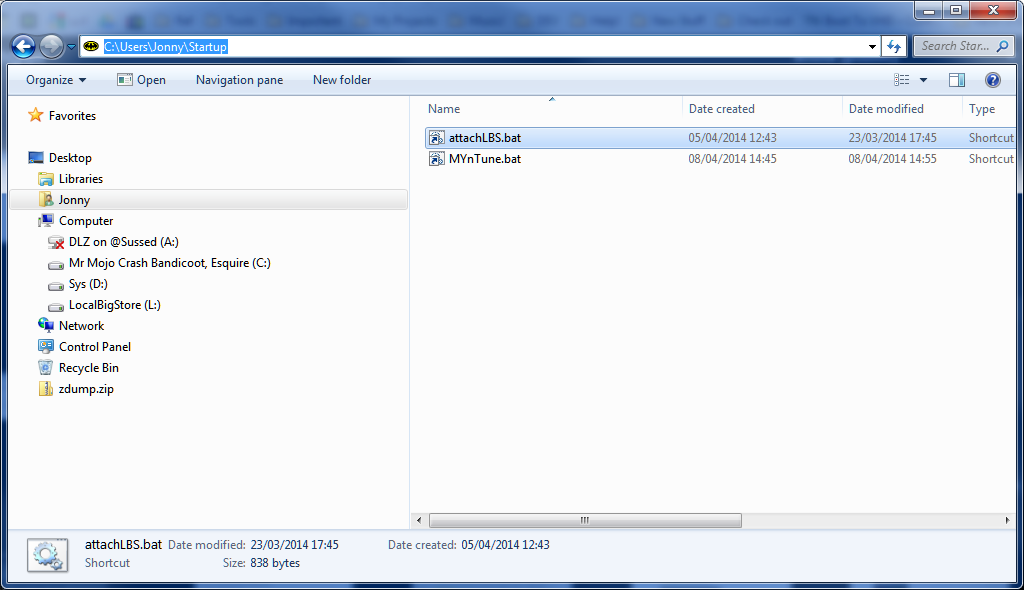 (can you believe User Startup isn't in C:\users\username\startup?!) - this gives the volume a path letter (L
 ... but it doesn't run in time..
So! My question is - how do I make windows ensure an operation is completed (attach volume, for example) BEFORE explorer.exe performs it's "display shell / user interface" task?!
Thanks!
I have a (taskbar) toolbar (like quick launch) that shows the folder contents (as usual, like quick launch) on the toolbar. The target folder resides on a virtual volume, that's always attached....
One of the problems is that I don't know how windows (internally) performs this (virtual volume) load/mount/attach operation....
I had used VHDAttach or something in the past... until I realised
- there are NO safety controls - if you (context) detach the (system C:\) VHD, it's goodnight vienna - eternal sleep! Dead virtual machine!
- the "nice to have's" offered out-of-the-box are all easily attainable with a bit of (diskpart /s script) batch magic
The problem is that I have to restart explorer after login to refresh the systemiconcache; by then, the volume is attached, and the icons are read (as normal) and displayed...
I'm running attachLBS.bat @
... but it doesn't run in time..So! My question is - how do I make windows ensure an operation is completed (attach volume, for example) BEFORE explorer.exe performs it's "display shell / user interface" task?!
Thanks!
My Computer
At a glance
Windows 7 Ultimate 64bit2.28GbNVIDIA
- Computer type
- Laptop
- Computer Manufacturer/Model Number
- Dell
- OS
- Windows 7 Ultimate 64bit
- CPU
- 2.2
- Memory
- 8Gb
- Graphics Card(s)
- NVIDIA
- Screen Resolution
- 1280/762
- Mouse
- built in pad || iphone || MS wireless
- Internet Speed
- 100MB
- Antivirus
- Avast
- Browser
- Chrome, Chrome portable
