Samsung laptop recovery from Backup files(init.w01)

hnagawin

New member
Local time
11:25 AM
Messages
5
Hi,

I am having some problem in restoring windows from a backup image on a Samsung laptop.
I have described the issue here. Any help would be greatly appreciated.

1. I have a samsung laptop which has dual boot with Ubuntu and windows.
2. I am trying to recover the windows from the windows recovery image.
3. The recovery image files(init.w01 files) are on an external hard drive.
4. Windows recovery backup image is very big in size.
5. Recovery partition image(factory setting) needs to be replaced with the backup image.
6. Recovery partition is not big enough for the backup image.
7. Recovery partition needs to be created on a separate external hard disk.
8. I have created a bootable recovery partition on an external hard disk.
9. Bootable recovery partition can only be created on a GPT disk type.
10. The image of the recovery partition on the external hard disk needs to be replaced.
with the backup image.
11. The recovery partition is getting created at the end sectors of the external hard disk and again not
big enough to hold the backup image. It is only 1GB in size.


How to create a bootable recovery partition with the partition not being at
the end
OR
Is there any other way the windows can be restored from the recovery image files?

Thanks,
HN
 

My Computer My Computer

At a glance

windows 7
Computer type
Laptop
Computer Manufacturer/Model Number
Samsung
OS
windows 7
3. The recovery image files(init.w01 files) are on an external hard drive.
4. Windows recovery backup image is very big in size.

You have two images?

1.Those init files are proprietary and I am not aware of a away to get at them except by using winclon program.

2. If you used windows system image to create an image, it will be in .vhd format. (Is that what you mean by"Windows recovery backup image" ) ?

VHD can be mounted and extracted, or mounted and cloned, or mounted and an image made with another imaging program.

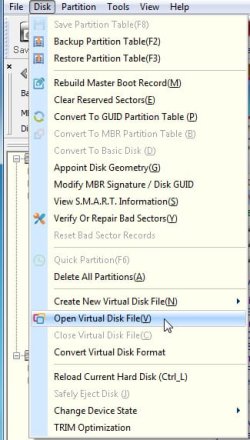
disk genius is one way - free version should do the job.

All-in-one Solution for Data Recovery, Partition Manager and Data Backup - DiskGenius


DG_OPENVITUALDISK.jpg
 

My Computers My Computers

  • At a glance

    7 X64i5 84002x8gb 3200mhz
    Computer type
    PC/Desktop
    OS
    7 X64
    CPU
    i5 8400
    Motherboard
    gigabyte b365m ds3h
    Memory
    2x8gb 3200mhz
    Hard Drives
    various
    PSU
    pure power 11 400w cm
    Case
    Coolermaster
    Cooling
    cryorig m9i
  • At a glance

    7x64g54008gb ddr4 2400
    Computer type
    PC/Desktop
    OS
    7x64
    CPU
    g5400
    Motherboard
    ga b365m ds3h
    Memory
    8gb ddr4 2400
    PSU
    xfx pro 450w
Alternatively, you could always use a regular win 7 installation media and install from scratch.
 

My Computers My Computers

  • At a glance

    7 X64i5 84002x8gb 3200mhz
    Computer type
    PC/Desktop
    OS
    7 X64
    CPU
    i5 8400
    Motherboard
    gigabyte b365m ds3h
    Memory
    2x8gb 3200mhz
    Hard Drives
    various
    PSU
    pure power 11 400w cm
    Case
    Coolermaster
    Cooling
    cryorig m9i
  • At a glance

    7x64g54008gb ddr4 2400
    Computer type
    PC/Desktop
    OS
    7x64
    CPU
    g5400
    Motherboard
    ga b365m ds3h
    Memory
    8gb ddr4 2400
    PSU
    xfx pro 450w
Thanks for the quick response SIW2.

I have only one image. My understanding is that the backup files that I have(init.w01..) can be used to create an image. But before I can restore windows from the recovery partition, the recovery partition image needs to be replaced with an image using the backup files.

The problem is not recovering windows which I have already done. I need to get the data which I lost when I installed ubuntu on the laptop.

Thanks,
HN
 

My Computer My Computer

At a glance

windows 7
Computer type
Laptop
Computer Manufacturer/Model Number
Samsung
OS
windows 7

My Computers My Computers

  • At a glance

    7 X64i5 84002x8gb 3200mhz
    Computer type
    PC/Desktop
    OS
    7 X64
    CPU
    i5 8400
    Motherboard
    gigabyte b365m ds3h
    Memory
    2x8gb 3200mhz
    Hard Drives
    various
    PSU
    pure power 11 400w cm
    Case
    Coolermaster
    Cooling
    cryorig m9i
  • At a glance

    7x64g54008gb ddr4 2400
    Computer type
    PC/Desktop
    OS
    7x64
    CPU
    g5400
    Motherboard
    ga b365m ds3h
    Memory
    8gb ddr4 2400
    PSU
    xfx pro 450w
Sorry for the late response.
I do not have an SRS bootable USB.
The links you have posted are very helpful. I have been trying to follow that.

Thanks,
HN
 

My Computer My Computer

At a glance

windows 7
Computer type
Laptop
Computer Manufacturer/Model Number
Samsung
OS
windows 7

My Computers My Computers

  • At a glance

    7 X64i5 84002x8gb 3200mhz
    Computer type
    PC/Desktop
    OS
    7 X64
    CPU
    i5 8400
    Motherboard
    gigabyte b365m ds3h
    Memory
    2x8gb 3200mhz
    Hard Drives
    various
    PSU
    pure power 11 400w cm
    Case
    Coolermaster
    Cooling
    cryorig m9i
  • At a glance

    7x64g54008gb ddr4 2400
    Computer type
    PC/Desktop
    OS
    7x64
    CPU
    g5400
    Motherboard
    ga b365m ds3h
    Memory
    8gb ddr4 2400
    PSU
    xfx pro 450w
I was able to install the recovery partition on an external hard drive.
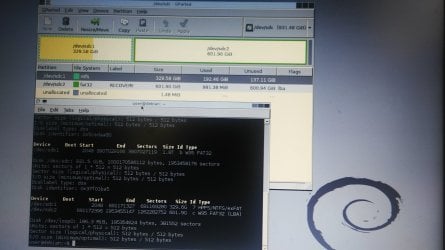
The recovery partition was only 1GB in size as expected.
Using EaseUS Partition Master I extended the size of the recovery partition on the external hard drive to 600GB.
I am able to boot into the recovery partition.
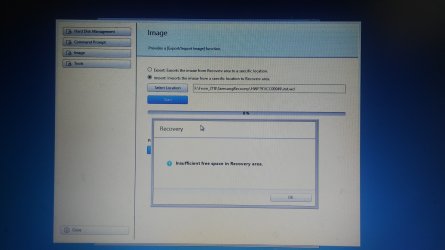
When I try to replace the recovery image on the partition with the back up image, I again get the message:
"Insufficient free space in Recovery area"
The attached images have a screenshot of the error and recovery partition info.


Thanks,
HN
 

Attachments

  • SamsungLaptopRecoveryError.jpg
    SamsungLaptopRecoveryError.jpg
    969.6 KB · Views: 1
  • SamsungRecoveryPartitionInfo.jpg
    SamsungRecoveryPartitionInfo.jpg
    589.9 KB · Views: 1

My Computer My Computer

At a glance

windows 7
Computer type
Laptop
Computer Manufacturer/Model Number
Samsung
OS
windows 7
Your 600gb recovery partition is formatted fat32. The max size of any single file is 4gb on fat32. Try formatting it as ntfs.
 

My Computers My Computers

  • At a glance

    7 X64i5 84002x8gb 3200mhz
    Computer type
    PC/Desktop
    OS
    7 X64
    CPU
    i5 8400
    Motherboard
    gigabyte b365m ds3h
    Memory
    2x8gb 3200mhz
    Hard Drives
    various
    PSU
    pure power 11 400w cm
    Case
    Coolermaster
    Cooling
    cryorig m9i
  • At a glance

    7x64g54008gb ddr4 2400
    Computer type
    PC/Desktop
    OS
    7x64
    CPU
    g5400
    Motherboard
    ga b365m ds3h
    Memory
    8gb ddr4 2400
    PSU
    xfx pro 450w
I did not think about that. I at least know why it throws that error. Thank you :o
I formatted it as NTFS but it does not boot since it is a UEFI system.

I tried Rufus to make it bootable but it did not work.
My options are
1. Make it NTFS and also make it bootable somehow.
2. Start the recovery application without booting into it. (Like from Windows if at all this is possible)

Thanks,
HN
 

My Computer My Computer

At a glance

windows 7
Computer type
Laptop
Computer Manufacturer/Model Number
Samsung
OS
windows 7
Back
Top