
Save dialogue bug

bst0602

New member
I ve been using windows 7 for several months now. But I never faced something as bizarre as this. Till yesterday my PC was running fine but from today in some programs the save as dialogue seem to be corrupted as it does not show the folders in the left pane, only a white blank area. This behavior is present in popular softwares like notepad++ , dreamweeaver etc.. I am attaching a screenshot. Please help me, 'cause I don't want to reinstall windows 7, as this seems to be a registry related problem.
 

Attachments
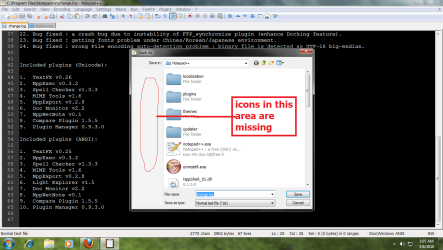
  • Untitled.png
    Untitled.png
    261.6 KB · Views: 28

My Computer

OS
Windows 7
CPU
Intel Core 2 Duo
Motherboard
Intel 945
Memory
2 GB DDR2
Monitor(s) Displays
Samsung LCD monitor
Screen Resolution
1360:768
Hard Drives
Seagate 80 GB
Samsung 250 GB
Seagate 1 TB
Seagate 1 TB
Keyboard
logitech wireless
Mouse
logitech wireless
Internet Speed
2Mbps
This is strange, the window that you show looks more like Vista than Windows 7. Was it a clean install or upgrade?

In any case, what I see when I click "save as" is a window which is very similar to the regular Explorer window. If I click "Organize", then there is the "layout" option, where I can either get rid or restore the navigation pane, which is what you are apparently missing on the left.

However, in your screenshot I do not see this "Organize" button, in fact the whole layout of your window is totally different from mine. When I reboot next time, I will take a look at Vista, I still have it on this PC, but what you show looks very much like Vista to me.
 

My Computer

Computer Manufacturer/Model Number
Dell Inspiron 530
OS
Windows 7 Ultimate (x64)
CPU
Q6600
Memory
8 GB
Graphics Card(s)
ATI Radeon HD 2600 XT
Monitor(s) Displays
Samsung Syncmaster P2450
Screen Resolution
1920x1080
Hard Drives
Samsung HD103UJ
Samsung HD501LJ
Internet Speed
25 Mb/s
nope it is a clean install. and this problem is driving me nuts. :(
 

My Computer

OS
Windows 7
CPU
Intel Core 2 Duo
Motherboard
Intel 945
Memory
2 GB DDR2
Monitor(s) Displays
Samsung LCD monitor
Screen Resolution
1360:768
Hard Drives
Seagate 80 GB
Samsung 250 GB
Seagate 1 TB
Seagate 1 TB
Keyboard
logitech wireless
Mouse
logitech wireless
Internet Speed
2Mbps
Run sfc /scannow in an elevated command prompt, then run a full system scan with Malwarebytes.
 

My Computer

Computer Manufacturer/Model Number
Sony Vaio Z46GDU
OS
Windows 7 Ultimate x86-64
CPU
[email protected] 1066MHz FSB
Motherboard
Sony branded
Memory
6GB DDR3 1066MHz
Graphics Card(s)
9300M GS 256MB Dedicated (Speed) + Intel4500MHD (Stamina)
Sound Card
Realtek HD Audio
Monitor(s) Displays
13.1' WXGA
Screen Resolution
1600x900
Hard Drives
320GB 7200RPM w/ 16MB cache
Internet Speed
1MB/s
I suppose the question is, what have you installed to change icons or alter the appearance of Windows?
 

My Computer

Computer type
PC/Desktop
Computer Manufacturer/Model Number
Alienware Aurora ALX R4
OS
Windows 10 Pro (x64)
CPU
Intel Core i7-3930K (3.2GHz - 4.5GHz)
Motherboard
Alienware Aurora-R4 x79
Memory
4x Samsung 4GB PC3-12800 DDR3 (16GB 1600MHz)
Graphics Card(s)
Nvidia Geforce GTX 690
Sound Card
SteelSeries Siberia Elite
Monitor(s) Displays
Dell UltraSharp U3011
Screen Resolution
2560x1600
Hard Drives
Samsung 850 Pro 256 GB, Seagate 1TB Desktop Hybrid HDD, 2x Western Digital 4TB Green HDD
PSU
875W Some Dell PSU <.<
Case
Alienware Aurora ALX
Cooling
Custom Liquid Cooling (EK CPU & GPU blocks) dual EK 480RAD
Keyboard
Logitech G710+ Mechanical
Mouse
Logitech G700s
Internet Speed
Verizon Fios (50 mbps average)
Other Info
Server: Intel NUC D54250WYK: i5-4250U, 16GB, 256 GB mSATA, Windows Server 2012 R2
okay i'll run sfc /scannow for restoring original files. But as far as I know I patched nothing , and I just changed individual file icons and for that I used creative elements powertools.
 

My Computer

OS
Windows 7
CPU
Intel Core 2 Duo
Motherboard
Intel 945
Memory
2 GB DDR2
Monitor(s) Displays
Samsung LCD monitor
Screen Resolution
1360:768
Hard Drives
Seagate 80 GB
Samsung 250 GB
Seagate 1 TB
Seagate 1 TB
Keyboard
logitech wireless
Mouse
logitech wireless
Internet Speed
2Mbps
I ran sfc /scannow. But that doesn't seem to have any impact. It shows "Windows Resource Protection did not find any integrity violations.". :(
I used CCleaner to clean the registry, may be it is the culprit. But I backed up the registry before that and the situation does not change even when I restore the registry from the backup. Even a system restore didn't solve my problem
 
Last edited:

My Computer

OS
Windows 7
CPU
Intel Core 2 Duo
Motherboard
Intel 945
Memory
2 GB DDR2
Monitor(s) Displays
Samsung LCD monitor
Screen Resolution
1360:768
Hard Drives
Seagate 80 GB
Samsung 250 GB
Seagate 1 TB
Seagate 1 TB
Keyboard
logitech wireless
Mouse
logitech wireless
Internet Speed
2Mbps
an interesting development:

I created a new user. and this account had no tweaks whatsoever. In this account the bug was not present. Hence, the bug must be related to my current account
 

My Computer

OS
Windows 7
CPU
Intel Core 2 Duo
Motherboard
Intel 945
Memory
2 GB DDR2
Monitor(s) Displays
Samsung LCD monitor
Screen Resolution
1360:768
Hard Drives
Seagate 80 GB
Samsung 250 GB
Seagate 1 TB
Seagate 1 TB
Keyboard
logitech wireless
Mouse
logitech wireless
Internet Speed
2Mbps
Back
Top