
Screen Capture and Video Editing in High Quality

I have been looking for a long time to find suitable programs to produce video tutorials like this one or that one. Most free screen capture programs produce poor quality and editing the resulting video is also a quality challenge.

The particular problem for tutorials is the fact that one often uses text pages (PDF documents or webpages) in the tutorial. That is a real challenge for the screen capture program. Very often you are unable to read the text or it is very fuzzy in the resulting video. Action movies are a lot easier to capture because the quality deterioration is not so obvious.

After trying about a dozen free and paid options, I have settled for two capture programs and two editing options. I also use YouTube and Vimeo for uploads. Since they do an additional conversion, this is another source of quality deterioration. So there is an interest to start with excellent input quality.

Screen capture programs

The program I have been using for a long time is WMCapture. I bought this for $39.95. The output quality is very good but the controls are not. There is no keyboard combination for Pause or Stop which makes it necessary to activate their control window each time. This, of course, shows up in the captured video and has to be cropped each time. I will not go into the operational details of this program because they are pretty obvious.

One day I found Microsoft Expression Encoder 4. This produces outstanding output quality and has the keyboard controls I always wanted. If you buy it, you will have to pay $199, but that is not necessary. They have a free download and you can use it forever. The only restriction of the free version is that you are only allowed 10 minutes for each capture. That was never a problem for me because after 10 minutes I run out of words anyhow and have to take a break and regroup. For capturing e.g. YouTube musicals it is usually also sufficient. I prefer the capture over the download because then I run no risk of collecting malware.

Microsoft Expression Encoder 4 (MSEE4)

I will explain the operation of MSEE4 because I found a few tricks that are useful to know. When you start MSEE4, you get this control.


2011-03-06_1831.png


All you usually need to do is click on the microphone icon and then on the red dot. Just be aware that the default settings are 15FPS and both the microphone and the headphone ports are activated. If you have your speakers attached to the headphone port and run e.g. the internet radio, the radio output will also record. This is, of course, handy if you play e.g. a video during your recording. Hence the video sound will be recorded.

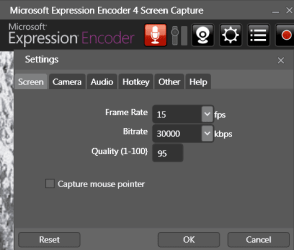
If you want to change the settings, you click on the cog wheel and you get these controls.

2011-03-06_1852.png


Here you see the 15FPS frame rate which you can augment up to 60FPS – this is recommended if you record action videos. But it will considerably increase the size of your output file.

Once you are done with the settings, click on the red dot which gets you to this Control.


2011-03-06_1859.png


Click on the leftmost box (under the word “Select”), release the clicker and move the cursor to the top left corner of your screen. Then hold the left clicker down and drag the cursor to the right bottom corner and release the clicker. Now you have selected the entire screen for the recording. If you want to record only parts of the screen, you have to move/drag the cursor accordingly.

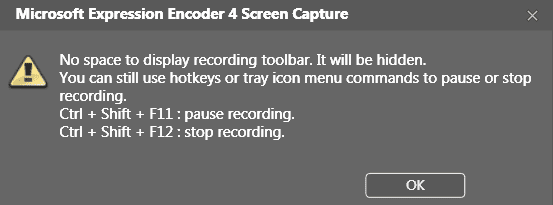
When you are done with the screen selection, click on the red dot of this control and you get this last control.
2011-03-06_1907.png


Here it tells you that you can pause with CTL+Shift+F11 and that you can stop with CTL+Shift+F12. That is the function I was always missing in WMCapture. It is very convenient.

When you click OK, a countdown of 3 seconds will start (big 3,2,1 on the screen) and the recording will start.

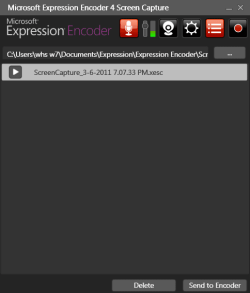
To end the recording, you press CTL+Shift+12 and the recording stops – or after 10 minutes when the program stops the recording automatically and informs you with a pop-up. Then you get this control.

2011-03-06_1908.png


Here they want you to send the output to the encoder. In typical Microsoft fashion they did not go the easy way and record in a known filetype (e.g. .wmv), but they had to invent this special filetype .xesc. If you want to deal with the encoder, that is fine. But there is a much easier way. The encoder will keep your system really busy. Depending on the power of your system, the encoding takes 3 to 6 minutes for every minute of recorded video. So a 10 minute screen capture can take up to an hour of encoding.

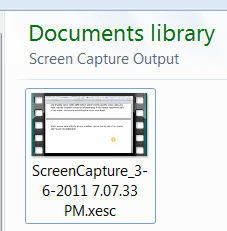
But we will do that “encoding” the smart way. We go to the MSEE4 output which is in:

C:\Users\yourname\Documents\Expression\Expression Encoder\Screen Capture Output.

And it looks like this:

2011-03-06_1937.png


Here we will use a simple trick. We will rename the filetype from .xesc to .wmv.. The result is the same as the result from the encoder. I could not see any difference. The .xesc filetype is more or less the same as the .wmv filetype. Note though that this “conversion” will not work if you rename it to .avi or any other known video filetypes – only .wmv is permissible. After the renaming you will get a warning message which you can ignore – just click Yes.

If you want to be 100% sure that your tweaked .wmv is really good under all circumstances, run it thru Format Factory and convert is from .wmv to .wmv. That is sometimes neccessary for uploads because the upload sites may have problems with this "hybrid .wmv". That way you have no loss of quality and Format Factory has done a genuine .wmv job.

But if Format Factory fails too (which happens on rare occasions), run it thru WLMM as the usltimate cure. None of that is required if you only use the video on a PC or burn it to a DVD. The hybrid .wmv is good enough for that.

Video Editing

Now you have this screen capture and probably a few more 10 minute pieces that you want to edit – crop off the possible MSEE4 pop-up and assemble the pieces. Here again you have a few options.

You can use the Windows Live Movie Maker (WLMM) – but do not use the older WMM which produces really poor output even at the best settings. If you use WLMM at the recommended settings, you can expect a reasonable result. The video does, however, go thru a conversion and it takes a long processing time for the output.

What you really want is a lossless editing. The best program I found for that is Machete. For $19.95, this little program is really good value. They do have a 2 week trial period – so you can try it out. They also have a free Machete Lite which I have never tried.

To get you started with Machete, I will explain the most basic operations. For more complex operations you can refer to their “How to..” documentation.

Cropping a video

Open Machete and follow the steps in the picture.
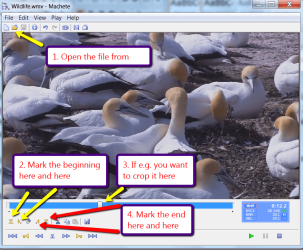

2011-03-06_2025.png


Once you have set the end point, go to File and Save the selection as… You will notice that the saving is extremely fast. Compare that to e.g. WLMM.

If you later want to assemble your pieces with Machete, you should familiarize yourself with the Key Frame concept which is well explained in the Machete documentation. If you assemble with WLMM, this is irrelevant.

Assembling videos

I will assume that you are familiar with WLMM and only explain the assembly procedure with Machete.

You open your first file and set the markers in the front and at the end. Make sure the “runner” is at the end of file1. Then you go to the icon as shown in the picture and insert the second file.
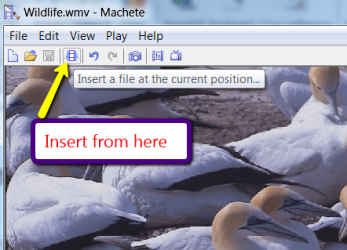

2011-03-06_2310.png


Now you set the marker at the end of this composite so that file1 and file2 are shown as one file. Then you can go back to the icon in the picture and insert file3 – and so on. Just make sure you also set the marker at the end after inserting the last file.

Once you have inserted all files you want to assemble, you go to File and click on Save the Selection as…Now you can select the folder to where you want to save. Saving your whole assembly will only take a few seconds – not hours like in WLMM. And the best part is that we still have the original quality of our screen capture.

Uploading

I prefer Vimeo as uploading site but I also use YouTube. Both sites will convert your video and that means the quality will deteriorate. But there is nothing you can do about that. After all, we are using their free service.

Vimeo limits you to 500MB per week on the free account. They also allow only one HD video per week.

YouTube allows up to 2GB per upload, but it must not be longer than 15 minutes. They convert everything to .flv which is a highly compressed format with the corresponding impact on quality.
 
Last edited:
Thanks, This set of eaglets will be gone by then, but the parents, who mate for life and live for 15 to 20 years have been known to use the same nest every year unless it's bothered by people, animals or the tree falls down.
 

My Computer My Computer

At a glance

Originally Win 7 Hm Prem x64 Ver 6.1.7600 Bui...Intel i3 530 2.93GHz, 2933MHz 2 Cores 4 Logic...6GB of 1,333MHz DDR3 SDRAM32MB Intel Graphics Media Accelerator HD IGChip
Computer type
PC/Desktop
Computer Manufacturer/Model Number
Gateway DX4831-01e (Mid-Tower Desktop)
OS
Originally Win 7 Hm Prem x64 Ver 6.1.7600 Build 7601-SP1 | Upgraded to Windows 10 December 14, 2019
CPU
Intel i3 530 2.93GHz, 2933MHz 2 Cores 4 Logical Processors
Motherboard
Gateway H57M01 133 megahertz
Memory
6GB of 1,333MHz DDR3 SDRAM
Graphics Card(s)
32MB Intel Graphics Media Accelerator HD IGChip
Sound Card
Realtek High Definition Audio
Monitor(s) Displays
Gateway HX2000 20inch TFT active matrix TN
Screen Resolution
1600 x 900 x 59 hertz
Hard Drives
WDC WD10EADS-00M2B0 [HDD] (1000.20 GB) -- drive 0,
HL-DT-ST DVDRAM GH41N [CD-ROM dr]
Four card readers, and Four USB 2.0
PSU
300watts.
Case
Mid-Tower Desktop
Cooling
Stock from Gateway
Keyboard
Natural Ergonomic Keyboard 4000, see Other Info
Mouse
Orig. Gateway wore out now using Insignia USB wired optical
Internet Speed
Vz FIOS 10ms png 57.64Mbps down 65.53Mbps up Speedtest.org
Antivirus
Zamana Anti-logger with Anti-malware, MSE, Windows Firewall,
Browser
IE11.0.9600.19399-Upd ver11.0.135, Firefox 68.0.1 x64
Other Info
System Specs by Belarc.

BIOS: American Megatrends Inc. P01-A0 11/17/2009

Replaced the MS 'Natural' Standard PS/2 Enhanced 101-102 Keyboard with a new Natural Ergonomic Keyboard 4000 on August 1st 2014.

Canon Pixma MG3222 Printer.

Updated to IE11 on 12102015 | Fios Quantum Router g1100

Additional AV: SpywareBlaster, manual Mbam, SAS
Hmm, looks like we have fun for a few years. Question is whether they will leave the camera.
 

My Computer My Computer

At a glance

Vista, Windows7, Mint Mate, Zorin, Windows 8from 1.6GHz Duo to i7
Computer Manufacturer/Model Number
HP, Dell, Gateway, Toshiba - 4 laptops and 2 desktops
OS
Vista, Windows7, Mint Mate, Zorin, Windows 8
CPU
from 1.6GHz Duo to i7
Monitor(s) Displays
2x HP w2207
Hard Drives
5x HDD, 7x SSD, 12x Externals
Keyboard
with trackball - no mices
Mouse
Trackball mice
Internet Speed
DSL 6000
Fun, fun, fun! The cam depends if the PA Game Commission has sponsorship or not.
 

My Computer My Computer

At a glance

Originally Win 7 Hm Prem x64 Ver 6.1.7600 Bui...Intel i3 530 2.93GHz, 2933MHz 2 Cores 4 Logic...6GB of 1,333MHz DDR3 SDRAM32MB Intel Graphics Media Accelerator HD IGChip
Computer type
PC/Desktop
Computer Manufacturer/Model Number
Gateway DX4831-01e (Mid-Tower Desktop)
OS
Originally Win 7 Hm Prem x64 Ver 6.1.7600 Build 7601-SP1 | Upgraded to Windows 10 December 14, 2019
CPU
Intel i3 530 2.93GHz, 2933MHz 2 Cores 4 Logical Processors
Motherboard
Gateway H57M01 133 megahertz
Memory
6GB of 1,333MHz DDR3 SDRAM
Graphics Card(s)
32MB Intel Graphics Media Accelerator HD IGChip
Sound Card
Realtek High Definition Audio
Monitor(s) Displays
Gateway HX2000 20inch TFT active matrix TN
Screen Resolution
1600 x 900 x 59 hertz
Hard Drives
WDC WD10EADS-00M2B0 [HDD] (1000.20 GB) -- drive 0,
HL-DT-ST DVDRAM GH41N [CD-ROM dr]
Four card readers, and Four USB 2.0
PSU
300watts.
Case
Mid-Tower Desktop
Cooling
Stock from Gateway
Keyboard
Natural Ergonomic Keyboard 4000, see Other Info
Mouse
Orig. Gateway wore out now using Insignia USB wired optical
Internet Speed
Vz FIOS 10ms png 57.64Mbps down 65.53Mbps up Speedtest.org
Antivirus
Zamana Anti-logger with Anti-malware, MSE, Windows Firewall,
Browser
IE11.0.9600.19399-Upd ver11.0.135, Firefox 68.0.1 x64
Other Info
System Specs by Belarc.

BIOS: American Megatrends Inc. P01-A0 11/17/2009

Replaced the MS 'Natural' Standard PS/2 Enhanced 101-102 Keyboard with a new Natural Ergonomic Keyboard 4000 on August 1st 2014.

Canon Pixma MG3222 Printer.

Updated to IE11 on 12102015 | Fios Quantum Router g1100

Additional AV: SpywareBlaster, manual Mbam, SAS
For gameplays too ?

The version with SP2 as shown in the page, not required to have installed previous versions because it already has included all. True?
 

My Computer My Computer

At a glance

64-bit Windows 7 ProfessionalIntel i5-3450 3.1 Ghz8 GB (2x4) Corsair Vengeance Red DDR3 1600MhzASUS HD 7770 DC 1.5GB
Computer type
PC/Desktop
Computer Manufacturer/Model Number
Assembled PC
OS
64-bit Windows 7 Professional
CPU
Intel i5-3450 3.1 Ghz
Motherboard
ASUS P8H77-M PRO
Memory
8 GB (2x4) Corsair Vengeance Red DDR3 1600Mhz
Graphics Card(s)
ASUS HD 7770 DC 1.5GB
Sound Card
Realtek HD Audio / Headphones Asus Orion Pro
Monitor(s) Displays
20" Samsung S20B300N
Screen Resolution
1600x900
Hard Drives
500GB SEAGATE HDD SATA
PSU
Corsair GS600 80PLUS Bronze Gaming
Case
Cooler Master Storm Enforcer
Cooling
Cooler Master Hyper 212 EVO
Keyboard
Logitech K200 USB
Mouse
Logitech M100 USB / Logitech G500 Gaming Mouse
Antivirus
ESET
Browser
Internet Explorer
Other Info
All the hardware selected by myself. I never imagined upgrade my PC :)
I'll try to answer in whs's absence:

For gameplays too ?
Yes. You will have to work with MSEE4 to understand what it can do. The more you use it the more proficient you will become. It will record anything you show on your display even errors like a moving mouse cursor, or switching to a different tab, but it is possible to edit these out.

The version with SP2 as shown in the page, not required to have installed previous versions because it already has included all. True?
I would believe so I went the long way; if microsoft holds true to the way they handle service packs everything that was in SP1 will be in SP2; From my #16 post:
I mentioned here that there is a SP1 for MSEE4, and when I went over 10' the first time I saw an alert that I couldn't go any longer so I looked around and saw that MSEE4 needs SP2 to remove that limitation. I installed SP2 over top of SP1 and after testing I can now go beyond 10minutes.

I noticed during both installs there is a page asking for a registration/License number, I entered nothing and clicked on OK and both times MSEE4 finished the installation.
The MSEE4 needs SP2 link will take you to the D/L page.
 

My Computer My Computer

At a glance

Originally Win 7 Hm Prem x64 Ver 6.1.7600 Bui...Intel i3 530 2.93GHz, 2933MHz 2 Cores 4 Logic...6GB of 1,333MHz DDR3 SDRAM32MB Intel Graphics Media Accelerator HD IGChip
Computer type
PC/Desktop
Computer Manufacturer/Model Number
Gateway DX4831-01e (Mid-Tower Desktop)
OS
Originally Win 7 Hm Prem x64 Ver 6.1.7600 Build 7601-SP1 | Upgraded to Windows 10 December 14, 2019
CPU
Intel i3 530 2.93GHz, 2933MHz 2 Cores 4 Logical Processors
Motherboard
Gateway H57M01 133 megahertz
Memory
6GB of 1,333MHz DDR3 SDRAM
Graphics Card(s)
32MB Intel Graphics Media Accelerator HD IGChip
Sound Card
Realtek High Definition Audio
Monitor(s) Displays
Gateway HX2000 20inch TFT active matrix TN
Screen Resolution
1600 x 900 x 59 hertz
Hard Drives
WDC WD10EADS-00M2B0 [HDD] (1000.20 GB) -- drive 0,
HL-DT-ST DVDRAM GH41N [CD-ROM dr]
Four card readers, and Four USB 2.0
PSU
300watts.
Case
Mid-Tower Desktop
Cooling
Stock from Gateway
Keyboard
Natural Ergonomic Keyboard 4000, see Other Info
Mouse
Orig. Gateway wore out now using Insignia USB wired optical
Internet Speed
Vz FIOS 10ms png 57.64Mbps down 65.53Mbps up Speedtest.org
Antivirus
Zamana Anti-logger with Anti-malware, MSE, Windows Firewall,
Browser
IE11.0.9600.19399-Upd ver11.0.135, Firefox 68.0.1 x64
Other Info
System Specs by Belarc.

BIOS: American Megatrends Inc. P01-A0 11/17/2009

Replaced the MS 'Natural' Standard PS/2 Enhanced 101-102 Keyboard with a new Natural Ergonomic Keyboard 4000 on August 1st 2014.

Canon Pixma MG3222 Printer.

Updated to IE11 on 12102015 | Fios Quantum Router g1100

Additional AV: SpywareBlaster, manual Mbam, SAS
Thanks for the answers.

You think that this program can do well for record gameplays. Or would it be better to opt for the most renowned(or semi popular) programs.

Yes, I have read the entire post. :)
The confusion comes because I think you say you installed version SP1 and SP2 later on that. Because of the details of the program says :"This download installs Expression Encoder 4, Expression Encoder 4 SP1, and Expression Encoder 4 SP2 all at the same time".


Greetings
 

My Computer My Computer

At a glance

64-bit Windows 7 ProfessionalIntel i5-3450 3.1 Ghz8 GB (2x4) Corsair Vengeance Red DDR3 1600MhzASUS HD 7770 DC 1.5GB
Computer type
PC/Desktop
Computer Manufacturer/Model Number
Assembled PC
OS
64-bit Windows 7 Professional
CPU
Intel i5-3450 3.1 Ghz
Motherboard
ASUS P8H77-M PRO
Memory
8 GB (2x4) Corsair Vengeance Red DDR3 1600Mhz
Graphics Card(s)
ASUS HD 7770 DC 1.5GB
Sound Card
Realtek HD Audio / Headphones Asus Orion Pro
Monitor(s) Displays
20" Samsung S20B300N
Screen Resolution
1600x900
Hard Drives
500GB SEAGATE HDD SATA
PSU
Corsair GS600 80PLUS Bronze Gaming
Case
Cooler Master Storm Enforcer
Cooling
Cooler Master Hyper 212 EVO
Keyboard
Logitech K200 USB
Mouse
Logitech M100 USB / Logitech G500 Gaming Mouse
Antivirus
ESET
Browser
Internet Explorer
Other Info
All the hardware selected by myself. I never imagined upgrade my PC :)
You're welcome.

I'm not a "gamer" so I wouldn't know if it would do well with gaming, I do know it does well with live animal videos, a sample of my work from my Live Bald Eagle Nest Cam Thread post #102:


There can be two reasons why the video may look out of focus:

1.) The live cam used to capture the nest, frequently went out of focus because of its own auto-focus limitations, and;

2.) Check the play settings and make sure they are set on 480p.

There was no audio at the source, so there is no sound.


Can you elaborate on what you believe are the:
most renowned(or semi popular) programs.
Good catch on the "details of the MSEE4 program" I missed that, in my defense all I was concerned about was I needed to install MSEE4's SP2 to exceed the 10' limitation, and it bolsters my belief that:
if microsoft holds true to the way they handle service packs everything that was in SP1 will be in SP2
If you want to give MSEE4 a try all you will need is the SP2 version.
 

My Computer My Computer

At a glance

Originally Win 7 Hm Prem x64 Ver 6.1.7600 Bui...Intel i3 530 2.93GHz, 2933MHz 2 Cores 4 Logic...6GB of 1,333MHz DDR3 SDRAM32MB Intel Graphics Media Accelerator HD IGChip
Computer type
PC/Desktop
Computer Manufacturer/Model Number
Gateway DX4831-01e (Mid-Tower Desktop)
OS
Originally Win 7 Hm Prem x64 Ver 6.1.7600 Build 7601-SP1 | Upgraded to Windows 10 December 14, 2019
CPU
Intel i3 530 2.93GHz, 2933MHz 2 Cores 4 Logical Processors
Motherboard
Gateway H57M01 133 megahertz
Memory
6GB of 1,333MHz DDR3 SDRAM
Graphics Card(s)
32MB Intel Graphics Media Accelerator HD IGChip
Sound Card
Realtek High Definition Audio
Monitor(s) Displays
Gateway HX2000 20inch TFT active matrix TN
Screen Resolution
1600 x 900 x 59 hertz
Hard Drives
WDC WD10EADS-00M2B0 [HDD] (1000.20 GB) -- drive 0,
HL-DT-ST DVDRAM GH41N [CD-ROM dr]
Four card readers, and Four USB 2.0
PSU
300watts.
Case
Mid-Tower Desktop
Cooling
Stock from Gateway
Keyboard
Natural Ergonomic Keyboard 4000, see Other Info
Mouse
Orig. Gateway wore out now using Insignia USB wired optical
Internet Speed
Vz FIOS 10ms png 57.64Mbps down 65.53Mbps up Speedtest.org
Antivirus
Zamana Anti-logger with Anti-malware, MSE, Windows Firewall,
Browser
IE11.0.9600.19399-Upd ver11.0.135, Firefox 68.0.1 x64
Other Info
System Specs by Belarc.

BIOS: American Megatrends Inc. P01-A0 11/17/2009

Replaced the MS 'Natural' Standard PS/2 Enhanced 101-102 Keyboard with a new Natural Ergonomic Keyboard 4000 on August 1st 2014.

Canon Pixma MG3222 Printer.

Updated to IE11 on 12102015 | Fios Quantum Router g1100

Additional AV: SpywareBlaster, manual Mbam, SAS
Sorry, I'm a little distracted and had forgotten the post :S

Can you elaborate on what you believe are the:
most renowned(or semi popular) programs.

There are programs that are best known for making gameplays. Many recommend : Action!, Open Broadcasting Software(OBS), Xplit, D3DGear, ShadowPlay, MSI Afterburner, DXTory, Fraps, MSEE4...

I could use any of those but some in their free version offers only a few minutes. Or need to download the driver to configure As might also conflict with the video if i use MSI applications.

THE MSS4 see it easier and safer to download. And it seems not consume many resources.
 

My Computer My Computer

At a glance

64-bit Windows 7 ProfessionalIntel i5-3450 3.1 Ghz8 GB (2x4) Corsair Vengeance Red DDR3 1600MhzASUS HD 7770 DC 1.5GB
Computer type
PC/Desktop
Computer Manufacturer/Model Number
Assembled PC
OS
64-bit Windows 7 Professional
CPU
Intel i5-3450 3.1 Ghz
Motherboard
ASUS P8H77-M PRO
Memory
8 GB (2x4) Corsair Vengeance Red DDR3 1600Mhz
Graphics Card(s)
ASUS HD 7770 DC 1.5GB
Sound Card
Realtek HD Audio / Headphones Asus Orion Pro
Monitor(s) Displays
20" Samsung S20B300N
Screen Resolution
1600x900
Hard Drives
500GB SEAGATE HDD SATA
PSU
Corsair GS600 80PLUS Bronze Gaming
Case
Cooler Master Storm Enforcer
Cooling
Cooler Master Hyper 212 EVO
Keyboard
Logitech K200 USB
Mouse
Logitech M100 USB / Logitech G500 Gaming Mouse
Antivirus
ESET
Browser
Internet Explorer
Other Info
All the hardware selected by myself. I never imagined upgrade my PC :)
THE MSS4 see it easier and safer to download. And it seems not consume many resources.
That is what I use and I'm happy with it and, as long as you install its SP2 version the record time is unlimited.
 

My Computer My Computer

At a glance

Originally Win 7 Hm Prem x64 Ver 6.1.7600 Bui...Intel i3 530 2.93GHz, 2933MHz 2 Cores 4 Logic...6GB of 1,333MHz DDR3 SDRAM32MB Intel Graphics Media Accelerator HD IGChip
Computer type
PC/Desktop
Computer Manufacturer/Model Number
Gateway DX4831-01e (Mid-Tower Desktop)
OS
Originally Win 7 Hm Prem x64 Ver 6.1.7600 Build 7601-SP1 | Upgraded to Windows 10 December 14, 2019
CPU
Intel i3 530 2.93GHz, 2933MHz 2 Cores 4 Logical Processors
Motherboard
Gateway H57M01 133 megahertz
Memory
6GB of 1,333MHz DDR3 SDRAM
Graphics Card(s)
32MB Intel Graphics Media Accelerator HD IGChip
Sound Card
Realtek High Definition Audio
Monitor(s) Displays
Gateway HX2000 20inch TFT active matrix TN
Screen Resolution
1600 x 900 x 59 hertz
Hard Drives
WDC WD10EADS-00M2B0 [HDD] (1000.20 GB) -- drive 0,
HL-DT-ST DVDRAM GH41N [CD-ROM dr]
Four card readers, and Four USB 2.0
PSU
300watts.
Case
Mid-Tower Desktop
Cooling
Stock from Gateway
Keyboard
Natural Ergonomic Keyboard 4000, see Other Info
Mouse
Orig. Gateway wore out now using Insignia USB wired optical
Internet Speed
Vz FIOS 10ms png 57.64Mbps down 65.53Mbps up Speedtest.org
Antivirus
Zamana Anti-logger with Anti-malware, MSE, Windows Firewall,
Browser
IE11.0.9600.19399-Upd ver11.0.135, Firefox 68.0.1 x64
Other Info
System Specs by Belarc.

BIOS: American Megatrends Inc. P01-A0 11/17/2009

Replaced the MS 'Natural' Standard PS/2 Enhanced 101-102 Keyboard with a new Natural Ergonomic Keyboard 4000 on August 1st 2014.

Canon Pixma MG3222 Printer.

Updated to IE11 on 12102015 | Fios Quantum Router g1100

Additional AV: SpywareBlaster, manual Mbam, SAS
I tried it and everything goes black. The same happens when I want to capture the image with the keyboard(Without the program). I think it's not for gameplays.
 

My Computer My Computer

At a glance

64-bit Windows 7 ProfessionalIntel i5-3450 3.1 Ghz8 GB (2x4) Corsair Vengeance Red DDR3 1600MhzASUS HD 7770 DC 1.5GB
Computer type
PC/Desktop
Computer Manufacturer/Model Number
Assembled PC
OS
64-bit Windows 7 Professional
CPU
Intel i5-3450 3.1 Ghz
Motherboard
ASUS P8H77-M PRO
Memory
8 GB (2x4) Corsair Vengeance Red DDR3 1600Mhz
Graphics Card(s)
ASUS HD 7770 DC 1.5GB
Sound Card
Realtek HD Audio / Headphones Asus Orion Pro
Monitor(s) Displays
20" Samsung S20B300N
Screen Resolution
1600x900
Hard Drives
500GB SEAGATE HDD SATA
PSU
Corsair GS600 80PLUS Bronze Gaming
Case
Cooler Master Storm Enforcer
Cooling
Cooler Master Hyper 212 EVO
Keyboard
Logitech K200 USB
Mouse
Logitech M100 USB / Logitech G500 Gaming Mouse
Antivirus
ESET
Browser
Internet Explorer
Other Info
All the hardware selected by myself. I never imagined upgrade my PC :)
Back
Top