
Script error Google Tag Manager

ColourOz

New member
Power User
Local time
3:40 AM
Messages
75
Recently my computer has shown a script error on bootup. I searched the internet but unable to come up with the answer. I contacted Yandex browser support, but they too have no answer. I opened the Startup menu and found the entry and disabled it, but for some reason it continues to emerge.
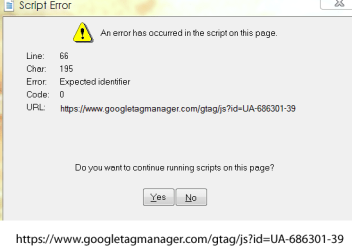
google tag error.png

This is from the bootup menu: (Whatsinstartup.exe)
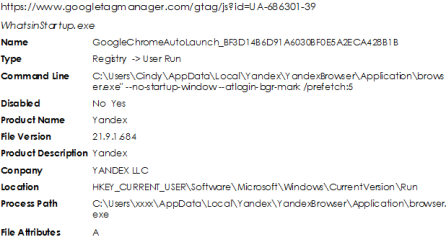
startup.png

Does anyone know how to get rid of the message on bootup? Help would be very much appreciated, thank you.
 
Last edited:

My Computer

Computer type
PC/Desktop
Computer Manufacturer/Model Number
Custom built
OS
Windows 7 Ultimate x64 SP1
CPU
Intel i7 6700
Motherboard
Asus H170-Pro
Memory
Crucial 16 GB (x1)
Graphics Card(s)
Nvidia GeForce GTX1050Ti
Sound Card
(incorporated with Nvidia Graphics Card)
Monitor(s) Displays
LG HDR WFHD 29" Model 705948
Screen Resolution
3840 x 2160
Hard Drives
1 x M.2 2TB, 1 x WD black 1TB
PSU
650 W
Case
traditional design
Cooling
2 fans
Keyboard
Wireless
Mouse
Wireless
Internet Speed
NBN fixed wireless
Antivirus
Microsoft Security Essentials
Browser
Mozilla
Other Info
*Acer Ultrabook, 500GB M.2, 8GB RAM - partitioned Win7 & Linux Mint
*Gigabyte Mini-PC (x64) 1TB HDD, 8GB RAM Windows7

*Windows7 setup identical to Main computer*
The Google analytics ID of: UA-686301 belongs to a company that creates partition software and such things. Do you have Partition Magic, Mini Tool, email recovery or CD recovery software installed? If so, it's trying to reach out and touch someone...

Yandex is Russian just so you know... I use more than one browser for multiple uses. Brave, Firefox, Pale Moon, portable Chrome, portable Firefox, and Ungoogled Chromium. DuckDuckGo is churning out their own PC browser for what ever that's worth. They do have their smart device App already and there's the Brave App. I use both on the phone and tablet.

Check out Autoruns and you can see what is all starting up. DO NOT disable something you shouldn't or know nothing about. Autoruns for Windows - Windows Sysinternals | Microsoft Docs
 

My Computer

Computer type
PC/Desktop
OS
Windows 7 Ultimate x64
Thank you for your suggestions. I do have MiniTool (Free) installed. Maybe I should uninstall the program...?

I constantly check the Startup menu for 'unwanteds' and every now and then the Google Script appears which I delete. However, I rarely use MiniTool.

I am aware that Yandex is Russian and have found them to be secure and their support team excellent. I am happy with the service they provide. I do use a 'no logs' VPN on my router. However, Google in particular is always spying no matter what website you view. This annoys me.
 

My Computer

Computer type
PC/Desktop
Computer Manufacturer/Model Number
Custom built
OS
Windows 7 Ultimate x64 SP1
CPU
Intel i7 6700
Motherboard
Asus H170-Pro
Memory
Crucial 16 GB (x1)
Graphics Card(s)
Nvidia GeForce GTX1050Ti
Sound Card
(incorporated with Nvidia Graphics Card)
Monitor(s) Displays
LG HDR WFHD 29" Model 705948
Screen Resolution
3840 x 2160
Hard Drives
1 x M.2 2TB, 1 x WD black 1TB
PSU
650 W
Case
traditional design
Cooling
2 fans
Keyboard
Wireless
Mouse
Wireless
Internet Speed
NBN fixed wireless
Antivirus
Microsoft Security Essentials
Browser
Mozilla
Other Info
*Acer Ultrabook, 500GB M.2, 8GB RAM - partitioned Win7 & Linux Mint
*Gigabyte Mini-PC (x64) 1TB HDD, 8GB RAM Windows7

*Windows7 setup identical to Main computer*
Back
Top