Seagate 5TB Expansion Drive not initialized in MBR or GPT? Drive OK?

Alonzo Poodle

New member
Member
Local time
4:17 PM
Messages
21
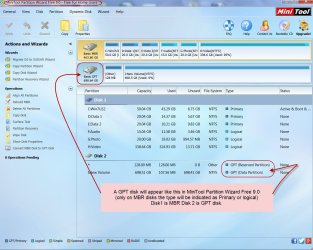
Seagate's website / the manual say the (this one: Desktop-Festplatte Expansion| Seagate) 5TB Expansion Drive is initialized in GPT (Expansion drives switching to GPT) but Windows 7 and dispart (http://i.imgur.com/1JxRAja.png) show it is initialized in MBR / not in GPT (the column under GPT is empty). The item to initialize in / convert to GPT is grayed out (I assume one have to remove the partition first to access that option): http://i.imgur.com/xeqkQmJ.png. And it looks like as if MiniToolPartizionWizard shows it was GPT as well: http://i.imgur.com/PsQfLY8.png

What could that mean? Is the display of Win / diskpart correct?

Is this message correct? DriveInfo shows: S.M.A.R.T. Drive Status: Drive is not OK! The device has detected a threshold exceeded condition! (http://i.imgur.com/5xfPSq9.png). What does that mean? A defect, a problem?
The entire report:
http://i.imgur.com/rySWvIt.png
http://i.imgur.com/qyquxVB.png
http://i.imgur.com/R5bx0s2.png

ChystalDisk shows this, does not appear to look that bad:
http://i.imgur.com/v7TYPhZ.png
and
http://i.imgur.com/z1exc22.png

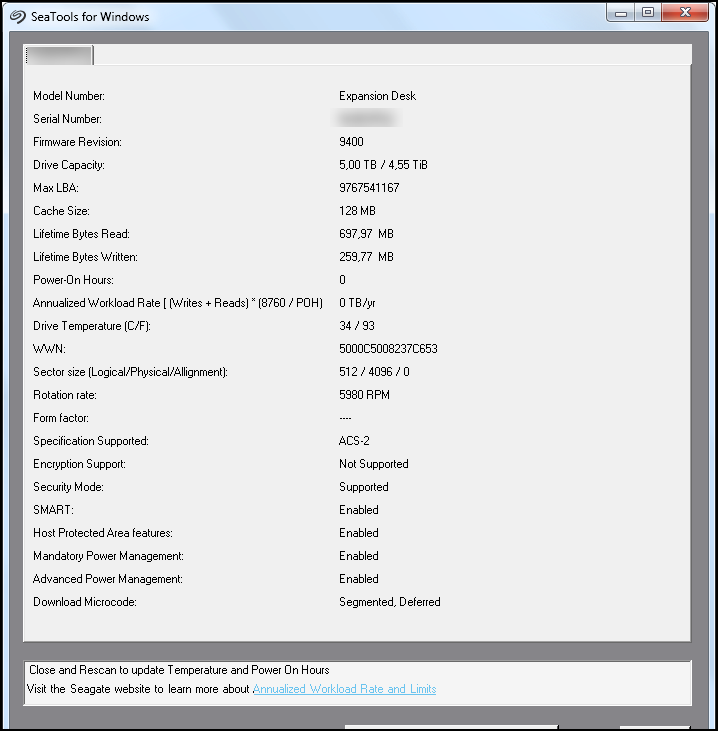
SeaTools shows this:
http://i.imgur.com/0ulGbCQ.png

HDDscan shows:
http://i.imgur.com/8hlD3pN.png
and
http://i.imgur.com/UMRP2GM.png

What do those items marked with that yellow sign mean:

"Airflow temperature"
and
"HDA Temperatur"
A problem?

What does the display about "Health" mean, 90 %, 92 % (instead of 100 %) appear to mean the state of the drive is not the best (anymore). May be there will occur problems, errors the next time?
 

My Computer My Computer

At a glance

Windows 7 Home Premium 64-bit SP1
Computer type
Laptop
OS
Windows 7 Home Premium 64-bit SP1
everything is okay. delete the partition, initialize GPT. gute nacht.
 

My Computer My Computer

At a glance

Windows 7 Ultimate x64Xeon E5-1650 v2Kingston ECCQuadro fx 580
Computer type
PC/Desktop
Computer Manufacturer/Model Number
Custom Build
OS
Windows 7 Ultimate x64
CPU
Xeon E5-1650 v2
Motherboard
Asus p9x79 ws
Memory
Kingston ECC
Graphics Card(s)
Quadro fx 580
Hard Drives
Samsung 850 pro
Corsair Force Gt
Seagate Enterprise 6TB on 3ware 9750
Antivirus
avira

My Computer My Computer

At a glance

Windows 7 Home Premium 32 bit
OS
Windows 7 Home Premium 32 bit
Many thanks, countzero.

everything is okay.
Well, this message appears to say something different: http://i.imgur.com/5xfPSq9.png

Many thanks again. Gute Nacht.

Hello jumanji,

Many thanks.

So, your screenshot very easily lets conclude that drive really is initialized with MBR.
 

My Computer My Computer

At a glance

Windows 7 Home Premium 64-bit SP1
Computer type
Laptop
OS
Windows 7 Home Premium 64-bit SP1
seatools is what matters. if a long drive self test says good: it'ts good.
 

My Computer My Computer

At a glance

Windows 7 Ultimate x64Xeon E5-1650 v2Kingston ECCQuadro fx 580
Computer type
PC/Desktop
Computer Manufacturer/Model Number
Custom Build
OS
Windows 7 Ultimate x64
CPU
Xeon E5-1650 v2
Motherboard
Asus p9x79 ws
Memory
Kingston ECC
Graphics Card(s)
Quadro fx 580
Hard Drives
Samsung 850 pro
Corsair Force Gt
Seagate Enterprise 6TB on 3ware 9750
Antivirus
avira
Yes, yes, unfortunately such a test lasts about 3 days or longer.
 

My Computer My Computer

At a glance

Windows 7 Home Premium 64-bit SP1
Computer type
Laptop
OS
Windows 7 Home Premium 64-bit SP1
on a usb3 port?
 

My Computer My Computer

At a glance

Windows 7 Ultimate x64Xeon E5-1650 v2Kingston ECCQuadro fx 580
Computer type
PC/Desktop
Computer Manufacturer/Model Number
Custom Build
OS
Windows 7 Ultimate x64
CPU
Xeon E5-1650 v2
Motherboard
Asus p9x79 ws
Memory
Kingston ECC
Graphics Card(s)
Quadro fx 580
Hard Drives
Samsung 850 pro
Corsair Force Gt
Seagate Enterprise 6TB on 3ware 9750
Antivirus
avira
No, USB 2.0
 

My Computer My Computer

At a glance

Windows 7 Home Premium 64-bit SP1
Computer type
Laptop
OS
Windows 7 Home Premium 64-bit SP1
that's the reason. time factor 5-6.
don't worry.
maybe run chkdsk once a week for a month, then forget about it.
 

My Computer My Computer

At a glance

Windows 7 Ultimate x64Xeon E5-1650 v2Kingston ECCQuadro fx 580
Computer type
PC/Desktop
Computer Manufacturer/Model Number
Custom Build
OS
Windows 7 Ultimate x64
CPU
Xeon E5-1650 v2
Motherboard
Asus p9x79 ws
Memory
Kingston ECC
Graphics Card(s)
Quadro fx 580
Hard Drives
Samsung 850 pro
Corsair Force Gt
Seagate Enterprise 6TB on 3ware 9750
Antivirus
avira
Many thanks, countzero,

So that time factor is the reason, good to know.

Alright, that's a very good idea, or run it twice a month for a year, then forget.

Many thanks again.
 

My Computer My Computer

At a glance

Windows 7 Home Premium 64-bit SP1
Computer type
Laptop
OS
Windows 7 Home Premium 64-bit SP1
If you are running Seatools for Windows, when you select the drive to be tested you will get a menu of Basic Tests you can perform. One of those will be Smart Check. Do that check and see what it indicates.
Only that can be taken as authentic. ( Look out for the latest version of Seatools for Windows and specifically for your drive in the Support section.) You may also talk to their Tech Support, if you feel something is not right.

http://www.seagate.com/staticfiles/support/downloads/seatools/docs/SeaTools%20for%20Windows.en-US.pdf
 

My Computer My Computer

At a glance

Windows 7 Home Premium 32 bit
OS
Windows 7 Home Premium 32 bit
Thank you, jumanji,

Yes, I had done those tests already, any errors.

Only that can be taken as authentic.
Why is that? Other programs like ChrystalDisk, that Western Digital diagnostic program, HDDscan and so on are not reliable / good?

( Look out for the latest version of Seatools for Windows and specifically for your drive in the Support section.)
There was only one version for Win for all of the drives (not just for mine) of that program I could find. There are more than one? Cannot find another one.

Here the link I posted at the beginning of the thread of the SMART values of SeaTool:
0ulGbCQ.png


You may also talk to their Tech Support, if you feel something is not right.
Yes, I already did, but no answers, since 1 or 2 days a message shows "maintenance", so I cannot post anymore. I have been there some months ago or so because of another drive, the same has happened. Appears to be pretty trashy that forum.

Thank you for the link, I will have a look at that manual.

Many thanks again
 

My Computer My Computer

At a glance

Windows 7 Home Premium 64-bit SP1
Computer type
Laptop
OS
Windows 7 Home Premium 64-bit SP1
SMART is firmware that resides on the hard drive and continuously monitors drive parameters such as performance and error rates.Different drive manufacturers will have different S.M.A.R.T. specifications and thresholds as well.The specifics of these thresholds are not made publicly available. Therefore a third party software that can have only one common assumed criteria/threshold for drives manufactured by various manufacturers cannot be relied upon. It is as simple as that.

As long as your system does not report a SMART error as per the set standards and threshold you are OK. That is why I directed you to contact the Tech Support if you are overanxious. :D
 

My Computer My Computer

At a glance

Windows 7 Home Premium 32 bit
OS
Windows 7 Home Premium 32 bit
SMART is firmware that resides on the hard drive and continuously monitors drive parameters such as performance and error rates.Different drive manufacturers will have different S.M.A.R.T. specifications and thresholds as well.The specifics of these thresholds are not made publicly available. Therefore a third party software that can have only one common assumed criteria/threshold for drives manufactured by various manufacturers cannot be relied upon. It is as simple as that.
Alright, so for each drive one should / must use the software of its manufacturer and not any other.

As long as your system does not report a SMART error as per the set standards and threshold you are OK.
The system? Means the OS? Or a program for a drive of the manufacturer? Well, there was that single error message shown above given by DriveInfo, that made me worry.


That is why I directed you to contact the Tech Support if you are overanxious.
Well, actually more like paranoid...over paranoid. Yes, a very good idea, of course, if only that Tech Support would be useful.

Thank you very much
 

My Computer My Computer

At a glance

Windows 7 Home Premium 64-bit SP1
Computer type
Laptop
OS
Windows 7 Home Premium 64-bit SP1
Your communication to anything that is happening in your system is always through the OS.The smart check by the in-built firmware goes on inside your HDD all the time. The OS has no role in it. If the built-in firmware finds that some performance specification or threshold as set my the manufacturer exceeds the set limit, it notifies the OS and the messenger OS intimates it to you.

Rest in peace. ( not the other RIP. :D)
 

My Computer My Computer

At a glance

Windows 7 Home Premium 32 bit
OS
Windows 7 Home Premium 32 bit
Alright, I understand.

Oops, I do not know another "rest in peace". Meaning my time has come now, to check in with the Almighty...that really does scare me a little bit.

Many thanks.
 

My Computer My Computer

At a glance

Windows 7 Home Premium 64-bit SP1
Computer type
Laptop
OS
Windows 7 Home Premium 64-bit SP1
Back
Top