Search Indexing

ahstanford

New member
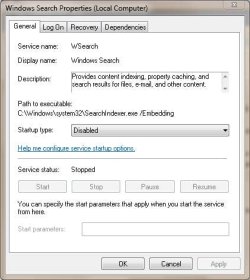
I have disabled Search Indexing under folder options in control panel but I still have a process called "SearchIndexer.exe" using a decent amount of resources - what should I do?
 

My Computer

Computer Manufacturer/Model Number
Asus Essentio CM5571-BR003
OS
Windows 7 Home Premium
CPU
Intel Pentium Dual E5400 @ 2.7Ghz
Memory
6GB DDR3
Graphics Card(s)
Onboard Video
Monitor(s) Displays
24" Asus LCD
Why someone in his right mind would want to disable search indexing is beyond me. Do you understand you are trying to disable the single most useful feature of Windows 7?
 

My Computer

OS
Windows 7 RTM x86
Last edited by a moderator:

My Computer

Computer Manufacturer/Model Number
Homebrew
OS
XP Pro SP3 X86 / Win7 Pro X86
CPU
Amd 64 x2 4200 (2.4ghz)
Motherboard
Asus M2N-MX SE Plus
Memory
Kingston DDR2 800 2gb
Graphics Card(s)
Nvidia GF-8400
Sound Card
Realtek on Motherboard
Monitor(s) Displays
Acer x-193bw
Screen Resolution
1440 x 900
Hard Drives
Western Digital 500g
PSU
350watt In-Win
Case
In-Win
Cooling
Air
Keyboard
yes
Mouse
yes
Internet Speed
5mpbs
Other Info
Also ASRock ION 330 as HTPC (on XP).
Acer Aspire as GP netbook (on XP).
Why someone in his right mind would want to disable search indexing is beyond me. Do you understand you are trying to disable the single most useful feature of Windows 7?

1) Because it thrashes hell out of the hard disk
2) Because it's a pointless waste of system resources
3) Because it's not a significant improvement in performance

Really... if you have a well organized fileing system and don't try to run your computer entirely by searching for stuff... it mostly gets in the way. Windows 2000, XP and Win7 have all included file indexing systems that are supposed to make searching a lot easier... I don't think I've used the in-machine file search tools in any of them more than a hadfull of times in over a decade.
 

My Computer

Computer Manufacturer/Model Number
Homebrew
OS
XP Pro SP3 X86 / Win7 Pro X86
CPU
Amd 64 x2 4200 (2.4ghz)
Motherboard
Asus M2N-MX SE Plus
Memory
Kingston DDR2 800 2gb
Graphics Card(s)
Nvidia GF-8400
Sound Card
Realtek on Motherboard
Monitor(s) Displays
Acer x-193bw
Screen Resolution
1440 x 900
Hard Drives
Western Digital 500g
PSU
350watt In-Win
Case
In-Win
Cooling
Air
Keyboard
yes
Mouse
yes
Internet Speed
5mpbs
Other Info
Also ASRock ION 330 as HTPC (on XP).
Acer Aspire as GP netbook (on XP).
Why someone in his right mind would want to disable search indexing is beyond me. Do you understand you are trying to disable the single most useful feature of Windows 7?

1) Because it thrashes hell out of the hard disk
2) Because it's a pointless waste of system resources
3) Because it's not a significant improvement in performance

Really... if you have a well organized fileing system and don't try to run your computer entirely by searching for stuff... it mostly gets in the way.

I have used search indexing for a long time and have never had any noticeable difference in performance.

And searching from the start menu makes it infinitely easier to do everything. I no longer have to remember file names and locations. All I need to do is to type anything at all that I remember about a particular document/music/video/program and within a fraction of a second the result appears. This is incredibly productive.

Using the Control Panel also becomes a pure delight with the Search feature. I think you have never used the search feature, that's why you don't understand its value.
 

My Computer

OS
Windows 7 RTM x86
I have used search indexing for a long time and have never had any noticeable difference in performance.

And searching from the start menu makes it infinitely easier to do everything. I no longer have to remember file names and locations. All I need to do is to type anything at all that I remember about a particular document/music/video/program and within a fraction of a second the result appears. This is incredibly productive.

Using the Control Panel also becomes a pure delight with the Search feature. I think you have never used the search feature, that's why you don't understand its value.

Disabling the service does NOT disable the search bars in the start menu or Windows Explorer.... It only disables the indexing service itself.
 

My Computer

Computer Manufacturer/Model Number
Homebrew
OS
XP Pro SP3 X86 / Win7 Pro X86
CPU
Amd 64 x2 4200 (2.4ghz)
Motherboard
Asus M2N-MX SE Plus
Memory
Kingston DDR2 800 2gb
Graphics Card(s)
Nvidia GF-8400
Sound Card
Realtek on Motherboard
Monitor(s) Displays
Acer x-193bw
Screen Resolution
1440 x 900
Hard Drives
Western Digital 500g
PSU
350watt In-Win
Case
In-Win
Cooling
Air
Keyboard
yes
Mouse
yes
Internet Speed
5mpbs
Other Info
Also ASRock ION 330 as HTPC (on XP).
Acer Aspire as GP netbook (on XP).
I personally don't search for stuff much. i have all my stuff neatly organized where I want it and keep all important files on my attached external 1tb hard drive.
 

My Computer

Computer Manufacturer/Model Number
Dell Inspiron 546s
OS
Windows 7 Ultimate x64
CPU
AMD Phenom x3
Memory
8 GB
Graphics Card(s)
integrated
Monitor(s) Displays
24" Full Hd
Hard Drives
650gb Internal 1TB External
I personally don't search for stuff much. i have all my stuff neatly organized where I want it and keep all important files on my attached external 1tb hard drive.

So... no harm disabling the Windows Search Service.

If this solves your problem, you should click the red triangle in the top right of the message and let the Admins know it's fixed.
 

My Computer

Computer Manufacturer/Model Number
Homebrew
OS
XP Pro SP3 X86 / Win7 Pro X86
CPU
Amd 64 x2 4200 (2.4ghz)
Motherboard
Asus M2N-MX SE Plus
Memory
Kingston DDR2 800 2gb
Graphics Card(s)
Nvidia GF-8400
Sound Card
Realtek on Motherboard
Monitor(s) Displays
Acer x-193bw
Screen Resolution
1440 x 900
Hard Drives
Western Digital 500g
PSU
350watt In-Win
Case
In-Win
Cooling
Air
Keyboard
yes
Mouse
yes
Internet Speed
5mpbs
Other Info
Also ASRock ION 330 as HTPC (on XP).
Acer Aspire as GP netbook (on XP).
I have used search indexing for a long time and have never had any noticeable difference in performance.

And searching from the start menu makes it infinitely easier to do everything. I no longer have to remember file names and locations. All I need to do is to type anything at all that I remember about a particular document/music/video/program and within a fraction of a second the result appears. This is incredibly productive.

Using the Control Panel also becomes a pure delight with the Search feature. I think you have never used the search feature, that's why you don't understand its value.

Disabling the service does NOT disable the search bars in the start menu or Windows Explorer.... It only disables the indexing service itself.

But disabling the index means you can no longer search for file contents within a fraction of a second, doesn't it? This will make the whole system far less useful, because then you have to remember file names which is impossible.
 

My Computer

OS
Windows 7 RTM x86

My Computer

Computer type
PC/Desktop
Computer Manufacturer/Model Number
Self built custom
OS
64-bit Windows 11 Pro for Workstations
CPU
Intel i7-8700K OC'd to 5 GHz
Motherboard
ASUS ROG Maximus XI Formula Z390
Memory
64 GB (4x16GB) G.SKILL TridentZ RGB DDR4 3600 MHz
Graphics Card(s)
ASUS ROG-STRIX-GTX1080TI-O11G-GAMING
Sound Card
Integrated
Monitor(s) Displays
2 x Samsung Odyssey G7 27"
Screen Resolution
2560x1440
Hard Drives
1TB Samsung 990 PRO M.2,
4TB Samsung 990 PRO PRO M.2,
TerraMaster F8 SSD Plus NAS
PSU
Seasonic Prime Titanium 850W
Case
Thermaltake Core P3
Cooling
Corsair Hydro H115i
Keyboard
Logitech wireless K800
Mouse
Logitech MX Master 4
Internet Speed
2 Gb/s Download and 100 Mb/s Upload
Antivirus
Malwarebyte Anti-Malware Premium
Browser
Google Chrome
Other Info
Logitech Z625 speaker system,
Logitech BRIO 4K Pro webcam,
HP Color LaserJet Pro MFP M477fdn,
APC SMART-UPS RT 1000 XL - SURT1000XLI,
Galaxy S23 Plus phone
Hello Pezzonvante,

Searching is the same with indexing turned off except that Windows 7 will search through the entire drive instead of just through the index locations. This may take a tiny bit longer, but you will always have accurate and up to date search results since you do not have to wait for the index to update itself from any changes (ex: deleted file) made.

http://www.sevenforums.com/tutorials/36098-search-options-change-restore.html

But if it is going to search file contents in non-indexed locations, surely it will take much longer to view the results. That will kill productivity. At the moment, I use Start Menu Search instead of Windows Explorer to open documents and music. Even before I finish typing what I'm looking for, the results start appearing. Are you saying the same thing can be achieved with Search Indexing turned off?
 

My Computer

OS
Windows 7 RTM x86
Yes. :)

As I posted above though, it may take a tiny bit longer for the search results, but they will always be accurate. It's a slight trade off of performance for accuracy.

The only downside to disabling the index is that you will no longer be able to search in a library window itself.
 

My Computer

Computer type
PC/Desktop
Computer Manufacturer/Model Number
Self built custom
OS
64-bit Windows 11 Pro for Workstations
CPU
Intel i7-8700K OC'd to 5 GHz
Motherboard
ASUS ROG Maximus XI Formula Z390
Memory
64 GB (4x16GB) G.SKILL TridentZ RGB DDR4 3600 MHz
Graphics Card(s)
ASUS ROG-STRIX-GTX1080TI-O11G-GAMING
Sound Card
Integrated
Monitor(s) Displays
2 x Samsung Odyssey G7 27"
Screen Resolution
2560x1440
Hard Drives
1TB Samsung 990 PRO M.2,
4TB Samsung 990 PRO PRO M.2,
TerraMaster F8 SSD Plus NAS
PSU
Seasonic Prime Titanium 850W
Case
Thermaltake Core P3
Cooling
Corsair Hydro H115i
Keyboard
Logitech wireless K800
Mouse
Logitech MX Master 4
Internet Speed
2 Gb/s Download and 100 Mb/s Upload
Antivirus
Malwarebyte Anti-Malware Premium
Browser
Google Chrome
Other Info
Logitech Z625 speaker system,
Logitech BRIO 4K Pro webcam,
HP Color LaserJet Pro MFP M477fdn,
APC SMART-UPS RT 1000 XL - SURT1000XLI,
Galaxy S23 Plus phone
Yes. :)

As I posted above though, it may take a tiny bit longer for the search results, but they will always be accurate. It's a slight trade off of performance for accuracy.

The only downside to disabling the index is that you will no longer be able to search in a library window itself.

What do you mean by "tiny bit longer"? Will it be as slow as it took XP when I used to search for file contents? Anyway, the Indexing Service has never affected my system performance. So, I have no problems turning it on.
 

My Computer

OS
Windows 7 RTM x86
Yes. :)

As I posted above though, it may take a tiny bit longer for the search results, but they will always be accurate. It's a slight trade off of performance for accuracy.

The only downside to disabling the index is that you will no longer be able to search in a library window itself.

What do you mean by "tiny bit longer"? Will it be as slow as it took XP when I used to search for file contents? Anyway, the Indexing Service has never affected my system performance. So, I have no problems turning it on.


Gees man... if you don't want to turn the thing off then don't!

The OP was asking how to turn it off and I saw no harm in answering his question.
 

My Computer

Computer Manufacturer/Model Number
Homebrew
OS
XP Pro SP3 X86 / Win7 Pro X86
CPU
Amd 64 x2 4200 (2.4ghz)
Motherboard
Asus M2N-MX SE Plus
Memory
Kingston DDR2 800 2gb
Graphics Card(s)
Nvidia GF-8400
Sound Card
Realtek on Motherboard
Monitor(s) Displays
Acer x-193bw
Screen Resolution
1440 x 900
Hard Drives
Western Digital 500g
PSU
350watt In-Win
Case
In-Win
Cooling
Air
Keyboard
yes
Mouse
yes
Internet Speed
5mpbs
Other Info
Also ASRock ION 330 as HTPC (on XP).
Acer Aspire as GP netbook (on XP).
Yes. :)

As I posted above though, it may take a tiny bit longer for the search results, but they will always be accurate. It's a slight trade off of performance for accuracy.

The only downside to disabling the index is that you will no longer be able to search in a library window itself.

What do you mean by "tiny bit longer"? Will it be as slow as it took XP when I used to search for file contents? Anyway, the Indexing Service has never affected my system performance. So, I have no problems turning it on.


Gees man... if you don't want to turn the thing off then don't!

The OP was asking how to turn it off and I saw no harm in answering his question.

I just wanted to make the point that the Indexing Service doesn't really affect performance. So, it's not necessary to turn off this useful feature. It's similar to the myth regarding Page Files.
 

My Computer

OS
Windows 7 RTM x86
Yes. :)

As I posted above though, it may take a tiny bit longer for the search results, but they will always be accurate. It's a slight trade off of performance for accuracy.

The only downside to disabling the index is that you will no longer be able to search in a library window itself.

What do you mean by "tiny bit longer"? Will it be as slow as it took XP when I used to search for file contents? Anyway, the Indexing Service has never affected my system performance. So, I have no problems turning it on.

It's up to you if you want to turn index on or off. I'm just simply stating the alternative option with the drawbacks of performance vs accuracy. No myth. For me, it doesn't take long to do a nonindex search for search results, but I'm sure that it will vary per system and how much is saved on the HDD.

Now, let's get back to helping the OP and his question shall we. ;)
 

My Computer

Computer type
PC/Desktop
Computer Manufacturer/Model Number
Self built custom
OS
64-bit Windows 11 Pro for Workstations
CPU
Intel i7-8700K OC'd to 5 GHz
Motherboard
ASUS ROG Maximus XI Formula Z390
Memory
64 GB (4x16GB) G.SKILL TridentZ RGB DDR4 3600 MHz
Graphics Card(s)
ASUS ROG-STRIX-GTX1080TI-O11G-GAMING
Sound Card
Integrated
Monitor(s) Displays
2 x Samsung Odyssey G7 27"
Screen Resolution
2560x1440
Hard Drives
1TB Samsung 990 PRO M.2,
4TB Samsung 990 PRO PRO M.2,
TerraMaster F8 SSD Plus NAS
PSU
Seasonic Prime Titanium 850W
Case
Thermaltake Core P3
Cooling
Corsair Hydro H115i
Keyboard
Logitech wireless K800
Mouse
Logitech MX Master 4
Internet Speed
2 Gb/s Download and 100 Mb/s Upload
Antivirus
Malwarebyte Anti-Malware Premium
Browser
Google Chrome
Other Info
Logitech Z625 speaker system,
Logitech BRIO 4K Pro webcam,
HP Color LaserJet Pro MFP M477fdn,
APC SMART-UPS RT 1000 XL - SURT1000XLI,
Galaxy S23 Plus phone
4 Windows 7, there's 2 ways about it..

  • Control Panel > Programs and Features > Turn Windows features on or off > Indexing Service
  • Indexer Sidebar Gadget @
    Code:
    brandontools.com/content/IndexerStatusGadget.aspx
    Code:
    gallery.live.com/liveItemDetail.aspx?li=45c441a6-edbc-454d-9262-d264728d6a3a
:)

P.S.
Also the actual search locations can be configured + offline files excluded & disabled, etc., etc.
 

My Computer

OS
Windblow$ 7 Pro x64
CPU
Intel i5-2400 @ 3.10GHz
Motherboard
MSI P67S-C43
Memory
DDR3 2x2GB 1600MHz
Graphics Card(s)
GeForce GTS450 Palit
Monitor(s) Displays
ViewSonic VP930 DVI, BenQ E2200HD D-SUB
Hard Drives
WD 1TB 64MB SATA 6.0Gb/s
I wanted to add my 2 cents in here. Windows Search Indexing is easily the most worthless feature in both Vista and Win7.

1. I can search for a file that I know for FACT is in a folder structure and the search results come back BLANK.

2. The performance hit is horrible. If you read and write tons of files mixed with just the right malware protection and you'll see a MASSIVE performance hit.

3. The indexing forces a veru narrow scope of search locations.

The first thing I always do with Vista and Win7 is turn that garbage off. Right off the bat the system is zippier, and now I can search and ACTUALLY FIND those files it never found before and with it off, it's ACTUALLY searching and not relying on the garbage index for results.

The best part about it. With it off I can instantly search the start menu and other files.

A good idea is to manager your own files and don't rely on Windows to enable you to be a total slob.

Another thing that's super helpful is to turn off using thumbs.db. Those are so annoing!!!! It would be a non issue if Windows didn't lock them!
 

My Computer

OS
Windows 7 Ultimate
I wanted to add my 2 cents in here. Windows Search Indexing is easily the most worthless feature in both Vista and Win7.

1. I can search for a file that I know for FACT is in a folder structure and the search results come back BLANK.

2. The performance hit is horrible. If you read and write tons of files mixed with just the right malware protection and you'll see a MASSIVE performance hit.

3. The indexing forces a veru narrow scope of search locations.

The first thing I always do with Vista and Win7 is turn that garbage off. Right off the bat the system is zippier, and now I can search and ACTUALLY FIND those files it never found before and with it off, it's ACTUALLY searching and not relying on the garbage index for results.

The best part about it. With it off I can instantly search the start menu and other files.

A good idea is to manager your own files and don't rely on Windows to enable you to be a total slob.

Another thing that's super helpful is to turn off using thumbs.db. Those are so annoing!!!! It would be a non issue if Windows didn't lock them!
I turned off my indexing and lo and behold my PC is now turbocharged and man is it FASSSSSTTTTT!
 

My Computer

OS
windows 7 home premium x64
CPU
i7 920
Motherboard
asus p6t se
Memory
6 gb corsair
Graphics Card(s)
gtx 260
Hard Drives
wd 640gb
Haven't used windows search indexer in ages, I've always found that third party tools do it way better. Now I'm using the Everything search engine which is blazing fast. Highly recommended if you don't need to search within files. As for typing in the start menu, it works pretty well without the indexer if you have a reasonably fast machine.
 

My Computer

OS
Windows 7 64
CPU
AMD Phenom II X4 Black Edition 940
Motherboard
Gigabyte GA-MA790X-UD3P
Memory
8 GB
Graphics Card(s)
Nvidia 8800GTS
Monitor(s) Displays
Benq G2420HDBL
Screen Resolution
1920x1080
Case
Lian-Li
Internet Speed
10/10 mb/s
Back
Top