JavaScript is disabled. For a better experience, please enable JavaScript in your browser before proceeding.
You are using an out of date browser. It may not display this or other websites correctly.
You should upgrade or use an
alternative browser .
Solved Secondary HDD no longer recognized in Windows (Primary SSD is fine)
Running a Lenovo ThinkCentre M93p SFF w/Win7 64-bit w/16GB RAM.
Capture1.JPG
68.1 KB
· Views: 0
Capture2.JPG
111.4 KB
· Views: 1
Capture3.jpg
698.2 KB
· Views: 0
Capture4.JPG
65.9 KB
· Views: 32
Windows 7 Professional Service Pack 1 (64bit) Intel Core i5-4670 3.4GHz 6MB Quad-Core Deskt... Ramexel 16GB PC3-12800 Dual DDR3 AMD Radeon R7 250 PC/Desktop Lenovo ThinkCentre M93p SFF Windows 7 Professional Service Pack 1 (64bit) Intel Core i5-4670 3.4GHz 6MB Quad-Core Desktop Processor Lenovo Sharkbay 0B98401 PRO Ramexel 16GB PC3-12800 Dual DDR3 AMD Radeon R7 250 Realtek High Definition Audio Dell SE2717H 1920 x 1080 Samsung 850 EVO 250GB SSD DELL DELL Barely Adequate Malwarebytes, Windows Defender Chrome
Wish to be flying
Guru
Gold Member
VIP
Don't try to fix it.
Windows 7 HP 64 i5 6600K - 800MHz to 4200MHz 4+4G GSkill DDR4 3000 IG - Intel 530 PC/Desktop custom build Windows 7 HP 64 i5 6600K - 800MHz to 4200MHz GA-Z170-HD3P 4+4G GSkill DDR4 3000 IG - Intel 530 Samsung 226BW 1680x1050 (1) -1 SM951 – 128GB M.2 AHCI PCIe SSD drive for Windows 7 and Lubuntu Thermaltake 450W TR2 gold Old and good Chicony mechanical keyboard Logitech mX performance - 9 buttons (had to disable some) 500Mb/s Firefox 64 TinyWall firewall
Windows 7 Pro i7-4500U 800MHz to 3.0GHz (4+4)G DDR3 1600 IG intel 4400 + NVIDIA GeForce GT 745M Laptop Asus Q550LF Windows 7 Pro i7-4500U 800MHz to 3.0GHz Asus Q550LF (4+4)G DDR3 1600 IG intel 4400 + NVIDIA GeForce GT 745M Realtek LG Display LP156WF4-SPH1 1920 x 1080 BX500 120G SSD for Windows and programs + 500 Mb/s Firefox TinyWall firewall
New member
Guru
Gold Member
VIP
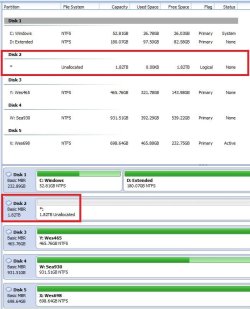
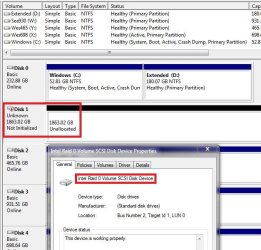
hmmmm............ 1TB drive becomes Unknown , not initialised, unallocated
2TB disk !!! Strange.
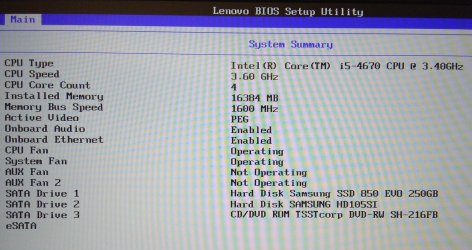
Let me get more information. Your ThinkCentre M93p SFF is a Small Form Factor desktop. How many internal disks are there inside the cabinet?
Please safely remove all USB plugged in external disks and post a full screenshot of Windows Disk Management showing only the internal disks. Follow the guidelines here :
Disk Management - Post a Screen Capture Image
Windows 7 Home Premium 32 bit
Windows 7 Home Premium 32 bit
Wish to be flying
Guru
Gold Member
VIP
You must tell us the story of this HDD
Windows 7 HP 64 i5 6600K - 800MHz to 4200MHz 4+4G GSkill DDR4 3000 IG - Intel 530 PC/Desktop custom build Windows 7 HP 64 i5 6600K - 800MHz to 4200MHz GA-Z170-HD3P 4+4G GSkill DDR4 3000 IG - Intel 530 Samsung 226BW 1680x1050 (1) -1 SM951 – 128GB M.2 AHCI PCIe SSD drive for Windows 7 and Lubuntu Thermaltake 450W TR2 gold Old and good Chicony mechanical keyboard Logitech mX performance - 9 buttons (had to disable some) 500Mb/s Firefox 64 TinyWall firewall
Windows 7 Pro i7-4500U 800MHz to 3.0GHz (4+4)G DDR3 1600 IG intel 4400 + NVIDIA GeForce GT 745M Laptop Asus Q550LF Windows 7 Pro i7-4500U 800MHz to 3.0GHz Asus Q550LF (4+4)G DDR3 1600 IG intel 4400 + NVIDIA GeForce GT 745M Realtek LG Display LP156WF4-SPH1 1920 x 1080 BX500 120G SSD for Windows and programs + 500 Mb/s Firefox TinyWall firewall
New member
Thread Starter
Thanks for your help but I found another solution that worked.
Windows 7 Professional Service Pack 1 (64bit) Intel Core i5-4670 3.4GHz 6MB Quad-Core Deskt... Ramexel 16GB PC3-12800 Dual DDR3 AMD Radeon R7 250 PC/Desktop Lenovo ThinkCentre M93p SFF Windows 7 Professional Service Pack 1 (64bit) Intel Core i5-4670 3.4GHz 6MB Quad-Core Desktop Processor Lenovo Sharkbay 0B98401 PRO Ramexel 16GB PC3-12800 Dual DDR3 AMD Radeon R7 250 Realtek High Definition Audio Dell SE2717H 1920 x 1080 Samsung 850 EVO 250GB SSD DELL DELL Barely Adequate Malwarebytes, Windows Defender Chrome
New member
Guru
Gold Member
VIP
OK fine. You booted into Live Linux and moved out all the data into another drive. Good job and that made be jobless
.
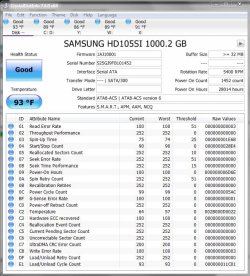
Still why that drive fails to show up in Windows is a mystery. Especially I am stumped by the fact that a 1TB drive shows up as a 2TB drive in Windows Disk Management.. I had never ever seen that. My google search also yielded no such event reported by any user. Crystal Disk Info shows the drive correctly as 1TB and healthy. And so what exactly has happened?
Now that you have moved out all the data, try initialising that disk as MBR and format it. See whether you can regain the drive in Windows.
If it doesn't, Download Windows Executable (works without installation): HDD Low Level Format Tool ver.4.40 (free for personal use) Website:
HDDGURU: HDD LLF Low Level Format Tool and do a full wipe. Then do a regular format.
( Take care to select the correct drive to wipe)
See my post #19 here:
Problem with my Toshiba external drive. Solved - Page 2 - Windows 10 Forums
Last edited: Aug 31, 2018
Windows 7 Home Premium 32 bit
Windows 7 Home Premium 32 bit
New member
Thread Starter
Interesting. Borrowed a Sabrent USB 3.0 docking station for 3.5" HDD.
Windows 7 Professional Service Pack 1 (64bit) Intel Core i5-4670 3.4GHz 6MB Quad-Core Deskt... Ramexel 16GB PC3-12800 Dual DDR3 AMD Radeon R7 250 PC/Desktop Lenovo ThinkCentre M93p SFF Windows 7 Professional Service Pack 1 (64bit) Intel Core i5-4670 3.4GHz 6MB Quad-Core Desktop Processor Lenovo Sharkbay 0B98401 PRO Ramexel 16GB PC3-12800 Dual DDR3 AMD Radeon R7 250 Realtek High Definition Audio Dell SE2717H 1920 x 1080 Samsung 850 EVO 250GB SSD DELL DELL Barely Adequate Malwarebytes, Windows Defender Chrome



 .
.