
You are using an out of date browser. It may not display this or other websites correctly.
You should upgrade or use an alternative browser.
You should upgrade or use an alternative browser.
sequence of programs at startup
- Thread starter enduser
- Start date

A Guy
Righteous Dude
I used this on XP. Have not felt the need on my new PC w/ Windows 7. Not sure about compatibility issues. May have to run in compatibility mode if it doesn't work natively.
Startup Delayer
A Guy
Startup Delayer
A Guy
My Computer
- Computer type
- PC/Desktop
- OS
- Windows 10 Home x64
- CPU
- INTEL Core i5-750 Quad-Core 3.37GHz
- Motherboard
- ASUS P7P55D
- Memory
- HyperX Fury Black Series 8GB (2 x 4GB) 1866Mhz
- Graphics Card(s)
- EVGA GeForce GTX 750 Superclocked 1GB 128-Bit GDDR5
- Monitor(s) Displays
- LG 32MA68HY 32" IPS
- Screen Resolution
- 1920 x 1080
- Hard Drives
- Samsung 840 Evo 120GB, SEAGATE 500GB Barracuda® 7200.12, SATA 3 Gb/s, 7200 RPM, 16MB cache
- PSU
- ANTEC TruePower New TP-550, 80 PLUS, 550W
- Case
- ANTEC Three Hundred Illusion
- Cooling
- COOLER MASTER Hyper 212 Plus, 4 x 120mm 1 x 140mm Noctua's
- Internet Speed
- 85 + Mbps
- Antivirus
- Avast
- Browser
- Vivaldi

Bill2
New member
I suppose a batch file could be used to delay the apps you want to have startup later. But why would you want to do that?
A couple of minutes here or there isn't very long is it? Get a coffee or a smoke while your machine completes the startup cycle.
One workaround is to put your machine to sleep when you are not using it, instead of shutting down.
A couple of minutes here or there isn't very long is it? Get a coffee or a smoke while your machine completes the startup cycle.
One workaround is to put your machine to sleep when you are not using it, instead of shutting down.
My Computer
- Computer Manufacturer/Model Number
- Too many to describe...
- OS
- Windows 7 x64 pro/ Windows 7 x86 Pro/ XP SP3 x86
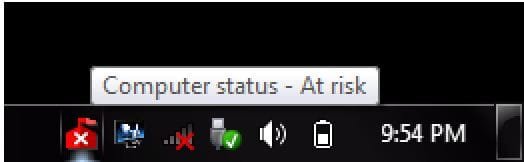
Just to make my point clear
This is at startup. Most of the programs are running but MSE has still not started(at least the real time protection). How do you remedy that?
Is the order of your tray icons been modified with Startup Delayer? At one time Startup Delayer had a problem with re-arranging startup items with the Process name being one of System. In your case this would be MSE. If you haven't used Startup Delayer and MSE is not starting up, then for me the answer would be because it's MSE. MSE will not work well for me. I get that what you describe in addition to constant high CPU/Mem and very slow and sluggish performance of the system.
My Computer
- Computer Manufacturer/Model Number
- Averatec 6130HS-20
- OS
- Windows 7 Professional 32-bit (6.1, Build 7600)
- CPU
- Intel(R) Pentium(R) 4 3.00 GHz HT
- Memory
- 2.0 GB
- Graphics Card(s)
- ATI Mobility Radeon 9600 64MB
- Sound Card
- Realtek AC'97 Audio
- Screen Resolution
- 1280 x 800
- Hard Drives
- Seagate 96023A 60GB 7200RPM -
Seagate FreeAgentDesktop 250GB
- Cooling
- 20 Inch Box Fan
- Mouse
- Targus PAWM10 Wireless Optical Laptop Mouse
Bill2
New member
Try this.
Click Start button, then type "Services.msc" without quotes, Hit Enter. In the Services window that opens, find Security Center > Right Click, choose Properties > Change Startup Type from Automatic (Delayed Start) to Automatic> Hit Apply > Hit OK > Reboot to test.
Click Start button, then type "Services.msc" without quotes, Hit Enter. In the Services window that opens, find Security Center > Right Click, choose Properties > Change Startup Type from Automatic (Delayed Start) to Automatic> Hit Apply > Hit OK > Reboot to test.
My Computer
- Computer Manufacturer/Model Number
- Too many to describe...
- OS
- Windows 7 x64 pro/ Windows 7 x86 Pro/ XP SP3 x86
Try this.
Click Start button, then type "Services.msc" without quotes, Hit Enter. In the Services window that opens, find Security Center > Right Click, choose Properties > Change Startup Type from Automatic (Delayed Start) to Automatic> Hit Apply > Hit OK > Reboot to test.
Is this method possible with a System service such as MSE? I tried it during my attempts to use MSE to no avail. I could change it in the registry after taking ownership and granting full privileges but not through services.msc
My Computer
- Computer Manufacturer/Model Number
- Averatec 6130HS-20
- OS
- Windows 7 Professional 32-bit (6.1, Build 7600)
- CPU
- Intel(R) Pentium(R) 4 3.00 GHz HT
- Memory
- 2.0 GB
- Graphics Card(s)
- ATI Mobility Radeon 9600 64MB
- Sound Card
- Realtek AC'97 Audio
- Screen Resolution
- 1280 x 800
- Hard Drives
- Seagate 96023A 60GB 7200RPM -
Seagate FreeAgentDesktop 250GB
- Cooling
- 20 Inch Box Fan
- Mouse
- Targus PAWM10 Wireless Optical Laptop Mouse
Bill2
New member
The service I was talking about is the "Security Center" service.Try this.
Click Start button, then type "Services.msc" without quotes, Hit Enter. In the Services window that opens, find Security Center > Right Click, choose Properties > Change Startup Type from Automatic (Delayed Start) to Automatic> Hit Apply > Hit OK > Reboot to test.
Is this method possible with a System service such as MSE? I tried it during my attempts to use MSE to no avail. I could change it in the registry after taking ownership and granting full privileges but not through services.msc
My Computer
- Computer Manufacturer/Model Number
- Too many to describe...
- OS
- Windows 7 x64 pro/ Windows 7 x86 Pro/ XP SP3 x86
The service I was talking about is the "Security Center" service.Try this.
Click Start button, then type "Services.msc" without quotes, Hit Enter. In the Services window that opens, find Security Center > Right Click, choose Properties > Change Startup Type from Automatic (Delayed Start) to Automatic> Hit Apply > Hit OK > Reboot to test.
Is this method possible with a System service such as MSE? I tried it during my attempts to use MSE to no avail. I could change it in the registry after taking ownership and granting full privileges but not through services.msc
Sorry Bill, I misunderstood. Something I do more frequently as I get older,lol.
My Computer
- Computer Manufacturer/Model Number
- Averatec 6130HS-20
- OS
- Windows 7 Professional 32-bit (6.1, Build 7600)
- CPU
- Intel(R) Pentium(R) 4 3.00 GHz HT
- Memory
- 2.0 GB
- Graphics Card(s)
- ATI Mobility Radeon 9600 64MB
- Sound Card
- Realtek AC'97 Audio
- Screen Resolution
- 1280 x 800
- Hard Drives
- Seagate 96023A 60GB 7200RPM -
Seagate FreeAgentDesktop 250GB
- Cooling
- 20 Inch Box Fan
- Mouse
- Targus PAWM10 Wireless Optical Laptop Mouse