Solved "service is unavailable" in WMC after going back to W7 frm W10

JJTech

New member
Member
Local time
3:25 PM
Messages
37
Location
Boston
"service is unavailable" in WMC after going back to W7 frm W10

After having my WMC hack undone by the W10 anniversary update and not finding a suitable substitute to WMC I have spent way too much time going back to W7.

I have a Hauppauge 950q and installed their newly updated software WinTV V8.

I am getting every channel I did a month ago except for channel 38.1 (in Boston). For that channel I get the message "service is unavailable" in WMC. I had this channel strong and reliable a month ago under W7 and I can also see it in Win TV viewer.

WMC guide lists the correct program for that channel.

What's up with this???

Thanks!
 

My Computer My Computer

At a glance

Windows 7 64 bitIntel® Core™ 2 Q6600 quad core processor with VT8 GBsNVIDIA® GeForce® 8500GT
Computer Manufacturer/Model Number
Gateway PC model GM5632E
OS
Windows 7 64 bit
CPU
Intel® Core™ 2 Q6600 quad core processor with VT
Motherboard
Intel (Schroeder Town) G33
Memory
8 GBs
Graphics Card(s)
NVIDIA® GeForce® 8500GT
Sound Card
Integrated 8-Channel (7.1) High Definition Audio
Monitor(s) Displays
Samsung SyncMater 912n; Analog Sony TV via S-Video/RCA conn
Hard Drives
Two WD 500 GB, One WD 1 TB, 7200 RPM, SATA II hard drives
PSU
400 watt
Case
Gateway - Side entrance
Cooling
1 case, 1 CPU
Hi,
The return trip back is pretty bad
I'm guessing you didn't bother to create a system image of your 7 before upgrading :(
 

My Computer My Computer

At a glance

Win-7-Pro64bit 7-H-Prem-64biti7-5930K 2nd i9-9940x both water blocked VRM'...Trident-z 3200C14 2nd Trident-z 3600C16EVGA 1080ti ftw3 2nd Titan Xp both water blocked
Computer type
PC/Desktop
Computer Manufacturer/Model Number
Custom assembled by me :}
OS
Win-7-Pro64bit 7-H-Prem-64bit
CPU
i7-5930K 2nd i9-9940x both water blocked VRM's too
Motherboard
ASUS SABERTOOTH X99 2nd ASUS x299 Apex
Memory
Trident-z 3200C14 2nd Trident-z 3600C16
Graphics Card(s)
EVGA 1080ti ftw3 2nd Titan Xp both water blocked
Sound Card
Built-in Realtek
Monitor(s) Displays
1-AOC G2460PG 24"G-Sync 144Hz/ 2nd 1-ASUS VG248QE 24" 144Hz
Screen Resolution
1920 x 1080 144Hz
Hard Drives
2-Samsung M.2 Evo & Evo Plus
2-Samsung 850 EVO 500GB SSD's/ 3-2.5 W.D. Black 1tb-&3-1tb/3-3.5 WD Black 1tb hdd's
PSU
EVGA SuperNOVA 1000-P2 2nd 1200-P2
Case
2-Corsair Obsidian Series 450D Black ATX Mid Tower
Cooling
Custom water loops
Keyboard
Logitech G710+/ 2nd Logitech G910
Mouse
2-RedDragon M901 Perdition 16400 dpi Gaming mouse = wired
Internet Speed
Comcast Ping 19ms 89.31mbps download speed 6.12mbps upload
Antivirus
Malwarebytes Pro/ Superantispyware Pro
Browser
FireFox & Pale moon
Other Info
2nd ASUS X299 Apex/Intel i9-9940x with Custom water loop/7H-Prem-x64/Corsair 450D case/Ram Trident-z 3600C16 4x8gb / Samsung970Evo plus 500gb SSD/Dual ssd EZ swap evo/PSU EVGA SuperNova 1200w-P2 80+Platinum/GPU Titan Xp /8-ML-140 on push-pull on 2-280GTX rads
Hi,
The return trip back is pretty bad
I'm guessing you didn't bother to create a system image of your 7 before upgrading :(

No I didn't. I had cloned a bad SSD on the old W7 so I always wanted to do a fresh install rather than go back to the old copy. Took 4 days and a bunch of work to get the updates to download and install. I am Windows believer but I can see why people go to Apple!
 

My Computer My Computer

At a glance

Windows 7 64 bitIntel® Core™ 2 Q6600 quad core processor with VT8 GBsNVIDIA® GeForce® 8500GT
Computer Manufacturer/Model Number
Gateway PC model GM5632E
OS
Windows 7 64 bit
CPU
Intel® Core™ 2 Q6600 quad core processor with VT
Motherboard
Intel (Schroeder Town) G33
Memory
8 GBs
Graphics Card(s)
NVIDIA® GeForce® 8500GT
Sound Card
Integrated 8-Channel (7.1) High Definition Audio
Monitor(s) Displays
Samsung SyncMater 912n; Analog Sony TV via S-Video/RCA conn
Hard Drives
Two WD 500 GB, One WD 1 TB, 7200 RPM, SATA II hard drives
PSU
400 watt
Case
Gateway - Side entrance
Cooling
1 case, 1 CPU
Hi,
Well you are sort of in luck :)
It's a lot easier to clean install these days with the unofficial sp2
There are essentially 3 updates needed for a clean install of windows that will get you updated through April of 2016

KB3020369 & KB3125574 & KB3172605 all can be downloaded from the M$ catalog using internet explorer
Microsoft Update Catalog

https://blogs.technet.microsoft.com...17/simplifying-updates-for-windows-7-and-8-1/
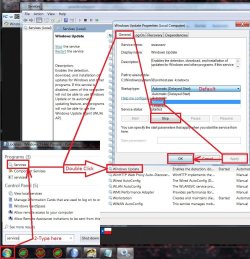
When manually installing updates you need to switch your update settings to Never check for updates and restart the machine first.

After restart you will need to ensure the built in windows update service is stopped and set to manual first too or it will conflict with the stand alone installer.
service stop windows update.jpg
Afterwards reset the windows updates service to what it was before and update settings to your preference and check for updates
Should be only 50 or so updates left to install.

You can get all 3 from my OneDrive for a easier method :)
https://1drv.ms/f/s!AsjD7o6P3KLKj2TjShn8-SumV1rr

If you need installation media just say the word plus which language and version ;)
 

My Computer My Computer

At a glance

Win-7-Pro64bit 7-H-Prem-64biti7-5930K 2nd i9-9940x both water blocked VRM'...Trident-z 3200C14 2nd Trident-z 3600C16EVGA 1080ti ftw3 2nd Titan Xp both water blocked
Computer type
PC/Desktop
Computer Manufacturer/Model Number
Custom assembled by me :}
OS
Win-7-Pro64bit 7-H-Prem-64bit
CPU
i7-5930K 2nd i9-9940x both water blocked VRM's too
Motherboard
ASUS SABERTOOTH X99 2nd ASUS x299 Apex
Memory
Trident-z 3200C14 2nd Trident-z 3600C16
Graphics Card(s)
EVGA 1080ti ftw3 2nd Titan Xp both water blocked
Sound Card
Built-in Realtek
Monitor(s) Displays
1-AOC G2460PG 24"G-Sync 144Hz/ 2nd 1-ASUS VG248QE 24" 144Hz
Screen Resolution
1920 x 1080 144Hz
Hard Drives
2-Samsung M.2 Evo & Evo Plus
2-Samsung 850 EVO 500GB SSD's/ 3-2.5 W.D. Black 1tb-&3-1tb/3-3.5 WD Black 1tb hdd's
PSU
EVGA SuperNOVA 1000-P2 2nd 1200-P2
Case
2-Corsair Obsidian Series 450D Black ATX Mid Tower
Cooling
Custom water loops
Keyboard
Logitech G710+/ 2nd Logitech G910
Mouse
2-RedDragon M901 Perdition 16400 dpi Gaming mouse = wired
Internet Speed
Comcast Ping 19ms 89.31mbps download speed 6.12mbps upload
Antivirus
Malwarebytes Pro/ Superantispyware Pro
Browser
FireFox & Pale moon
Other Info
2nd ASUS X299 Apex/Intel i9-9940x with Custom water loop/7H-Prem-x64/Corsair 450D case/Ram Trident-z 3600C16 4x8gb / Samsung970Evo plus 500gb SSD/Dual ssd EZ swap evo/PSU EVGA SuperNova 1200w-P2 80+Platinum/GPU Titan Xp /8-ML-140 on push-pull on 2-280GTX rads
Thank you!

I tried the "Convenience rollup" update but had trouble with that so I just painfully completed all the updates the hard way.

Any ideas on the WMC problem?
 

My Computer My Computer

At a glance

Windows 7 64 bitIntel® Core™ 2 Q6600 quad core processor with VT8 GBsNVIDIA® GeForce® 8500GT
Computer Manufacturer/Model Number
Gateway PC model GM5632E
OS
Windows 7 64 bit
CPU
Intel® Core™ 2 Q6600 quad core processor with VT
Motherboard
Intel (Schroeder Town) G33
Memory
8 GBs
Graphics Card(s)
NVIDIA® GeForce® 8500GT
Sound Card
Integrated 8-Channel (7.1) High Definition Audio
Monitor(s) Displays
Samsung SyncMater 912n; Analog Sony TV via S-Video/RCA conn
Hard Drives
Two WD 500 GB, One WD 1 TB, 7200 RPM, SATA II hard drives
PSU
400 watt
Case
Gateway - Side entrance
Cooling
1 case, 1 CPU
Hi,
Not really not on a clean install ?

I've personally never used wmc all I do is turn it off in windows features.
Someone else might though good luck
Cheers.
 

My Computer My Computer

At a glance

Win-7-Pro64bit 7-H-Prem-64biti7-5930K 2nd i9-9940x both water blocked VRM'...Trident-z 3200C14 2nd Trident-z 3600C16EVGA 1080ti ftw3 2nd Titan Xp both water blocked
Computer type
PC/Desktop
Computer Manufacturer/Model Number
Custom assembled by me :}
OS
Win-7-Pro64bit 7-H-Prem-64bit
CPU
i7-5930K 2nd i9-9940x both water blocked VRM's too
Motherboard
ASUS SABERTOOTH X99 2nd ASUS x299 Apex
Memory
Trident-z 3200C14 2nd Trident-z 3600C16
Graphics Card(s)
EVGA 1080ti ftw3 2nd Titan Xp both water blocked
Sound Card
Built-in Realtek
Monitor(s) Displays
1-AOC G2460PG 24"G-Sync 144Hz/ 2nd 1-ASUS VG248QE 24" 144Hz
Screen Resolution
1920 x 1080 144Hz
Hard Drives
2-Samsung M.2 Evo & Evo Plus
2-Samsung 850 EVO 500GB SSD's/ 3-2.5 W.D. Black 1tb-&3-1tb/3-3.5 WD Black 1tb hdd's
PSU
EVGA SuperNOVA 1000-P2 2nd 1200-P2
Case
2-Corsair Obsidian Series 450D Black ATX Mid Tower
Cooling
Custom water loops
Keyboard
Logitech G710+/ 2nd Logitech G910
Mouse
2-RedDragon M901 Perdition 16400 dpi Gaming mouse = wired
Internet Speed
Comcast Ping 19ms 89.31mbps download speed 6.12mbps upload
Antivirus
Malwarebytes Pro/ Superantispyware Pro
Browser
FireFox & Pale moon
Other Info
2nd ASUS X299 Apex/Intel i9-9940x with Custom water loop/7H-Prem-x64/Corsair 450D case/Ram Trident-z 3600C16 4x8gb / Samsung970Evo plus 500gb SSD/Dual ssd EZ swap evo/PSU EVGA SuperNova 1200w-P2 80+Platinum/GPU Titan Xp /8-ML-140 on push-pull on 2-280GTX rads
Someone suggested the following:


Control Panel > troubleshooter> Troubleshooting >View all >Set up TV tuner


Hopeful but I don't have "Set up TV tuner" under troubleshooting.


Any suggestions on any front?
 

My Computer My Computer

At a glance

Windows 7 64 bitIntel® Core™ 2 Q6600 quad core processor with VT8 GBsNVIDIA® GeForce® 8500GT
Computer Manufacturer/Model Number
Gateway PC model GM5632E
OS
Windows 7 64 bit
CPU
Intel® Core™ 2 Q6600 quad core processor with VT
Motherboard
Intel (Schroeder Town) G33
Memory
8 GBs
Graphics Card(s)
NVIDIA® GeForce® 8500GT
Sound Card
Integrated 8-Channel (7.1) High Definition Audio
Monitor(s) Displays
Samsung SyncMater 912n; Analog Sony TV via S-Video/RCA conn
Hard Drives
Two WD 500 GB, One WD 1 TB, 7200 RPM, SATA II hard drives
PSU
400 watt
Case
Gateway - Side entrance
Cooling
1 case, 1 CPU
It's been a while and I still have no fix so I thought I would give an update.

Here is the summery:

•In WMC 38.1 came in just fine 2 months ago with W7. Then after trying out W10, I came back down to W7 and now I get "Service is unavailable" bla bla bla for 38.1
•I am using a Hauppauge 950Q on a W7 64 bit
•WMC correctly shows channel 38.1 in the listing, it scans signal strength at a full 6 bars, Win TV plays the channel just fine (as it did 2 months ago in WMC) but I can't get it to display now when I came back to W7 from W10 in WMC. HOW COULD THAT BE POSSIBLE????
•I have manually reinstalled WMC, tried different zip codes, tried to manually add channels like 38.2, 39.1, etc. with no luck. WMC forces the .1 as in 39.1.
•Under settings/tv/guide/edit channels/click on 38.1, click edit sources the channel that WMC configures shows 39.1 and 100% quality at the bottom of the screen.


I know it is not the antenna or the signal. The techs at the station and Hauppauge don't have an answer.


Any ideas?
 

My Computer My Computer

At a glance

Windows 7 64 bitIntel® Core™ 2 Q6600 quad core processor with VT8 GBsNVIDIA® GeForce® 8500GT
Computer Manufacturer/Model Number
Gateway PC model GM5632E
OS
Windows 7 64 bit
CPU
Intel® Core™ 2 Q6600 quad core processor with VT
Motherboard
Intel (Schroeder Town) G33
Memory
8 GBs
Graphics Card(s)
NVIDIA® GeForce® 8500GT
Sound Card
Integrated 8-Channel (7.1) High Definition Audio
Monitor(s) Displays
Samsung SyncMater 912n; Analog Sony TV via S-Video/RCA conn
Hard Drives
Two WD 500 GB, One WD 1 TB, 7200 RPM, SATA II hard drives
PSU
400 watt
Case
Gateway - Side entrance
Cooling
1 case, 1 CPU
After having my WMC hack undone by the W10 anniversary update and not finding a suitable substitute to WMC I have spent way too much time going back to W7.

I've had MS break WMC on W10 twice now, but it's no big deal to reinstall. I just completely remove any remnants of WMC (incl hidden files) and install again. If you don't do a clean-up, WMC won't install after the update. The latest hack comes with an uninstaller, but sometimes using an older version (eg v8) uninstaller works best. I guess I'll be doing this every 6 months, but it don't take too long compared to going back to W7.

I never understood why MS didn't push TV on WMC instead of deprecating it. I've tried several alternatives, but none come close to WMC. I currently have 2 W10 Pro x64 machines with TBS 6205 quad HD tuners for UK Freeview on WMC.

According to MDL, there's a backup method so you don't have to retune etc when reinstalling WMC, but I've never tried it.
 

My Computer My Computer

At a glance

W10 Pro x64, W7 Pro x64 in VMwarei7 2600K @ 4.4GHz8GB Mushkin @ 1600MHzNvidia GTX 750 Ti
Computer type
PC/Desktop
Computer Manufacturer/Model Number
self build
OS
W10 Pro x64, W7 Pro x64 in VMware
CPU
i7 2600K @ 4.4GHz
Motherboard
MSI Z68A-GD80
Memory
8GB Mushkin @ 1600MHz
Graphics Card(s)
Nvidia GTX 750 Ti
Monitor(s) Displays
27" Benq + 27" LG
Screen Resolution
1080p
Hard Drives
500GB 850 Evo SSD + 3 * 2TB Seagate
PSU
EVGA 650 GS modular
Case
Antec 300
Cooling
Seidon 120V v2
Internet Speed
62/18 Mbps
Antivirus
Defender (W10) + MSE (W7)
Browser
Firefox

My Computer My Computer

At a glance

W7 home premium 32bit/W7HP 64bit/w10 tp insid...E5300 dual core3gbNvidia Geforce 7100 Nforce 630i
Computer type
PC/Desktop
Computer Manufacturer/Model Number
medionl/Aspire 6930G/acer x55a
OS
W7 home premium 32bit/W7HP 64bit/w10 tp insider ring
CPU
E5300 dual core
Motherboard
medion MS7366
Memory
3gb
Graphics Card(s)
Nvidia Geforce 7100 Nforce 630i
Monitor(s) Displays
avixc
Internet Speed
n (isp resticted to 72)
Antivirus
mse/pands
Browser
palemoon
Other Info
Belkin Fd7050 n USB using Railink RT2870 drivers, more upto date
It's been a while and I still have no fix so I thought I would give an update.

Here is the summery:

•In WMC 38.1 came in just fine 2 months ago with W7. Then after trying out W10, I came back down to W7 and now I get "Service is unavailable" bla bla bla for 38.1
•I am using a Hauppauge 950Q on a W7 64 bit
•WMC correctly shows channel 38.1 in the listing, it scans signal strength at a full 6 bars, Win TV plays the channel just fine (as it did 2 months ago in WMC) but I can't get it to display now when I came back to W7 from W10 in WMC. HOW COULD THAT BE POSSIBLE????
•I have manually reinstalled WMC, tried different zip codes, tried to manually add channels like 38.2, 39.1, etc. with no luck. WMC forces the .1 as in 39.1.
•Under settings/tv/guide/edit channels/click on 38.1, click edit sources the channel that WMC configures shows 39.1 and 100% quality at the bottom of the screen.


I know it is not the antenna or the signal. The techs at the station and Hauppauge don't have an answer.


Any ideas?

After several long and frustrating weeks, Trip in VA found the answer! The station just added 38.2 and mistyped the TSID. WMC compares that to the guide and will not show it unless it agrees. I called the station, they changed it and it finally works!!! Many thanks to all that tried to figure this out and a special thanks to Trip inVA!


You can see the whole thread here: http://www.avsforum.com/forum/45-local-hdtv-info-reception/28454-boston-ma-ota-368.html


I have also included the results from TSReader in the attached files. Before and after the fix. You can see at the top of both files the change from 1357 to 1367.
 

Attachments

My Computer My Computer

At a glance

Windows 7 64 bitIntel® Core™ 2 Q6600 quad core processor with VT8 GBsNVIDIA® GeForce® 8500GT
Computer Manufacturer/Model Number
Gateway PC model GM5632E
OS
Windows 7 64 bit
CPU
Intel® Core™ 2 Q6600 quad core processor with VT
Motherboard
Intel (Schroeder Town) G33
Memory
8 GBs
Graphics Card(s)
NVIDIA® GeForce® 8500GT
Sound Card
Integrated 8-Channel (7.1) High Definition Audio
Monitor(s) Displays
Samsung SyncMater 912n; Analog Sony TV via S-Video/RCA conn
Hard Drives
Two WD 500 GB, One WD 1 TB, 7200 RPM, SATA II hard drives
PSU
400 watt
Case
Gateway - Side entrance
Cooling
1 case, 1 CPU
Back
Top