Solved Set start pg in new chrome installation

klxdrt

New member
Member
VIP
Local time
9:10 PM
Messages
188
Just set up Chrome, and want set Chrome to open up an html pg on my HD as it's start page. The html page has all my important links. I went to advance settings, found where to set it up BUT there was NO function to let me browse my HD to select it?

Tried to load it but I could not see or find a standard menu bar to open it.

W7 pro

Could not find Ver in std area.


help,

klx
 

My Computer My Computer

Computer type
PC/Desktop
Computer Manufacturer/Model Number
locally made
OS
w7 pro 32 bit w/XP virt enabled.
CPU
AMD A6-3650
Motherboard
ASUS F1A55-M CSM
Memory
4 GB DDR3 RAM
Graphics Card(s)
NVIDIA GeForce 210
Sound Card
NVIDIA High Definition Audio
Monitor(s) Displays
28" HD monitor
Screen Resolution
1680 x 1050 x 32 bits (4294967296 colors) @ 59 Hz
Hard Drives
2 x 500 GB Western Digital Blue Hard Drive
PSU
?
Case
?
Cooling
3-4 fans
Keyboard
big yellow keys
Mouse
logitec
Internet Speed
60 mb
Antivirus
panda
Browser
ff
Other Info
scanner, webcam, bw printer, fax modem, cd/dvd burner, PC usb ports: 2 usb3, 6 usb2 plus 7 port usb hub, 2 tb usb3, 1 Tb usb3, 500Mb usb2, 120Mb USB2 portable drives, asst of flash drives 250 Mb to 32 Gb. backup PC, office

Chrome do not have menu.

As you have the html page, copy it.

Select the 3 dots on the top right.

Select Setting

There is this "On startup"
There is this 3rd option; "Open a specific page or set of pages."
On the right; click on the "Set pages"
Add a new page: Paste your html file.

That's all.
 

My Computer My Computer

Computer type
Laptop
Computer Manufacturer/Model Number
Toshiba L630 and L735
OS
Windows 7 x64
Hard Drives
240 GB SSD
There is one more option for you to use.

Bookmark.

Click on the 3 dots line, cursor to Bookmarks --> click on "Show bookmarks bar"

Below the Address bar, there is this bookmarks bar.

If you always go to this site, on the bookmarks bar --> right-click --> Add page....

You can create a folder (you can name the folder) on the bookmarks bar.
And if the address is related to the folder, right-click on the folder --> Add page...

As Chrome do not have Menu bar, but there is all the setting inside the 3 dots on the top right.

Click on the 3 dots and click on the Setting.
Scroll all the way down there is this; click on "Show advance settings" and you can scroll downwards.
All types of settings are here.
Such as Download folder, zoom, font size, passwords.
For passwords, when you are in a secured website where you have to enter username & password, Chrome offer you to save, which will be saved, and you can view or deleted in the setting --> passwords.

There is this "incognito" window, which will not be in the History of your visited website.

Enjoy using Chrome...
 

My Computer My Computer

Computer type
Laptop
Computer Manufacturer/Model Number
Toshiba L630 and L735
OS
Windows 7 x64
Hard Drives
240 GB SSD
Thanks, but I dont want to go back to the stone age with chrome

HI guys :banghead:

Thanks for your help, but no more solutions needed as I don't want to go back to the stone age with chrome and waste your time. EOS

Regards,
 

Attachments

  • chain whl klx.png
    chain whl klx.png
    4.3 KB · Views: 8

My Computer My Computer

Computer type
PC/Desktop
Computer Manufacturer/Model Number
locally made
OS
w7 pro 32 bit w/XP virt enabled.
CPU
AMD A6-3650
Motherboard
ASUS F1A55-M CSM
Memory
4 GB DDR3 RAM
Graphics Card(s)
NVIDIA GeForce 210
Sound Card
NVIDIA High Definition Audio
Monitor(s) Displays
28" HD monitor
Screen Resolution
1680 x 1050 x 32 bits (4294967296 colors) @ 59 Hz
Hard Drives
2 x 500 GB Western Digital Blue Hard Drive
PSU
?
Case
?
Cooling
3-4 fans
Keyboard
big yellow keys
Mouse
logitec
Internet Speed
60 mb
Antivirus
panda
Browser
ff
Other Info
scanner, webcam, bw printer, fax modem, cd/dvd burner, PC usb ports: 2 usb3, 6 usb2 plus 7 port usb hub, 2 tb usb3, 1 Tb usb3, 500Mb usb2, 120Mb USB2 portable drives, asst of flash drives 250 Mb to 32 Gb. backup PC, office
You're welcome.

Do mark this thread as closed.

Eric.
 

My Computer My Computer

Computer type
Laptop
Computer Manufacturer/Model Number
Toshiba L630 and L735
OS
Windows 7 x64
Hard Drives
240 GB SSD
Hi,

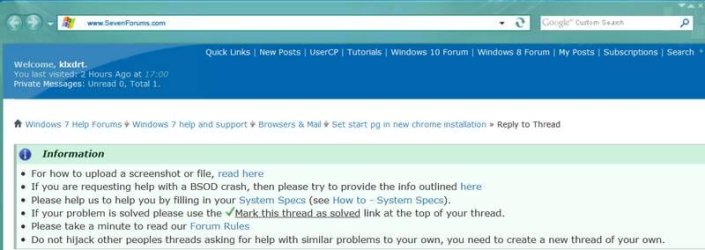
Sorry about no closing, Roger Wilco, when I find where you guys hide the green check mark" Maybe a larger RED 14 pt bold chk mark in the info block would deliver better results.

"If your problem is solved please use the
tick.png
Mark this thread as solved link at the top of your thread."


Attachments

  • close thread.jpg
    close thread.jpg
    31.8 KB · Views: 1
  • chain whl klx.png
    chain whl klx.png
    4.3 KB · Views: 4

My Computer My Computer

Computer type
PC/Desktop
Computer Manufacturer/Model Number
locally made
OS
w7 pro 32 bit w/XP virt enabled.
CPU
AMD A6-3650
Motherboard
ASUS F1A55-M CSM
Memory
4 GB DDR3 RAM
Graphics Card(s)
NVIDIA GeForce 210
Sound Card
NVIDIA High Definition Audio
Monitor(s) Displays
28" HD monitor
Screen Resolution
1680 x 1050 x 32 bits (4294967296 colors) @ 59 Hz
Hard Drives
2 x 500 GB Western Digital Blue Hard Drive
PSU
?
Case
?
Cooling
3-4 fans
Keyboard
big yellow keys
Mouse
logitec
Internet Speed
60 mb
Antivirus
panda
Browser
ff
Other Info
scanner, webcam, bw printer, fax modem, cd/dvd burner, PC usb ports: 2 usb3, 6 usb2 plus 7 port usb hub, 2 tb usb3, 1 Tb usb3, 500Mb usb2, 120Mb USB2 portable drives, asst of flash drives 250 Mb to 32 Gb. backup PC, office
Back
Top