
Setting up a second Network

I don't understand why you need to use ICS at all... if all 3 machines are connected to the router then they should all have internet access, ICS is only used when only 1 machine has internet access....

Or am I missing the point?

I'm not sure if you are missing the point, ICS was set up when I installed the Modem and connected the PC's but I want to set up a fully sharing network but am worried about losing ICS and about security.

cheers

Daniel
 

My Computer

Computer type
PC/Desktop
Computer Manufacturer/Model Number
Multimedia PC MEDION® Akoya® E7330 D
OS
Microsoft Windows 7 Professional 32-bit 7601 Multiprocessor Free Service Pack 1
CPU
Intel(R) Core(TM)2 Quad CPU Q8300 @ 2.50GHz
Motherboard
MEDIONPC MS-7366
Memory
4.00 GB
Graphics Card(s)
NVIDIA GeForce GT 220
Sound Card
(1) High Definition Audio Device (2) High Definition Audio
Screen Resolution
1920 x 1080 x 32 bits (4294967296 colors) @ 60 Hz
Hard Drives
(1) WDC WD10EZEX-00WN4A0 ATA Device (2) WDC WD6400AACS-00G8B1 ATA Device (3) Generic Flash HS-CF USB Device (4) Generic Flash HS-MS/SD USB Device (5) Generic Flash HS-SM USB Device (6) HP Officejet 5740 s USB Device (7) USB Flash Disk USB
Ok, I have attached a diagram of how I think your network looks, or at least how you want it to look, is that accurate?
 

Attachments

  • Network.png
    Network.png
    4.3 KB · Views: 8

My Computer

Computer type
PC/Desktop
Computer Manufacturer/Model Number
Medion Erazer (note to self: insert model number) - with custom additions
OS
Windows 10 Pro x64
CPU
Intel Core i5 7400 @ 3.00GHz
Motherboard
OEM supllied with PC
Memory
8GB 2133Mhz DDR4 (OEM supplied)
Graphics Card(s)
Gygabyte Windforce GTX 1050Ti (Factory Overclocked)
Sound Card
Realtek
Monitor(s) Displays
Acer Al1980 + HKC
Screen Resolution
1360*768(HKC) / 1280*1024(Acer)
Hard Drives
1TB Toshiba
1TB WD Caviar Green
120GB Samsung Evo 840
PSU
OEM supplied (no power rating on case)
Case
OEM Supplied
Cooling
Stock
Keyboard
Logitech Wireless
Mouse
Logitect Wireless
Internet Speed
40Mb/s Down 10Mb/s Up
Antivirus
Defender
Browser
Firefox
Ok, I have attached a diagram of how I think your network looks, or at least how you want it to look, is that accurate?

Yes, spot on. BTW ICS is my term to show that the PC's all have Internet but are not able to access each other.

thanks

Daniel
 

My Computer

Computer type
PC/Desktop
Computer Manufacturer/Model Number
Multimedia PC MEDION® Akoya® E7330 D
OS
Microsoft Windows 7 Professional 32-bit 7601 Multiprocessor Free Service Pack 1
CPU
Intel(R) Core(TM)2 Quad CPU Q8300 @ 2.50GHz
Motherboard
MEDIONPC MS-7366
Memory
4.00 GB
Graphics Card(s)
NVIDIA GeForce GT 220
Sound Card
(1) High Definition Audio Device (2) High Definition Audio
Screen Resolution
1920 x 1080 x 32 bits (4294967296 colors) @ 60 Hz
Hard Drives
(1) WDC WD10EZEX-00WN4A0 ATA Device (2) WDC WD6400AACS-00G8B1 ATA Device (3) Generic Flash HS-CF USB Device (4) Generic Flash HS-MS/SD USB Device (5) Generic Flash HS-SM USB Device (6) HP Officejet 5740 s USB Device (7) USB Flash Disk USB
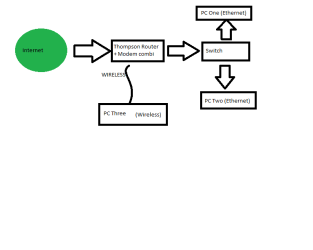
Aha! Thats where the confusion lies. I have been watching this thread all day, and scratching my head trying to figure out what was going on. Now I see.

So your problem is with sharing, ICS is something completely different

To answer your original question, yes you can network them quite happily and they will all have the internet still. The way you have it set up is pretty much the proper way to do it. As for security, that shouldn't be an issue unless your sharing infected files between the machines, and as long as you trust whoever uses the machines.

Do you know how to set up the network? If it is already set up precisely what problems are you having?
 
Last edited:

My Computer

Computer type
PC/Desktop
Computer Manufacturer/Model Number
Medion Erazer (note to self: insert model number) - with custom additions
OS
Windows 10 Pro x64
CPU
Intel Core i5 7400 @ 3.00GHz
Motherboard
OEM supllied with PC
Memory
8GB 2133Mhz DDR4 (OEM supplied)
Graphics Card(s)
Gygabyte Windforce GTX 1050Ti (Factory Overclocked)
Sound Card
Realtek
Monitor(s) Displays
Acer Al1980 + HKC
Screen Resolution
1360*768(HKC) / 1280*1024(Acer)
Hard Drives
1TB Toshiba
1TB WD Caviar Green
120GB Samsung Evo 840
PSU
OEM supplied (no power rating on case)
Case
OEM Supplied
Cooling
Stock
Keyboard
Logitech Wireless
Mouse
Logitect Wireless
Internet Speed
40Mb/s Down 10Mb/s Up
Antivirus
Defender
Browser
Firefox
Hi

PC1 Windows 7 Pro
PC2 and PC3 Vista Home Premium
PC3 Connected Wirelessly
PC2 is set up to share fully
Problems are

1) I can see PC1 and PC2 from each other but cannot get access, PC2 from PC1 says the path is incorrect and diagnoses find nothing, PC1 from PC2ask for a username and Password

2) I cannot see PC3 from PC1 and PC2

3) The modem installation (I guess) set up a network of sorts with the name WORKGROUP, I altered that to OTHER in the belief that I could then go in and set up a secure password, to stop passersbay from connecting to my Wireless Network.

Hope this makes sense, I am willing to start again.

Cheers

Daniel
 

My Computer

Computer type
PC/Desktop
Computer Manufacturer/Model Number
Multimedia PC MEDION® Akoya® E7330 D
OS
Microsoft Windows 7 Professional 32-bit 7601 Multiprocessor Free Service Pack 1
CPU
Intel(R) Core(TM)2 Quad CPU Q8300 @ 2.50GHz
Motherboard
MEDIONPC MS-7366
Memory
4.00 GB
Graphics Card(s)
NVIDIA GeForce GT 220
Sound Card
(1) High Definition Audio Device (2) High Definition Audio
Screen Resolution
1920 x 1080 x 32 bits (4294967296 colors) @ 60 Hz
Hard Drives
(1) WDC WD10EZEX-00WN4A0 ATA Device (2) WDC WD6400AACS-00G8B1 ATA Device (3) Generic Flash HS-CF USB Device (4) Generic Flash HS-MS/SD USB Device (5) Generic Flash HS-SM USB Device (6) HP Officejet 5740 s USB Device (7) USB Flash Disk USB
Ok, well the first (and most obvious) thing to check is that all PC's are on the same WORKGROUP. It honestly doesn't matter if they are are called the default WORKGROUP or not as long as your wireless password is secure. (WPA or WPA2 encrypted, a nice strong passphrase) here is a tutorial if your not sure: http://www.sevenforums.com/tutorials/105015-wireless-security-how-protect-your-network.html

I would recommend working through this tutorial: http://www.sevenforums.com/tutorials/53830-file-sharing-between-xp-w7-vice-versa.html

although it says XP to Win 7 it does show how to set up a Win 7 machine, the process for Vista is pretty much identical. As you obviously have some knowledge of networking, the few differences there are (and it really is just a couple of menu's in a slightly different place) shouldn't be too difficult for you to figure out.

Note there are two tutorials there, the 2nd one goes into more depth about setting up 7/Vista.

One you have done that, report back, and we'll go from there.
 

My Computer

Computer type
PC/Desktop
Computer Manufacturer/Model Number
Medion Erazer (note to self: insert model number) - with custom additions
OS
Windows 10 Pro x64
CPU
Intel Core i5 7400 @ 3.00GHz
Motherboard
OEM supllied with PC
Memory
8GB 2133Mhz DDR4 (OEM supplied)
Graphics Card(s)
Gygabyte Windforce GTX 1050Ti (Factory Overclocked)
Sound Card
Realtek
Monitor(s) Displays
Acer Al1980 + HKC
Screen Resolution
1360*768(HKC) / 1280*1024(Acer)
Hard Drives
1TB Toshiba
1TB WD Caviar Green
120GB Samsung Evo 840
PSU
OEM supplied (no power rating on case)
Case
OEM Supplied
Cooling
Stock
Keyboard
Logitech Wireless
Mouse
Logitect Wireless
Internet Speed
40Mb/s Down 10Mb/s Up
Antivirus
Defender
Browser
Firefox
Thanks Martin, I will go through the Tuts and have a go, I will be doing this later today or tomorrow as I have a yard that is screaming for attention and I have to go out and fix it up.

I'll report back when done.

regards

Daniel
 

My Computer

Computer type
PC/Desktop
Computer Manufacturer/Model Number
Multimedia PC MEDION® Akoya® E7330 D
OS
Microsoft Windows 7 Professional 32-bit 7601 Multiprocessor Free Service Pack 1
CPU
Intel(R) Core(TM)2 Quad CPU Q8300 @ 2.50GHz
Motherboard
MEDIONPC MS-7366
Memory
4.00 GB
Graphics Card(s)
NVIDIA GeForce GT 220
Sound Card
(1) High Definition Audio Device (2) High Definition Audio
Screen Resolution
1920 x 1080 x 32 bits (4294967296 colors) @ 60 Hz
Hard Drives
(1) WDC WD10EZEX-00WN4A0 ATA Device (2) WDC WD6400AACS-00G8B1 ATA Device (3) Generic Flash HS-CF USB Device (4) Generic Flash HS-MS/SD USB Device (5) Generic Flash HS-SM USB Device (6) HP Officejet 5740 s USB Device (7) USB Flash Disk USB
Take your time, we'll still be here when you get back.
 

My Computer

Computer type
PC/Desktop
Computer Manufacturer/Model Number
Medion Erazer (note to self: insert model number) - with custom additions
OS
Windows 10 Pro x64
CPU
Intel Core i5 7400 @ 3.00GHz
Motherboard
OEM supllied with PC
Memory
8GB 2133Mhz DDR4 (OEM supplied)
Graphics Card(s)
Gygabyte Windforce GTX 1050Ti (Factory Overclocked)
Sound Card
Realtek
Monitor(s) Displays
Acer Al1980 + HKC
Screen Resolution
1360*768(HKC) / 1280*1024(Acer)
Hard Drives
1TB Toshiba
1TB WD Caviar Green
120GB Samsung Evo 840
PSU
OEM supplied (no power rating on case)
Case
OEM Supplied
Cooling
Stock
Keyboard
Logitech Wireless
Mouse
Logitect Wireless
Internet Speed
40Mb/s Down 10Mb/s Up
Antivirus
Defender
Browser
Firefox
Hi

I just came inside to cool down for a minute and I thought of a question.

Since my PC3 is connected through wireless, do I need to connect the other two PC's through wireless in order to see PC3 with PC1 and PC2? Remember that the
Modem has both Cable and Wireless outlets

thanks

Daniel
 

My Computer

Computer type
PC/Desktop
Computer Manufacturer/Model Number
Multimedia PC MEDION® Akoya® E7330 D
OS
Microsoft Windows 7 Professional 32-bit 7601 Multiprocessor Free Service Pack 1
CPU
Intel(R) Core(TM)2 Quad CPU Q8300 @ 2.50GHz
Motherboard
MEDIONPC MS-7366
Memory
4.00 GB
Graphics Card(s)
NVIDIA GeForce GT 220
Sound Card
(1) High Definition Audio Device (2) High Definition Audio
Screen Resolution
1920 x 1080 x 32 bits (4294967296 colors) @ 60 Hz
Hard Drives
(1) WDC WD10EZEX-00WN4A0 ATA Device (2) WDC WD6400AACS-00G8B1 ATA Device (3) Generic Flash HS-CF USB Device (4) Generic Flash HS-MS/SD USB Device (5) Generic Flash HS-SM USB Device (6) HP Officejet 5740 s USB Device (7) USB Flash Disk USB
no you do not... the router will use the TCPv4 / UDP protocol to communicate with one another.

it doesn't matter whether or not your using wired or wireless as long as you are in the same work group and the settings are the same on all computers in relevant to your router, than you shouldn't have a problem.
 

My Computer

Computer Manufacturer/Model Number
HP Pavilion Elite HPE-410f
OS
Windows 7 Ultimate x64
CPU
AMD Phenom x6 1045t
Motherboard
N/A
Memory
8 GB
Graphics Card(s)
ATI Radeon HD 5570
Sound Card
Realtek Highdefinition Audio / 5.1 Dolby Setup
Monitor(s) Displays
HP w2207h Widescreen
Screen Resolution
1680*1050
Hard Drives
1 TB (fixed), 320 Portable maxtor, Server Hard drives
PSU
350 Watt
Case
HP CASE
Cooling
Bass
Keyboard
Logitech MX 5500
Mouse
Logitech MX 5500
Internet Speed
ROAD RUNNER 16MB D/512 U
. You say you are already sharing files between systems
Are you having any particular problem with sharing?

Only ICS

cheers

Daniel

You have no need to use ICS at all. Thats what routers are for. It should be no problem to set up sharing between these systems.

It's important to note that just about any A/V software or third party firewalls will cause problems with sharing.

Other than that just follow the tutorials and set up sharing between your machines.
 

My Computer

Computer type
PC/Desktop
Computer Manufacturer/Model Number
Home built
OS
Windows 7 Ult, Windows 8.1 Pro,
CPU
Q9650-4.275GHz, E8600 4.5GHz, E6750-3.8GHz
Motherboard
Evga 780i FTW
Memory
G.Skill PC2 9600 1200Mhz 5 5 5 15 2T
Graphics Card(s)
GTX480
Sound Card
Asus Xonar D2
Monitor(s) Displays
HannsG
Screen Resolution
1680X1050
Hard Drives
GSkill Phoenix Pro 120GB SSD
PSU
ThermalTake Toughpower 1000Watt modular
Case
ThermalTake XaserV
Cooling
Xigmatek S1283
Keyboard
Logitech G15
Mouse
Logitech G9
Internet Speed
T1
Ok, well the first (and most obvious) thing to check is that all PC's are on the same WORKGROUP. It honestly doesn't matter if they are are called the default WORKGROUP or not as long as your wireless password is secure. (WPA or WPA2 encrypted, a nice strong passphrase) here is a tutorial if your not sure: http://www.sevenforums.com/tutorials/105015-wireless-security-how-protect-your-network.html

I would recommend working through this tutorial: http://www.sevenforums.com/tutorials/53830-file-sharing-between-xp-w7-vice-versa.html

although it says XP to Win 7 it does show how to set up a Win 7 machine, the process for Vista is pretty much identical. As you obviously have some knowledge of networking, the few differences there are (and it really is just a couple of menu's in a slightly different place) shouldn't be too difficult for you to figure out.

Note there are two tutorials there, the 2nd one goes into more depth about setting up 7/Vista.

One you have done that, report back, and we'll go from there.

Hi

I have set up my PC1 (Windows7) "Shared" folder as shown in the tutorial here

http://www.sevenforums.com/tutorials/53830-file-sharing-between-xp-w7-vice-versa.html

I have set up PC2 and 3 (Vista) as close as I can given the differences in OS.

From PC2 and 3 I can access PC1 but not the Shared folder, only the "Users" folder.
On PC1 the Shared folder has a Lock on it??

From PC1 I cannot access PC2 and 3 although I can see them, I get a path not found error and when I diagnose I am told the log on permissions were did not allow access.
None of my PC's have logons and I have changed Network setting to not require logons.

I cannot find where to change to a Work Network on the Vista PC's

Also, is it possible to share the entire computer/s instead of just a set of predetermined folders?

Thanks for your help.

regards

Daniel
 

My Computer

Computer type
PC/Desktop
Computer Manufacturer/Model Number
Multimedia PC MEDION® Akoya® E7330 D
OS
Microsoft Windows 7 Professional 32-bit 7601 Multiprocessor Free Service Pack 1
CPU
Intel(R) Core(TM)2 Quad CPU Q8300 @ 2.50GHz
Motherboard
MEDIONPC MS-7366
Memory
4.00 GB
Graphics Card(s)
NVIDIA GeForce GT 220
Sound Card
(1) High Definition Audio Device (2) High Definition Audio
Screen Resolution
1920 x 1080 x 32 bits (4294967296 colors) @ 60 Hz
Hard Drives
(1) WDC WD10EZEX-00WN4A0 ATA Device (2) WDC WD6400AACS-00G8B1 ATA Device (3) Generic Flash HS-CF USB Device (4) Generic Flash HS-MS/SD USB Device (5) Generic Flash HS-SM USB Device (6) HP Officejet 5740 s USB Device (7) USB Flash Disk USB
Yes it is...
The safest thing is to only share the USER folder...

If you share the whole C: root directory, you may run into a lot of problems in the future.

It is your call though....
 

My Computer

Computer Manufacturer/Model Number
HP Pavilion Elite HPE-410f
OS
Windows 7 Ultimate x64
CPU
AMD Phenom x6 1045t
Motherboard
N/A
Memory
8 GB
Graphics Card(s)
ATI Radeon HD 5570
Sound Card
Realtek Highdefinition Audio / 5.1 Dolby Setup
Monitor(s) Displays
HP w2207h Widescreen
Screen Resolution
1680*1050
Hard Drives
1 TB (fixed), 320 Portable maxtor, Server Hard drives
PSU
350 Watt
Case
HP CASE
Cooling
Bass
Keyboard
Logitech MX 5500
Mouse
Logitech MX 5500
Internet Speed
ROAD RUNNER 16MB D/512 U
Yes it is...
The safest thing is to only share the USER folder...

If you share the whole C: root directory, you may run into a lot of problems in the future.

It is your call though....

If I only had a dollar for everytime I've said that, they never seem to believe me though.:confused:
 

My Computer

Computer type
PC/Desktop
Computer Manufacturer/Model Number
Home built
OS
Windows 7 Ult, Windows 8.1 Pro,
CPU
Q9650-4.275GHz, E8600 4.5GHz, E6750-3.8GHz
Motherboard
Evga 780i FTW
Memory
G.Skill PC2 9600 1200Mhz 5 5 5 15 2T
Graphics Card(s)
GTX480
Sound Card
Asus Xonar D2
Monitor(s) Displays
HannsG
Screen Resolution
1680X1050
Hard Drives
GSkill Phoenix Pro 120GB SSD
PSU
ThermalTake Toughpower 1000Watt modular
Case
ThermalTake XaserV
Cooling
Xigmatek S1283
Keyboard
Logitech G15
Mouse
Logitech G9
Internet Speed
T1
What are you going to do... people are going to do what they are going to do, then complain and go crazy when it really happens... someone has hacked into their system and manipulated their system files.

I kind of see it as a paradox...

They ask for help to protect them selfs, they get the help, but ignore it, and then come back when it breaks and continues to never learn from it.
 

My Computer

Computer Manufacturer/Model Number
HP Pavilion Elite HPE-410f
OS
Windows 7 Ultimate x64
CPU
AMD Phenom x6 1045t
Motherboard
N/A
Memory
8 GB
Graphics Card(s)
ATI Radeon HD 5570
Sound Card
Realtek Highdefinition Audio / 5.1 Dolby Setup
Monitor(s) Displays
HP w2207h Widescreen
Screen Resolution
1680*1050
Hard Drives
1 TB (fixed), 320 Portable maxtor, Server Hard drives
PSU
350 Watt
Case
HP CASE
Cooling
Bass
Keyboard
Logitech MX 5500
Mouse
Logitech MX 5500
Internet Speed
ROAD RUNNER 16MB D/512 U
Yes it is...
The safest thing is to only share the USER folder...

If you share the whole C: root directory, you may run into a lot of problems in the future.

It is your call though....
What sort of problems, I and my wife are the only ones who use the system, I need access to all files from each PC, what other option is there?

cheers

Daniel
 

My Computer

Computer type
PC/Desktop
Computer Manufacturer/Model Number
Multimedia PC MEDION® Akoya® E7330 D
OS
Microsoft Windows 7 Professional 32-bit 7601 Multiprocessor Free Service Pack 1
CPU
Intel(R) Core(TM)2 Quad CPU Q8300 @ 2.50GHz
Motherboard
MEDIONPC MS-7366
Memory
4.00 GB
Graphics Card(s)
NVIDIA GeForce GT 220
Sound Card
(1) High Definition Audio Device (2) High Definition Audio
Screen Resolution
1920 x 1080 x 32 bits (4294967296 colors) @ 60 Hz
Hard Drives
(1) WDC WD10EZEX-00WN4A0 ATA Device (2) WDC WD6400AACS-00G8B1 ATA Device (3) Generic Flash HS-CF USB Device (4) Generic Flash HS-MS/SD USB Device (5) Generic Flash HS-SM USB Device (6) HP Officejet 5740 s USB Device (7) USB Flash Disk USB
Yes it is...
The safest thing is to only share the USER folder...

If you share the whole C: root directory, you may run into a lot of problems in the future.

It is your call though....
What sort of problems, I and my wife are the only ones who use the system, I need access to all files from each PC, what other option is there?

cheers

Daniel

If you have a virus or even worse a trojan in the computer
they can mess with your system files

It is better to just share the user files. there is no need to share the Root Directory, those files should not be touched..

If you share the USER, then you will have control of all the user folders on the hard disk
 

My Computer

Computer Manufacturer/Model Number
HP Pavilion Elite HPE-410f
OS
Windows 7 Ultimate x64
CPU
AMD Phenom x6 1045t
Motherboard
N/A
Memory
8 GB
Graphics Card(s)
ATI Radeon HD 5570
Sound Card
Realtek Highdefinition Audio / 5.1 Dolby Setup
Monitor(s) Displays
HP w2207h Widescreen
Screen Resolution
1680*1050
Hard Drives
1 TB (fixed), 320 Portable maxtor, Server Hard drives
PSU
350 Watt
Case
HP CASE
Cooling
Bass
Keyboard
Logitech MX 5500
Mouse
Logitech MX 5500
Internet Speed
ROAD RUNNER 16MB D/512 U
What sort of problems, I and my wife are the only ones who use the system, I need access to all files from each PC, what other option is there?

cheers

Daniel[/QUOTE]

If you have a virus or even worse a trojan in the computer
they can mess with your system files

It is better to just share the user files. there is no need to share the Root Directory, those files should not be touched..

If you share the USER, then you will have control of all the user folders on the hard disk[/QUOTE]

That is if I save my files in the predetermined places, My Docs, libraries etc, but I have always saved my stuff in what I consider to be logical places on the Root of which ever drive I am on, two of my PC's have more than 2 HDD's, so access to "My Computer" would be better.

Cheers

Daniel
 

My Computer

Computer type
PC/Desktop
Computer Manufacturer/Model Number
Multimedia PC MEDION® Akoya® E7330 D
OS
Microsoft Windows 7 Professional 32-bit 7601 Multiprocessor Free Service Pack 1
CPU
Intel(R) Core(TM)2 Quad CPU Q8300 @ 2.50GHz
Motherboard
MEDIONPC MS-7366
Memory
4.00 GB
Graphics Card(s)
NVIDIA GeForce GT 220
Sound Card
(1) High Definition Audio Device (2) High Definition Audio
Screen Resolution
1920 x 1080 x 32 bits (4294967296 colors) @ 60 Hz
Hard Drives
(1) WDC WD10EZEX-00WN4A0 ATA Device (2) WDC WD6400AACS-00G8B1 ATA Device (3) Generic Flash HS-CF USB Device (4) Generic Flash HS-MS/SD USB Device (5) Generic Flash HS-SM USB Device (6) HP Officejet 5740 s USB Device (7) USB Flash Disk USB
As security was your number one concern, I am going to advise against sharing the root drive. There is really no need to anyway. You won't be using 99.9% of the files. If you have USer stuff on the root drive, then just share the folders you need to rather than the whole thing.

However, in the interests of giving a full answer. If your going to do it anyway, just follow the steps for setting up sharing on the "shared" folder in my tutorial, but apply them to the root drive instead (or whatever folders you want to share)
 

My Computer

Computer type
PC/Desktop
Computer Manufacturer/Model Number
Medion Erazer (note to self: insert model number) - with custom additions
OS
Windows 10 Pro x64
CPU
Intel Core i5 7400 @ 3.00GHz
Motherboard
OEM supllied with PC
Memory
8GB 2133Mhz DDR4 (OEM supplied)
Graphics Card(s)
Gygabyte Windforce GTX 1050Ti (Factory Overclocked)
Sound Card
Realtek
Monitor(s) Displays
Acer Al1980 + HKC
Screen Resolution
1360*768(HKC) / 1280*1024(Acer)
Hard Drives
1TB Toshiba
1TB WD Caviar Green
120GB Samsung Evo 840
PSU
OEM supplied (no power rating on case)
Case
OEM Supplied
Cooling
Stock
Keyboard
Logitech Wireless
Mouse
Logitect Wireless
Internet Speed
40Mb/s Down 10Mb/s Up
Antivirus
Defender
Browser
Firefox
As security was your number one concern, I am going to advise against sharing the root drive. There is really no need to anyway. You won't be using 99.9% of the files. If you have USer stuff on the root drive, then just share the folders you need to rather than the whole thing.

However, in the interests of giving a full answer. If your going to do it anyway, just follow the steps for setting up sharing on the "shared" folder in my tutorial, but apply them to the root drive instead (or whatever folders you want to share)

Thanks Martin,

I'll have a look at it in the morning (my time) and see how much I need the root of the drives to be accessible. Perhaps a shortcut to the Root drives in the user folder will work?

Thanks

Daniel
 

My Computer

Computer type
PC/Desktop
Computer Manufacturer/Model Number
Multimedia PC MEDION® Akoya® E7330 D
OS
Microsoft Windows 7 Professional 32-bit 7601 Multiprocessor Free Service Pack 1
CPU
Intel(R) Core(TM)2 Quad CPU Q8300 @ 2.50GHz
Motherboard
MEDIONPC MS-7366
Memory
4.00 GB
Graphics Card(s)
NVIDIA GeForce GT 220
Sound Card
(1) High Definition Audio Device (2) High Definition Audio
Screen Resolution
1920 x 1080 x 32 bits (4294967296 colors) @ 60 Hz
Hard Drives
(1) WDC WD10EZEX-00WN4A0 ATA Device (2) WDC WD6400AACS-00G8B1 ATA Device (3) Generic Flash HS-CF USB Device (4) Generic Flash HS-MS/SD USB Device (5) Generic Flash HS-SM USB Device (6) HP Officejet 5740 s USB Device (7) USB Flash Disk USB
Back
Top