
Setting up raid 0 on my system (need suggestions)

Marshall Moore

New member
Member
Local time
3:19 PM
Messages
76
Location
Anniston, Alabama
My system now has one HDD and one SSD. I have found a good price finally on an identical HDD. I have my OS installed on my SSD. Is it possible to simply backup my data from my HDD. Install the new HDD. Set these two drives to raid 0. Restore the data.

Any suggestion, Marshall Moore
 

My Computer My Computer

Computer type
PC/Desktop
Computer Manufacturer/Model Number
Custom Build
OS
Windows 7 Ultimate x64
CPU
Intel i7 2600K
Motherboard
Gigabyte Technology Co. - Model GA-Z68X-UD5-B3
Memory
G.SKILL Sniper Series 16GB (4 x 4GB) 1866
Graphics Card(s)
Gigabyte AMD Radeon HD 7870 GV-R787OC-2GD
Sound Card
Asus Xonar Essence STX
Monitor(s) Displays
HP 2711x 27 inch
Screen Resolution
1920x1080
Hard Drives
SSD OCZ Vertex 4 256 GB
Western Digital WD3001FAEX 3TB 7200 SATA 6Gb/s 64MB
HDD 1.5T|HITACHI 7K3000
PSU
CORSAIR Professional Series HX650 (Modular)
Case
CASE ZALMAN | Z9 R
Cooling
COOLER MASTER Hyper 212 EVO
Keyboard
Logitech K800 Illuminated Wireless
Mouse
Logitech M600 Touch Mouse
Antivirus
Norton Internet Security
Browser
WaterFox 64 bit
Other Info
Audioengine A5+ w/S8 sub and Audio-Technica ATH M50 headphones
Yes, no problem Marshall. Be sure to backup your data regularly from the RAID0 once its up & running to avoid catastrophic data loss in the event that one of the member disks of the RAID array fails on you.

Some background reading on RAID0, if you aren't familiar with it:
Standard RAID levels - Wikipedia, the free encyclopedia
 

My Computer My Computer

Computer type
PC/Desktop
Computer Manufacturer/Model Number
Golden Mk. I.4
OS
Windows 10 Pro x64 ; Xubuntu x64
CPU
Intel i7 860 @ 2.80 GHz O/C'ed to 4.0GHz
Motherboard
Gigabyte P55A-UD3R Rev.1. Award BIOS F13
Memory
16GB Corsair Vengance DDR3 @ 661 MHz Dual Channel (9-9-9-24)
Graphics Card(s)
EVGA NVidia GTX 560 1024MB
Sound Card
Realtek Integrated
Monitor(s) Displays
Dual Samsung SyncMaster 2494HS
Screen Resolution
1920*1080 and 1920*1080
Hard Drives
1*Samsung 840 EVO 120GB SSD;
1*OCZ Vertex 2 60GB SSD;
2*Samsung F3 SpinPoint 1TB in RAID0;
1*Samsung F1 SpinPoint 1TB;
2*Western Digital 1TB External USB 3.0
1*Western Digital 500GB External USB 3.0
1*Seagate 500GB External USB 2.0
PSU
Thermaltake ToughPower QFan 750W
Case
Thermaltake Element S VK60001W2Z
Cooling
Corsair H60 Water Cooling, 2*230mm and 2*80mm case fans
Keyboard
Logitech G110
Mouse
Logitech MX518

My Computer My Computer

Computer type
PC/Desktop
Computer Manufacturer/Model Number
Custom Build
OS
Windows 7 Professional SP1 - x64 [Non-UEFI Boot]
CPU
Ivy Bridge Core i5 3570K (Delidded)
Motherboard
Asus P8Z77-V LE PLUS
Memory
G.Skill "Ares" DDR3 PC3-12800 - 1600MHz (16Gb)
Graphics Card(s)
Asus Dual-RX480-O4G
Sound Card
Creative Sound Blaster Z w/5.1 sound system
Monitor(s) Displays
Asus IPS 23"
Screen Resolution
16/9
Hard Drives
Internal:
500Go Sata 6Gb/s (x2)
500Go Sata 3Gb/s (x2)
SSD 60Go Sata 6Gb/s
PSU
In Win C 900W Series 80+ Platinum
Case
Thermaltake Chaser A71
Cooling
Custom Water Cooling Loop
Keyboard
Cooler Master QuickFire XTi
Mouse
Razer Imperator 2012 (4G)
Antivirus
MSE
Browser
IE 11.0.xxx Rtm
Other Info
"Raid0" with Intel Smart Response Technology (HDD/SSD)
Thank you for your response. I am familiar with raid configurations I learned about it in Computer School, however I have never physically set one up. I have one more thought and would like to ask you. I have many programs installed to my HDD. If my backup is done with an image backup and I restore back to the raid 0 shouldn't my system be just the same as before (identical) user experience except for now a performance boost?

Thanks, Marshall
 

My Computer My Computer

Computer type
PC/Desktop
Computer Manufacturer/Model Number
Custom Build
OS
Windows 7 Ultimate x64
CPU
Intel i7 2600K
Motherboard
Gigabyte Technology Co. - Model GA-Z68X-UD5-B3
Memory
G.SKILL Sniper Series 16GB (4 x 4GB) 1866
Graphics Card(s)
Gigabyte AMD Radeon HD 7870 GV-R787OC-2GD
Sound Card
Asus Xonar Essence STX
Monitor(s) Displays
HP 2711x 27 inch
Screen Resolution
1920x1080
Hard Drives
SSD OCZ Vertex 4 256 GB
Western Digital WD3001FAEX 3TB 7200 SATA 6Gb/s 64MB
HDD 1.5T|HITACHI 7K3000
PSU
CORSAIR Professional Series HX650 (Modular)
Case
CASE ZALMAN | Z9 R
Cooling
COOLER MASTER Hyper 212 EVO
Keyboard
Logitech K800 Illuminated Wireless
Mouse
Logitech M600 Touch Mouse
Antivirus
Norton Internet Security
Browser
WaterFox 64 bit
Other Info
Audioengine A5+ w/S8 sub and Audio-Technica ATH M50 headphones
Thank you for your response. I am familiar with raid configurations I learned about it in Computer School, however I have never physically set one up. I have one more thought and would like to ask you. I have many programs installed to my HDD. If my backup is done with an image backup and I restore back to the raid 0 shouldn't my system be just the same as before (identical) user experience except for now a performance boost?

Thanks, Marshall

If your programs are just data, and not launch from the actual SSD it shouldn't be a problem.

For Raid configuration you should see what kind of Raid Array you'd like, one for better Performance (Raid 0) or better data protection (Raid 5).
 
Last edited:

My Computer My Computer

Computer type
PC/Desktop
Computer Manufacturer/Model Number
Custom Build
OS
Windows 7 Professional SP1 - x64 [Non-UEFI Boot]
CPU
Ivy Bridge Core i5 3570K (Delidded)
Motherboard
Asus P8Z77-V LE PLUS
Memory
G.Skill "Ares" DDR3 PC3-12800 - 1600MHz (16Gb)
Graphics Card(s)
Asus Dual-RX480-O4G
Sound Card
Creative Sound Blaster Z w/5.1 sound system
Monitor(s) Displays
Asus IPS 23"
Screen Resolution
16/9
Hard Drives
Internal:
500Go Sata 6Gb/s (x2)
500Go Sata 3Gb/s (x2)
SSD 60Go Sata 6Gb/s
PSU
In Win C 900W Series 80+ Platinum
Case
Thermaltake Chaser A71
Cooling
Custom Water Cooling Loop
Keyboard
Cooler Master QuickFire XTi
Mouse
Razer Imperator 2012 (4G)
Antivirus
MSE
Browser
IE 11.0.xxx Rtm
Other Info
"Raid0" with Intel Smart Response Technology (HDD/SSD)
What do you have on your HDD that you need the performance of RAID 0 for? I would use RAID 1 for redundancy and backups and keep everything that needs to run faster on the SSD. Just my thoughts.
 

My Computer My Computer

Computer type
PC/Desktop
Computer Manufacturer/Model Number
Custom Built
OS
Windows 7 Professional 64bit SP1
CPU
Intel Core i5-3570K @ 4.5GHz
Motherboard
Asus Sabertooth Z77
Memory
Corsair Vengeance 16GB (4x4) @1866MHz CL 9-9-9-24 1T
Graphics Card(s)
EVGA GTX 750 Ti FTW
Sound Card
Onboard Audio
Monitor(s) Displays
Dell S2309W
Screen Resolution
1920x1080
Hard Drives
Samsung 830 128GB SSD - OS
(4) Seagate 5TB HDD
(1) Seagate 2TB HDD
PSU
Seasonic X750 80+ Gold Full Modular
Case
Antec Eleven Hundred Super Mid Tower
Cooling
Intel Liquid Cooler
Keyboard
Max Nighthawk X8 Mechanical keyboard
Mouse
Mionix Naos 7000
Internet Speed
50 Mbps Down / 10 Mbps Up
Antivirus
Microsoft Security Essentials/Malwarebytes Anti-Malware
Browser
Chrome/Firefox
Other Info
Klipsch ProMedia 2.1's
Asus RT-N66R Wireless Router
I have many programs installed to my HDD. If my backup is done with an image backup and I restore back to the raid 0 shouldn't my system be just the same as before (identical) user experience except for now a performance boost?

Yes, thats correct - you should get a performance increase, but it depends on the application. What are you using to create/restore the image? I recommend Macrium for that:

http://www.sevenforums.com/tutorials/73828-imaging-free-macrium.html

Whilst I don't believe in lecturing people not to use RAID (I use it myself) I try to remind people to familiarise themselves with the risks associated with any RAID setup before they proceed:
RAID, not such a clever idea for a home pc
 

My Computer My Computer

Computer type
PC/Desktop
Computer Manufacturer/Model Number
Golden Mk. I.4
OS
Windows 10 Pro x64 ; Xubuntu x64
CPU
Intel i7 860 @ 2.80 GHz O/C'ed to 4.0GHz
Motherboard
Gigabyte P55A-UD3R Rev.1. Award BIOS F13
Memory
16GB Corsair Vengance DDR3 @ 661 MHz Dual Channel (9-9-9-24)
Graphics Card(s)
EVGA NVidia GTX 560 1024MB
Sound Card
Realtek Integrated
Monitor(s) Displays
Dual Samsung SyncMaster 2494HS
Screen Resolution
1920*1080 and 1920*1080
Hard Drives
1*Samsung 840 EVO 120GB SSD;
1*OCZ Vertex 2 60GB SSD;
2*Samsung F3 SpinPoint 1TB in RAID0;
1*Samsung F1 SpinPoint 1TB;
2*Western Digital 1TB External USB 3.0
1*Western Digital 500GB External USB 3.0
1*Seagate 500GB External USB 2.0
PSU
Thermaltake ToughPower QFan 750W
Case
Thermaltake Element S VK60001W2Z
Cooling
Corsair H60 Water Cooling, 2*230mm and 2*80mm case fans
Keyboard
Logitech G110
Mouse
Logitech MX518
Clarifying my reason for the question.

I want to explain why I am doing this raid thing. I an enthusiast when it comes to PC's, so much so that I do things just to learn through experience. I have no real life need to set up a raid configuration. I just like to experiment. I am 53 and about two classes shy of an AAS degree in computer science. I may set up a raid 0 and after I have experienced the benefits I will know whether its practicable or not. Then I may just change it to a raid 1. I may even just build another PC and use the extra HDD in it. To me it is fun to do. I built this PC I have now with an 2600k just to play around and learn a little about overclocking. I have since returned the CPU settings back to default because I don't really need it. Had fun though playing around and experimenting, I even installed a nice CPU cooler so I wouldn't have to worry about overheating. Part of my motivation for doing these things is to gain pure hands on experience. I hope to some day become somewhat of an expert on PC's and I feel I can take the classroom knowledge to a new level by doing things hands on. Like I said earlier I have fun doing it too. I appreciate your opinions and advice. I am experimenting with the PC I use daily (in this case) so if I make mistakes assuming I can do a system image and a image restore without problems and it turns out I do, I will have to suffer the consequences. That is why I check with you guys first. I am going to try this I guess because no one has indicated that it will not work. I will restate what I am going to do. I have an SSD with the OS installed. I have one HDD with 2 partitions. I plan to make a system image of the HDD (Do nothing to the SSD). Install the identical HDD. Set the BIOS to raid 0. Restore the system image to the two HDD's setup in raid 0.
If anyone thinks I will encounter a problem please let me know. Thanks, Marshall
 

My Computer My Computer

Computer type
PC/Desktop
Computer Manufacturer/Model Number
Custom Build
OS
Windows 7 Ultimate x64
CPU
Intel i7 2600K
Motherboard
Gigabyte Technology Co. - Model GA-Z68X-UD5-B3
Memory
G.SKILL Sniper Series 16GB (4 x 4GB) 1866
Graphics Card(s)
Gigabyte AMD Radeon HD 7870 GV-R787OC-2GD
Sound Card
Asus Xonar Essence STX
Monitor(s) Displays
HP 2711x 27 inch
Screen Resolution
1920x1080
Hard Drives
SSD OCZ Vertex 4 256 GB
Western Digital WD3001FAEX 3TB 7200 SATA 6Gb/s 64MB
HDD 1.5T|HITACHI 7K3000
PSU
CORSAIR Professional Series HX650 (Modular)
Case
CASE ZALMAN | Z9 R
Cooling
COOLER MASTER Hyper 212 EVO
Keyboard
Logitech K800 Illuminated Wireless
Mouse
Logitech M600 Touch Mouse
Antivirus
Norton Internet Security
Browser
WaterFox 64 bit
Other Info
Audioengine A5+ w/S8 sub and Audio-Technica ATH M50 headphones
Hi,

Its great to experiment and see how it works first-hand. What you might also try (as a fail-safe for the image restore) is to manually copy your data to an external device (USB for example). That way, if the restore to the RAID fails (and I don't think it will), you can simply copy the data from the external to the RAID - this will definitely work as I have done this many times with both my RAID0 and RAID5.

Regards,
Golden
 

My Computer My Computer

Computer type
PC/Desktop
Computer Manufacturer/Model Number
Golden Mk. I.4
OS
Windows 10 Pro x64 ; Xubuntu x64
CPU
Intel i7 860 @ 2.80 GHz O/C'ed to 4.0GHz
Motherboard
Gigabyte P55A-UD3R Rev.1. Award BIOS F13
Memory
16GB Corsair Vengance DDR3 @ 661 MHz Dual Channel (9-9-9-24)
Graphics Card(s)
EVGA NVidia GTX 560 1024MB
Sound Card
Realtek Integrated
Monitor(s) Displays
Dual Samsung SyncMaster 2494HS
Screen Resolution
1920*1080 and 1920*1080
Hard Drives
1*Samsung 840 EVO 120GB SSD;
1*OCZ Vertex 2 60GB SSD;
2*Samsung F3 SpinPoint 1TB in RAID0;
1*Samsung F1 SpinPoint 1TB;
2*Western Digital 1TB External USB 3.0
1*Western Digital 500GB External USB 3.0
1*Seagate 500GB External USB 2.0
PSU
Thermaltake ToughPower QFan 750W
Case
Thermaltake Element S VK60001W2Z
Cooling
Corsair H60 Water Cooling, 2*230mm and 2*80mm case fans
Keyboard
Logitech G110
Mouse
Logitech MX518
I have a 1 TB external HDD I plan to use. My internal is a 1.5 TB. Luckily I have a little less than 1 TB on it so my external should hold it. I wiped the external drive to empty it just for this. I will wipe it clean again afterwords if all goes well and use the external for normal backup use. I would have to buy another external to just transfer files. I guess I won't be doing that. I wish I had another to use and I sure would do that. If I bought another one I would only really need it once. So I hope it all goes well. If you have one I could borrow, I would appreciate it (just joking).
 

My Computer My Computer

Computer type
PC/Desktop
Computer Manufacturer/Model Number
Custom Build
OS
Windows 7 Ultimate x64
CPU
Intel i7 2600K
Motherboard
Gigabyte Technology Co. - Model GA-Z68X-UD5-B3
Memory
G.SKILL Sniper Series 16GB (4 x 4GB) 1866
Graphics Card(s)
Gigabyte AMD Radeon HD 7870 GV-R787OC-2GD
Sound Card
Asus Xonar Essence STX
Monitor(s) Displays
HP 2711x 27 inch
Screen Resolution
1920x1080
Hard Drives
SSD OCZ Vertex 4 256 GB
Western Digital WD3001FAEX 3TB 7200 SATA 6Gb/s 64MB
HDD 1.5T|HITACHI 7K3000
PSU
CORSAIR Professional Series HX650 (Modular)
Case
CASE ZALMAN | Z9 R
Cooling
COOLER MASTER Hyper 212 EVO
Keyboard
Logitech K800 Illuminated Wireless
Mouse
Logitech M600 Touch Mouse
Antivirus
Norton Internet Security
Browser
WaterFox 64 bit
Other Info
Audioengine A5+ w/S8 sub and Audio-Technica ATH M50 headphones
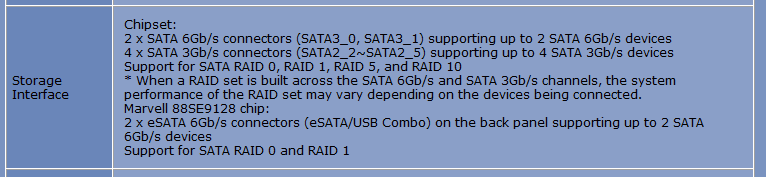
WOW thought of a new question

I have a new question. I will have 3 drives (2 HDD and 1 SSD). My motherboard has 2 (6 gb/s) sata connectors and 4 (3 gb's) sata connectors. I guess I should connect the SSD to a 3 gb/s and the HDD's to the 6gb's. What do you think?
 

My Computer My Computer

Computer type
PC/Desktop
Computer Manufacturer/Model Number
Custom Build
OS
Windows 7 Ultimate x64
CPU
Intel i7 2600K
Motherboard
Gigabyte Technology Co. - Model GA-Z68X-UD5-B3
Memory
G.SKILL Sniper Series 16GB (4 x 4GB) 1866
Graphics Card(s)
Gigabyte AMD Radeon HD 7870 GV-R787OC-2GD
Sound Card
Asus Xonar Essence STX
Monitor(s) Displays
HP 2711x 27 inch
Screen Resolution
1920x1080
Hard Drives
SSD OCZ Vertex 4 256 GB
Western Digital WD3001FAEX 3TB 7200 SATA 6Gb/s 64MB
HDD 1.5T|HITACHI 7K3000
PSU
CORSAIR Professional Series HX650 (Modular)
Case
CASE ZALMAN | Z9 R
Cooling
COOLER MASTER Hyper 212 EVO
Keyboard
Logitech K800 Illuminated Wireless
Mouse
Logitech M600 Touch Mouse
Antivirus
Norton Internet Security
Browser
WaterFox 64 bit
Other Info
Audioengine A5+ w/S8 sub and Audio-Technica ATH M50 headphones
I have a new question. I will have 3 drives (2 HDD and 1 SSD). My motherboard has 2 (6 gb/s) sata connectors and 4 (3 gb's) sata connectors. I guess I should connect the SSD to a 3 gb/s and the HDD's to the 6gb's. What do you think?

Yes, it is in that manner you should plug the SSD in SATA II and HDD in SATA III but only if you plan to use the SSD for caching.

Also, if you have the two HDD in Sata 6Gb/s and doing RAID with them, The SSD can go on Sata 3Gb/s.

OR

In the opposite situation, two HDD in Sata 3Gb/s plugs and the SSD for the O.S in Sata 6Gb/s.

What are the Speed specs of your Hard drives include SSD?

In Bios don't forget to set in Raid mode for Caching or other.

Install the Sata Raid drivers in F6 mode during the OS install.
 

My Computer My Computer

Computer type
PC/Desktop
Computer Manufacturer/Model Number
Custom Build
OS
Windows 7 Professional SP1 - x64 [Non-UEFI Boot]
CPU
Ivy Bridge Core i5 3570K (Delidded)
Motherboard
Asus P8Z77-V LE PLUS
Memory
G.Skill "Ares" DDR3 PC3-12800 - 1600MHz (16Gb)
Graphics Card(s)
Asus Dual-RX480-O4G
Sound Card
Creative Sound Blaster Z w/5.1 sound system
Monitor(s) Displays
Asus IPS 23"
Screen Resolution
16/9
Hard Drives
Internal:
500Go Sata 6Gb/s (x2)
500Go Sata 3Gb/s (x2)
SSD 60Go Sata 6Gb/s
PSU
In Win C 900W Series 80+ Platinum
Case
Thermaltake Chaser A71
Cooling
Custom Water Cooling Loop
Keyboard
Cooler Master QuickFire XTi
Mouse
Razer Imperator 2012 (4G)
Antivirus
MSE
Browser
IE 11.0.xxx Rtm
Other Info
"Raid0" with Intel Smart Response Technology (HDD/SSD)
All of them can go in the 3Gb/s slots - there isn't a disk yet made that fully utilise the 3Gb/s capacity, let alone the 6Gb/s. It also simplifies the controller (Intel presumably) since the 6Gb/s often require the installation of the Marvell controller to work in RAID (this is motherboard dependent) which complicates it a bit.
 

My Computer My Computer

Computer type
PC/Desktop
Computer Manufacturer/Model Number
Golden Mk. I.4
OS
Windows 10 Pro x64 ; Xubuntu x64
CPU
Intel i7 860 @ 2.80 GHz O/C'ed to 4.0GHz
Motherboard
Gigabyte P55A-UD3R Rev.1. Award BIOS F13
Memory
16GB Corsair Vengance DDR3 @ 661 MHz Dual Channel (9-9-9-24)
Graphics Card(s)
EVGA NVidia GTX 560 1024MB
Sound Card
Realtek Integrated
Monitor(s) Displays
Dual Samsung SyncMaster 2494HS
Screen Resolution
1920*1080 and 1920*1080
Hard Drives
1*Samsung 840 EVO 120GB SSD;
1*OCZ Vertex 2 60GB SSD;
2*Samsung F3 SpinPoint 1TB in RAID0;
1*Samsung F1 SpinPoint 1TB;
2*Western Digital 1TB External USB 3.0
1*Western Digital 500GB External USB 3.0
1*Seagate 500GB External USB 2.0
PSU
Thermaltake ToughPower QFan 750W
Case
Thermaltake Element S VK60001W2Z
Cooling
Corsair H60 Water Cooling, 2*230mm and 2*80mm case fans
Keyboard
Logitech G110
Mouse
Logitech MX518
All of them can go in the 3Gb/s slots - there isn't a disk yet made that fully utilise the 3Gb/s capacity, let alone the 6Gb/s. It also simplifies the controller (Intel presumably) since the 6Gb/s often require the installation of the Marvell controller to work in RAID (this is motherboard dependent) which complicates it a bit.

Sorry, but my main hard drive is on Sata 6Gb/s and the controler Intel tells well it is on Sata 6Gb/s Generation. As the SSD when not Caching can show Sata 6Gb/s.

You cannot plug the SSD in Sata 6Gb/s when using it in Raid mode coupled with a hard drive. OS Limitation downgrade it to Sata 3Gb/s.

But SSD can be use alone on the Sata 6Gb/s.

Just don't forget to do a F6 Install with a thumb drive

GA-Z68X-UD5-B3: (according to specs, it doesn't need the marvel controller to be set yet, as it is e-sata controller on back panel)
 

Attachments

  • Capture.PNG
    Capture.PNG
    5.9 KB · Views: 5
Last edited:

My Computer My Computer

Computer type
PC/Desktop
Computer Manufacturer/Model Number
Custom Build
OS
Windows 7 Professional SP1 - x64 [Non-UEFI Boot]
CPU
Ivy Bridge Core i5 3570K (Delidded)
Motherboard
Asus P8Z77-V LE PLUS
Memory
G.Skill "Ares" DDR3 PC3-12800 - 1600MHz (16Gb)
Graphics Card(s)
Asus Dual-RX480-O4G
Sound Card
Creative Sound Blaster Z w/5.1 sound system
Monitor(s) Displays
Asus IPS 23"
Screen Resolution
16/9
Hard Drives
Internal:
500Go Sata 6Gb/s (x2)
500Go Sata 3Gb/s (x2)
SSD 60Go Sata 6Gb/s
PSU
In Win C 900W Series 80+ Platinum
Case
Thermaltake Chaser A71
Cooling
Custom Water Cooling Loop
Keyboard
Cooler Master QuickFire XTi
Mouse
Razer Imperator 2012 (4G)
Antivirus
MSE
Browser
IE 11.0.xxx Rtm
Other Info
"Raid0" with Intel Smart Response Technology (HDD/SSD)
Both the HDD's are 6gb/s compatable. They are Hitachi Deskstar 7K3000's 64 cache.
SSD is OCZ Vertex 3.
 

My Computer My Computer

Computer type
PC/Desktop
Computer Manufacturer/Model Number
Custom Build
OS
Windows 7 Ultimate x64
CPU
Intel i7 2600K
Motherboard
Gigabyte Technology Co. - Model GA-Z68X-UD5-B3
Memory
G.SKILL Sniper Series 16GB (4 x 4GB) 1866
Graphics Card(s)
Gigabyte AMD Radeon HD 7870 GV-R787OC-2GD
Sound Card
Asus Xonar Essence STX
Monitor(s) Displays
HP 2711x 27 inch
Screen Resolution
1920x1080
Hard Drives
SSD OCZ Vertex 4 256 GB
Western Digital WD3001FAEX 3TB 7200 SATA 6Gb/s 64MB
HDD 1.5T|HITACHI 7K3000
PSU
CORSAIR Professional Series HX650 (Modular)
Case
CASE ZALMAN | Z9 R
Cooling
COOLER MASTER Hyper 212 EVO
Keyboard
Logitech K800 Illuminated Wireless
Mouse
Logitech M600 Touch Mouse
Antivirus
Norton Internet Security
Browser
WaterFox 64 bit
Other Info
Audioengine A5+ w/S8 sub and Audio-Technica ATH M50 headphones
Both the HDD's are 6gb/s compatable. They are Hitachi Deskstar 7K3000's 64 cache.
SSD is OCZ Vertex 3.

Since all three of them are in SATA 6Gb/s.

I suppose you should let the SSD on Sata 6Gb/s with OS and put the two HDD on sata 3Gb/s plugs.

I do not know if it really important to set the jumpers on the Hard Drives Hitachi to reduce the spinning at Sata 3Gb/s for more efficiency & stability. Or should the MB does it for you.

Maybe have a closer read at their Data Sheet HERE
 

My Computer My Computer

Computer type
PC/Desktop
Computer Manufacturer/Model Number
Custom Build
OS
Windows 7 Professional SP1 - x64 [Non-UEFI Boot]
CPU
Ivy Bridge Core i5 3570K (Delidded)
Motherboard
Asus P8Z77-V LE PLUS
Memory
G.Skill "Ares" DDR3 PC3-12800 - 1600MHz (16Gb)
Graphics Card(s)
Asus Dual-RX480-O4G
Sound Card
Creative Sound Blaster Z w/5.1 sound system
Monitor(s) Displays
Asus IPS 23"
Screen Resolution
16/9
Hard Drives
Internal:
500Go Sata 6Gb/s (x2)
500Go Sata 3Gb/s (x2)
SSD 60Go Sata 6Gb/s
PSU
In Win C 900W Series 80+ Platinum
Case
Thermaltake Chaser A71
Cooling
Custom Water Cooling Loop
Keyboard
Cooler Master QuickFire XTi
Mouse
Razer Imperator 2012 (4G)
Antivirus
MSE
Browser
IE 11.0.xxx Rtm
Other Info
"Raid0" with Intel Smart Response Technology (HDD/SSD)
Back
Top